1. 제품 오버view
The Waveshare CM4-IO-BASE-B is a versatile carrier board designed for the Raspberry Pi Compute Module 4 (CM4). It expands the CM4's capabilities by providing a wide array of connectivity options, making it suitable for various embedded applications and development projects. This bundle includes a USB HDMI Adapter to further enhance connectivity.
주요 특징은 다음과 같습니다.
- Standard CM4 socket, compatible with all variants of Compute Module 4 (Lite/eMMC series).
- Multiple USB and HDMI connectors via FFC for extended peripheral support.
- Gigabit Ethernet RJ45 port for reliable network connectivity.
- Color-coded Raspberry Pi 40PIN GPIO header for easy expansion.
- Support for MIPI DSI display and MIPI CSI-2 camera interfaces.
- M.2 slot for NVME SSDs or communication modules.

Figure 1: Waveshare CM4-IO-BASE-B carrier board with the USB HDMI Adapter connected via FFC cable.
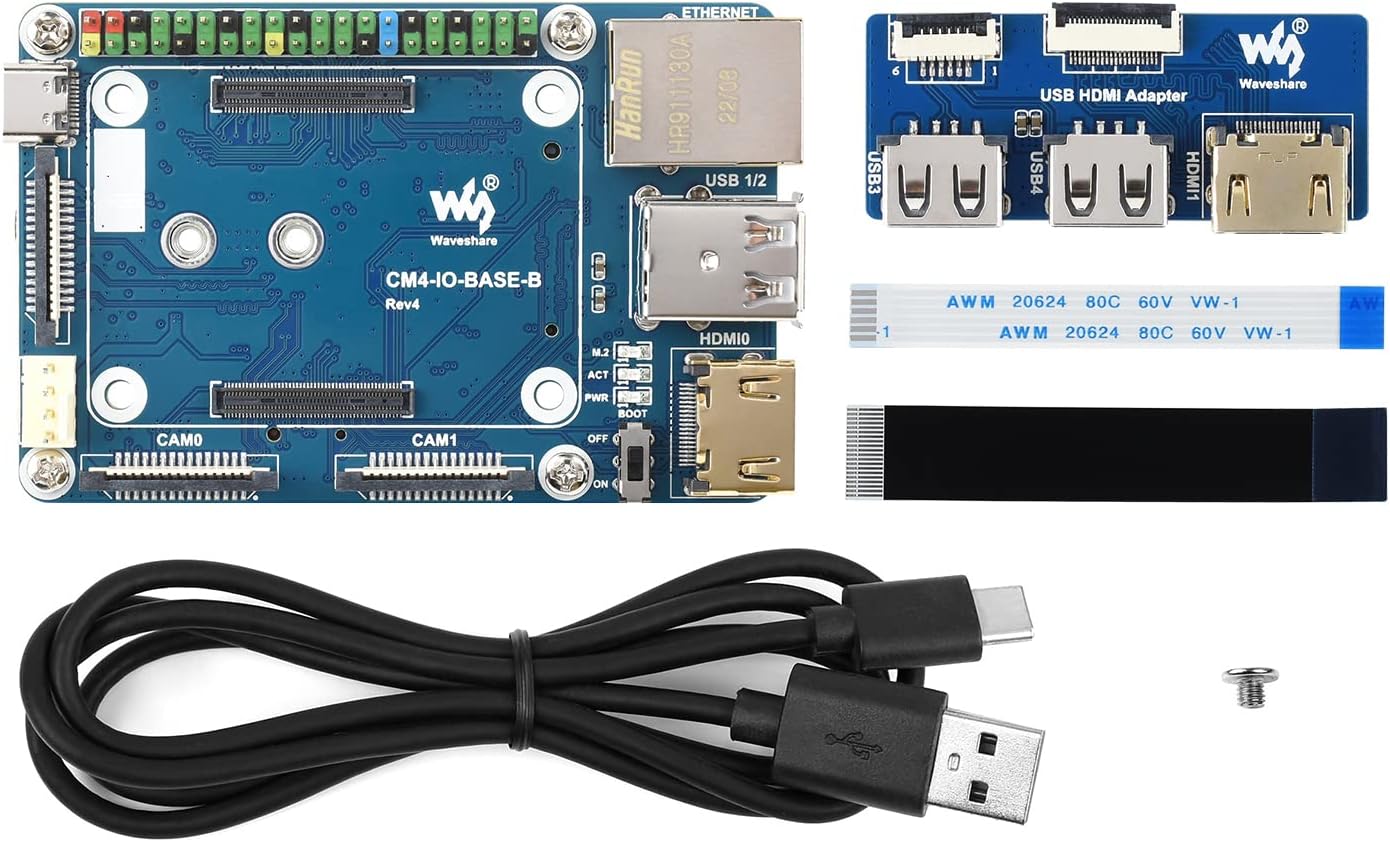
Figure 2: Included components: CM4-IO-BASE-B board, USB HDMI Adapter, FFC cables, USB-C power cable, and mounting screw.
2. 설정 및 설치
2.1 Attaching the Compute Module 4
- Carefully align your Raspberry Pi Compute Module 4 (CM4) with the CM4 socket on the CM4-IO-BASE-B board. Ensure the connectors are correctly oriented.
- Gently press the CM4 into the socket until it is securely seated. Do not force it.
- If using a metal case, install the CM4 and IO board into the case following the case manufacturer's instructions.

Figure 3: Raspberry Pi CM4 installed on the CM4-IO-BASE-B board within an optional metal case, highlighting the 40PIN GPIO header.
2.2 Connecting the USB HDMI Adapter
- Locate the FFC (Flat Flexible Cable) connectors on both the CM4-IO-BASE-B board and the USB HDMI Adapter.
- Gently open the latches on the FFC connectors.
- Insert the FFC cables into the corresponding connectors, ensuring they are fully seated and correctly oriented.
- Close the latches to secure the FFC cables.
2.3 Initial Power-Up and OS Installation
- Connect a 5V/2.5A power supply to the USB-C power input port on the CM4-IO-BASE-B.
- Connect a display to one of the HDMI ports (either directly on the CM4-IO-BASE-B or via the USB HDMI Adapter).
- Connect a USB keyboard and mouse to the USB 2.0 ports.
- If your CM4 is a Lite variant (without eMMC), insert a microSD card with a pre-installed Raspberry Pi OS image into the microSD card slot.
- Set the BOOT selection switch to the appropriate position (ON for USB-C boot/programming, OFF for eMMC/microSD boot).
- Power on the device. Follow the standard Raspberry Pi OS setup procedures.
3. 운영
3.1 포트 기능
The CM4-IO-BASE-B provides extensive connectivity:
- USB 2.0 포트: For connecting peripherals like keyboards, mice, and USB storage devices.
- HDMI 포트: Supports up to 4K 30fps output for displays.
- 기가비트 이더넷 : 유선 네트워크 연결의 경우.
- 40핀 GPIO 헤더: For connecting various sensors, actuators, and expansion boards. Refer to Raspberry Pi documentation for pinout details.
- MIPI DSI Display Port: For connecting compatible DSI displays.
- MIPI CSI-2 Camera Ports: For connecting compatible CSI cameras.
- M.2 슬롯: Supports NVME SSDs or communication modules with PCIe KEY-M interface.

Figure 4: Demonstration of the CM4-IO-BASE-B with the USB HDMI Adapter connected to an external display.

Figure 5: Detailed diagram illustrating the various ports and components on the CM4-IO-BASE-B board, including CM4 socket, GPIO header, USB ports, HDMI ports, Ethernet, and M.2 slot.
3.2 Boot Selection
The BOOT switch on the board controls the boot mode of the Compute Module 4:
- 에: The CM4 will boot from the USB-C interface. This mode is typically used for flashing the eMMC memory or for console access.
- OFF : The CM4 will boot from the eMMC (if present) or the microSD card (for Lite variants).
Always ensure the CM4 is powered off before changing the BOOT switch position.
4. 유지관리
To ensure the longevity and optimal performance of your Waveshare CM4-IO-BASE-B, follow these general maintenance guidelines:
- 깨끗하게 유지하십시오: 먼지와 이물질을 제거하기 위해 부드럽고 마른 브러시나 압축 공기를 사용하여 정기적으로 보드를 청소하십시오. 액체 사용은 피하십시오.
- 적절한 종료: Always perform a proper software shutdown of the Raspberry Pi OS before disconnecting power to prevent data corruption.
- 환경 조건: Operate the board within its specified temperature and humidity ranges. Avoid extreme conditions.
- 조심스럽게 다루십시오: Avoid touching the electronic components directly. Use anti-static precautions when handling the board.
5. 문제 해결
If you encounter issues with your CM4-IO-BASE-B, consider the following troubleshooting steps:
- 전원 없음/LED 꺼짐: Ensure the 5V/2.5A USB-C power supply is correctly connected and functional. Check the PWR indicator LED on the board.
- 디스플레이 출력 없음: Verify that the HDMI cables are securely connected to both the board/adapter and the monitor. Ensure the monitor is set to the correct input source. Check the BOOT switch position.
- USB 장치가 작동하지 않음: Confirm that USB devices are properly plugged into the USB 2.0 ports. Try different USB devices or ports.
- 네트워크 연결 문제: Check the Ethernet cable connection. Verify network settings within the Raspberry Pi OS.
- CM4 Not Booting: Ensure the CM4 is correctly seated in its socket. If using a Lite variant, verify the microSD card has a valid OS image and is inserted correctly. Check the BOOT switch position.
- 소프트웨어 문제: Many issues can be resolved by ensuring your Raspberry Pi OS is up-to-date. Refer to the official Raspberry Pi documentation for OS-specific troubleshooting.
6. 사양
The following table details the technical specifications of the Waveshare CM4-IO-BASE-B:
| 특징 | 사양 |
|---|---|
| 모델명 | CM4-IO-BASE-B |
| CM4 Socket | Suitable for all variants of Compute Module 4 |
| 네트워킹 | Gigabit Ethernet RJ45 connector |
| 커넥터 | Raspberry Pi 40PIN GPIO header |
| USB | USB 2.0 Type A × 2, USB 2.0 via FFC connector × 2 |
| 표시하다 | MIPI DSI display port (15pin 1.0mm FPC connector) |
| 카메라 | MIPI CSI-2 camera port × 2 (15pin 1.0mm FPC connector) |
| 비디오 출력 | HDMI port × 2 (including one port via FFC connector), supports 4K 30fps output |
| 실시간 | Real-time clock with battery socket and ability to wake Compute Module 4 |
| 저장 | TF card socket for Compute Module 4 Lite (without eMMC) variants |
| 팬 헤더 | Allows speed adjustment and measurement, 5V |
| 전원 입력 | 5V |
| 치수 | 85 년 × 56mm |
| 품목 무게 | 4.8 온스 |
| 패키지 크기 | 5.3 x 3.8 x 1.6 인치 |

Figure 6: Part 1 of the detailed specifications for the CM4-IO-BASE-B, including CM4 socket, networking, and USB.
Figure 7: Part 2 of the detailed specifications for the CM4-IO-BASE-B, including display, camera, power input, and dimensions.
7. 지원 및 보증
For further technical support, documentation, and resources, please visit the official Waveshare website or their product wiki. Waveshare provides comprehensive guides and examples for their products.
Information regarding product warranty can typically be found on the Waveshare official web웹사이트 또는 구매처를 통해 보증 서비스를 받으실 수 있습니다. 보증 청구를 위해 구매 증빙 자료를 보관해 주십시오.
추가적인 도움이 필요하시면 다음 페이지를 방문해 주세요. Waveshare CM4-IO-BASE-B Wiki Page.


