소개
The Altec Lansing HydraBlast is a robust and versatile wireless portable Bluetooth speaker designed for various environments, from outdoor parties to everyday use. It features IP67 Everything Proof protection, ensuring it is waterproof, shockproof, snowproof, and dustproof. With a long-lasting battery, built-in phone charging capabilities, and dynamic LED lights, the HydraBlast delivers powerful audio and convenience wherever you go.

그림 1: 전면 view of the Altec Lansing HydraBlast speaker in Royal Blue.
상자 안에 무엇이 들어있나요?
- Altec Lansing HydraBlast Bluetooth Speaker
- USB-C 충전 케이블
- 카라비너 클립
- 사용 설명서 (본 문서)
제품 특징
- Bold Bass and Clear Audio: Experience HD audio with immersive bass for a rich listening experience.
- IP67 모든 기능 방수/방진 등급: Designed to be waterproof, shockproof, snowproof, and dustproof, making it suitable for any environment.

Figure 2: The HydraBlast speaker demonstrating its water resistance.
- 20시간 플레이타임: 한 번 충전으로 장시간 음악을 재생하세요.
- 내장형 휴대폰 충전기: Features both wireless (Qi) charging and wired USB-C output to charge your devices.

Figure 3: Wireless charging a smartphone on the speaker's top surface.
- LED 조명 모드: Multiple LED light modes to enhance your listening experience and create a party atmosphere.

Figure 4: The speaker features 11 distinct LED light modes, including strobe effects.
- 휴대성 있는 디자인: Lightweight and includes a built-in carabiner hook for easy transport and attachment.

Figure 5: The included carabiner clip allows for easy portability, attaching to bags or gear.
- 블루투스 5.0 : 최대 9미터(100피트) 거리까지 안정적인 무선 연결을 제공합니다.
- 진정한 무선 페어링: Connect two HydraBlast speakers for a stereo sound experience.
컨트롤 오버view

Figure 6: Top panel controls of the HydraBlast speaker.
- 전원 켜기 / 끄기 버튼 : 길게 누르면 스피커 전원이 켜지거나 꺼집니다.
- 링크 버튼: Used for True Wireless Pairing with another HydraBlast speaker.
- 색상 변경 버튼: 다양한 LED 조명 모드가 순환됩니다.
- Wireless Qi Charger: 호환 기기용 충전 패드가 내장되어 있습니다.
- 볼륨 낮추기/이전 트랙 버튼(-): 짧게 누르면 볼륨이 낮아지고, 길게 누르면 이전 트랙으로 돌아갑니다.
- Voice Assistant / Answer Calls Button: Activates voice assistant or answers/ends calls.
- 볼륨 높이기/다음 트랙 버튼(+): 짧게 누르면 볼륨이 커지고, 길게 누르면 다음 트랙이 됩니다.
설정
1. 초기 충전
Before first use, fully charge your HydraBlast speaker. Locate the USB-C charging port on the side of the speaker (protected by a waterproof flap). Connect the provided USB-C cable to the speaker and the other end to a USB power adapter (not included) or a computer's USB port. The charging indicator light will show charging status.
2. 블루투스 페어링
- 스피커의 전원이 꺼져 있는지 확인하세요.
- 를 누르고 계세요 전원 켜기/끄기 button until you hear an audible prompt and the Bluetooth indicator light begins to flash, indicating pairing mode.
- 스마트폰 또는 블루투스 지원 기기에서 블루투스 설정으로 이동하세요.
- Select "Altec Lansing HydraBlast" from the list of available devices.
- Once connected, you will hear a confirmation tone, and the Bluetooth indicator light will become solid.
3. True Wireless Pairing (Pairing Two Speakers)
To achieve a stereo sound experience, you can pair two HydraBlast speakers together:
- Ensure both HydraBlast speakers are powered on and not connected to any other Bluetooth devices.
- On one speaker (this will be your primary speaker), press the 링크 button. The speaker will enter True Wireless Pairing mode.
- 두 번째 스피커에서도 버튼을 누르세요. 링크 단추.
- 두 스피커는 자동으로 서로 연결됩니다. 연결되면 확인음이 들립니다.
- Now, connect your Bluetooth device to the primary speaker as described in the "Bluetooth Pairing" section above. Audio will play through both speakers in stereo.
작동 지침
오디오 재생
- Bluetooth 페어링이 성공적으로 완료되면 기기에서 원하는 음악 애플리케이션을 열고 재생을 시작하세요.
- 사용하세요 볼륨 업(+) 그리고 볼륨 작게 (-) buttons on the speaker to adjust the volume.
- 길게 누르세요 볼륨 업(+) 다음 트랙을 위한 버튼을 누르고 길게 누르세요 볼륨 작게 (-) 이전 트랙 버튼입니다.
통화 관리
- 전화가 오면 버튼을 누르세요. Voice Assistant / Answer Calls 버튼을 클릭합니다.
- 통화를 종료하려면 같은 버튼을 다시 누르세요.
- 수신 전화를 거부하려면 Voice Assistant / Answer Calls 단추.
Using LED Light Modes
를 누르세요 색상 변경 button to cycle through the available LED light modes. Continue pressing until you find your desired light pattern or turn the lights off.
외부 장치 충전
- 무선 충전: Place your Qi-compatible smartphone or device on the designated wireless charging area on top of the speaker. Ensure proper alignment for charging to begin.
- 유선 충전: Open the waterproof flap on the side of the speaker to access the USB-A output port. Connect your device's charging cable to this port to charge it.
유지
- 청소: 부드러운 d를 사용하세요amp 스피커 외부를 닦을 때는 천을 사용하십시오. 독한 화학 약품이나 연마성 세척제는 사용하지 마십시오.
- 방수 기능: While the speaker is IP67 rated, ensure the charging port flap is securely closed before exposing it to water or dust. Do not submerge the speaker for extended periods or at depths greater than 1 meter.
- 저장: 사용하지 않을 때는 스피커를 서늘하고 건조한 곳에 보관하세요. 극한의 온도는 피하세요.
- 배터리 관리 : For optimal battery life, avoid fully discharging the speaker frequently. Charge it regularly, even if not in constant use.
문제 해결
| 문제 | 가능한 원인 / 해결책 |
|---|---|
| 스피커가 켜지지 않습니다. | Battery may be depleted. Connect to a power source using the USB-C cable and charge for at least 30 minutes before attempting to power on again. |
| 블루투스로 페어링할 수 없습니다. |
|
| 소리가 나지 않거나 볼륨이 작습니다. |
|
| 무선 충전이 작동하지 않습니다. |
|
| 사운드 왜곡. |
|
명세서
| 특징 | 세부 사항 |
|---|---|
| 상표 | 알텍랜싱 |
| 모델명 | HydraBlast (IMW1300-RYB-STK-2) |
| 연결 기술 | 블루투스, USB |
| 무선 통신 기술 | 블루투스 5.0 |
| 블루투스 범위 | 100 피트 |
| 스피커 유형 | 집 밖의 |
| 특징 | Portable, Waterproof, Built-in Phone Charger, LED Lights |
| 방수 레벨 | IP67 (방수, 방충망, 방설, 방진) |
| 배터리 수명 | 최대 20시간 |
| 전원 | 배터리 구동 |
| 충전 포트 | USB-C |
| 오디오 출력 모드 | 스테레오 재생 |
| 스피커 최대 출력 전력 | 6 와트 |
| 제품 치수 | 8.7인치 깊이 x 4.4인치 너비 x 5.5인치 높이 |
| 품목 무게 | 1.9파운드 |
| 재료 | Durable Plastic / Rubberized Plastic |
| 포함된 구성 요소 | 블루투스 스피커 |
| 한국어: | 021331023704 |
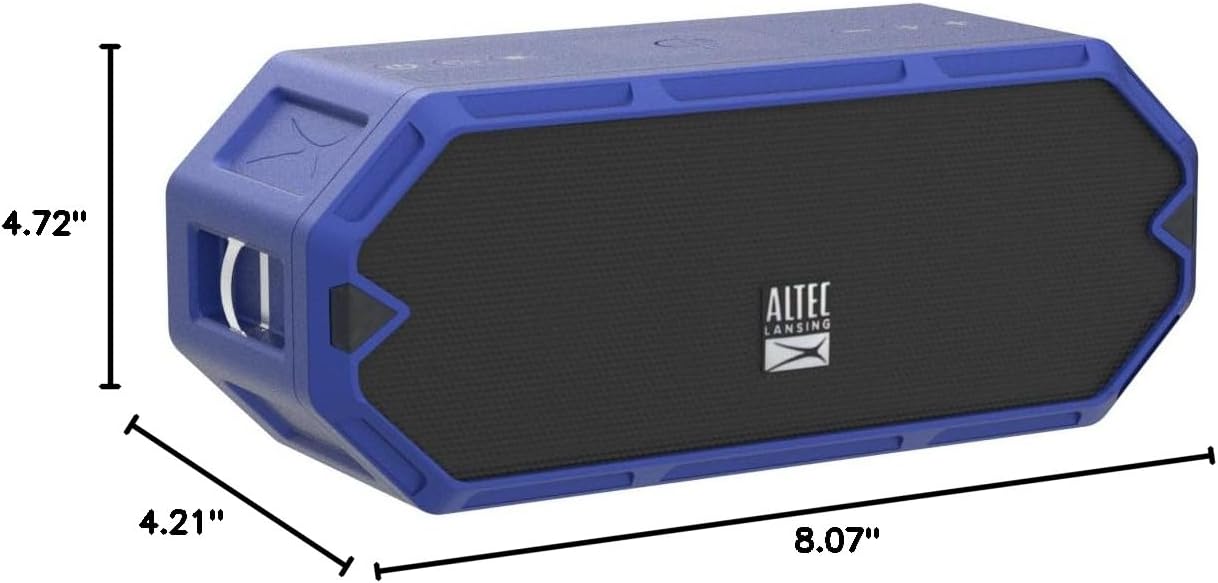
Figure 7: Dimensions of the HydraBlast speaker.
보증 및 지원
The Altec Lansing HydraBlast speaker comes with a Limited Warranty. For specific warranty terms, conditions, and duration, please refer to the warranty card included with your product or visit the official Altec Lansing web대지.
For technical support, troubleshooting assistance, or warranty claims, please contact Altec Lansing Customer Service:
- Web대지: alteclansing.com/support
- 핸드폰: 제품 포장을 참조하거나 web지역 연락처 사이트.
Please have your product model number (IMW1300-RYB-STK-2) and proof of purchase ready when contacting support.


