1. 서론
This manual provides essential information for the installation, operation, and maintenance of the ABB Winpower SNMP Network Interface Card. This card is designed to enable real-time monitoring and management of ABB PowerValue 11RT G2 Uninterruptible Power Supply (UPS) systems (6-10 kVA) via a standard web 브라우저.
The Network Interface Card facilitates real-time visibility into your UPS system's status, allowing for proactive problem identification and resolution. It includes monitoring software for comprehensive system oversight.
중요 참고 사항: This Network Interface Card is intended for use within private networks. For deployment in public networks, additional security measures, such as firewalls, are required to ensure system integrity and data protection.
2. 상자 안에 무엇이 들어있나요?
Carefully unpack the contents and verify that all items are present and undamaged. If any items are missing or damaged, please contact your supplier immediately.
- SNMP Network Card
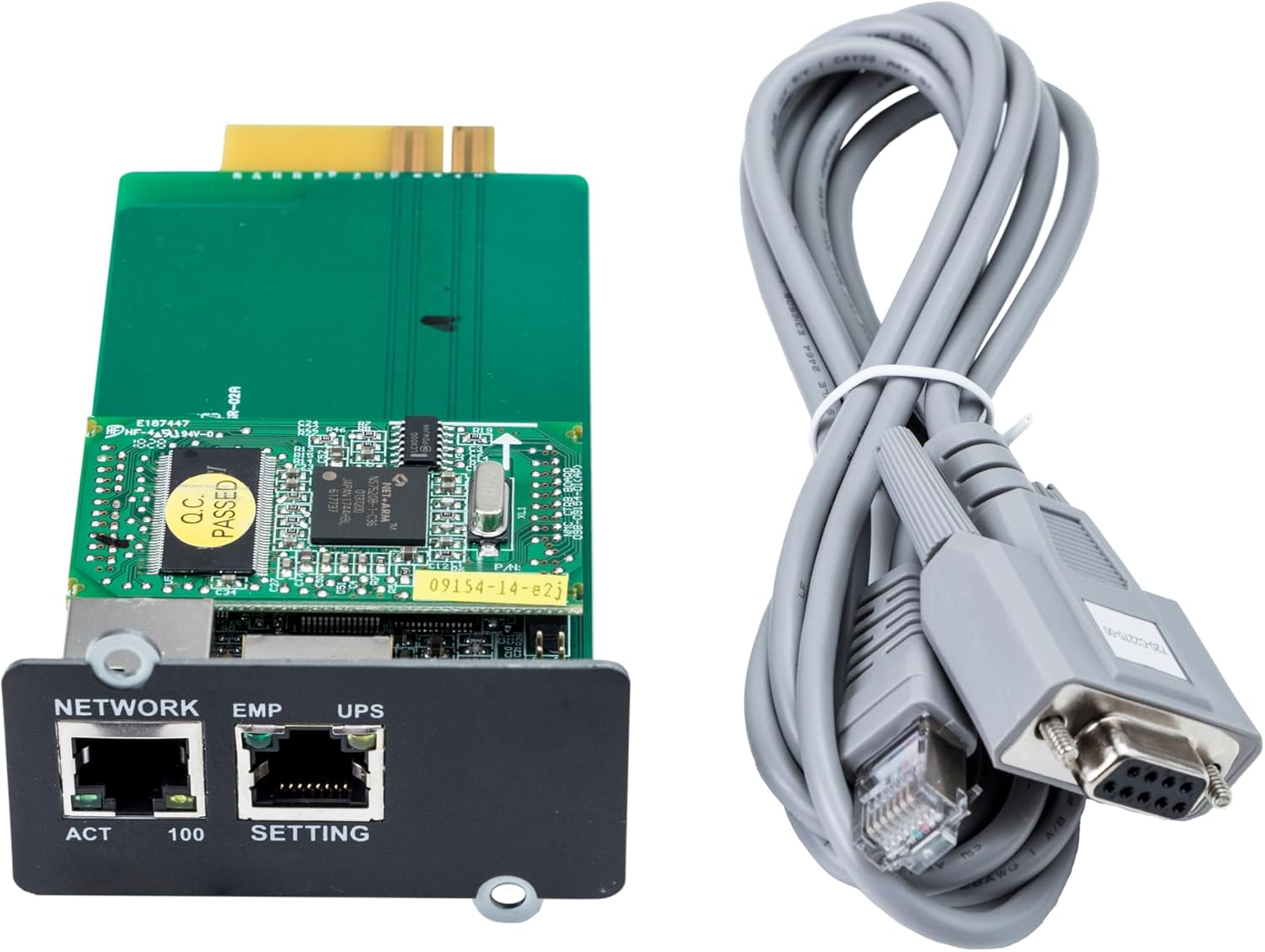
그림 2.1: 전면 view of the ABB Winpower SNMP Network Interface Card and its accompanying serial cable.

그림 2.2: 후면 view of the ABB Winpower SNMP Network Interface Card, showing the circuit board components.
3. 설정 및 설치
Follow these steps to properly install the Network Interface Card into your compatible ABB PowerValue 11RT G2 UPS system.
- 전원 차단 UPS: Before beginning installation, ensure the UPS system is completely powered off and disconnected from all power sources to prevent electrical hazards. Refer to your UPS manual for proper shutdown procedures.
- 확장 슬롯 찾기: Identify the designated expansion slot on your PowerValue 11RT G2 UPS for network interface cards. This is typically a dedicated slot on the rear or side panel.
- 네트워크 카드 삽입: Carefully align the Network Interface Card with the expansion slot. Gently push the card into the slot until it is firmly seated. Do not force the card; if it does not insert easily, re-check alignment.
- 보안 카드: Once seated, secure the card using any provided screws or retention clips specific to your UPS model.
- 네트워크 케이블을 연결하십시오: Connect a standard Ethernet cable from your network switch or router to the 'NETWORK' port on the newly installed SNMP card.
- Power Up UPS: Reconnect the UPS to its power source and power it on according to the UPS manufacturer's instructions. The SNMP card will initialize with the UPS.
- 초기 구성: Once the UPS and card are powered on, refer to the separate Winpower software documentation or the card's web interface guide for initial network configuration, IP address assignment, and monitoring setup.
4. 사용 설명서
The ABB Winpower SNMP Network Interface Card allows for remote monitoring and management of your UPS system. After successful installation and initial network configuration, you can access the card's web interface or use the Winpower monitoring software.
- 접근하기 Web 인터페이스: 열기 web browser and enter the IP address assigned to the SNMP card. Log in using the default credentials (refer to the card's specific documentation for these details, and change them immediately after the first login for security).
- Monitoring UPS Status: 그만큼 web interface and Winpower software provide real-time data on UPS parameters such as battery status, load level, input/output voltage, and event logs.
- 이벤트 알림: Configure email or SNMP trap notifications to be alerted of critical UPS events, such as power outages, battery low warnings, or system faults.
- 원격 관리: Depending on the card's features and UPS model, you may be able to perform remote actions such as scheduled shutdowns or reboots.
5. 유지관리
Regular maintenance ensures the optimal performance and longevity of your Network Interface Card and UPS system.
- 펌웨어 업데이트: Periodically check the ABB support website for firmware updates for your SNMP card. Keeping the firmware updated can improve performance, add features, and address security vulnerabilities.
- 물리적 검사: During routine UPS maintenance, visually inspect the SNMP card and its network cable connections. Ensure cables are securely plugged in and there are no signs of physical damage.
- 환경 조건: Ensure the UPS environment is clean, dry, and within the recommended temperature and humidity ranges to prevent damage to electronic components.
- 보안 재view: 정기적으로 다시view the security settings of the SNMP card, including user accounts and network access controls, especially if the card is exposed to a public network (with appropriate firewall protection).
6. 문제 해결
If you encounter issues with your ABB Winpower SNMP Network Interface Card, refer to the following troubleshooting steps:
- 카드가 감지되지 않음:
- Ensure the UPS is powered off before installation and then powered on correctly.
- Verify the card is fully seated in its expansion slot.
- Check the UPS manual to confirm compatibility with the SNMP card.
- 네트워크 연결 없음:
- Check the Ethernet cable connection between the card and your network switch/router.
- Verify that the network port on the switch is active and functioning.
- Confirm the network settings (IP address, subnet mask, gateway) on the SNMP card are correct and match your network configuration.
- Check the network status indicator LEDs on the card and the network switch.
- 접근할 수 없습니다 Web 인터페이스:
- Ensure your computer is on the same network segment as the SNMP card or has proper routing configured.
- Verify the IP address entered in the web browser is correct.
- Temporarily disable any firewall software on your computer to rule out blocking issues.
- Try pinging the card's IP address from your computer to confirm basic network reachability.
- Incorrect UPS Data or Alerts:
- Ensure the SNMP card's firmware is up to date.
- Verify the UPS model and configuration settings within the SNMP card's interface are correct.
- Consult the Winpower software documentation for specific configuration details.
If problems persist after attempting these steps, please contact ABB technical support.
7. 사양
| 특징 | 세부 사항 |
|---|---|
| 모델 번호 | 4NWP100110R0001 (SNMP adapters) |
| 제품 치수 | 5.24 x 2.36 x 1.3인치(13.31 x 5.99 x 3.3cm) |
| 품목 무게 | 7온스(0.2킬로그램) |
| 하드웨어 인터페이스 | 이더넷 |
| 데이터 링크 프로토콜 | 이더넷 |
| 호환 장치 | ABB PowerValue 11RT G2 (6-10 kVA) UPS systems |
| 제조업체 | ABB 주식회사 |
| ASIN | B098HPTHBR |
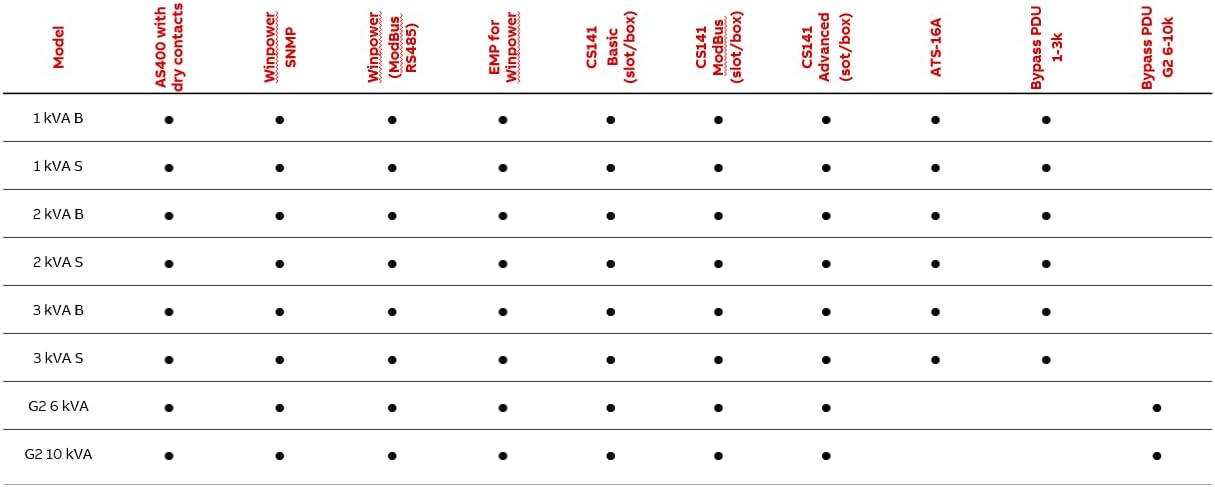
Figure 7.1: Compatibility table for ABB UPS digital accessories.
8. 보증 및 지원
Specific warranty terms and conditions for the ABB Winpower SNMP Network Interface Card are typically provided with the product documentation or can be found on the official ABB web사이트. 보증 청구를 위해 구매 증빙 자료를 보관하세요.
기술 지원, 서비스 또는 기타 문의 사항은 ABB 공식 웹사이트를 방문하십시오. website or contact your local ABB representative. Support contact information may vary by region.