소개
Thank you for choosing the Continu.us R230D2 Master TV Remote. This remote control is specifically designed to provide comprehensive control over RCA and Continu.us brand televisions, including access to commercial menus. Its intuitive layout ensures ease of use for all essential TV functions.

그림 1: 전면 view of the R230D2 Master TV Remote, showing all buttons.
설정
Before using your new remote, you will need to install batteries.
배터리 설치
- 리모콘 뒷면에서 배터리함을 찾으세요.
- 배터리 덮개를 아래로 밀어서 들어 올려 떼어냅니다.
- AA 배터리 2개를 넣을 때, 양극(+)과 음극(-) 단자가 배터리함 안쪽의 표시와 일치하는지 확인하십시오.
- 배터리 칸 덮개를 제자리에 다시 밀어 넣어 딸깍 소리가 날 때까지 단단히 고정합니다.

그림 2: 뒤로 view of the R230D2 Master TV Remote, illustrating the battery compartment.
초기 사용
The R230D2 Master TV Remote is pre-programmed for RCA and Continu.us televisions and typically requires no code entry or complex synchronization. Simply point the remote at your television and press the 힘 button. If the TV responds, the remote is ready for use.
작동 지침
This section details the functions of the buttons on your R230D2 remote control.
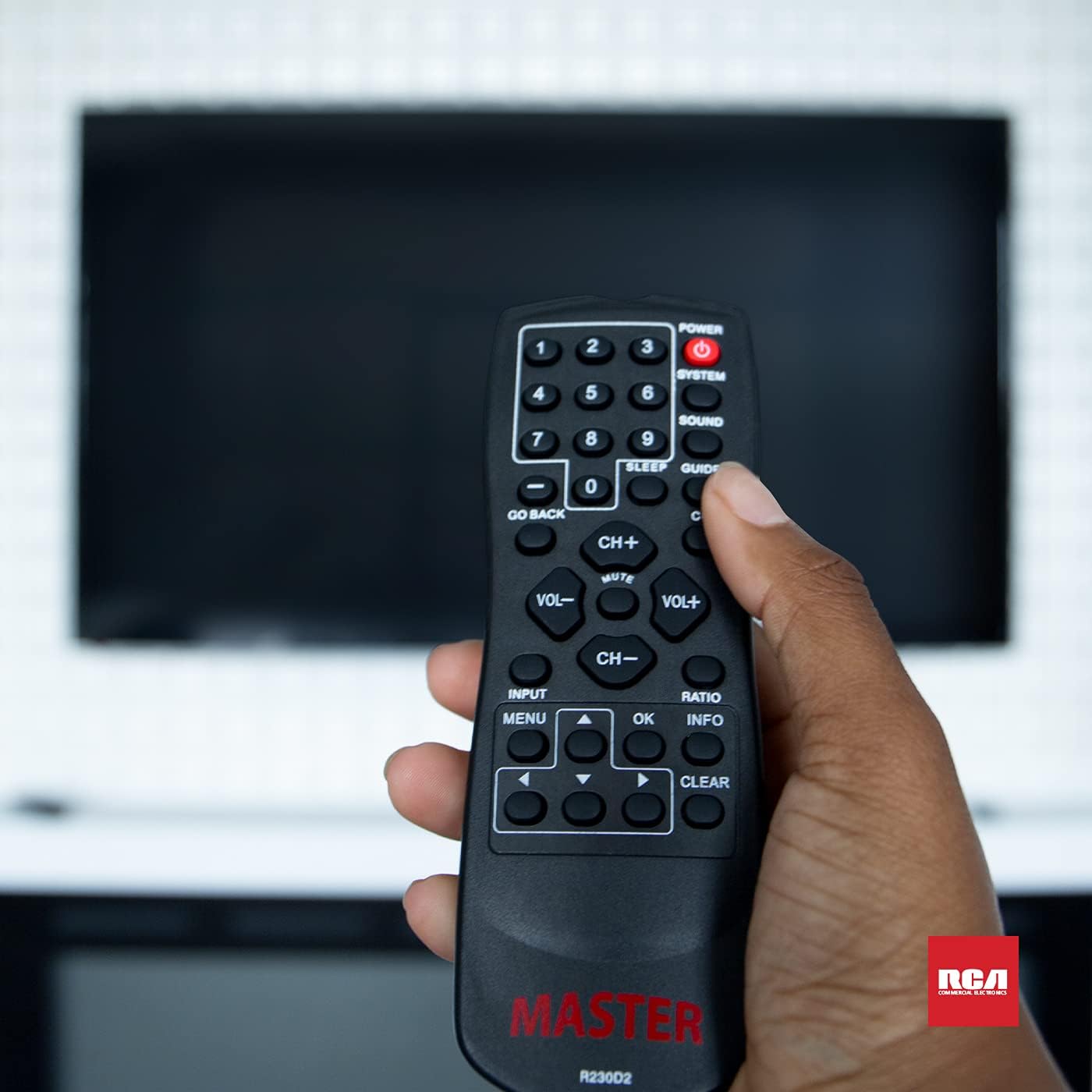
Figure 3: Using the R230D2 Master TV Remote with a television.
- 힘: 텔레비전을 켜거나 끕니다.
- 체계: Accesses system-specific functions or menus.
- 소리: Adjusts sound modes or settings.
- 가이드: 전자 프로그램 가이드(EPG)를 표시합니다.
- 잠TV가 자동으로 꺼지도록 타이머를 설정합니다.
- CC(자막): 자막을 켜거나 끕니다.
- 돌아가기: 이전 채널 또는 메뉴 화면으로 돌아갑니다.
- 숫자 버튼(0-9)채널 번호를 직접 입력하세요.
- 채널+ / 채널-채널을 위아래로 변경합니다.
- VOL + / VOL-: Increases or decreases volume.
- 음소거: Mutes or unmutes the television sound.
- 입력: Selects the input source (e.g., HDMI 1, AV).
- 메뉴: Opens the television's main menu.
- OK: Confirms a selection or enters a submenu.
- 정보: 현재 프로그램이나 입력에 대한 정보를 표시합니다.
- 비율: Adjusts the screen aspect ratio.
- 분명한: Clears input or exits certain functions.
- 탐색 화살표(위, 아래, 왼쪽, 오른쪽): 메뉴와 옵션을 탐색합니다.
Accessing Commercial Menus
The R230D2 remote is designed to access commercial menus on compatible RCA and Continu.us televisions. The specific button or sequence to access these menus may vary by TV model. Typically, this function is integrated within the 체계 or 메뉴 buttons, or a combination thereof. Refer to your television's specific user manual for detailed instructions on accessing its commercial menu features.
유지
리모컨의 수명과 최적의 성능을 유지하려면 다음의 간단한 관리 지침을 따르십시오.
- 청소: 리모컨은 부드럽고 마른 천으로 닦으세요. 잘 지워지지 않는 오염의 경우 가볍게 두드리세요.amp천에 물이나 순하고 연마성이 없는 세제를 묻혀 닦으세요. 독한 화학 물질을 사용하거나 리모컨을 액체에 담그지 마세요.
- 배터리 교체: Replace batteries when the remote's response becomes sluggish or stops working. Always replace both batteries at the same time with new AA batteries. Do not mix old and new batteries, or different types of batteries.
- 저장: 리모컨은 직사광선, 극한 온도, 높은 습도를 피해 서늘하고 건조한 곳에 보관하세요.
- 낙하 방지: 리모컨을 물리적 충격으로부터 보호하세요. 떨어뜨리면 내부 구성 요소가 손상될 수 있습니다.
문제 해결
If you encounter issues with your R230D2 remote, try the following solutions:
- 원격 응답 없음:
- 배터리가 올바른 극성에 맞게 올바르게 삽입되었는지 확인하세요.
- 배터리를 새 것으로 교체하십시오.
- 리모컨과 TV의 적외선 센서 사이에 장애물이 없는지 확인하세요.
- TV의 IR 수신기의 유효 범위 내에 있는지 확인하세요.
- TV Not Turning On/Off:
- TV가 작동하는 콘센트에 제대로 꽂혀 있는지 확인하십시오.
- Try turning the TV on/off using its physical power button.
- 작동하지 않는 특정 기능:
- Some functions may require the TV's menu to be open or a specific input selected.
- 리모컨이 TV를 향해 직접 향하도록 하세요.
- Remote Still Not Working:
- 리모컨을 최근에 떨어뜨리거나 습기에 노출된 경우 내부가 손상되었을 수 있습니다.
- 추가 지원이 필요하면 고객 지원팀에 문의하세요.
명세서
| 특징 | 세부 사항 |
|---|---|
| 상표 | Continu.us |
| 모델 번호 | R230D2 |
| 호환 장치 | RCA and Continu.us Televisions |
| 연결 기술 | 적외선 |
| 전원 | 2 AA 배터리(포함되지 않음) |
| 품목 무게 | 1.76 온스 |
| 제품 치수 | 6 x 2 x 1 인치 |
| 지원되는 최대 장치 수 | 1 |
보증 및 지원
Continu.us products are designed and tested to high standards. We pride ourselves on offering excellent customer support.
고객 지원
If you require assistance with your R230D2 Master TV Remote, our support and technical team are available to help. Please reach out via phone or email for any pressing issues or questions.
For the most up-to-date contact information, please visit the official Continu.us web웹사이트를 참조하거나 제품 포장을 확인하세요.
보증 정보
Specific warranty details for the R230D2 remote are typically provided with the product packaging or can be found on the Continu.us official web사이트. 보증 청구를 위해 구매 증빙 자료를 보관하세요.