1. 서론
The trimmOne LITE is a state-of-the-art GPS bicycle computer designed to enhance your cycling experience. Weighing only 59 grams and with a slim profile of 13.5 mm, it offers advanced navigation, precise data tracking, and seamless connectivity. Its 3.2-inch LCD screen with 200 DPI resolution ensures clear visibility of all your ride data, day or night.

Image 1.1: The trimmOne LITE displaying both navigation and detailed ride metrics.

이미지 1.2: 다양한 views of the trimmOne LITE, showcasing its sleek design and integrated mounting system.
2. 상자 안에 무엇이 들어있나요?
Upon unboxing your trimmOne LITE, please ensure all the following components are present:
- trimmOne LITE Bicycle Computer
- 장착 브래킷
- 충전 케이블
- Rubber Rings for mounting
3. 설정
3.1 장치 충전
Before first use, fully charge your trimmOne LITE using the provided charging cable. The device also features solar charging capabilities for extended battery life during rides.
3.2 Mounting the trimmOne LITE
Attach the mounting bracket to your bicycle's handlebars or stem using the rubber rings. Ensure the bracket is securely fastened. Align the trimmOne LITE with the bracket and twist to lock it into place.

Image 3.1: The trimmOne LITE securely mounted on a bicycle, showcasing는 슬림 프로입니다file.
3.3 초기 전원 켜기 및 앱 페어링
Press and hold the power button to turn on the device. Download the dedicated trimmOne mobile application from your smartphone's app store. Follow the in-app instructions to pair your trimmOne LITE, plan routes, and customize settings.
4. 사용 설명서
4.1 Display and Data Fields
The 3.2-inch high-contrast LCD screen provides clear visibility of various data fields. You can customize the displayed information through the mobile application to show metrics most relevant to your ride, such as speed, distance, altitude, cadence, heart rate, and power.
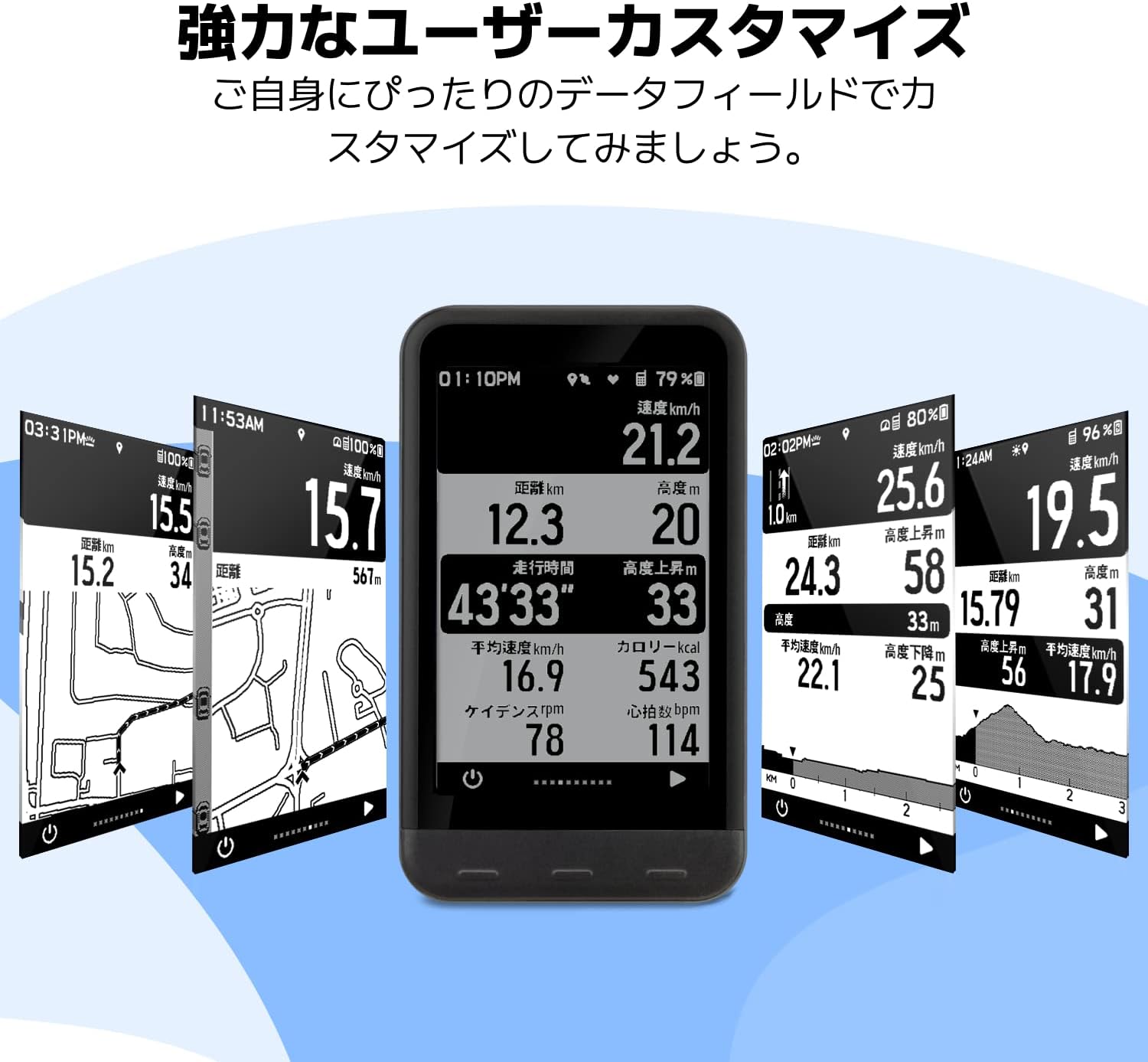
Image 4.1: The trimmOne LITE's customizable display, allowing users to arrange data fields to their preference.

Image 4.2: The trimmOne LITE's display clarity, ensuring data is easily readable in various environments.
4.2 탐색 기능
The trimmOne LITE offers robust navigation capabilities. It can calculate new routes from your current location and provides real-time re-routing if you deviate from your planned path. The detailed map display helps you stay on track.

Image 4.3: The trimmOne LITE's navigation screen, showing map details and re-routing suggestions.
4.3 Connectivity (Bluetooth 5.0 & ANT+)
The trimmOne LITE supports both Bluetooth 5.0 and ANT+ protocols, allowing it to connect with a wide range of external sensors and devices, including power meters, rear radars, smartwatches, heart rate monitors, cadence sensors, and speed sensors.

Image 4.4: Connectivity diagram illustrating the trimmOne LITE's compatibility with various cycling sensors and devices.
4.4 모바일 앱 통합
The trimmOne mobile application serves as a central hub for your cycling data. It allows you to plan routes, record and analyze ride data, and automatically update your device. The app also supports integration with popular cycling platforms like Strava, Komoot, and TrainingPeaks.

Image 4.5: The trimmOne mobile application interface, demonstrating ride history and integration with third-party cycling services.
5. 유지관리
5.1 청소
To clean your trimmOne LITE, gently wipe the device with a soft, damp 천을 사용하십시오. 강한 화학 물질이나 연마재는 화면을 손상시킬 수 있으므로 사용하지 마십시오.asing. 충전 포트 덮개가 단단히 닫혀 있는지 확인하여 물이 들어가지 않도록 하십시오.
5.2 배터리 관리
The trimmOne LITE uses a Lithium-Polymer battery. For optimal battery life, avoid fully discharging the device frequently. Store the device in a cool, dry place when not in use for extended periods. Regular charging, even if not fully depleted, can help maintain battery health.
5.3 소프트웨어 업데이트
Periodically check the trimmOne mobile application for available software updates. Updates often include performance improvements, new features, and bug fixes. Ensure your device is sufficiently charged before initiating any software update.
6. 문제 해결
6.1 장치 전원이 켜지지 않음
- 기기가 완전히 충전되었는지 확인하세요. 전원에 연결하고 몇 분 정도 기다린 후 다시 전원을 켜보세요.
- If the issue persists, perform a soft reset by holding the power button for 10-15 seconds.
6.2 GPS 신호 문제
- 당신이 깨끗한 열린 공간에 있는지 확인하십시오 view 하늘의.
- Wait for the device to acquire a GPS signal, which may take a few minutes on first use or after a long period of inactivity.
6.3 Connectivity Problems with Sensors/App
- Ensure Bluetooth on your smartphone and ANT+ on your sensors are enabled.
- Restart both the trimmOne LITE and your smartphone.
- Check if the sensors' batteries are charged.
- Unpair and re-pair the device/sensors through the trimmOne app.
7. 사양
| 특징 | 사양 |
|---|---|
| 모델 번호 | TRIMM trimmOne LITE |
| 치수 | 56 x 96.9 x 13.5mm |
| 무게 | 59g(2.18온스) |
| 디스플레이 크기 | 3.2인치 |
| 디스플레이 해상도 | 200DPI |
| 재료 유형 | 플라스틱 |
| 배터리 유형 | 1 Lithium-Polymer Battery (included) |
| 연결성 | 블루투스 5.0, ANT+ |
| IP 인증 | IP54 |
| 색상 | 검은색 |
8. 보증 및 지원
For warranty information and technical support, please refer to the official Trimm web사이트를 방문하거나 고객 서비스에 문의하세요. 보증 청구를 위해 구매 증빙 자료를 보관하세요.


