소개
Thank you for choosing the Hetyre 5-in-1 Night Light Bluetooth Speaker. This versatile device combines a Bluetooth speaker, touch-sensitive LED lamp, alarm clock, MP3 player, and hands-free call functionality into one compact unit. Designed for ease of use and multi-purpose enjoyment, it is suitable for various settings including bedrooms, living rooms, parties, and camp주고받음.

The Hetyre 5-in-1 Night Light Bluetooth Speaker, showcasing its multi-color lighting capabilities.
상자 안에 무엇이 들어있나요?
- Hetyre 5-in-1 Night Light Bluetooth Speaker (Model DY28S)
- 전원 케이블(USB)
- 내장형 충전식 배터리

The product packaging and included accessories.
제품 특징
- 5-in-1 다기능성: Integrates Bluetooth speaker, touch sensor LED lamp, alarm clock, MP3 player, and hands-free call capabilities.
- 소프트엘amp 빛: Features 3 levels of adjustable warm light and 48 multi-color lighting modes with a cool touch sensor. Light colors can change automatically with music rhythm.
- 알람 시계: Large digit 12/24h display with calendar, alarm, and sleep mode. Includes snooze function (tap once for 5-minute snooze, tap twice to stop).
- Extended Playtime & Lighting: Built-in 2000mAh rechargeable battery provides 8-10 hours of music playback (at max volume) or up to 1 week of night light use on a full charge.
- MP3 플레이어: Supports music playback via USB flash drive and MicroSD Card input.
- 핸즈프리 통화: Integrated microphone for convenient hands-free phone calls when connected via Bluetooth.
설정
1. 장치 충전
Before first use, fully charge the device. Connect the provided USB power cable to the charging port on the speaker and plug the other end into a standard USB power adapter (not included) or a computer USB port. A full charge typically takes 6-8 hours. The battery capacity is 2000mAh.
2. 전원 켜기/끄기
전원 버튼(⏻) located on the control panel to turn the device on or off.
작동 지침
조명 제어
- 따뜻한 흰색 빛: Tap the top mesh area of the lamp once for low brightness, twice for medium brightness, and three times for high brightness. Tapping a fourth time will turn the warm white light off.
- Multi-Color Light: Press and hold the top mesh area to switch to multi-color mode. The light will cycle through various colors automatically.
- 고정 색상 모드: In multi-color mode, tap the top mesh area to pause on a specific color. Tap again to resume automatic color cycling. There are 48 lighting mode colors available.
- Music Light Mode: The light can also change colors with the rhythm of the music automatically.

Touch control for adjusting warm white light brightness.

Visual representation of the three brightness levels.
블루투스 스피커 기능
기기를 블루투스 스피커로 사용하려면 다음 단계를 따르세요.
- 를 누르세요 BT button on the control panel to enter Bluetooth pairing mode. The device will emit an audible prompt.
- On your smartphone, tablet, or other Bluetooth-enabled device, search for "DY28S" or "Hetyre Speaker" in the Bluetooth settings.
- Select the device to pair. Once paired, you will hear a confirmation sound.
- You can now play music from your connected device. Use the M/+ 그리고 중/- buttons to adjust volume or skip tracks.

Connecting to the speaker via Bluetooth for music and hands-free calls.
알람 시계 설정
The device features a 12/24-hour alarm clock with snooze functionality.
- 설정 시간: Refer to the detailed instructions in the included physical user manual for specific time setting steps, as this often involves a combination of button presses.
- 알람 설정: Similarly, alarm setting procedures are typically detailed in the physical manual. The alarm supports custom sounds from MicroSD card or USB disk.
- 스누즈 기능 : When the alarm rings, tap the top mesh area once to activate snooze. The alarm will ring again in 5 minutes.
- 경보 정지: To stop the alarm completely, quickly tap the top mesh area twice when it is ringing.

The alarm clock mode helps ensure you wake up on time.
MP3 플레이어 기능
The device can play MP3 files directly from a USB flash drive or MicroSD card.
- Insert a USB flash drive or MicroSD card containing MP3 files into the corresponding port on the device.
- The device should automatically switch to MP3 playback mode. If not, press the Mode button (if available, or cycle through modes using the BT button) until MP3 mode is active.
- 제어 버튼을 사용하여 재생, 일시 정지, 트랙 건너뛰기 및 볼륨을 조절하세요.
핸즈프리 통화
블루투스를 통해 스마트폰에 연결하면 스피커를 사용하여 핸즈프리 통화를 할 수 있습니다.
- 전화 받기 / 끊기 : Press the Phone button (☎) on the control panel to answer an incoming call or end an ongoing call.
- 재다이얼: 마지막으로 걸었던 번호로 다시 전화를 걸려면 전화 버튼을 두 번 누르세요.
유지
- 청소: 부드럽고 마른 천으로 기기를 닦으세요. 연마성 세제나 용제를 사용하지 마세요.
- 저장: 본 기기는 직사광선과 극한의 온도를 피해 시원하고 건조한 곳에 보관하세요.
- 배터리 관리 : 배터리 수명을 연장하려면 배터리를 자주 완전히 방전하지 마십시오. 장시간 사용하지 않더라도 정기적으로 충전하십시오.
- 방수 기능: 이 제품은 아니다 방수 기능이 있습니다. 물이나 높은 습도에 노출되지 않도록 하십시오.
문제 해결
| 문제 | 가능한 원인 | 해결책 |
|---|---|---|
| 장치의 전원이 켜지지 않습니다. | 배터리가 소진되었습니다. | 기기를 완전히 충전하세요(6~8시간). |
| Bluetooth를 통해 연결할 수 없습니다. | Device is not in pairing mode; Bluetooth is off on source device; too far from device. | Ensure device is in BT pairing mode. Turn on Bluetooth on your phone/tablet. Move closer to the speaker (within 10 meters). |
| 스피커에서 소리가 나지 않습니다. | Volume is too low; device is paused; incorrect mode selected. | Increase volume on both speaker and connected device. Press play. Ensure correct mode (Bluetooth/MP3) is selected. |
| 조명이 작동하지 않습니다. | Light is off; battery is low. | Tap the top mesh area to turn on the light. Charge the device. |
| 알람이 울리지 않습니다. | 알람이 올바르게 설정되지 않았습니다. 볼륨이 너무 낮습니다. | Verify alarm settings. Increase alarm volume. |
명세서
| 모델명 | DY28S |
| 상표 | 헤티레 |
| 제품 치수 | 4.84인치 깊이 x 4.92인치 너비 x 5.63인치 높이 |
| 품목 무게 | 1파운드(약 0.45kg) |
| 재료 | 플라스틱 |
| 색상 | 하얀색 |
| 연결 기술 | 블루투스, USB |
| 무선 통신 기술 | 블루투스 |
| 블루투스 범위 | 10 미터 |
| 스피커 최대 출력 전력 | 3 와트 |
| 배터리 용량 | 2000밀리amp 시간 |
| 충전 시간 | 8시간 |
| 제어 방법 | 만지다 |
| MP3 플레이어가 포함되어 있나요? | 예 |
| 방수 레벨 | 방수가 되지 않음 |
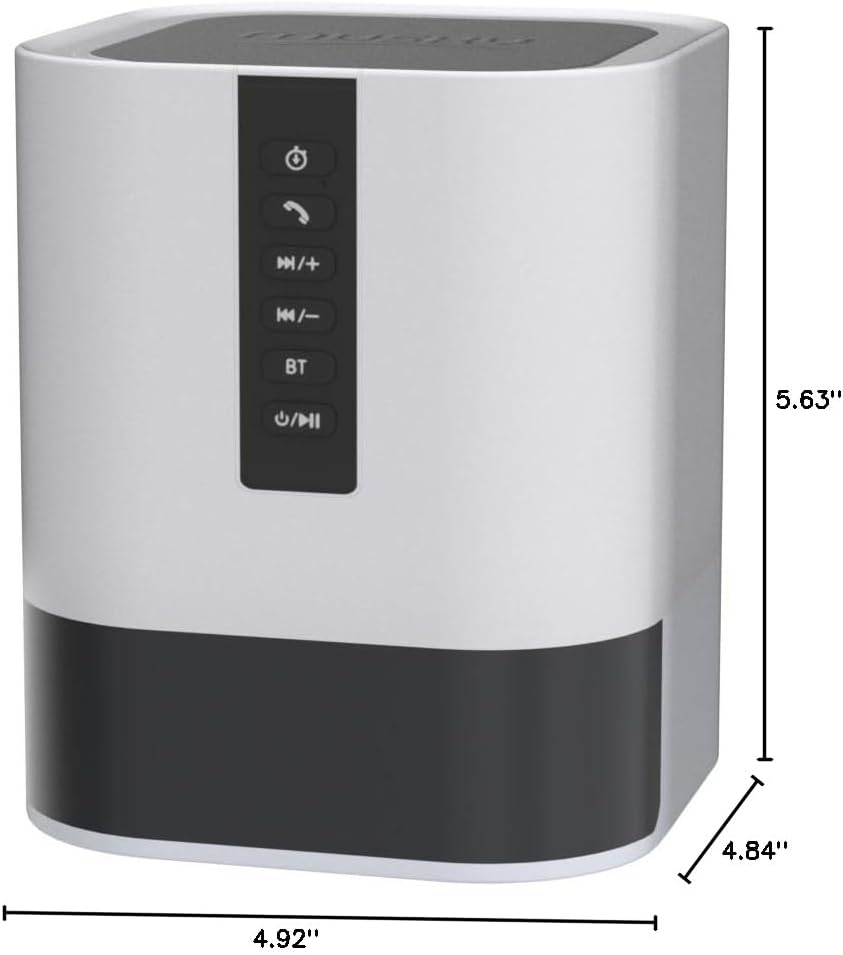
Product dimensions for placement and reference.
보증 및 지원
This product comes with a Limited Warranty. For specific details regarding warranty coverage and duration, please refer to the warranty card included in your product packaging or contact Hetyre customer support.
For technical support, troubleshooting assistance, or warranty claims, please contact Hetyre customer service through their official web사이트 또는 제품 설명서에 제공된 연락처 정보를 참조하세요.
보증을 위해 구매 영수증을 보관해 주십시오.

