1. 제품 오버view
The DALY Smart BMS (Battery Management System) is designed for Li-ion 17S 60V 60A battery packs. It features a programmable Bluetooth module and a common port for both charging and discharging. This BMS provides essential protection functions and allows for real-time monitoring and parameter adjustments via a mobile application.

Figure 1: DALY Smart BMS with Bluetooth module and smartphone app interface.
주요 특징:
- Supports up to 60A continuous discharge and 30A charge current. Suitable for high current applications.
- Programmable temperature protection: Stops current if battery temperature limits are exceeded.
- Programmable over-charge and over-discharge protection: Stops charging/discharging when voltage limits are reached.
- Programmable over-current protection: Stops charging/discharging if current exceeds limits.
- Integrated Bluetooth module for mobile app (iOS & Android) connectivity.
- UART cable for PC monitoring and parameter setting.
- SOC (State of Charge) calculation with automatic learning function.
- Automatic battery charge function or static balance function.

Figure 2: The DALY Smart BMS offers 12 protection functions including Bluetooth, programmable settings, over-charging, over-discharging, over-current, short-circuit, over-voltage, balance, NTC temperature, waterproof, moistureproof, fireproof, and dustproof features.
2. 안전 정보
Adherence to safety guidelines is crucial for the proper and safe operation of the DALY Smart BMS. Failure to follow these instructions may result in damage to the product, battery, or personal injury.
- Do not charge the battery pack at temperatures below -1°C.
- Always follow battery management guidelines to prevent over-charge, over-discharge, and voltag전자 불균형.
- Keep the BMS and battery pack away from extreme temperatures and humidity.
- Ensure all wiring connections are secure and correct before operation. Incorrect wiring can cause damage.
- Only use the specified balance wires and cables provided with the BMS.
- Consult a qualified professional if you are unsure about any installation or operation steps.
3. 설정 및 설치
Careful installation is essential for the correct functioning of your DALY Smart BMS. Please follow these steps precisely.
3.1 배선 연결
- 준비: Ensure all power sources are disconnected. Tools needed include a soldering machine (suggested 662°F/350°C), scissors, double-sided tape, tin wire, and a multimeter.
- Balance Wires: Disconnect balance wires from the BMS connection port. Connect the balance wires to your battery pack, ensuring correct polarity and sequence.
- BMS Connection: Connect the main negative (B-) and positive (P+) wires from the battery pack to the BMS.
- Balance Wire Reconnection: After confirming all balance wires are correctly welded and installed, connect them to the BMS connection port.
- NTC and Bluetooth Module: Plug in the NTC (temperature sensor) and Bluetooth module into their respective ports on the BMS.
- 활성화: Press the button on the Bluetooth module to activate the smart BMS.

Figure 3: Wiring diagram showing connections for the DALY Smart BMS, battery pack, charger, and motor/load. Ensure balance wires are connected correctly from the last series to the first series of the battery cells.
3.2 모바일 앱 설정
- 앱 다운로드 : 검색 "Smart BMS" in the Huawei App Store or Apple App Store and download the application.
- 블루투스를 통해 연결: Open the Smart BMS app and connect to the corresponding Bluetooth device listed.
- 초기 매개변수 설정: For the first power-on, the battery capacity must be set to the actual capacity of your battery pack. The initial password for parameter changes is 123456.
Video 1: Official DALY Smart BMS setup and app connection guide. This video demonstrates the wiring process, activating the BMS, connecting to the mobile app, viewing battery parameters, and setting initial battery capacity.
4. 사용 설명서
The DALY Smart BMS allows for comprehensive monitoring and control of your battery pack.
4.1 실시간 모니터링
Use the "Smart BMS" mobile application to monitor battery status in real-time. This includes:
- 충전 상태 (SOC)
- 전류(충전/방전)
- 권tage (총 부피 및 개별 세포 부피)tag그것은)
- 온도
- Warning and fault messages
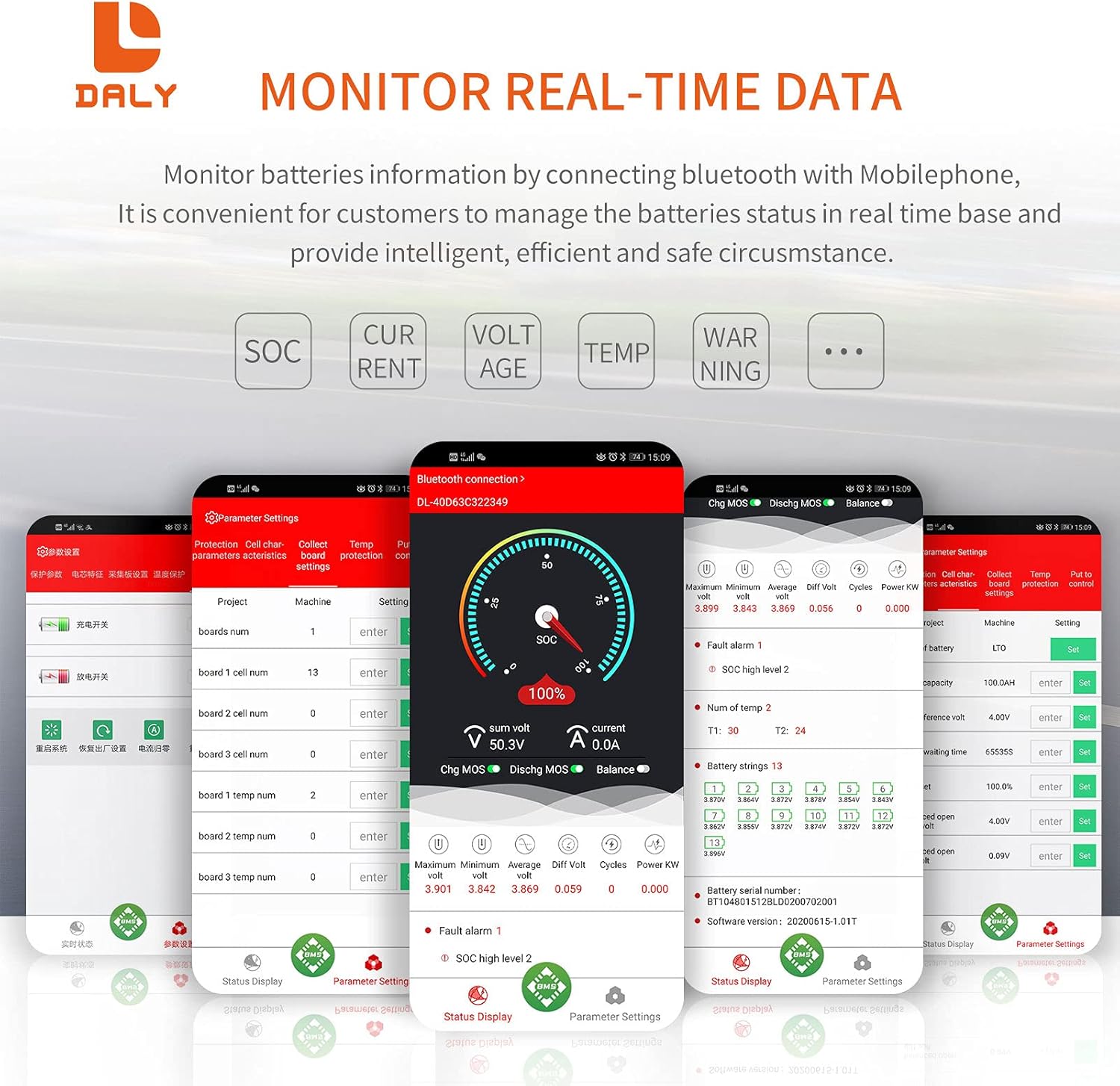
Figure 4: Real-time data monitoring via the DALY Smart BMS mobile application, showing SOC, current, voltage, 그리고 온도.
4.2 파라미터 설정
The app allows you to adjust various protection parameters to suit your battery type and application. Always ensure you understand the implications of changing these settings.
- 셀 볼륨tage high/low protection limits.
- 총 볼륨tage high/low protection limits.
- Charge/discharge over-current protection limits.
- High/low temperature protection limits for charging and discharging.
- 잔액 시작 볼륨tage와 차등 voltage.
The BMS also supports PC monitoring via the UART cable, providing a detailed interface for advanced users to view 매개변수를 조정합니다.
5. 유지관리
Regular maintenance ensures the longevity and optimal performance of your DALY Smart BMS and battery pack.
- 연결 확인: 모든 배선 연결부의 조임 상태와 부식 여부를 주기적으로 점검하십시오. 연결부가 헐거워지면 성능 저하 또는 안전상의 위험이 발생할 수 있습니다.
- 펌웨어 업데이트: Check the DALY website or app for any available firmware updates for your BMS model. Updates can improve performance and add new features.
- 환경 조건: Ensure the BMS is operated within its specified temperature and humidity ranges. Avoid exposure to direct sunlight, water, or excessive dust.
- 청소: BMS를 깨끗하게 유지하고 먼지와 이물질이 쌓이지 않도록 하십시오. 청소할 때는 부드럽고 마른 천을 사용하십시오. 액체 세척제는 사용하지 마십시오.
- 배터리 보정: The BMS features automatic SOC calibration. For accurate readings, ensure the battery is fully charged periodically until the voltage reaches the high protection limit, allowing the BMS to recalibrate.
6. 문제 해결
This section addresses common issues you might encounter with your DALY Smart BMS.
| 문제 | 가능한 원인 | 해결책 |
|---|---|---|
| BMS not activating / no power output |
|
|
| 블루투스 앱이 연결되지 않습니다 |
|
|
| BMS shuts down unexpectedly |
|
|
| Inaccurate SOC or cell voltag전자 판독값 |
|
|
7. 사양
Detailed technical specifications for the DALY Smart BMS Li-ion 17S 60V 60A.
| 특징 | 세부 사항 |
|---|---|
| 제품 유형 | Li-ion 17S 60A Common Port with Balance |
| 연락 | UART, Bluetooth (Optional: CAN/RS485) |
| 방전 전류 | 60A(연속) |
| 과방전 전류 | 90A ± 9A (Programmable) |
| 충전 전류 | 30A(연속) |
| Overcharge Current | 90A ± 9A (Programmable) |
| 과충전 Voltage | 4.25V ± 0.05V (per string, Programmable) |
| 과방전 Voltage | 2.7V ± 0.1V (per string, Programmable) |
| 차지볼tage | 71.4V (Programmable) |
| 모델 | R25T |
| 치수 | 128 x 66 x 18mm(5.04 x 2.6 x 0.71인치) |
| Output Wire Gauge | 16AWG |
| Balance Wires | 24AWG/350mm |
| 무게 | ~333g (12.8 ounces) |
| 재료 | 폴리카보네이트(PC) |
| 연결 기술 | 블루투스 |
| 전원 | 배터리 구동 |
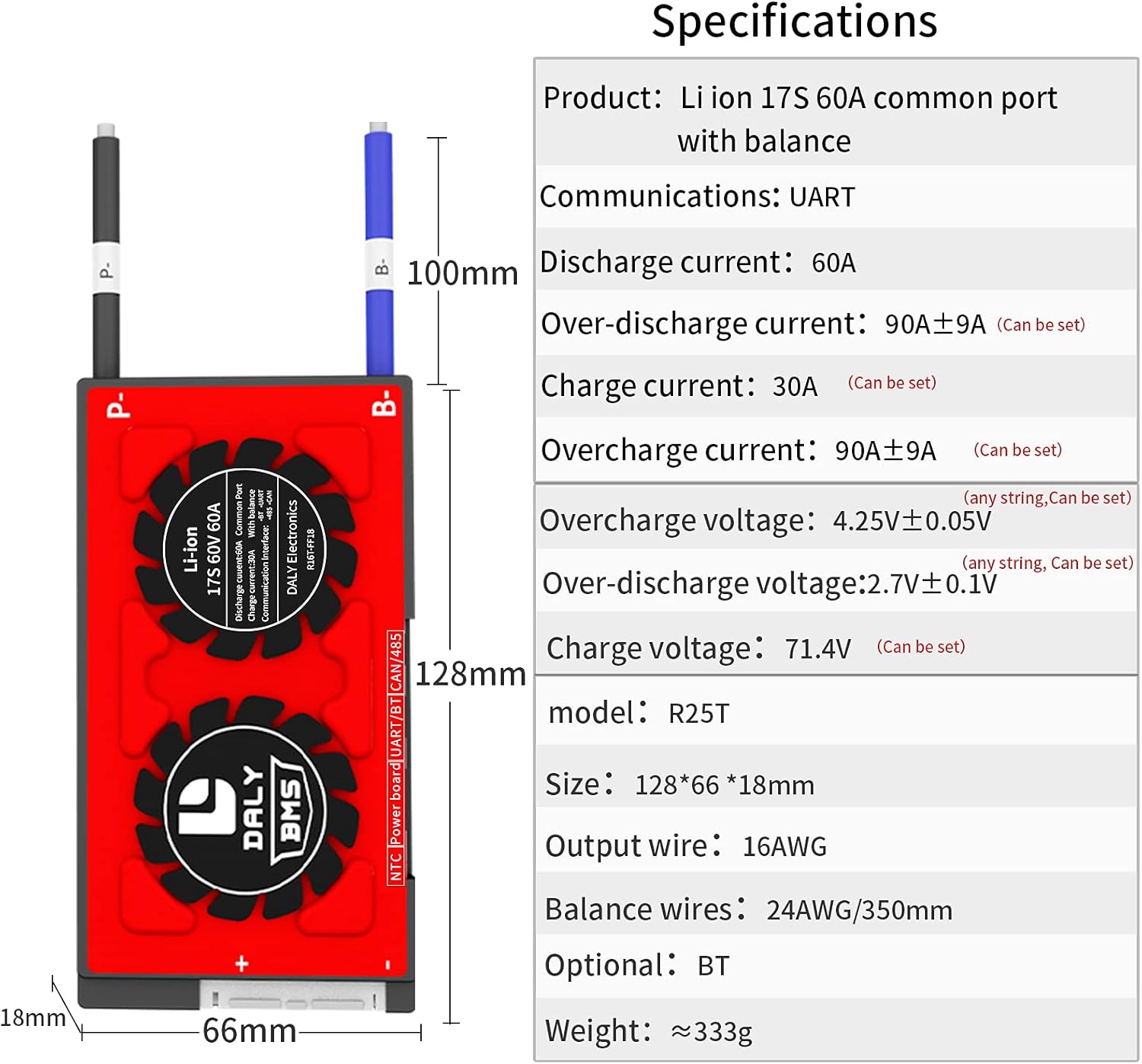
Figure 5: Physical dimensions and key electrical specifications of the DALY Smart BMS.
8. 보증 및 지원
For warranty information, technical support, or service inquiries, please refer to the official DALY web사이트를 방문하거나 판매점에 문의하세요.
- 보호 계획: Optional 2-Year and 3-Year protection plans may be available for purchase. Refer to your purchase documentation for details.
- 반품 정책: A 30-day refund/replacement return policy typically applies. Consult your seller for specific terms.
- 제조업체: DALY
- 연락하다: 추가 지원을 받으려면 다음을 방문하세요. DalyBMS Store on Amazon or the official DALY web대지.


