소개
Thank you for choosing the PHEANOO D6 Sound Bar System. This 2.1 channel soundbar with a dedicated wired subwoofer is designed to enhance your audio experience, providing clear dialogue, powerful bass, and immersive sound for your home entertainment. This manual provides detailed instructions for setup, operation, maintenance, and troubleshooting to ensure optimal performance and longevity of your device.
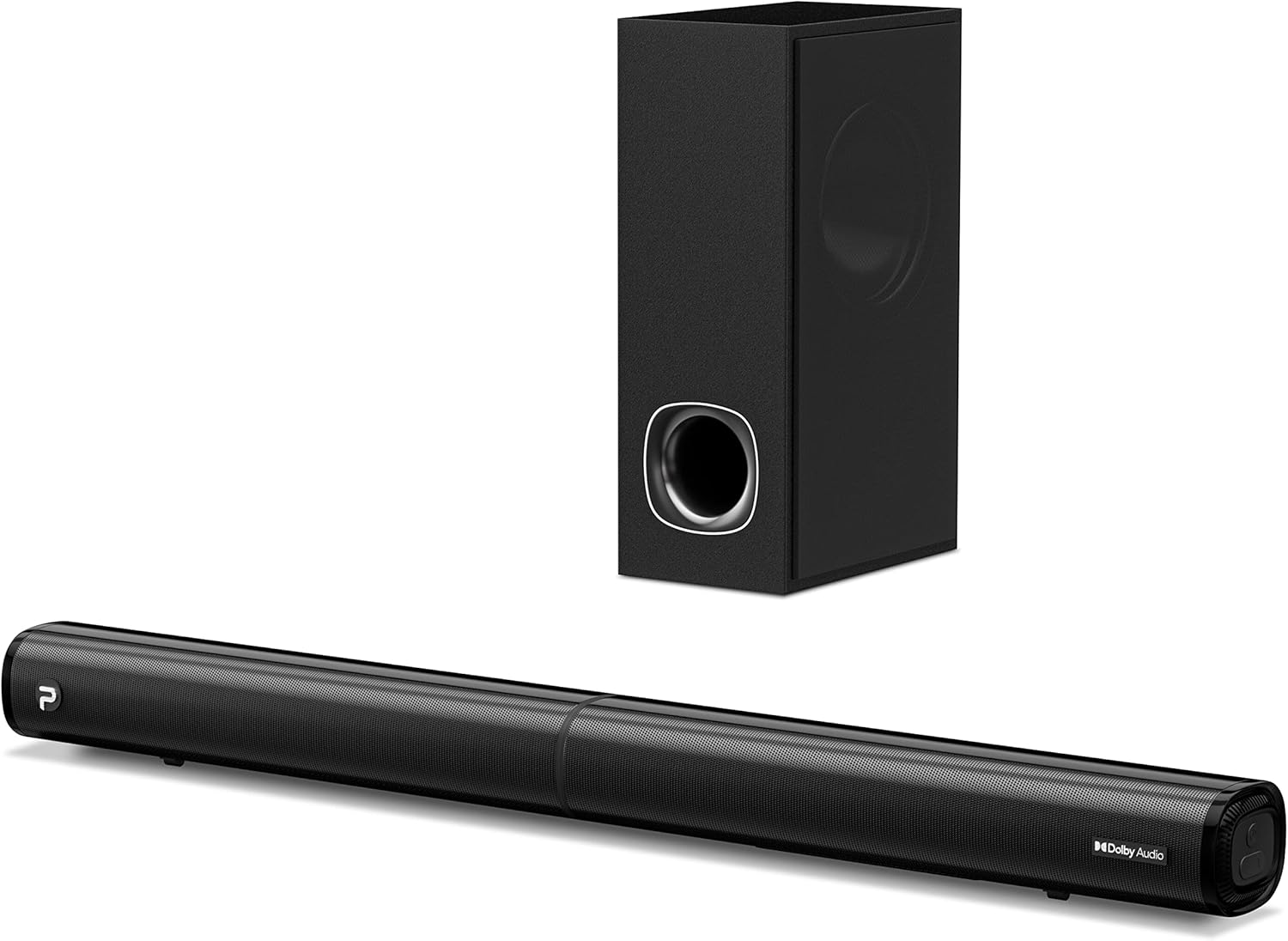
Image: The PHEANOO D6 Sound Bar and its accompanying wired subwoofer, showcasin세련된 검은색 디자인.
상자 안에 무엇이 들어있나요?
포장 내용물을 꼼꼼히 확인해 주세요. 누락되었거나 손상된 품목이 있는 경우 고객 지원팀에 문의하세요.
- Soundbar and Wired Subwoofer
- HDMI 케이블
- RCA 오디오 케이블
- Wall Mount Kit (screws and anchors)
- 리모콘(배터리는 포함되어 있지 않음)
- 전원 어댑터

Image: All components included in the PHEANOO D6 Sound Bar package, laid out for clear identification, including the soundbar, subwoofer, cables, remote, and wall mount kit.
설정
1. Assembling the Soundbar (Detachable Design)
The PHEANOO D6 soundbar features a unique detachable design for flexible placement. Follow these steps to assemble it:
- Align the audio connector from one half of the soundbar with the corresponding port on the other half.
- Gently push the two halves together until they click into place.
- Twist the two halves to secure the connection, ensuring the soundbar is firmly assembled.

Image: A three-step visual guide demonstrating how to connect the two halves of the detachable soundbar, ensuring proper alignment and secure locking.
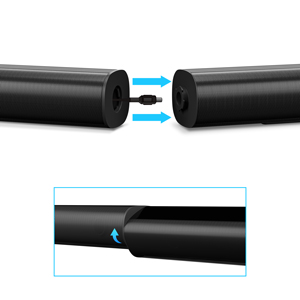
이미지: 클로즈업 view of the soundbar's detachable connection point, showing the male and female connectors.
2. 서브우퍼 연결하기
전용 서브우퍼 케이블을 사용하여 유선 서브우퍼를 사운드바에 연결하세요. 연결이 제대로 되었는지 확인하세요.
3. 배치 옵션
You can place the soundbar on a tabletop or mount it on a wall.
- 탁상 배치: Place the soundbar directly in front of your TV, ensuring it does not obstruct the TV's remote sensor.
- 벽면 장착: Use the included wall mount kit. It is recommended to measure and mark the drilling points accurately, rather than relying solely on the paper stencil, to ensure a level installation.
4. 오디오 연결
The PHEANOO D6 offers multiple connectivity options. Choose the best one for your device:
- HDMI (ARC) : For the best audio quality and control, connect an HDMI cable from the soundbar's HDMI (ARC) port to your TV's HDMI (ARC) port. This allows your TV remote to control the soundbar's volume.
- 광학: Connect an optical cable from the soundbar's Optical port to your TV's Optical Digital Audio Out port.
- 보조: Use the 3.5mm AUX cable to connect to devices with a 3.5mm audio output.
- 블루투스 5.0 : For wireless connection, pair your device via Bluetooth.

Image: The rear panel of the PHEANOO D6 Sound Bar, highlighting the HDMI (ARC), Bluetooth, Optical, and AUX input ports with corresponding icons.

이미지: 자세한 view of the soundbar's input panel, showing the AUX, Optical, and HDMI (ARC) ports clearly labeled.
5. 전원 연결
Connect the power adapter to the soundbar and then plug it into a wall outlet.
작동 지침
원격 제어
The included remote control allows you to manage all functions of the soundbar. Insert two AAA batteries (not included) into the remote before use.

Image: The remote control for the PHEANOO D6 Sound Bar, showing its buttons and an indicator light.
전원 켜기/끄기
Press the power button on the remote or the soundbar to turn the unit on or off.
입력 선택
Press the "Input" button on the remote to cycle through available input sources: HDMI (ARC), Optical, AUX, and Bluetooth.
블루투스 페어링
Bluetooth 장치를 페어링하려면:
- Select Bluetooth input on the soundbar. The indicator light will flash.
- Enable Bluetooth on your device (smartphone, tablet, etc.) and search for "PHEANOO D6".
- Select the soundbar from the list to pair. Once connected, the indicator light will be solid.

Image: A smartphone displaying a music app, wirelessly connected to the PHEANOO D6 Sound Bar via Bluetooth, indicated by a Wi-Fi like symbol.
사운드 모드
이 사운드바는 청취 경험을 최적화하기 위해 다양한 사운드 모드를 제공합니다.
- 대화 모드: 음성 명료도를 향상시켜 말소리를 더 쉽게 이해할 수 있도록 합니다.
- 음악 모드: 음악 재생에 최적화되어 균형 잡힌 오디오를 제공합니다.
- 영화 모드 : Delivers an immersive cinematic experience with enhanced effects.
- 3D 모드: Creates a wider, more enveloping soundstage.

Image: Icons representing different sound modes: Dialogue, Music, Movie, and 3D, indicating the soundbar's versatility.
저음 조정
Use the dedicated bass control buttons on the remote to increase or decrease the subwoofer's output level to your preference.

Image: A close-up of the subwoofer, with a visual effect suggesting powerful bass emanating from it.
Dolby Digital Support
The PHEANOO D6 Sound Bar supports Dolby Digital decoding, providing a rich and dynamic audio experience for compatible content.

Image: A living room setup with the soundbar and TV, overlaid with a grid pattern indicating premium 3D surround sound powered by Dolby Audio.

Image: The Dolby Audio logo accompanied by visual representations of sound waves, emphasizing the enhanced audio quality.
로쿠 TV 준비
This soundbar is certified to work seamlessly with your Roku TV. Enjoy smooth setup, easy access to sound settings, and compatibility with any Roku TV remote.

Image: A television screen displaying the "Roku TV Ready" setup interface, with the PHEANOO Soundbar and subwoofer positioned below it, illustrating seamless integration.
유지
- 청소: 사운드바와 서브우퍼 표면은 부드럽고 마른 천으로 닦아주세요. 액체 세척제나 스프레이형 세척제는 사용하지 마세요.
- 통풍: 과열을 방지하기 위해 사운드바와 서브우퍼 주변의 통풍을 원활하게 유지하세요. 통풍구를 막지 마세요.
- 저장: 장기간 보관할 경우 전원을 끄고 서늘하고 건조한 곳에 보관하세요.
문제 해결
| 문제 | 가능한 원인 | 해결책 |
|---|---|---|
| 전원이 없습니다 | 전원 케이블이 연결되지 않았습니다. 전원 콘센트가 작동하지 않습니다. | 전원 케이블이 제대로 연결되어 있는지 확인하세요. 다른 콘센트에 연결해 보세요. |
| 소리가 나지 않습니다 | 잘못된 입력이 선택되었습니다. 볼륨이 너무 낮습니다. 케이블이 제대로 연결되지 않았습니다. | 올바른 입력 소스를 선택하십시오. 볼륨을 높이십시오. 모든 오디오 케이블 연결 상태를 확인하십시오. |
| 블루투스 페어링이 실패했습니다 | 사운드바가 페어링 모드가 아닙니다. 장치가 너무 멀리 떨어져 있습니다. 간섭이 있습니다. | Ensure soundbar is in Bluetooth input and indicator is flashing. Move device closer. Turn off other Bluetooth devices. |
| 음질이 좋지 않음 | Incorrect sound mode; Source audio quality is low. | Try different sound modes (Music, Movie, Dialogue). Ensure the audio source is high quality. |
| 리모컨이 작동하지 않습니다 | Batteries dead or incorrectly inserted; Obstruction between remote and soundbar. | 배터리를 교체할 때는 극성을 정확히 확인하십시오. 장애물을 제거하십시오. |
For more detailed troubleshooting, refer to the official Troubleshooting Guide PDF available on the product page or contact PHEANOO customer support.
명세서
| 특징 | 세부 사항 |
|---|---|
| 모델 | D6 |
| 상표 | 피누 |
| 스피커 유형 | 유선 서브우퍼가 있는 사운드바 |
| 채널 구성 | 2.1 채널 |
| 연결 기술 | HDMI (ARC), Bluetooth 5.0, Optical, AUX |
| 블루투스 범위 | 최대 100미터(약 328피트) |
| 스피커 최대 출력 전력 | 240 와트 |
| 제품 치수(사운드바) | 폭 29.5인치 x 높이 2.4인치 x 깊이 2.8인치 |
| 품목 무게 | 11.57 파운드 |
| 컨트롤러 유형 | 원격 제어 |
| 특별 기능 | Dolby Digital Decoding, Dialogue Enhancement, Bass Adjustable, Detachable Design, Roku TV Ready |
보증 및 지원
The PHEANOO D6 Sound Bar System comes with a 한정 보증. 자세한 약관은 패키지에 포함된 보증서를 참조하세요.
For technical support, warranty claims, or further assistance, please visit the official PHEANOO website or contact their customer service department. You can also find additional resources like the 사용 설명서 (PDF) 그리고 문제 해결 가이드(PDF) 온라인.


