1. 서론
This manual provides detailed instructions for the installation, operation, and maintenance of your CPVAN BC01-Pro Outdoor Security Camera. Please read this manual thoroughly before using the product to ensure proper functionality and safety. Keep this manual for future reference.
2. 상자 안에 무엇이 들어있나요?
패키지에 모든 구성품이 들어 있는지 확인하세요.
- CPVAN BC01-Pro Outdoor Security Camera
- Solar Panel (3.3W with 3-meter charging cable)
- Adjustable Wall Mount (for camera)
- Mounting Bracket (for solar panel)
- 장착 나사 및 벽 앵커
- USB 충전 케이블
- 사용자 가이드 (이 문서)
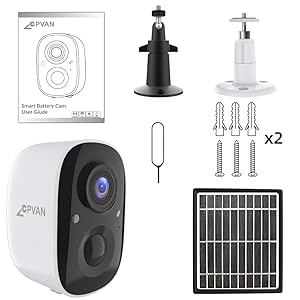
Figure 2.1: All components included in the CPVAN BC01-Pro package.
3. 설정
3.1 초기 충전
Before first use, fully charge the camera's built-in 5200mAh rechargeable battery using the provided USB cable. The charging indicator light will change to indicate a full charge.
3.2 카메라 및 태양광 패널 장착
태양광 패널을 설치할 최적의 일조량을 확보할 수 있는 야외 장소를 선택하고, 주변이 탁 트여 있는지 확인하십시오. view for the camera. The camera features a 360° adjustable wall mount for flexible positioning.
- Secure the camera's wall mount to a desired surface using the provided screws and anchors.
- 카메라를 마운트 브래킷에 부착하세요.
- 태양광 패널은 하루 종일 직사광선을 최대한 많이 받을 수 있는 곳에 설치하십시오.
- Connect the solar panel's charging cable to the camera's charging port. Ensure the port cover is securely closed after connection to maintain weather resistance.

그림 3.1: 예ample installation of the camera and solar panel on an exterior wall.
3.3 Wi-Fi 및 앱 연결
Download the VicoHome APP from your smartphone's app store. Follow the in-app instructions to connect your camera to your Wi-Fi network and complete the setup process. This typically involves scanning a QR code displayed on your phone with the camera.
4. 카메라 작동
4.1 라이브 View 및 양방향 오디오
Access the live video feed through the VicoHome APP. The camera supports two-way audio, allowing you to listen and speak through the camera's built-in speaker and microphone.

Figure 4.1: VicoHome App interface for live view and two-way audio communication.
4.2 동작 감지 및 활동 영역
The camera features AI PIR motion detection to reduce false alarms. You can define specific activity zones within the camera's view via the VicoHome APP. Smart AI recognition (subscription required) can differentiate between people, cars, pets, and packages, sending real-time alerts to your device.
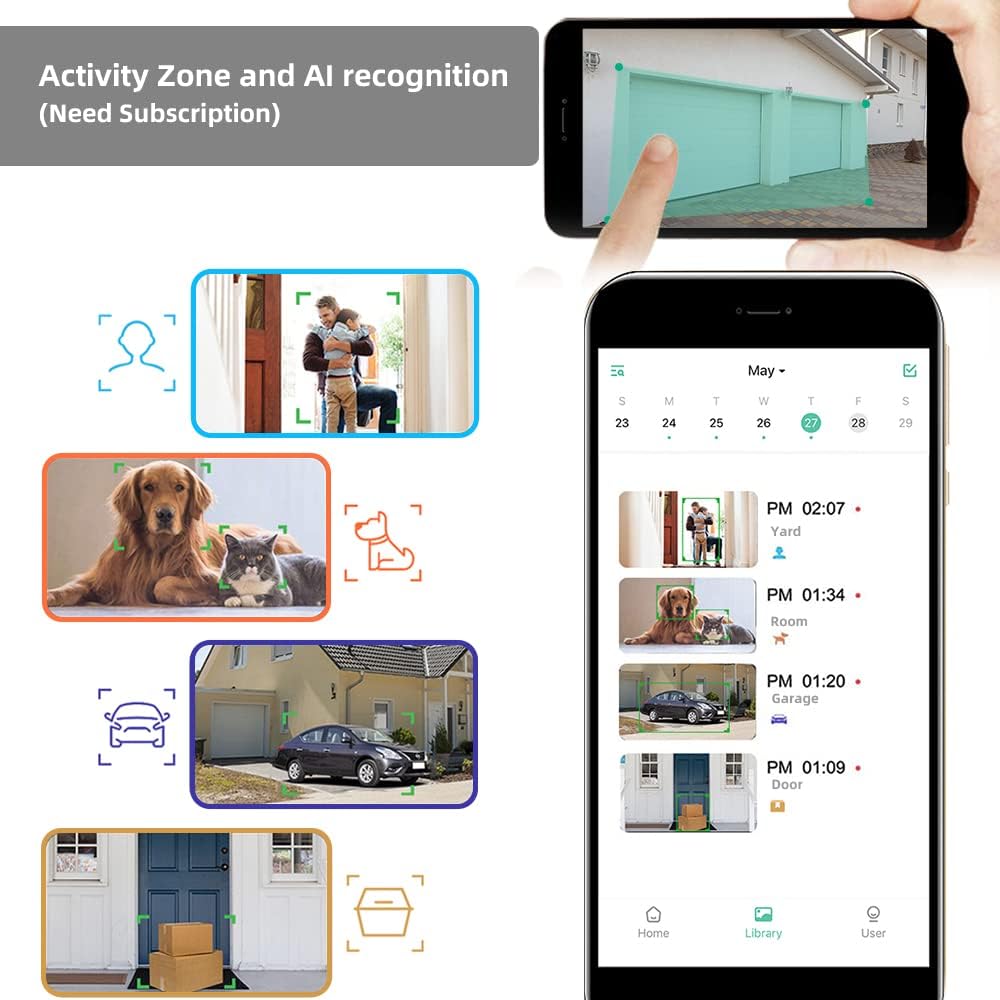
Figure 4.2: Configuring activity zones and viewing AI-detected events in the app.

Figure 4.3: Camera's field of view and motion detection capabilities.
4.3 야간 투시경
The camera offers 1080P HD video quality day and night. It automatically activates night vision mode using 8 IR LEDs in low light conditions. A powerful spotlight can be manually activated to provide full-color night vision.

Figure 4.4: Visual comparison of night vision modes.
4.4 기록 및 저장
The camera supports event recording. A 7-day rolling cloud storage is permanently free, with a 30-day trial of advanced cloud features available (subscription required). Local storage via Micro SD card is also supported.

Figure 4.5: Cloud service and local storage options.
5. 유지관리
5.1 배터리 관리
The solar panel continuously recharges the camera's battery, minimizing the need for manual recharging. Ensure the solar panel is clean and positioned for maximum sun exposure.


Figure 5.1: Solar power ensures continuous battery charge.
5.2 청소 및 환경 보호
The camera has an IP65 waterproof rating, protecting it from dust and water splashes. Periodically clean the camera lens and solar panel surface with a soft, damp cloth to ensure clear images and efficient charging. Avoid using harsh chemicals.

Figure 5.2: The camera's IP65 rating ensures durability in various weather conditions.
5.3 펌웨어 업데이트
Regularly check the VicoHome APP for available firmware updates. Keeping your camera's firmware updated ensures optimal performance, security, and access to new features.
6. 문제 해결
- 카메라가 Wi-Fi에 연결되지 않음: Ensure your Wi-Fi network is 2.4GHz (5GHz is not supported). Check Wi-Fi signal strength at the camera's location. Restart your router and camera.
- 이미지 품질이 좋지 않음: 카메라 렌즈를 청소하세요. 카메라 시야에 방해물이 없는지 확인하세요. view인터넷 연결 속도를 확인해 보세요.
- 배터리가 충전되지 않음: Verify the solar panel is receiving direct sunlight and is clean. Check the connection between the solar panel and the camera. Ensure the camera is within the recommended operating temperature range (-4°F to 122°F).
- 오작동 감지 알림: Adjust motion detection sensitivity in the app. Define specific activity zones to exclude irrelevant areas.
- 소리가 안 나거나 양방향 음성 품질이 좋지 않음: Check microphone and speaker settings in the app. Ensure your smartphone's volume is up.
7. 사양
| 특징 | 세부 사항 |
|---|---|
| 모델 | BC01-Pro |
| 비디오 해상도 | 1080p HD (1920x1080 pixels) |
| 효과적인 스틸 해상도 | 2 MP |
| 분야 View | 110도 광각 |
| 나이트 비전 | 8 IR LEDs, Color Night Vision (with spotlight) |
| 동작 감지 | AI PIR Motion Detection, Activity Zone support |
| 전원 | Rechargeable Battery (5200mAh), Solar Panel (3.3W) |
| 연결성 | 와이파이(2.4GHz) |
| 저장 | Cloud Storage (7-day free rolling, subscription for advanced features), Micro SD Card |
| 오디오 | Two-Way Audio, Built-in Siren |
| 내후성 | IP65 방수 |
| 작동 온도 | -4°F ~ 122°F(-20°C ~ 50°C) |
| 치수 | 2.64 x 2.28 x 3.5 인치 |
| 무게 | 400그램(14.1온스) |
| 제어 방법 | VicoHome 앱 |
8. 보증 및 지원
For warranty information and technical assistance, please refer to the official CPVAN website or contact customer support. We are committed to providing the best possible experience with our products and typically respond to inquiries within 24 hours.


