소개
이 설명서는 Black 제품의 설치, 작동, 유지 관리 및 문제 해결에 필요한 필수 지침을 제공합니다.view Tab 10 Android Tablet. The Blackview Tab 10 features a 10.1-inch FHD+ display, an MTK8768 Octa-Core processor, 4GB RAM, 64GB internal storage, and runs on Android 11 (Doke OS_P 1.0). It supports dual SIM cards for 4G phone calls and data, Wi-Fi, and Bluetooth 5.0 connectivity.
Please read this manual thoroughly to ensure proper use and to maximize your tablet's performance and longevity.

이미지: 더 블랙view Tab 10 tablet shown from the rear in three color options: gray, golden, and silvery, highlighting its sleek design.
설정
패키지 내용
패키지에 모든 품목이 들어 있는지 확인하세요.
- 검은색view Tab 10 Tablet PC
- USB 케이블(C형)
- 전원 어댑터(9V 2A)
- 사용자 설명서
배터리 충전
Before first use, fully charge the tablet. Connect the USB Type-C cable to the tablet's Type-C port and the other end to the provided power adapter. Plug the adapter into a power outlet. The charging indicator will show the charging status. The tablet supports 18W fast charging.
SIM 카드와 TF 카드 삽입
블랙view Tab 10 supports dual Nano SIM cards or one Nano SIM card and one TF (microSD) card for expandable storage up to 128GB.
- 태블릿 측면에 있는 SIM/TF 카드 트레이를 찾으세요.
- 제공된 SIM 꺼내기 도구를 사용하여 트레이를 엽니다.
- Carefully place the Nano SIM card(s) and/or TF card into the designated slots on the tray. Ensure the cards are correctly oriented.
- 트레이를 태블릿에 다시 살짝 밀어 넣어 딸깍 소리가 나면서 제자리에 고정되도록 합니다.
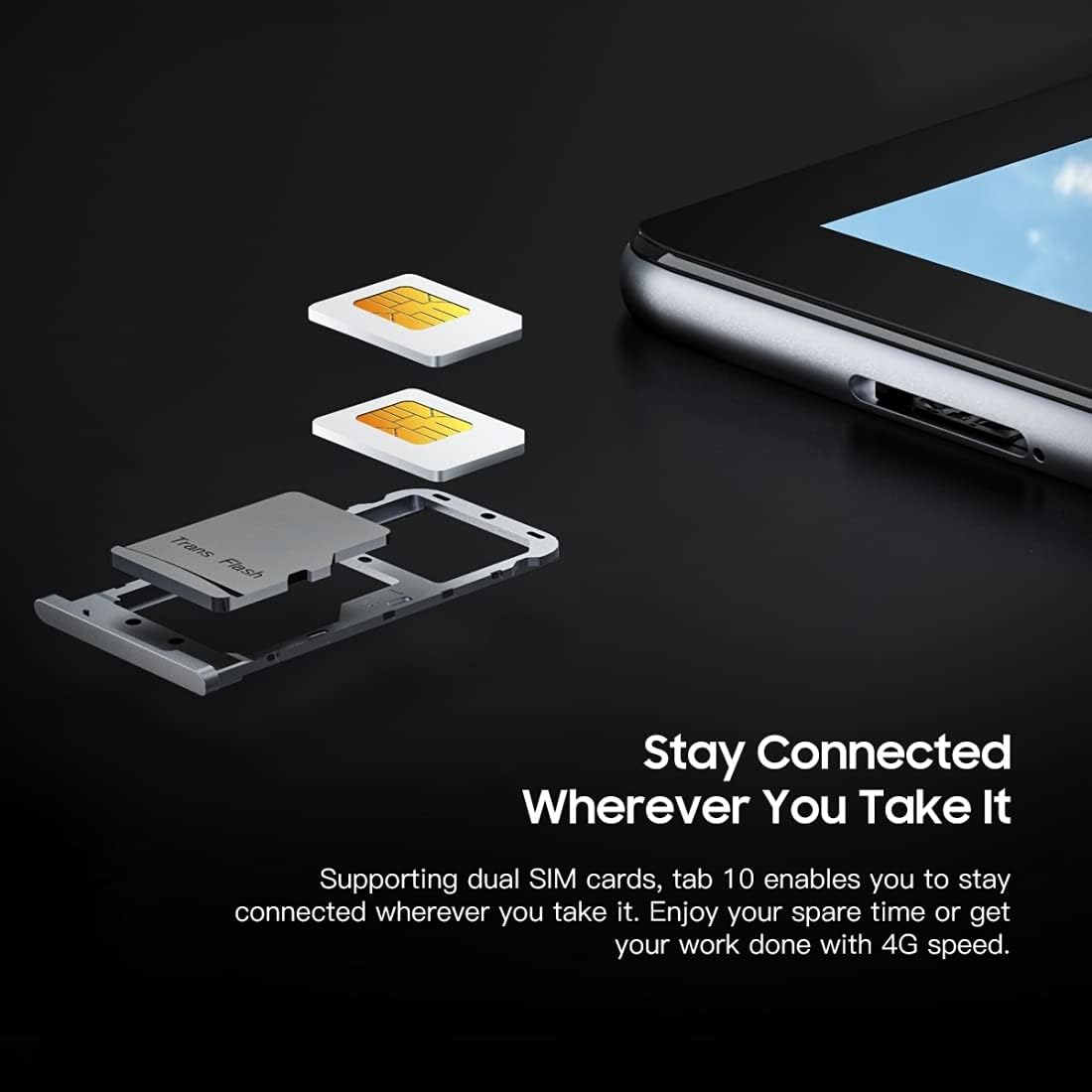
이미지: 자세한 view 검은색의view Tab 10's SIM card tray, showing how two Nano SIM cards are inserted, illustrating the dual SIM support.
전원 켜기/끄기
- 전원을 켜려면: 전원 버튼을 검은색 화면이 나타날 때까지 길게 누르세요.view 로고가 나타납니다.
- 전원을 끄려면: 전원 옵션 메뉴가 나타날 때까지 전원 버튼을 길게 누른 다음 "전원 끄기"를 선택합니다.
- 재시작하기 위해: 전원 옵션 메뉴가 나타날 때까지 전원 버튼을 길게 누른 다음 "다시 시작"을 선택합니다.
초기 설정
처음 전원을 켜면 화면의 지시에 따라 초기 설정을 완료하세요.
- 언어를 선택하세요.
- Wi-Fi 네트워크에 연결합니다.
- Google 계정으로 로그인하거나 새 계정을 만드세요.
- 화면 잠금(PIN, 패턴, 비밀번호)을 설정합니다.
- Review 이용약관에 동의하세요.
작동 지침
기본 탐색
- 수도꼭지: 앱을 열거나, 항목을 선택하거나, 버튼을 누르려면 화면을 한 번 터치하세요.
- 길게 터치: 항목을 길게 누르면 더 많은 옵션을 이용하거나 항목을 이동할 수 있습니다.
- 강타: 손가락으로 화면을 드래그하여 페이지나 콘텐츠를 스크롤하세요.
- 꼬집기: 두 손가락을 사용하여 이미지를 확대하거나 축소합니다. web 페이지.
네트워크에 연결
- 와이파이: 이동하다 설정 > 네트워크 및 인터넷 > 와이파이Wi-Fi를 켜고, 원하는 네트워크를 선택한 후, 필요한 경우 비밀번호를 입력하세요.
- 블루투스: 이동하다 설정 > 연결된 장치 > 블루투스. Turn Bluetooth on, then select a device from the list to pair.
- 모바일 데이터(4G): 유심 카드가 삽입되어 있으면 다음으로 이동하세요. 설정 > 네트워크 및 인터넷 > 모바일 네트워크 to enable mobile data and configure settings.
카메라 사용
블랙view Tab 10 features a 13.0MP rear camera and a 5.0MP front camera.
- 열기 카메라 앱.
- 전면 카메라와 후면 카메라를 전환하려면 카메라 아이콘을 탭하세요.
- 셔터 버튼을 탭하여 사진을 찍거나 비디오 녹화를 시작/중지하세요.
- Explore various camera modes and settings within the app.

이미지: 더 블랙view Tab 10 displaying its camera features, including an 8MP front camera and a 13MP rear camera, emphasizing its photographic capabilities.
Android 11 and Doke OS_P 1.0
Your tablet runs on Android 11 with Blackview's Doke OS_P 1.0 interface, offering enhanced privacy controls, improved notification management, and a more intuitive user experience. Explore the 설정 menu to customize your device, manage apps, and optimize performance.

이미지: 더 블랙view Tab 10 screen showing the Doke OS_P 1.0 interface based on Android 11, with various settings and app screens visible.
유지
장치 청소
- 부드럽고 보푸라기가 없는 천을 사용하여 태블릿의 화면과 본체를 닦으세요.
- 완고한 얼룩의 경우 약간 damp천에 물을 묻히거나 전자제품용 화면 세정제를 묻힙니다.
- 강한 화학 물질, 연마재 또는 에어로졸 스프레이를 정제에 직접 사용하지 마십시오.
배터리 관리
- 태블릿을 극한 온도(고온 또는 저온)에 노출시키지 마십시오. 배터리 수명에 영향을 줄 수 있습니다.
- 태블릿을 완전히 충전한 후에도 장시간 충전 상태로 두지 마세요.
- 태블릿과 함께 제공된 정품 충전기와 케이블만 사용하십시오.
소프트웨어 업데이트
태블릿에 최신 기능, 보안 패치 및 성능 향상이 적용되도록 정기적으로 소프트웨어 업데이트를 확인하고 설치하세요. 자세한 내용은 다음 링크를 참조하세요. 설정 > 체계 > 시스템 업데이트.
문제 해결
장치가 켜지지 않음
- 배터리가 충전되어 있는지 확인하십시오. 태블릿을 충전기에 최소 30분 동안 연결해 두세요.
- 전원 버튼을 10~15초간 길게 눌러 강제로 다시 시작하세요.
Wi-Fi 연결 문제
- Wi-Fi 라우터와 태블릿을 다시 시작하세요.
- Wi-Fi 설정에서 네트워크를 삭제하고 다시 연결하세요.
- Wi-Fi 신호 범위 내에 있는지 확인하세요.
느린 성능
- 백그라운드에서 실행 중인 사용하지 않는 애플리케이션을 닫습니다.
- 자주 사용하는 앱의 캐시 데이터를 지웁니다.
- 충분한 저장 공간을 확보하세요. 불필요한 파일은 삭제하세요. files 또는 앱.
- 최후의 수단으로 공장 초기화를 고려하세요(먼저 데이터를 백업하세요).
앱이 충돌하거나 멈춤
- Force close the app: Go to 설정 > 앱 및 알림, select the app, then tap 강제 정지.
- Clear the app's cache and data (this will reset the app).
- 앱을 제거했다가 다시 설치하세요.
명세서
| 모델 | 탭 10 |
| 화면 크기 | 10.1인치 |
| 디스플레이 해상도 | 1920 x 1200(FHD+) |
| 프로세서 | MTK8768 Octa Core Cortex-A53 2.0GHz |
| 숫양 | 4GB |
| 내부 저장소 | 64GB |
| 확장 가능한 스토리지 | TF 카드(최대 128GB, 별도 구매) |
| 운영 체제 | Android 11 (Doke OS_P 1.0) |
| 후방 카메라 | 13.0MP with AF, LED flash |
| 전면 카메라 | 5.0MP |
| 배터리 용량 | 7480mAh |
| 충전 중 | 9V 2A, 18W Fast Charging |
| 네트워크 커뮤니케이션 | 4G LTE, Wi-Fi (802.11a/b/g/n/ac), Bluetooth V5.0 |
| SIM 유형 | 듀얼 나노 SIM |
| 인터페이스 | 1 x 3.5mm Earphone Port, 1 x Type-C, 1 x Magnetic Port |
| 치수(길이 x 너비 x 높이) | 243 x 162 x 8.4mm (9.57 x 6.38 x 0.33 inches) |
| 무게 | 523g (1.15 파운드) |

이미지: 인포그래픽 쇼asing 더 블랙view Tab 10's main features, including its 13MP rear camera, Octa-core processor, 7480mAh battery, 10.1-inch FHD display, 8.8mm slim body, and support for dual SIM cards.
보증 및 지원
블랙view Tab 10 comes with a standard manufacturer's warranty. Please refer to the warranty card included in your package for specific terms and conditions, including warranty period and coverage details.
For technical support, service inquiries, or additional product information, please visit the official Blackview web사이트를 방문하거나 고객 서비스 부서에 문의하세요. 지원을 요청하실 때는 구매 영수증과 제품 일련번호를 보관하세요.
공식 블랙view 가게: 검은색view 아마존에서 판매하기


