1. 제품 오버view
The Cisco Catalyst 9300 C9300-24S-E is a 24-port Gigabit Ethernet SFP modular uplink network switch designed for enterprise-level network deployments. It provides high-performance switching capabilities, advanced security features, and network automation for modern business environments. This manual provides essential information for the safe and efficient installation, operation, and maintenance of your switch.
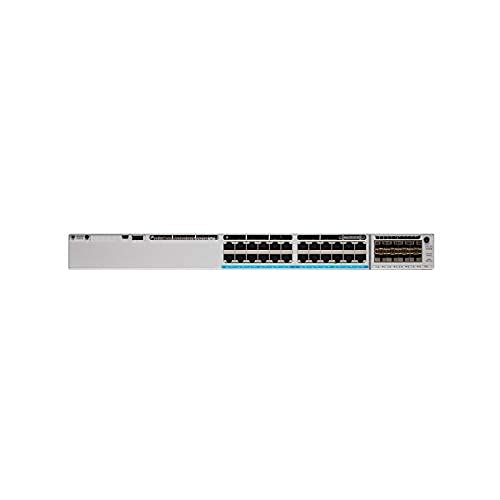
그림 1: 전면 view of the Cisco Catalyst 9300 C9300-24S-E Switch. This image displays the 24 SFP ports and modular uplink slots.
2. 안전 정보
Read all safety warnings and instructions before installing, operating, or servicing this equipment. Failure to follow these instructions can result in serious injury or equipment damage.
- 전기 안전: 전원 공급 장치의 전압이 스위치의 전압과 일치하는지 확인하십시오.tage requirements. Always connect the power cord to a grounded outlet. Do not operate the switch with damaged power cords or plugs.
- 통풍: 스위치 주변의 공기 흐름을 적절히 유지하여 과열을 방지하십시오. 통풍구를 막지 마십시오.
- 손질: This device is heavy. Use proper lifting techniques or assistance when moving or installing.
- 환경: 지정된 온도 및 습도 범위 내에서 스위치를 작동하십시오. 습기나 극한 온도에 노출시키지 마십시오.
- 서비스: 모든 서비스는 자격을 갖춘 서비스 담당자에게 맡기십시오. 스위치를 직접 열거나 수리하려고 하지 마십시오.
3. 패키지 내용
Verify that your package contains the following items. If any item is missing or damaged, contact your vendor immediately.
- Cisco Catalyst 9300 C9300-24S-E Switch
- AC 전원 코드
- 랙 마운트 키트(브래킷, 나사)
- 콘솔 케이블(RJ-45 - DB-9)
- 문서(빠른 시작 가이드, 안전 정보)
4. 물리적 설명 및 구성 요소
The C9300-24S-E switch features a robust design with various ports and indicators for network connectivity and status monitoring.
4.1 전면 패널
그림 2: 상세 view of the switch's front panel, highlighting SFP ports and status LEDs.
- 24 x SFP Ports: For Gigabit Ethernet fiber or copper connectivity using SFP transceivers.
- Modular Uplink Slots: Located on the right side, these slots accommodate optional uplink modules for higher bandwidth connections (e.g., 10G, 25G, 40G, 100G).
- 상태 LED: Indicate system status (SYS), redundant power supply (RPS), port status (STAT), and stack status (STACK).
- USB Type-A 포트: For external storage or software upgrades.
- USB Type-C Console Port: 콘솔 접속 및 초기 구성을 위해.
- RJ-45 콘솔 포트: For traditional console access.
4.2 후면 패널
그림 3: 후면 view of the switch, showing power supply bays and fan modules.
- 전원 공급 장치 베이: Two bays for redundant power supplies.
- 팬 모듈: Field-replaceable fan modules for cooling.
- StackWise-1T Ports: (If applicable to the specific model variant) For stacking multiple switches.
5. 설정 및 설치
Follow these steps to properly install your Cisco Catalyst 9300 switch.
5.1 랙 마운팅
- 제공된 나사를 사용하여 제공된 랙 장착 브래킷을 스위치 측면에 부착합니다.
- Align the switch with the desired rack unit (RU) space in your equipment rack.
- Secure the switch to the rack using the rack screws.
Figure 4: Illustration of the switch being mounted into a standard equipment rack.
5.2 전원 연결
- Insert the AC power cord into the power supply module on the rear of the switch.
- 전원 코드의 다른 쪽 끝을 접지된 AC 전원 콘센트에 연결하십시오.
- If using redundant power supplies, repeat for the second power supply.
5.3 네트워크 연결
- Insert appropriate SFP transceivers into the 24 SFP ports as needed.
- Connect fiber optic or copper cables from your network devices (servers, workstations, other switches) to the SFP transceivers.
- Install any optional uplink modules into the modular uplink slots and connect them to your core network infrastructure.
6. 사용 설명서
6.1 전원 켜기
Once power is connected, the switch will automatically power on. Observe the system status LEDs on the front panel. The SYS LED should turn green after the boot sequence completes.
6.2 초기 구성
For initial configuration, connect a console cable from your computer to the switch's console port (either USB-C or RJ-45). Use a terminal emulation program (e.g., PuTTY, Tera Term) with the following settings:
- 전송 속도: 9600
- 데이터 비트: 8
- 패리티 : 없음
- 중지 비트 : 1
- 흐름 제어: 없음
Follow the on-screen prompts to complete the initial setup wizard. For advanced configurations, refer to the Cisco IOS XE documentation for Catalyst 9300 Series switches.
6.3 LED 표시등
| 주도의 | 색상/상태 | 설명 |
|---|---|---|
| 시스템 (체계) | 녹색(단색) | 시스템이 정상적으로 작동하고 있습니다. |
| 호박색(고체) | System fault or error. | |
| 통계 (Port Status) | 녹색(단색) | 링크가 설정되었습니다. |
| 녹색(깜박임) | Activity on port. | |
| 끄다 | 링크 또는 포트가 비활성화되지 않았습니다. |
7. 유지관리
정기적인 유지관리를 통해 스위치의 최적의 성능과 수명을 보장할 수 있습니다.
- 청소: Periodically clean the exterior of the switch with a soft, dry cloth. Ensure ventilation openings are free from dust and debris. Do not use liquid cleaners directly on the switch.
- 펌웨어 업데이트: 정기적으로 Cisco 지원을 확인하세요 website for the latest firmware updates. Applying updates can improve performance, add features, and address security vulnerabilities. Follow Cisco's recommended procedures for firmware upgrades.
- 환경 모니터링: Ensure the operating environment remains within specified temperature and humidity ranges to prevent hardware stress.
8. 문제 해결
이 섹션에서는 일반적으로 발생할 수 있는 문제에 대한 해결책을 제공합니다.
8.1 전원 없음
- 전원 코드 확인: 전원 코드가 스위치와 콘센트에 제대로 연결되어 있는지 확인하십시오.
- 콘센트 확인: 다른 기기를 사용하여 전원 콘센트가 정상적으로 작동하는지 확인하십시오.
- 전원 공급 장치 상태: Check the power supply LEDs on the rear of the switch. If off or amber, the power supply may be faulty or not receiving power.
8.2 포트에 링크 없음
- 케이블 연결: Ensure the network cable is securely connected to both the switch port and the connected device.
- 케이블 무결성: 케이블 불량 여부를 확인하려면 다른 기기로 케이블을 테스트하거나 교체해 보세요.
- 송수신기 : If using SFP transceivers, ensure they are properly seated and compatible with both the switch and the connected device.
- 포트 구성: Verify that the switch port is enabled and correctly configured (e.g., speed, duplex settings).
8.3 네트워크 연결 문제
- IP 구성: Verify IP addresses, subnet masks, and gateway settings on connected devices and the switch.
- VLAN: If using VLANs, ensure ports are assigned to the correct VLANs and trunk links are properly configured.
- Firewall/ACLs: Check for any Access Control Lists (ACLs) or firewall rules on the switch that might be blocking traffic.
- 소프트웨어 문제: Consider restarting the switch or checking the system logs for error messages.
9. 사양
Key technical specifications for the Cisco Catalyst 9300 C9300-24S-E switch:
| 특징 | 세부 사항 |
|---|---|
| 모델 번호 | C9300-24S-E |
| 상표 | 시스코 |
| 인터페이스 유형 | 영어: SFP2.0은 100% 유효합니다. |
| 포트 수 | 24 |
| 호환 장치 | 데스크톱, 노트북, 프린터 |
| 제품 치수 | 21.65 x 22.44 x 9.45 인치 |
| 케이스 소재 | 플라스틱 |
| 상한 온도 등급 | 섭씨 40도 |
| 제조업체 | 시스코 시스템즈 - 엔터프라이즈 |
| 한국어: | 656942062790 |
10. 보증 및 지원
This Cisco product is typically covered by a limited hardware warranty provided by Cisco Systems. The exact terms and duration of the warranty may vary based on your region and purchase agreement. For detailed warranty information, please refer to the official Cisco warranty statements available on their web해당 웹사이트를 방문하거나 공인 시스코 리셀러에게 문의하십시오.
For technical support, documentation, and software downloads, visit the official Cisco Support website. You will need your product serial number to register and access certain support resources.
- 시스코 지원 Web대지: www.cisco.com/go/support
- 지원팀에 문의: 시스코를 참고하세요 web지역별 연락처 정보는 사이트를 참조하세요.


