소개
Thank you for choosing the Mahli Smart Robotic 3-in-1 Vacuum Cleaner. This manual provides important information on the safe use, operation, and maintenance of your device. Please read it thoroughly before first use and keep it for future reference.

Figure 1: Mahli Smart Robotic 3-in-1 Vacuum Cleaner and Remote Control
This image displays the Mahli Smart Robotic 3-in-1 Vacuum Cleaner in white, accompanied by its remote control. The vacuum cleaner is round with a power button on top, and the remote control is rectangular with navigation and function buttons.
안전 지침
- 기기를 사용하기 전에 모든 지침을 읽으세요.
- Do not operate the vacuum cleaner in wet environments or near water.
- 머리카락, 느슨한 옷, 손가락 및 신체의 모든 부분을 구멍이나 움직이는 부품에서 멀리 두십시오.
- 본 설명서에 명시된 대로만 사용하십시오. 제조업체에서 권장하는 부속품만 사용하십시오.
- 손상된 코드나 플러그는 사용하지 마십시오. 기기가 제대로 작동하지 않거나, 떨어뜨렸거나, 손상되었거나, 실외에 방치되었거나, 물에 빠진 경우 서비스 센터로 반품하십시오.
- 코드를 잡아당기거나 운반하지 말고, 코드를 손잡이로 사용하거나, 코드를 코드로 문을 닫거나, 날카로운 모서리나 모서리를 따라 코드를 잡아당기지 마십시오. 기기를 코드 위로 돌리지 마십시오. 코드를 가열된 표면에서 멀리 두십시오.
- 코드를 잡아당겨서 플러그를 뽑지 마십시오. 플러그를 뽑으려면 코드가 아닌 플러그를 잡으십시오.
- 젖은 손으로 플러그나 기기를 만지지 마세요.
- 개구부에 어떤 물건도 넣지 마십시오. 개구부가 막힌 상태에서 사용하지 마십시오. 먼지, 보푸라기, 머리카락 및 공기 흐름을 감소시킬 수 있는 모든 것이 없도록 하십시오.
- 플러그를 뽑기 전에 모든 제어 장치를 끄세요.
- 계단을 청소할 때는 특별히 주의하세요.
- 가솔린 등 가연성 또는 연소성 액체를 흡입하거나, 가연성 또는 연소성 액체가 있는 곳에서 사용하지 마십시오.
- 담배, 성냥, 뜨거운 재 등 타고 있거나 연기가 나는 물건은 집어 올리지 마세요.
- 먼지백 및/또는 필터가 장착되지 않은 상태에서 사용하지 마십시오.
- 의도하지 않은 시작을 방지합니다. 배터리 팩에 연결하거나 제품을 들거나 운반하기 전에 스위치가 꺼짐 위치에 있는지 확인하십시오.
- 제조업체가 지정한 충전기로만 충전하세요.
- 기기나 배터리 팩을 개조하거나 수리하려고 하지 마세요.
제품 구성 요소
The Mahli Smart Robotic 3-in-1 Vacuum Cleaner comes with the following components:
- Main Robotic Vacuum Unit
- 원격 제어
- USB 충전 케이블
- 사이드 브러시(2개)
- 걸레 천 (1x)
- Cleaning Brush (1x)
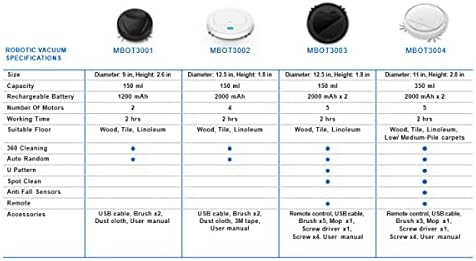
그림 2: 포함된 구성 요소
This image shows the Mahli Smart Robotic 3-in-1 Vacuum Cleaner along with its accessories: two side brushes, a mop cloth, a USB charging cable, and a small cleaning brush.
설정
1. Charging the Vacuum Cleaner
- Connect the USB charging cable to the charging port on the vacuum cleaner.
- USB 케이블의 다른 쪽 끝을 호환되는 USB 전원 어댑터(포함되지 않음)나 컴퓨터 USB 포트에 꽂습니다.
- 충전 표시등이 켜집니다. 완전히 충전하는 데는 약 3시간이 걸립니다.
- Once fully charged, the indicator light may change or turn off. Disconnect the vacuum cleaner from the power source.
2. Attaching Side Brushes
Gently press the side brushes onto the designated posts on the underside of the vacuum cleaner until they click into place.
3. Attaching the Mop Cloth (Optional)
If using the mopping function, attach the mop cloth to the designated area on the bottom of the vacuum cleaner. Ensure it is securely fastened.
작동 지침
1. 전원 켜기 / 끄기
- To power on, press the power switch on the side or bottom of the vacuum cleaner. Alternatively, for some models, simply touch the power button on the top surface after ensuring the main power switch is on.
- To power off, press the power switch again or hold the power button on the top surface.
2. 청소 모드
The vacuum cleaner features intelligent omni-directional and auto-route technology for efficient cleaning.
- 자동 청소: Once powered on, the vacuum cleaner will automatically begin cleaning, navigating around obstacles and covering the floor area.
- 원격 제어 작동: Use the provided remote control for manual direction changes or to start/stop cleaning.
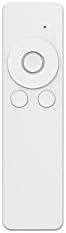
그림 3: 원격 제어
This image shows the white remote control for the Mahli Smart Robotic 3-in-1 Vacuum Cleaner. It features a circular directional pad at the top, with two smaller circular buttons below it.
3. 물걸레질 기능
If the mop cloth is attached, the vacuum cleaner will perform mopping simultaneously with sweeping and vacuuming. Ensure the mop cloth is clean and slightly damp 최고의 결과를 얻으려면.
유지
1. 쓰레기통 비우기
Regularly empty the dustbin to maintain optimal cleaning performance. Locate the dustbin compartment, open it, and dispose of collected debris. Clean the dustbin with the provided cleaning brush or a soft cloth.
2. 사이드 브러시 청소
Check the side brushes for tangled hair or debris. Remove any obstructions carefully. If brushes are worn, they may need replacement.
3. Cleaning the Mop Cloth
After each use, remove the mop cloth and wash it thoroughly. Allow it to air dry completely before reattaching.
4. 센서 청소
Wipe the anti-fall sensors and other optical sensors on the bottom and front of the vacuum cleaner with a clean, dry cloth to ensure proper navigation.
문제 해결
| 문제 | 가능한 원인 | 해결책 |
|---|---|---|
| 진공청소기가 켜지지 않습니다. | Battery is low or depleted. Main power switch is off. | Charge the vacuum cleaner. Ensure the main power switch is in the ON position. |
| 진공청소기가 갑자기 멈춥니다. | Dustbin is full. Obstruction detected. Battery is low. | Empty the dustbin. Remove any obstructions. Recharge the vacuum cleaner. |
| 세척 성능이 좋지 않음. | Dustbin is full. Side brushes are tangled or worn. Sensors are dirty. | Empty the dustbin. Clean or replace side brushes. Clean all sensors. |
| Vacuum cleaner gets stuck frequently. | Too many obstacles in the cleaning area. Sensors are dirty. | Clear the cleaning area of excessive clutter. Clean all sensors. |
명세서
| 특징 | 세부 사항 |
|---|---|
| 모델 | MBOT3002 |
| 기능 | Sweeping, Vacuuming, Mopping (3-in-1) |
| 배터리 용량 | 2000mAh |
| 충전 시간 | 약 3시간 |
| 근무시간 | 약 2시간 |
| 정격 볼륨tage | 3.7V |
| 작동 소음 | 55데시벨 |
| 치수 | 직경: 12.5인치, 높이: 1.8인치 |
| Suitable Floor Types | Wood, Tile, Linoleum |
| 특별 기능 | Intelligent Omni-Directional, Auto Route Technology, Smart Navigation, 360 Motion, Advanced Sensors, Anti-Fall Sensors |
| 포함된 구성 요소 | Sweeper, 2x Brush, 1x Mop, 1x USB Charging Cable, 1x Cleaning Brush, Remote Control |
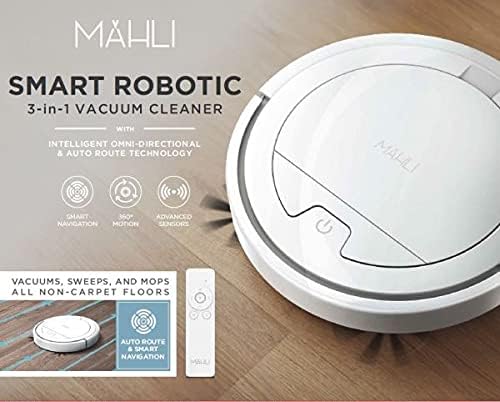
Figure 4: Robotic Vacuum Specifications Overview
This image displays a table comparing specifications for various Mahli robotic vacuum models (MBOT3001, MBOT3002, MBOT3003, MBOT3004). Key specifications include size, capacity, battery, motors, working time, suitable floor, cleaning patterns, sensors, remote, and accessories.
보증 및 지원
For warranty information and customer support, please refer to the contact details provided on the product packaging or the official Mahli web사이트. 구매 증빙 자료로 구매 영수증을 보관하세요.
For technical assistance or troubleshooting beyond this manual, please contact Mahli customer service.


