1. 서론
This manual provides instructions for the setup, operation, and maintenance of your Nixplay 10.1 inch Smart Digital Photo Frame (Model W10J). Please read this manual thoroughly before using your device to ensure proper functionality and longevity.
2. 제품 오버view
The Nixplay Smart Digital Photo Frame allows you to display photos and videos from your connected accounts or directly uploaded content. It features Wi-Fi connectivity for easy content management.
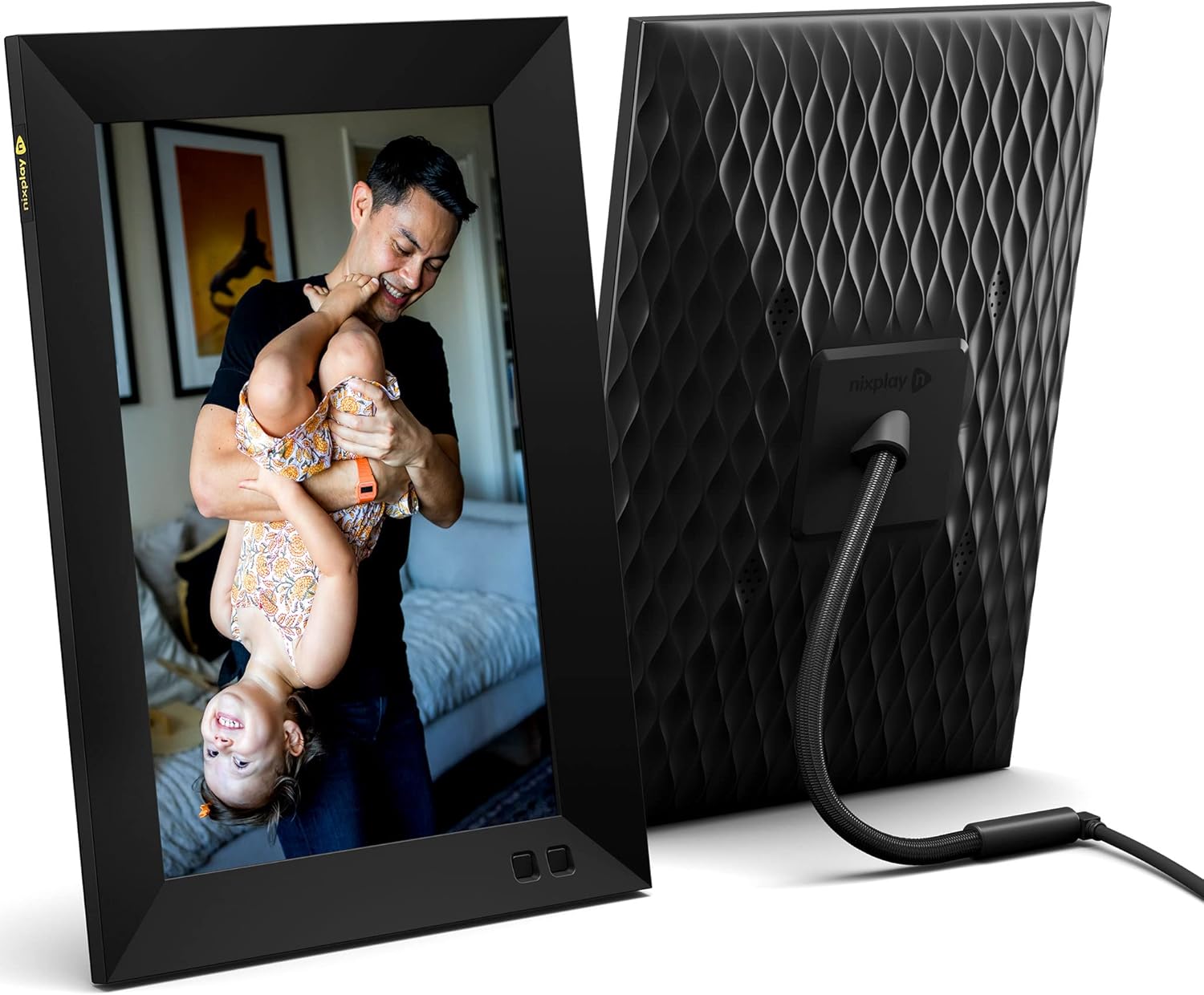
그림 2.1: 전면 및 후면 view of the Nixplay 10.1 inch Smart Digital Photo Frame. The front displays an image of a person holding a child, while the rear shows the textured back panel and power cable connection.
2.1 패키지 내용

그림 2.2: Contents of the Nixplay Smart Digital Photo Frame package. Includes the frame, power adapter, remote control, wall mounting guide, screws, and a brief guide.
상자를 푼 후 모든 품목이 들어 있는지 확인하세요.
- Nixplay 10.1 inch Smart Digital Photo Frame
- 전원 어댑터
- 원격 제어
- Wall Mounting Guide and Hardware
- 빠른 시작 가이드
3. 설정
3.1 프레임 전원 켜기
- 전원 어댑터를 프레임의 전원 포트에 연결하세요.
- 전원 어댑터를 벽면 콘센트에 꽂으세요.
- The frame will automatically power on and display the Nixplay logo.
3.2 Initial Wi-Fi and Account Setup
Follow the on-screen prompts to connect your frame to a Wi-Fi network and create or log in to your Nixplay account. This process typically involves:
- Selecting your Wi-Fi network and entering the password.
- Downloading the Nixplay app on your smartphone or tablet.
- Pairing your frame with your Nixplay account using the app.

그림 3.1: The Nixplay app displayed on a smartphone, illustrating how to share photos and videos instantly. The digital frame is shown displaying a family photo.
4. 사용 설명서
4.1 Managing Content with the Nixplay App
The Nixplay app is the primary tool for managing your frame's content. It allows you to upload photos and videos, create playlists, and invite others to share content.
- 사진/비디오 업로드: Use the app to select media from your device or linked cloud services (e.g., Google Photos, Dropbox) and upload them to your Nixplay account.
- 재생 목록 만들기: Organize your uploaded media into playlists. You can assign specific playlists to your frame.
- 공유: Invite family and friends to contribute photos and videos to your frame via email or the Nixplay app.

그림 4.1: The Nixplay app interface displaying various playlists, including "Google Photos family," "Christmas Playlist," and "Wedding." This demonstrates the app's content organization features.
4.2 리모컨 사용하기
The included remote control allows for basic navigation and settings adjustments directly on the frame. Functions typically include:
- Navigating through menus.
- Adjusting volume (for videos).
- Pausing/playing slideshows.
- Accessing frame settings.
4.3 모션 센서 기능
The frame features a motion sensor that can be configured to turn the display on when motion is detected and off after a period of inactivity, conserving energy.
5. 유지관리
5.1 프레임 청소
- Use a soft, dry, lint-free cloth to clean the screen and frame exterior.
- 연마성 세척제, 용제 또는 에어로졸 스프레이는 표면을 손상시킬 수 있으므로 사용을 피하십시오.
- 화면에 잔뜩 묻은 자국은 가볍게 닦아내세요ampen the cloth with water, then wipe gently.
5.2 소프트웨어 업데이트
Ensure your frame's software is up to date for optimal performance and new features. The frame typically updates automatically when connected to Wi-Fi, or you may be prompted to install updates via the Nixplay app.
6. 문제 해결
| 문제 | 가능한 해결책 |
|---|---|
| 프레임의 전원이 켜지지 않습니다. | 전원 어댑터가 프레임과 작동하는 전원 콘센트에 단단히 연결되어 있는지 확인하세요. 다른 콘센트를 사용해 보세요. |
| Wi-Fi에 연결할 수 없습니다. | Verify the Wi-Fi password. Ensure the frame is within range of your router. Restart your router and the frame. |
| Photos are not appearing on the frame. | Check your Nixplay app to confirm photos are uploaded and assigned to the correct playlist for your frame. Ensure the frame is connected to Wi-Fi. |
| 원격 제어가 작동하지 않습니다. | 리모컨과 프레임 사이에 장애물이 없는지 확인하십시오. 필요한 경우 리모컨 배터리를 교체하십시오. |
7. 사양
- 모델 번호: W10J
- 화면 크기: 10.1 인치
- 해결: 1280 x 800
- 색상: 검은색
- 제품 크기: 8.54 x 35 x 0.99 인치
- 품목 무게: 2.86파운드
- 호환 장치: 스마트폰, 태블릿
- 배터리: 1 Lithium Metal battery (included, for remote control)
- 제조업체: 닉스플레이
- ASIN: B09364Y1QJ
8. 보증 및 지원
For warranty information and technical support, please refer to the documentation included with your product or visit the official Nixplay support web고객 서비스 연락처 정보는 일반적으로 제조업체 웹사이트에서 찾을 수 있습니다. web대지.