소개
This manual provides detailed instructions for the safe and efficient operation, maintenance, and troubleshooting of your BE COOL Air Cooler, Model BCP5AC2101F. Please read this manual thoroughly before using the appliance and keep it for future reference.
중요 안전 지침
- 항상 기기를 안정적이고 평평한 표면에 놓으세요.
- 제품, 코드, 플러그를 물이나 기타 액체에 담그지 마십시오.
- 청소, 충전 또는 유지 보수를 하기 전에 제품의 전원 플러그를 콘센트에서 뽑으십시오.
- 기기를 어린이와 애완동물이 닿지 않는 곳에 보관하세요.
- 공기 흡입구나 배출구를 막지 마십시오. 장치 주변에 충분한 환기가 이루어지도록 하십시오.
- 물탱크에는 깨끗한 수돗물만 사용하세요. 화학 물질이나 첨가제를 첨가하지 마세요.
- 전원 코드가 손상된 경우 위험을 방지하기 위해 제조업체, 서비스 대리점 또는 이와 유사한 자격을 갖춘 사람이 교체해야 합니다.
- 이 기기는 실내 가정용입니다.
제품 끝view
Familiarize yourself with the components of your BE COOL Air Cooler.

그림 1: 전면 view of the BE COOL Air Cooler, showing the main fan grille, water level indicator, and "BE COOL" logo.

Figure 2: Top control panel with buttons for Timer, Cool, Speed, and On/Off, along with indicator lights.

Figure 3: Diagram illustrating key features: integrated dust filter, timer function, and remote control operation.
설정
1. 풀기
Carefully remove the air cooler from its packaging. Retain the packaging for future storage or transport.
2. 바퀴 부착하기
The appliance comes with 4 castor wheels for easy mobility. Insert each wheel into the designated slots at the bottom of the unit until they click securely into place.
3. 물탱크 채우기
The BE COOL Air Cooler features a 5-liter water tank. For cooling and humidifying functions, the tank must be filled with water.
- 어플라이언스가 전원 콘센트에서 분리되어 있는지 확인하십시오.
- Locate the water tank opening, typically at the bottom rear or side of the unit.
- Carefully pour clean tap water into the tank. Do not exceed the "MAX" fill line indicated on the water level indicator.
- For enhanced cooling, you may add ice packs (not included) to the water tank if available.
- Close the water tank opening securely.
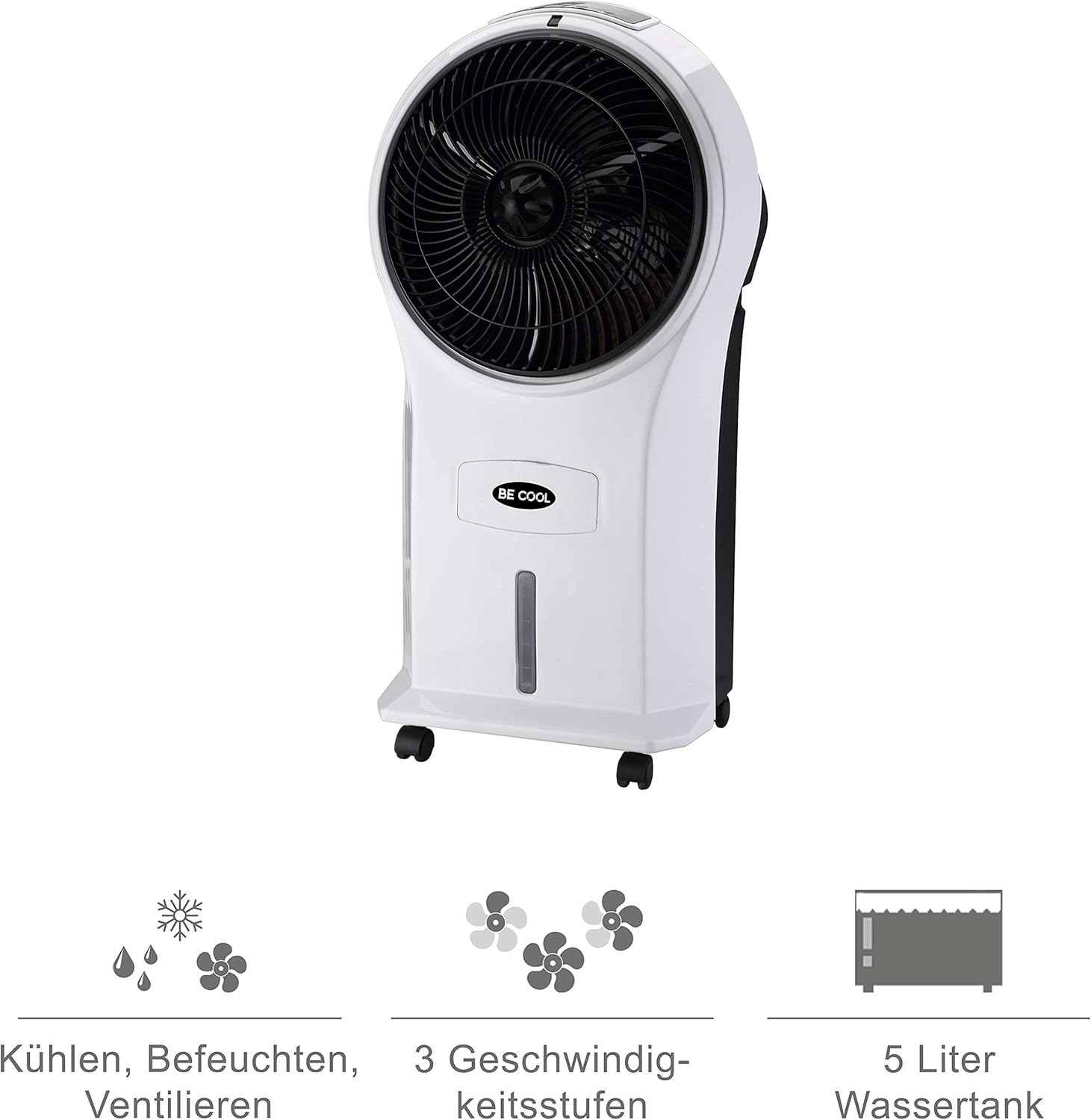
Figure 4: Visual representation of the 3-in-1 functions (cooling, humidifying, ventilating), 3 speed levels, and the 5-liter water tank capacity.
작동 지침
1. 전원 켜기/끄기
전원 코드를 적절한 콘센트에 꽂으세요. 버튼을 누르세요. 켜기/끄기 제어판이나 리모컨의 버튼을 눌러 장치를 켜거나 끕니다.
2. 팬 속도 조절
를 누르세요 속도 button repeatedly to cycle through the three available fan speeds: Low, Medium, and High. The corresponding indicator light will illuminate.
3. Cooling and Humidifying Function
To activate the cooling and humidifying function, ensure the water tank is filled. Press the 시원한 button. The unit will begin to draw water from the tank to cool and humidify the air. This function can reduce room temperature by up to 8°C.
4. 타이머 기능
The air cooler features a 7-hour timer. Press the 시간제 노동자 button repeatedly to set the desired operating time in increments (e.g., 1 hour, 2 hours, 4 hours, up to 7 hours). The unit will automatically turn off once the set time has elapsed.
5. 원격 제어 사용
The included remote control allows for convenient operation from a distance. Ensure the remote control has batteries installed (batteries not included). Point the remote control towards the front of the air cooler when operating.
6. Air Purification
The integrated filter helps to purify the air by trapping dust, pollen, mites, bacteria, and unpleasant odors, contributing to a cleaner indoor environment.

Figure 5: The BE COOL Air Cooler positioned in a bedroom, demonstrating its compact size and portability.

Figure 6: The BE COOL Air Cooler in an office environment, highlighting its suitability for various indoor spaces.
유지
정기적인 유지관리를 통해 에어쿨러의 최적의 성능과 수명을 보장할 수 있습니다.
1. 공기 필터 청소
공기 필터는 정기적으로 청소해야 하며, 특히 기기를 자주 사용하거나 먼지가 많은 환경에서 사용하는 경우 더욱 그렇습니다.
- 전원 콘센트에서 기기의 플러그를 뽑습니다.
- Locate and remove the air filter, usually found at the back of the unit.
- Gently clean the filter with a soft brush or vacuum cleaner to remove dust. For deeper cleaning, rinse with lukewarm water and mild detergent.
- 필터를 장치에 다시 삽입하기 전에 완전히 자연 건조시키세요.
2. 물탱크 청소
To prevent mold and mildew growth, clean the water tank weekly or as needed.
- Unplug the appliance and empty any remaining water from the tank.
- 부드러운 천으로 탱크 내부를 닦아주세요 damp순한 세제 용액으로 세척하세요.
- Rinse the tank thoroughly with clean water to remove any detergent residue.
- Allow the tank to air dry completely before refilling or storing the unit.
3. 외부 청소
부드러운 천으로 기기 외부를 닦아주세요.amp 천. 연마성 세척제나 용매를 사용하지 마십시오.
4. 보관
If storing the air cooler for an extended period, ensure the water tank is empty and clean, and the unit is dry. Store it in a cool, dry place, preferably in its original packaging.
문제 해결
일반적인 문제와 해결 방법은 이 섹션을 참조하세요.
| 문제 | 가능한 원인 | 해결책 |
|---|---|---|
| 기기가 켜지지 않습니다. | 전원 공급 없음; 전원 버튼이 눌리지 않았습니다. | Check if the power cord is securely plugged in. Press the On/Off button. |
| 냉각 효과가 없습니다. | Water tank empty; Cool function not activated. | Fill the water tank. Press the Cool button. |
| 공기 흐름이 약함. | Air filter clogged; Fan speed set too low. | Clean the air filter. Increase the fan speed. |
| 불쾌한 냄새. | Stagnant water in tank; Dirty filter. | Empty and clean the water tank. Clean or replace the air filter. |
| 리모컨이 작동하지 않습니다. | 배터리가 소진되었거나 잘못 삽입됨. 리모컨과 장치 사이에 방해물이 있음. | Replace batteries. Ensure no obstructions and point directly at the unit. |
명세서
- 모델: BCP5AC2101F
- 유형: 3-in-1 Evaporative Air Cooler (Cooler, Humidifier, Fan)
- 전력 소비량: 45 와트
- 기류 용량: 17.5 cubic meters per minute (1050 m³/h)
- 물탱크 용량: 5리터
- 팬 속도: 3(낮음, 중간, 높음)
- 시간제 노동자: 최대 7시간
- 제어 유형: 리모컨, 수동 버튼
- 치수(길이 x 너비 x 높이): 31.5 x 27 x 61cm(12.4 x 10.6 x 24인치)
- 무게: 2.9킬로그램(6.4파운드)
- 색상: 흰색/검정색
- 포함된 구성 요소: Main unit, Remote control, 4 Castor wheels
보증 및 지원
For warranty information or technical support, please refer to the warranty card included with your purchase or contact Be Cool customer service. Keep your proof of purchase for warranty claims.
For further assistance, you may visit the official Be Cool store on Amazon: Be Cool Store


