1. 서론
The Ducky Feather Lightweight Gaming Mouse is engineered for precision and speed, featuring the PixArt PMW3389DM optical sensor. Designed for both left and right-handed users, this mouse weighs approximately 65g and utilizes durable Omron switches for reliable performance. This manual provides essential information for setting up, operating, maintaining, and troubleshooting your Ducky Feather gaming mouse.
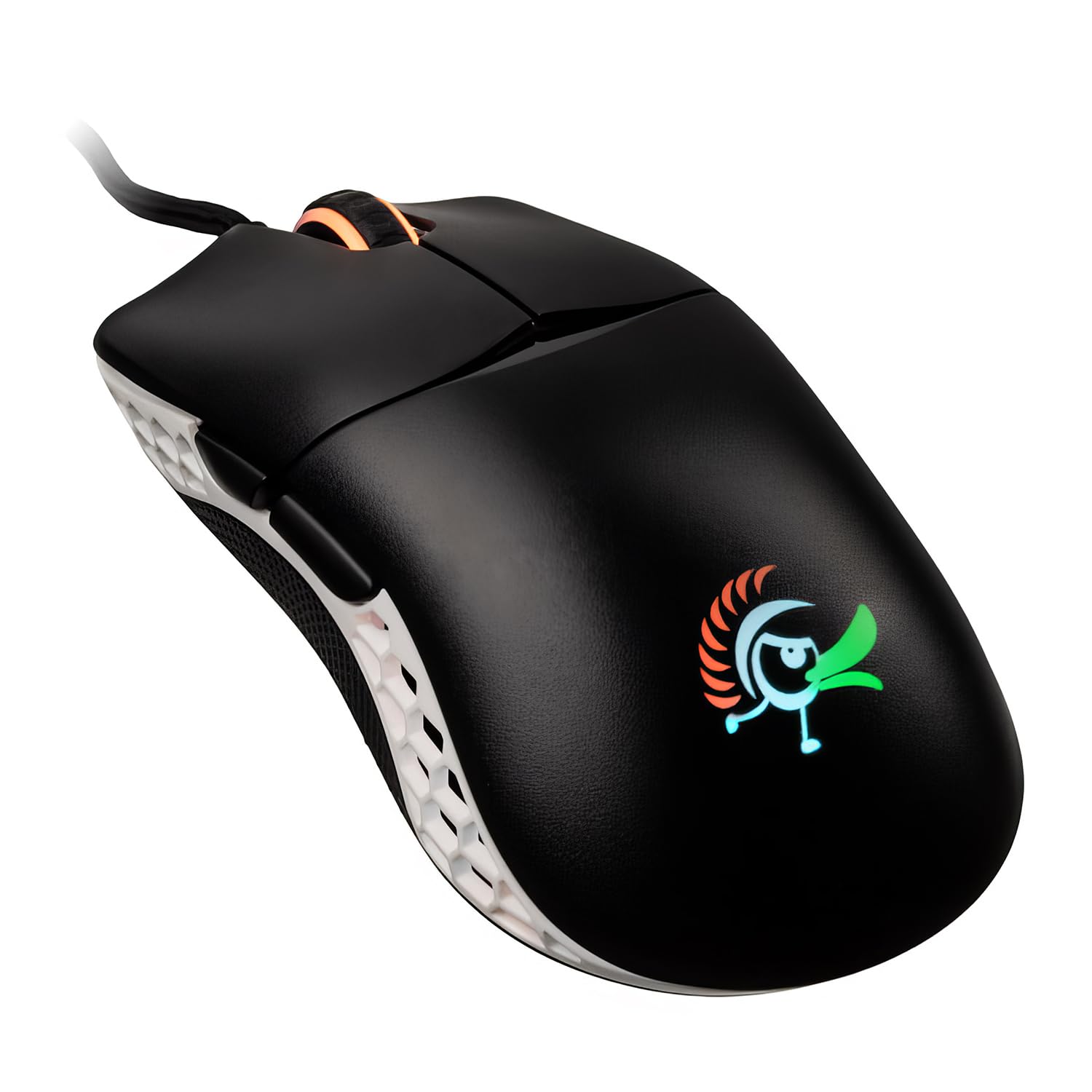
Image: The Ducky Feather Lightweight Gaming Mouse, showcasing its ergonomic design and lightweight build.
2. 패키지 내용
패키지에 모든 품목이 들어 있는지 확인하세요.
- Ducky Feather Lightweight Gaming Mouse
- USB 연결 케이블
- 사용 설명서 (본 문서)
3. 설정
Follow these steps to set up your Ducky Feather gaming mouse:
- 마우스 연결: Plug the USB connection cable from the Ducky Feather mouse into an available USB port on your computer.
- 드라이버 설치: The mouse is typically plug-and-play and does not require additional drivers for basic functionality. Your operating system should automatically detect and install the necessary drivers.
- 소프트웨어(선택 사항): For advanced customization, such as DPI settings, button remapping, and macro creation, please visit the official Ducky website to download any available software for the Feather mouse.
Video: A detailed guide on setting up and configuring the Ducky Feather Gaming Mouse (1:39 duration).
4. 사용 설명서
The Ducky Feather mouse offers intuitive controls for an optimized gaming experience:
- DPI 조정: Use the dedicated DPI button (usually located behind the scroll wheel) to cycle through different sensitivity levels. The mouse may have an indicator light to show the current DPI setting.
- 프로그래밍 가능한 버튼: The mouse features multiple buttons, including side buttons. These can often be customized using the Ducky software to perform specific functions or macros.
- 양손잡이 디자인: The symmetrical design allows comfortable use for both left and right-handed users. Ensure any software settings are adjusted to match your preferred hand orientation if applicable.
비디오: 오버view of the Ducky Feather Gaming Mouse features and basic operation (0:33 duration).
5. 유지관리
Proper maintenance ensures the longevity and performance of your Ducky Feather mouse:
- 센서 청소: Periodically clean the optical sensor on the underside of the mouse with a soft, dry cloth or a cotton swab. Avoid using harsh chemicals.
- 표면 청소: 마우스 표면을 약간 부드러운 천으로 닦으세요.amp, soft cloth. Do not immerse the mouse in water or use abrasive cleaners.
- 케이블 관리: 손상을 방지하려면 USB 케이블을 급격하게 구부리거나 과도하게 당기지 마세요.
- 저장: 마우스를 사용하지 않을 때는 깨끗하고 건조한 곳에 보관하십시오.
6. 문제 해결
If you encounter issues with your Ducky Feather mouse, refer to the following common solutions:
| 문제 | 가능한 해결책 |
|---|---|
| 마우스가 감지되지 않음 |
|
| 불규칙한 커서 움직임 |
|
| 버튼이 응답하지 않습니다 |
|
7. 사양
Key technical specifications for the Ducky Feather Lightweight Gaming Mouse:
- 모델 번호: DMFE20O-OAZPA7V
- 감지기: PixArt PMW3389DM Optical Sensor
- 스위치: Omron (60M click lifespan)
- 무게: 약 2.29온스(65g)
- 치수: 4.88 x 2.32 x 1.42 인치
- 연결성: USB
- 특징: Lightweight, Ambidextrous Design
- 색상: 검은색, 흰색
- 제조업체: Duckychannel International Co., Ltd.
- ASIN: B0928GLWYS
8. 보증 및 지원
Ducky products are manufactured to high-quality standards. For warranty information, technical support, or to access additional resources, please visit the official Ducky web사이트를 방문하거나 가까운 판매점에 문의하세요.
또한 방문할 수 있습니다 아마존에서 Ducky 스토어를 만나보세요 제품 정보 및 고객 서비스는 다음을 참조하십시오.