1. 서론
Thank you for choosing the A4Tech Fstyler FG30S Silent Wireless Mouse. This optical mouse is designed for comfortable and quiet operation, featuring advanced 2.4 GHz wireless technology for a stable connection. This manual provides essential information for setting up, operating, maintaining, and troubleshooting your device.
2. 패키지 내용
다음 품목이 패키지에 포함되어 있는지 확인하세요.
- A4Tech Fstyler FG30S Silent Wireless Mouse
- 나노 USB 수신기
- 사용 설명서 (본 문서)
메모: An AA alkaline battery is required for operation and is not included in the package.
3. 설정
Follow these steps to set up your A4Tech Fstyler FG30S mouse:
- 배터리 삽입: Locate the battery compartment on the underside of the mouse. Open the cover and insert one AA alkaline battery, ensuring correct polarity. Close the battery cover securely.
- USB 수신기 연결: Plug the Nano USB receiver into an available USB port on your computer (desktop PC or laptop).
- 마우스 전원 켜기: Slide the On/Off switch, located on the underside of the mouse, to the 'ON' position. The mouse should now be detected by your computer.
- 드라이버 설치: Your computer's operating system (e.g., Windows XP, Linux, or newer versions) should automatically detect and install the necessary drivers. No manual driver installation is typically required.
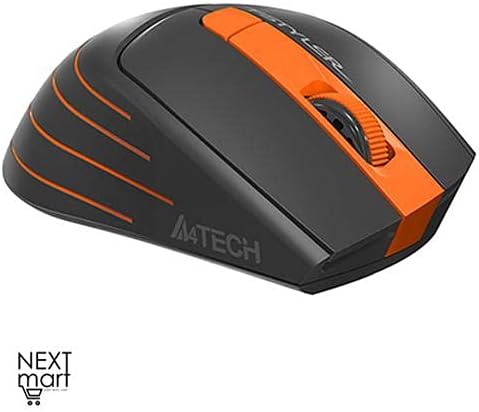
그림 3.1: 상향식 view of the A4Tech Fstyler FG30S Silent Wireless Mouse, highlighting its ergonomic shape and orange design elements.
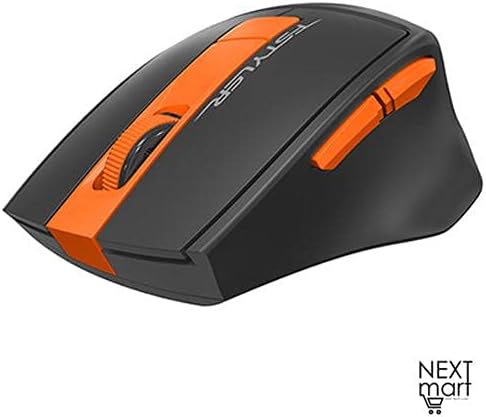
그림 3.2: 각도 view of the A4Tech Fstyler FG30S Silent Wireless Mouse, illustrating the placement of its side buttons and the textured scroll wheel.
4. 사용 설명서
Your A4Tech Fstyler FG30S mouse offers several features for enhanced productivity:
- 조용한 클릭: The mouse features silent click technology, reducing noise during use and minimizing disturbance to others.
- DPI 조정: The mouse has 3 adjustable DPI levels (1000/1600/2000 DPI). Press the DPI button (usually located near the scroll wheel) to cycle through the sensitivity settings.
- 6 버튼: In addition to the standard left, right, and scroll wheel buttons, the mouse includes additional buttons for various functions. These can often be customized through software (if available from the manufacturer).
- 16-in-One Shortcut Commands: This feature allows you to assign up to 16 customizable shortcut commands or gestures to specific mouse actions, enhancing workflow efficiency. Refer to the manufacturer's website for any specific software required for customization.
- 켜기/끄기 스위치: Use the On/Off switch on the underside of the mouse to conserve battery power when the mouse is not in use or during transport.
- 절전: The mouse incorporates 4-level adjustable power-saving modes. It will enter sleep mode after 0.2 seconds of inactivity to extend battery life.

그림 4.1: 특징view of the A4Tech Fstyler FG30S mouse, detailing DPI settings, button lifespan, programmable gestures, silent operation, power management, and the power switch.
5. 유지관리
마우스의 최적의 성능과 수명을 보장하려면:
- 청소: 부드럽고 마른 천으로 마우스 표면을 닦으십시오. 광학 센서의 경우 면봉을 사용하여 가볍게 닦아주세요.amp소독용 알코올로 마무리하여 액체가 쥐 안으로 들어가지 않도록 합니다.
- 배터리 교체: When the mouse performance degrades or it stops responding, replace the AA battery. Always use a fresh, high-quality alkaline battery.
- 저장: When not in use for extended periods, turn off the mouse using the On/Off switch and consider removing the battery to prevent leakage. Store in a cool, dry place.
6. 문제 해결
If you encounter issues with your mouse, try the following solutions:
| 문제 | 해결책 |
|---|---|
| 마우스가 응답하지 않음 |
|
| 불규칙한 커서 움직임 |
|
| 짧은 무선 범위 |
|
7. 사양
| 특징 | 세부 사항 |
|---|---|
| 상표 | A4Tech |
| 모델 번호 | FG30S |
| 색상 | 주황색 |
| 마우스 유형 | 광마우스 |
| 연결 유형 | 무선(2.4GHz) |
| 무선 범위 | 10-15 미터 |
| DPI 레벨 | 1000 / 1600 / 2000 DPI (조절 가능) |
| 버튼의 수 | 6 |
| 수신기 유형 | 나노 USB 수신기 |
| 전원 | 1 x AA Alkaline Battery (not included) |
| 배터리 수명 | 최대 12개월 |
| 특별 기능 | Silent Clicks, 4-Level Adjustable Power Saving, Anti-slip Side, On/Off Switch, 16-in-One Shortcut Commands |
| 버튼 수명 | 최대 5만 클릭 |
| 호환 장치 | 데스크톱 PC, 노트북 |
| 운영 체제 | 리눅스, 윈도우 XP (및 이후 버전) |
| 손의 방향 | 양손잡이 |
| 품목 무게 | 160그램 |
| 치수(패키지) | 19.6 x 13 x 6.2cm |
8. 보증 및 지원
The A4Tech Fstyler FG30S mouse is designed for durability, with a button lifespan of up to 5 million clicks. For warranty claims or technical support, please refer to the retailer where you purchased the product or visit the official A4Tech website for contact information and further assistance.