소개
This instruction manual provides comprehensive guidance for the SOAR NFL True Wireless Earbuds V.4. These earbuds feature Bluetooth 5.0 technology, a built-in microphone, and touch controls, offering 3-4 hours of playtime per charge. The included charging case ensures portability and extended use. Please read this manual thoroughly before using your earbuds to ensure proper operation and longevity.
상자 안에 무엇이 들어있나요?
Upon opening your SOAR NFL True Wireless Earbuds V.4 package, you should find the following items:
- One (1) Pair of True Wireless Earbuds
- 충전 케이스 1개
- 1개(1)의 마이크로 USB 충전 케이블

The image above displays the SOAR NFL True Wireless Earbuds V.4 in their retail packaging. The package includes the earbuds, the charging case, and a micro-USB charging cable.
제품 끝view
The SOAR NFL True Wireless Earbuds V.4 consist of two individual earbuds and a portable charging case. Each earbud features a touch-sensitive area for controls and an LED indicator. The charging case has a lid, charging ports for the earbuds, and LED indicators to show its battery status.

This image shows the earbuds outside their charging case, which is open and connected to a charging cable. The charging case has designated slots for each earbud (Left and Right) and LED indicators for charging status.
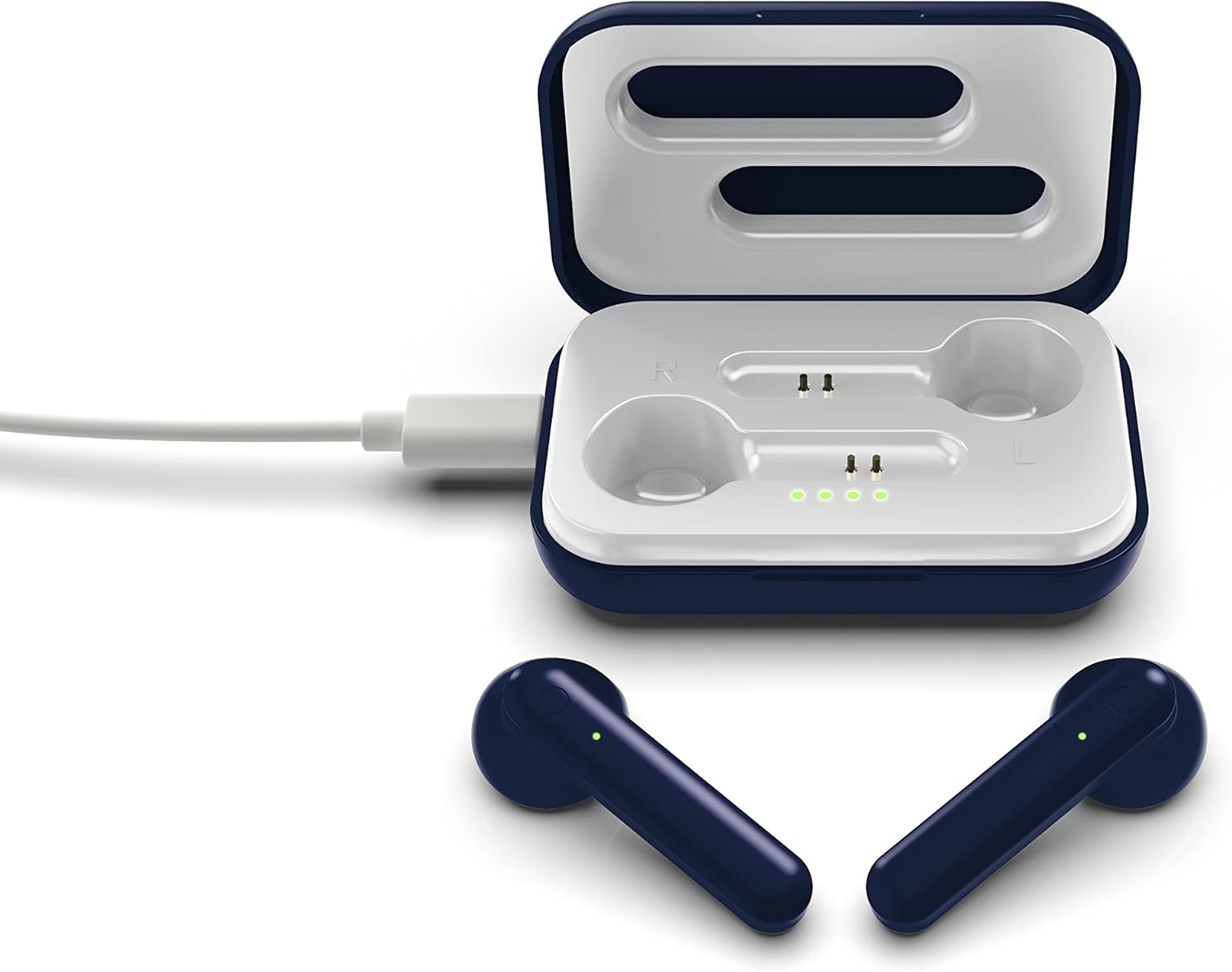
The image above illustrates the earbuds securely placed within their charging case. The illuminated LED lights on the case indicate the charging status of both the case and the earbuds.
설정
1. 이어버드와 케이스 충전
처음 사용하기 전에 이어버드와 충전 케이스를 모두 완전히 충전하세요.
- 케이스 충전: Connect the provided Micro-USB cable to the charging port on the case and the other end to a USB power source (e.g., computer, wall adapter). The LED indicators on the case will illuminate to show charging progress.
- 이어버드 충전: Place the earbuds into their respective slots in the charging case. Ensure they are correctly seated. The earbuds will begin charging automatically from the case's internal battery. The LED indicators on the earbuds will show their charging status.
- 완충 시 약 3~4시간 동안 사용 가능합니다.
2. 블루투스 페어링
이어버드를 장치에 연결하려면:
- 이어버드가 충전되어 있는지 확인하세요.
- 충전 케이스를 여세요. 이어버드가 자동으로 켜지고 페어링 모드로 전환됩니다. 한쪽 이어버드의 LED 표시등이 깜빡이며 페어링 준비가 완료되었음을 알려줍니다.
- 기기(스마트폰, 태블릿 등)에서 Bluetooth를 활성화하세요.
- 검색 available Bluetooth devices and select "SOAR TWS4" from the list.
- Once connected, the earbud LED indicator will stop flashing. You will hear an audible confirmation.
- 기기에서 Bluetooth가 활성화되어 있는 경우, 이어버드를 케이스에서 꺼내면 마지막으로 페어링된 기기에 자동으로 다시 연결됩니다.
작동 지침
The SOAR NFL True Wireless Earbuds V.4 feature touch controls for easy management of audio and calls.
전원 켜기/끄기
- 전원 켜기: 충전 케이스를 열거나 양쪽 이어버드의 터치 영역을 3초 동안 길게 누르세요.
- 전원 끄기 : 이어버드를 충전 케이스에 다시 넣고 뚜껑을 닫거나, 양쪽 이어버드의 터치 영역을 5초 동안 길게 누르세요.
음악 재생
- 재생/일시 중지: 양쪽 이어버드를 한 번 탭하세요.
- 다음 트랙: 오른쪽 이어버드를 두 번 탭하세요.
- 이전 트랙 : 왼쪽 이어버드를 두 번 탭하세요.
통화 관리
- 전화 받기/종료: 수신 전화나 통화 중일 때 한쪽 이어버드를 한 번 탭합니다.
- 전화 거부: Long-press on either earbud for 2 seconds during an incoming call.
음성 지원
- Voice Assistant 활성화 : 양쪽 이어버드를 세 번 탭하세요.
유지
이어폰을 제대로 관리하면 수명을 연장할 수 있습니다.
- 청소: 부드럽고 마른 천을 사용하여 이어버드와 충전 케이스를 닦으세요. 강한 화학 물질이나 연마재를 사용하지 마세요.
- 저장: 사용하지 않을 때는 이어버드를 충전 케이스에 보관하여 보호하고 충전 상태를 유지하세요.
- 방수 기능: 이 이어폰은 방수가 안 됨. Avoid exposure to liquids, moisture, and extreme temperatures.
- 충전 중: 충전 시에는 제공된 마이크로 USB 케이블 또는 인증된 동등 케이블만 사용하십시오.
문제 해결
이어버드에 문제가 발생하면 다음의 일반적인 해결 방법을 참조하세요.
| 문제 | 해결책 |
|---|---|
| One earbud is not connecting or producing sound. |
|
| Earbuds are not pairing with my device. |
|
| 이어버드가 충전되지 않습니다. |
|
명세서
| 특징 | 세부 사항 |
|---|---|
| 모델명 | 진정한 무선 이어폰 V.4 |
| 품목 모델 번호 | NFL-TWS4-SHKS |
| 연결 기술 | 블루투스, 무선 |
| 무선 통신 기술 | 블루투스 5.0 |
| 블루투스 범위 | 최대 30피트(9.14미터) |
| 배터리 수명(재생 시간) | 충전당 3-4시간 |
| 제어 유형 | 터치, 미디어 컨트롤 |
| 특징 | 마이크 포함 |
| 귀 위치 | 귀에 |
| 방수 레벨 | 방수가 되지 않음 |
| 재료 | 플라스틱 |
| 제품 치수 | 1.25 x 4.5 x 6.5 인치 |
| 품목 무게 | 3.52 온스 |
| 제조업체 | Prime Brands Group, Inc. |
| 한국어: | 192129070757 |
공식 제품 영상
이 영상은 시각적으로 다음을 제공합니다.view of the SOAR TWS4 True Wireless Earbuds V.4, highlighting key features such as the wireless charging case, touch controls, and Bluetooth 5.0 technology. It demonstrates the product's design and functionality.
보증 및 지원
Your SOAR NFL True Wireless Earbuds V.4 are covered by a 1년 한정 보증. This warranty covers manufacturing defects and issues arising from normal use. It does not cover damage caused by misuse, accidents, unauthorized modifications, or exposure to liquids.
For warranty claims, technical support, or further assistance, please contact the manufacturer, Prime Brands Group, Inc., or visit their official web사이트. 보증 확인을 위해 구매 증빙 자료를 보관하세요.


