소개
The COVERT SCOUTING CAMERAS MP32 Trail Camera is designed to capture high-quality still photos and videos of wildlife and activity in outdoor environments. Featuring a 32MP camera for still images and 1080p video recording capabilities, it utilizes 40 low-glow LEDs for an invisible flash up to 100 feet. The camera is equipped with a passive infrared motion sensor that detects movement up to 85 feet away, triggering the lens in just 0.4 seconds. This manual provides essential information for setting up, operating, maintaining, and troubleshooting your MP32 camera.
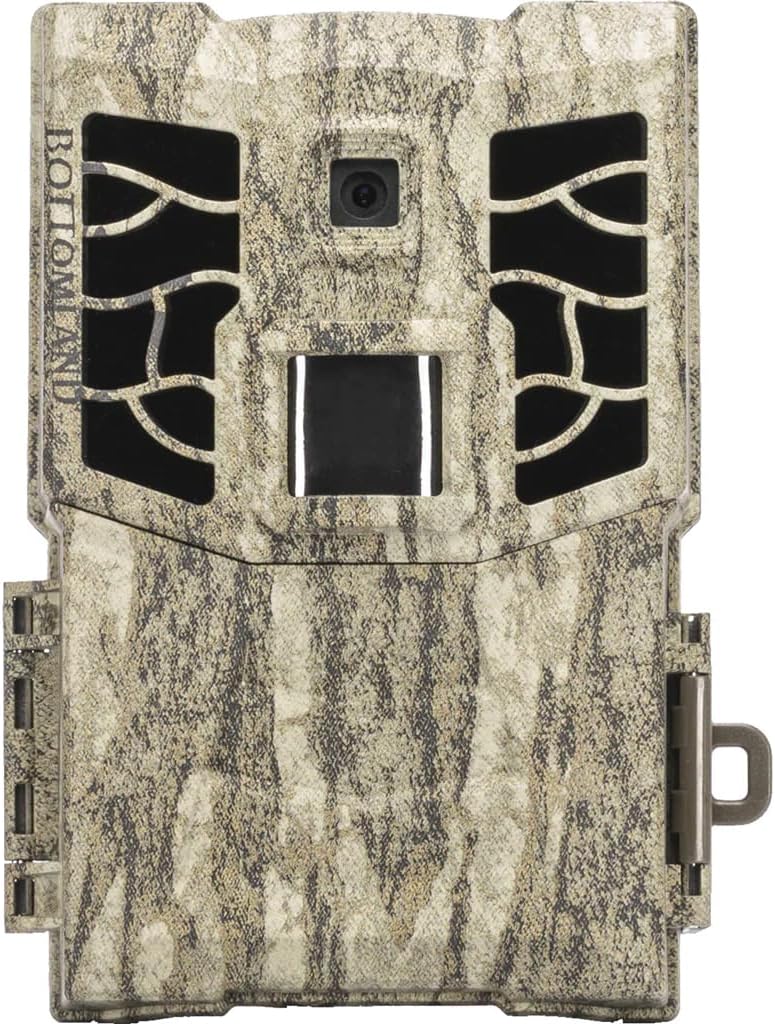
앞쪽 view of the COVERT SCOUTING CAMERAS MP32 Trail Camera, featuring its Mossy Oak camouflage finish, lens, infrared LEDs, and motion sensor.
설정
1. 배터리 설치
The MP32 camera operates on AA batteries. Ensure the camera is powered off before installing or replacing batteries.
- Open the battery compartment latch, typically located on the side or bottom of the camera.
- Insert the required number of AA batteries (refer to the camera's internal markings for polarity) into the battery slots.
- 방수 밀봉을 위해 배터리함을 단단히 닫으십시오.
2. SD 카드 설치
The camera supports SD cards up to 32GB for storing photos and videos.
- Locate the SD card slot, usually inside the camera's main compartment.
- Insert a formatted SD card into the slot with the metal contacts facing down, until it clicks into place.
- To remove, push the SD card in slightly until it springs out.
3. 카메라 장착
Proper mounting ensures optimal performance and capture.
- Choose a sturdy tree or post at the desired height, typically 3-6 feet off the ground.
- Use the included mounting strap or a compatible mounting accessory to secure the camera firmly.
- Angle the camera to cover the intended area, avoiding direct sunlight or heat sources that might cause false triggers.
작동 지침
1. 전원 켜기 / 끄기
Locate the power switch inside the camera's main compartment. Toggle it to the 'ON' position to power on the camera and to 'OFF' to power it down.
2. 모드 선택
The MP32 camera typically offers different operating modes, such as Photo, Video, or Photo+Video. Use the internal controls or menu system to select your desired mode.
3. 설정 구성
Access the camera's internal menu to adjust various settings:
- 사진 해상도: Set to 32MP for maximum detail.
- 비디오 해상도: Set to 1080p for high-definition video.
- 사진 버스트: Configure the camera to take 1 to 5 photos per trigger event.
- 트리거 간격: Adjust the delay between consecutive triggers.
- 시간과 날짜: Set the correct time and date for accurate timestamp캡처 이미지에 s가 표시됩니다.
- 감광도: Adjust the motion sensor sensitivity based on environmental conditions.
4. Retrieving Images and Videos
To access your captured media:
- 카메라 전원을 끕니다.
- SD 카드를 슬롯에서 꺼내세요.
- SD 카드를 컴퓨터의 SD 카드 리더기 또는 호환되는 장치에 삽입하십시오.
- 탐색하다 fileSD 카드에 있는 s view or transfer your photos and videos.
유지
1. 청소
- 카메라 렌즈에 묻은 먼지나 얼룩을 제거하려면 부드럽고 보풀 없는 천으로 살살 닦아주세요.
- Clean the camera's exterior casin광고가 있는 gamp 천으로 닦으세요. 연마성 세제나 용제는 사용하지 마세요.
- Ensure the battery compartment and SD card slot are free of debris.
2. 배터리 관리
- Regularly check battery levels, especially before deploying the camera for extended periods.
- Replace all batteries simultaneously with new ones to ensure consistent power.
- Remove batteries if the camera will not be used for a long duration to prevent leakage.
3. 펌웨어 업데이트
Periodically check the COVERT SCOUTING CAMERAS website for any available firmware updates. Firmware updates can improve camera performance and add new features. Follow the instructions provided with the update carefully.
문제 해결
| 문제 | 가능한 원인 | 해결책 |
|---|---|---|
| 카메라 전원이 켜지지 않음 | Dead or incorrectly installed batteries; Power switch off. | Replace batteries, ensuring correct polarity. Turn power switch to 'ON'. |
| 이미지/비디오 품질이 좋지 않음 | 렌즈 오염; 잘못된 해상도 설정; 저조도 환경. | Clean the lens. Check resolution settings in the menu. Ensure adequate lighting or proper flash range. |
| No triggers or missed events | PIR sensor blocked; Sensitivity too low; Incorrect placement. | Clear any obstructions from the PIR sensor. Increase sensitivity. Reposition camera for optimal detection. |
| SD 카드 오류 | Unformatted or incompatible SD card; Full SD card. | Format the SD card in the camera or on a computer. Use a compatible SD card (up to 32GB). Delete old files or use a new SD card. |
명세서
- 모델 이름: CC8021
- 상표: 은밀한 정찰 카메라
- 이미지 해상도: 32메가픽셀
- 비디오 해상도: 1080p
- 플래시 유형: 40 Low-Glow LEDs
- 플래시 범위: 최대 100피트
- 감지 범위: 최대 85피트
- 트리거 속도: 0.4초
- SD 카드 지원: 최대 32GB (SD 카드는 포함되지 않음)
- 전원: AA 배터리(포함되지 않음)
- 품목 크기(LxWxH): 6 x 2.75 x 8.5 인치
- 품목 패키지 크기(LxWxH): 9.25 x 5 x 3.15 인치
- 패키지 무게: 0.38 킬로그램
- 색상: Multi (Mossy Oak)
- 재료: 혼합하다
- 제조업체: FeraDyne Outdoors
- 한국어: 850022648021
보증 정보
The COVERT SCOUTING CAMERAS MP32 Trail Camera comes with a Limited Warranty. For specific details regarding warranty coverage, duration, and claims procedures, please refer to the warranty card included with your product or visit the official COVERT SCOUTING CAMERAS web대지.
고객 지원
For further assistance, technical support, or inquiries regarding your COVERT SCOUTING CAMERAS MP32 Trail Camera, please contact the manufacturer, FeraDyne Outdoors, or visit the official COVERT SCOUTING CAMERAS web연락처 정보와 자료를 제공하는 사이트입니다.
공식적인 Web대지: www.feradyne.com (or search for Covert Scouting Cameras)


