This manual provides comprehensive instructions for setting up and operating your ALFAJR CW-15 Automatic Islamic Azan Prayer Clock. Designed for both wall mounting and table placement, this digital clock automatically calculates and plays the Azan five times a day based on your set location. Please read this manual carefully to ensure proper use and to fully utilize all features of your new clock.
Automatic Azan time adjustment after initial city/time setup.
Gregorian and Hijri calendar display.
섭씨 또는 화씨로 온도가 표시됩니다.
Daylight Saving Time (DST) option.
English and Arabic display languages.
Wall-mountable or table-standing design.
Dimensions: Approximately 9 inches (width) x 8.5 inches (height).
Powered by 4 AA batteries (included) or USB-C (cable not included).
설치 가이드
1. 배터리 설치
The ALFAJR CW-15 clock operates on 4 AA batteries. These are included in your package.
시계 뒷면에서 배터리 칸을 찾으세요.
배터리 덮개를 엽니다.
AA 배터리 4개를 올바른 극성(+ 및 -)에 맞춰 삽입합니다.
배터리 덮개를 단단히 닫으세요.
Alternatively, the clock can be powered via a USB-C cable (not included) connected to a compatible power adapter.
2. Initial Power On and Display Overview
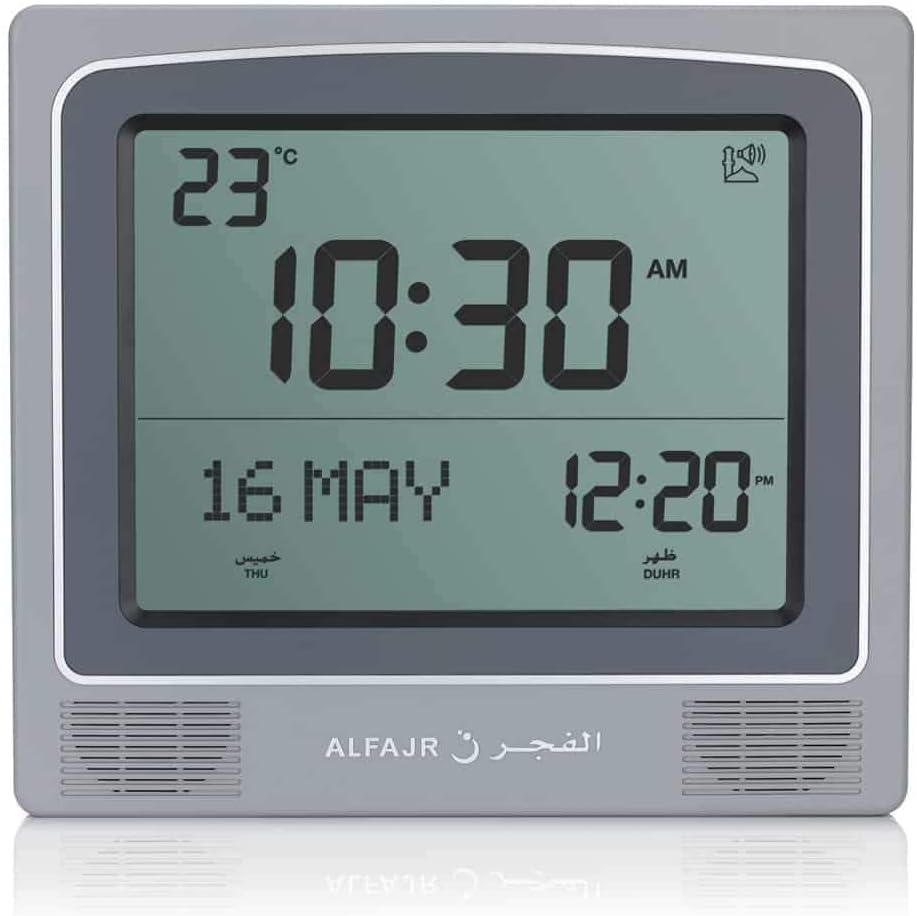
Upon inserting batteries or connecting USB-C power, the clock will power on. The display will show the current time, date, and temperature. Familiarize yourself with the buttons on the side/back of the clock: UP, 세트, 그리고 아래에.
그림 1: 전면 view of the ALFAJR CW-15 clock, showing the digital display with time, date, and temperature. The speaker grilles are visible at the bottom.
그림 2: 전면 view of the ALFAJR CW-15 clock, similar to Figure 1, but with the ALFAJR brand logo visible at the bottom center.
3. 시간 및 날짜 설정
를 누르고 계세요 세트 button for approximately 3 seconds until the time display starts flashing.
사용하세요 UP 그리고 아래에 시간을 조정하려면 버튼을 누르세요. 세트 확인하고 회의록으로 이동합니다.
분을 조정하세요 UP 그리고 아래에, 그런 다음 누르세요 세트.
Continue this process to set the year, month, and day.
날짜를 설정한 후 누르세요 세트 to exit the time/date setting mode.
4. Setting Location (City or Coordinates)
Accurate Azan times depend on correct location settings. You can select a pre-programmed city or enter latitude/longitude.
를 누르세요 세트 button once (short press) to enter the main menu.
사용 UP or 아래에 to navigate to the "CITY" or "LOCATION" setting.
누르다 세트 to enter the location setting.
Option A: Select Pre-programmed City: 사용 UP or 아래에 to scroll through the list of cities. Once your city is displayed, press 세트 확인합니다.
Option B: Enter Latitude/Longitude: If your city is not listed, select the option to enter coordinates. Use UP 그리고 아래에 to adjust the values for latitude, longitude, and time zone offset (GMT). Press 세트 각 값 뒤에.
After confirming your location, the clock will automatically calculate the Azan times.
5. Azan Calculation Method
The clock supports various Azan calculation methods. Consult local Islamic authorities for the recommended method in your region.
From the main menu (short press 세트), navigate to "CALC. METHOD".
누르다 세트 들어가다.
사용 UP or 아래에 to select the desired calculation method (e.g., Muslim World League, Umm Al-Qura, Egyptian General Authority of Survey, etc.).
누르다 세트 확인합니다.
6. 일광 절약 시간제(DST)
If your region observes Daylight Saving Time, enable this feature.
From the main menu, navigate to "DST".
누르다 세트.
사용 UP or 아래에 to toggle between "ON" and "OFF".
누르다 세트 확인합니다.
7. 온도 단위
You can choose to display temperature in Celsius or Fahrenheit.
From the main menu, navigate to "TEMP UNIT".
누르다 세트.
사용 UP or 아래에 to select "C" (Celsius) or "F" (Fahrenheit).
누르다 세트 확인합니다.
8. 달력 표시
The clock can display either the Gregorian or Hijri calendar.
From the main menu, navigate to "CALENDAR".
누르다 세트.
사용 UP or 아래에 to select "GREGORIAN" or "HIJRI".
누르다 세트 확인합니다.
작동 지침
1. Adjusting Azan Volume
The clock features adjustable Azan volume. The volume buttons are typically located on the side or back of the unit.
During an Azan, press the UP or 아래에 볼륨을 높이거나 낮추는 버튼입니다.
Alternatively, some models may have a dedicated volume switch or buttons on the back. Refer to the physical clock for exact button placement.
2. Changing Azan Reciter
You can select from five different Azan reciters.
From the main menu (short press 세트), navigate to "AZAN VOICE" or "RECITER".
누르다 세트 들어가다.
사용 UP or 아래에 to cycle through the available reciters (Makkah, Madina, Egypt, AlQuds, Riyadh).
누르다 세트 선택을 확인하세요.
3. Daily Alarms
The clock includes daily alarm functions in addition to the Azan. These can be set for specific times.
From the main menu, navigate to "DAILY ALARM".
누르다 세트.
사용 UP or 아래에 to set the desired alarm time (hour and minute).
누르다 세트 to confirm and enable the alarm.
To disable, navigate back to "DAILY ALARM" and set the time to "OFF" or a similar option.
4. 디스플레이 모드
The clock typically cycles through different display information or allows manual switching.
The default display shows time, date, and temperature.
짧게 누르면 UP or 아래에 buttons outside of menu mode may cycle through additional information like next prayer time or Qibla direction (if available on this model).
장착 옵션
The ALFAJR CW-15 clock is designed for versatile placement, either on a wall or a flat surface.
1. 벽 장착
To mount the clock on a wall:
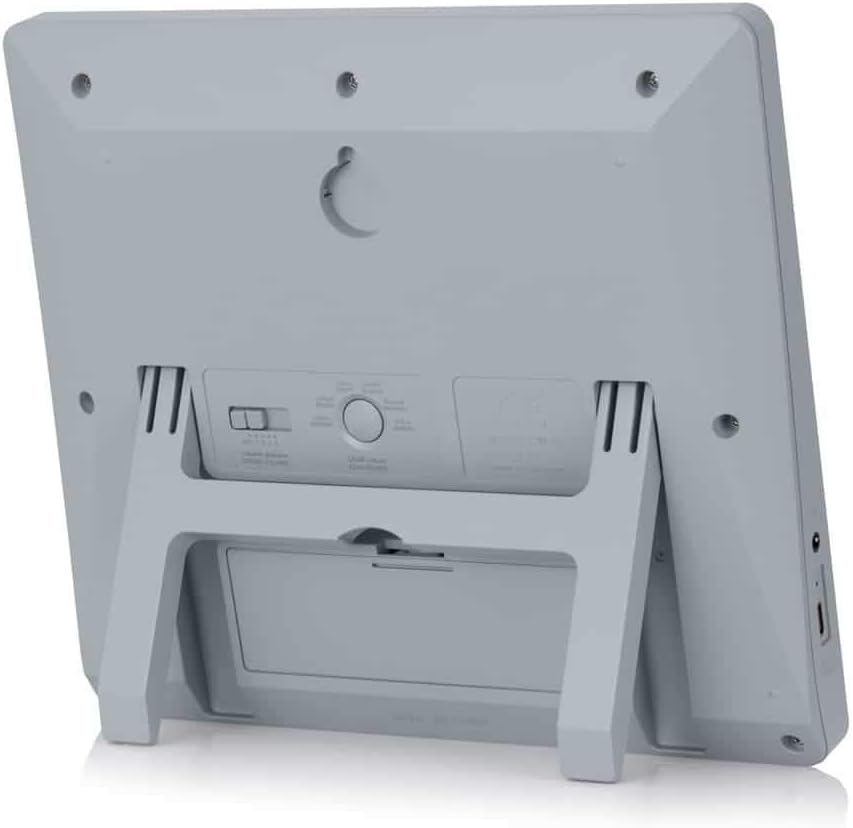
Locate the keyhole slot on the back of the clock.
벽에서 적합한 위치를 선택하세요.
Install a screw (not included) into the wall, leaving a small portion protruding. Ensure the screw head fits into the keyhole slot.
Carefully hang the clock onto the screw, ensuring it is securely seated.
그림 3: 후면 view of the ALFAJR CW-15 clock, highlighting the keyhole for wall mounting and the battery compartment.
2. Table Placement
For table or desk placement:
Locate the integrated stand on the back of the clock.
Pull out the stand until it locks into position.
시계를 평평하고 안정적인 표면에 놓으세요.
그림 4: 측면 view of the ALFAJR CW-15 clock, showing the integrated kickstand extended for stable table placement.
유지
1. 청소
시계의 모양과 기능을 유지하려면:
부드럽고 마른 천으로 시계 표면을 닦으세요.
연마성 세척제, 용제 또는 화학 스프레이는 디스플레이나 케이스를 손상시킬 수 있으므로 사용하지 마십시오.asing.
Avoid getting moisture into the clock's openings.
2. 배터리 교체
When the display dims or the clock functions become erratic, it's time to replace the batteries.
시계 뒷면의 배터리 칸을 엽니다.
오래된 AA 배터리를 제거하세요.
극성을 확인하여 새 AA 배터리 4개를 삽입하십시오.
배터리 칸을 닫습니다.
You may need to re-enter the time and location settings after battery replacement.
문제 해결
문제
가능한 원인
해결책
시계 전원이 켜지지 않습니다.
Batteries are dead or incorrectly inserted. No USB-C power.
Check battery polarity. Replace with new batteries. Ensure USB-C cable (if used) is connected and power source is active.
Verify city, latitude, longitude, and GMT offset. Select the correct Azan calculation method for your region. Check DST setting.
Azan sound is too low or too high.
볼륨 설정을 조정해야 합니다.
Adjust the volume using the dedicated buttons or through the menu.
디스플레이가 어둡거나 깜빡입니다.
배터리 전원이 부족합니다.
AA 배터리 4개를 모두 새 배터리로 교체하세요.
Clock resets unexpectedly.
Intermittent power loss or very low batteries.
Ensure batteries are fresh and securely seated. If using USB-C, check the connection and power source stability.
명세서
모델: CW-15
상표: 알파즈르
디스플레이 유형: 디지털
색상: 회색
재료: 플라스틱
제품 크기: 8.5인치(W) x 9인치(H)
품목 무게: 3 온스
전원: 4 AA batteries (included) or USB-C (cable not included)
장착 유형: 벽걸이형 / 테이블 스탠드
특별 기능: Automatic Azan, Multiple Azan Reciters, Gregorian/Hijri Calendar, Temperature Display, Daylight Saving Time
언어: 영어, 아랍어
보증 및 지원
한정 보증
The ALFAJR CW-15 Azan Clock comes with a limited warranty. Please refer to the warranty card included in your original packaging for specific terms, conditions, and duration. This warranty typically covers manufacturing defects under normal use.
고객 지원
For technical assistance, troubleshooting not covered in this manual, or warranty claims, please contact ALFAJR customer support through their official website or the retailer from whom you purchased the product. Please have your model number (CW-15) and purchase date available when contacting support.
S&A CW-5000 및 CW-5200 시리즈 산업용 냉동 냉각기 사용 설명서 광저우 테위 전자기계 주식회사(GUANGZHOU TEYU ELECTROMECHANICAL CO., LTD.)의 S&A CW-5000 및 CW-5200 시리즈 산업용 냉동 칠러 사용 설명서입니다. 정밀한 온도 제어를 위한 설치, 작동, 사양 및 문제 해결 방법을 다룹니다.