iHip 3ft PVC Micro USB High-Speed Data and Charging Cable
Model: WLG-PP27
소개
This manual provides essential information for the proper use, setup, maintenance, and troubleshooting of your iHip 3ft PVC Micro USB High-Speed Data and Charging Cable. Please read this manual thoroughly before using the product.
The iHip Micro USB cable is designed for fast charging and high-speed data transfer, compatible with a wide range of devices including Android phones, tablets, gaming consoles, and other devices with a Micro USB interface. It features a durable rubber finish and a metal tip, engineered for longevity with a 10,000 bend test certification.
패키지 내용
- 1 x iHip 3ft PVC Micro USB High-Speed Data and Charging Cable
설정
The iHip Micro USB cable is designed for plug-and-play functionality. Follow these steps to connect your device:
- 포트 식별: Locate the Micro USB port on your device (e.g., smartphone, tablet, game controller) and a standard USB-A port on your power adapter, computer, or other charging/data source.
- 장치에 연결: Gently insert the Micro USB connector (the smaller, trapezoidal end) into the Micro USB port on your device. Ensure it is inserted horizontally and correctly to avoid damage.
- 전원/데이터 소스에 연결하세요: Insert the standard USB-A connector (the larger, rectangular end) into a compatible USB-A port on your power adapter, computer, or other charging/data source.
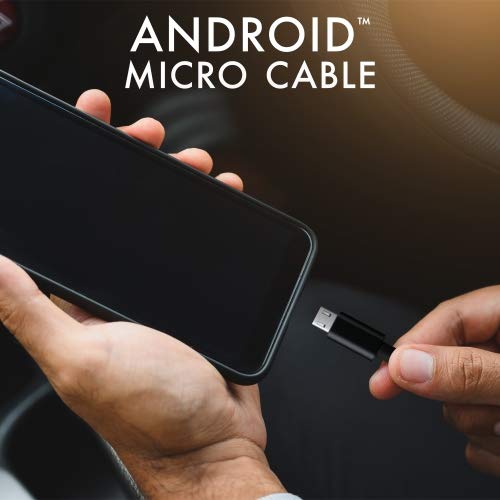
Image: Connecting the iHip Micro USB cable to a smartphone. The cable is designed for easy and secure connection.
작동 지침
기기 충전하기
To charge your device using the iHip Micro USB cable:
- "설치" 섹션에 설명된 대로 케이블을 연결하십시오.
- Ensure your power adapter or USB port provides sufficient power. For fast charging, use a Quick Charge compatible power adapter (e.g., 9V/2A output) or a standard power adapter with 5V/2.4A output.
- The device's charging indicator should activate, confirming that charging has begun.
데이터 전송
기기와 컴퓨터 간에 데이터를 전송하려면 다음 단계를 따르세요.
- Micro USB 끝을 장치에 연결하고 USB-A 끝을 컴퓨터의 USB 포트에 연결합니다.
- Your computer should recognize the connected device. You may need to select "File 메시지가 표시되면 장치 화면에 "전송" 또는 "MTP" 모드가 표시됩니다.
- You can now access your device's storage to transfer files at speeds up to 480Mb/s.
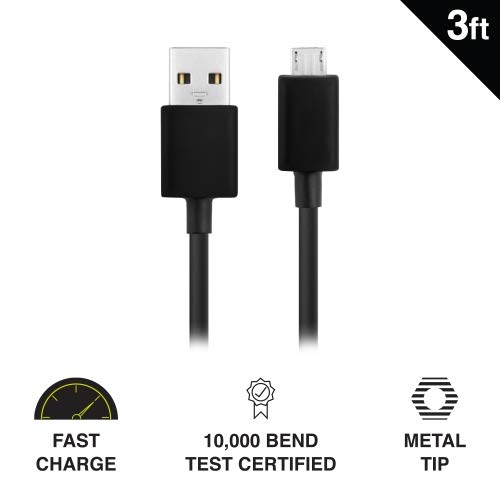
Image: Key features of the iHip Micro USB cable, highlighting its fast charge capability, durability, and robust metal tip.
유지 보수 및 관리
To ensure the longevity and optimal performance of your iHip Micro USB cable, follow these maintenance guidelines:
- 적절한 취급: 케이블을 연결하거나 분리할 때는 항상 커넥터 헤드를 잡으십시오. 케이블 자체를 직접 당기지 마십시오. 내부 전선이 손상될 수 있습니다.
- 저장: 케이블은 깨끗하고 건조한 곳에 보관하고, 극한 온도와 직사광선을 피하십시오. 케이블을 너무 세게 감거나 급격한 각도로 구부리지 마십시오.
- 청소: If the connectors become dirty, gently wipe them with a dry, lint-free cloth. Do not use liquids or abrasive cleaners.
- 스트레스를 피하세요: Do not place heavy objects on the cable or allow it to be pinched, which can lead to internal damage.
문제 해결
If you encounter issues with your iHip Micro USB cable, try the following troubleshooting steps:
- 장치가 충전되지 않음:
- 케이블 양쪽 끝이 제대로 연결되어 있는지 확인하세요.
- 다른 전원 어댑터나 USB 포트를 사용해 보세요.
- 다른 호환 장치로 케이블을 테스트하여 장치 문제를 배제하세요.
- Check the Micro USB port on your device for any debris or damage.
- 느린 충전:
- Ensure you are using a power adapter with adequate output (e.g., 5V/2.4A or Quick Charge compatible).
- Avoid charging from low-power USB ports (e.g., some laptop USB 2.0 ports).
- 데이터 전송 문제:
- 기기가 "로 설정되어 있는지 확인하십시오"File 컴퓨터에 연결했을 때 "전송" 또는 "MTP" 모드입니다.
- 컴퓨터의 다른 USB 포트를 사용해 보십시오.
- 기기와 컴퓨터를 다시 시작하세요.
명세서
| 특징 | 세부 사항 |
|---|---|
| 모델 번호 | WLG-PP27 |
| 케이블 길이 | 3피트(약 0.91미터) |
| 커넥터 유형 | USB-A to Micro USB |
| 재료 | PVC with Rubber Finish, Metal Tip |
| 데이터 전송 속도 | 최대 480Mb/s |
| 내구성 | 10,000+ bend lifespan certified |
| 호환성 | Android Cell Phones, Tablets, Windows Phones (Samsung Note/Galaxy, Nokia Lumia, LG, HTC), MP4, hard drives, PlayStation 4, Xbox One controller, and other Micro USB devices. |
| 제품 치수 | 6.5 x 3 x 1인치; 1.76온스 |

Image: The iHip 3ft PVC Micro USB cable, showcasing its compact and flexible design.
보증 및 지원
The iHip Micro USB cable comes with a lifetime guarantee. For detailed warranty information and support, please visit the official iHip web대지:
For any further assistance or inquiries, please refer to the contact information provided on the iHip web대지.


