1. 서론
This manual provides essential information for the safe and efficient operation of your DOOGEE S97 Pro Rugged Smartphone. Please read it thoroughly before using your device.

Image 1.1: The DOOGEE S97 Pro Rugged Smartphone, showcasin견고한 디자인과 디스플레이를 자랑합니다.
2. 디바이스 오버view
The DOOGEE S97 Pro is a rugged smartphone designed for durability and performance. Key features include:
- 운영 체제: 안드로이드 11
- 프로세서: 헬리오 G95 옥타코어 2.1GHz 12nm
- 메모리: 8GB 램 + 128GB 롬
- 배터리: 8500mAh Super Battery with 33W Fast Charging and 10W Wireless Charging
- 표시하다: 5.71-inch Corning Gorilla Glass
- 후방 카메라: Samsung 48MP AI Main Camera (48MP + 8MP + 2MP + 2MP)
- 전면 카메라: 16MP
- 특별 기능: 40m Rangefinder, IP68 Waterproof, Dustproof, Shockproof, NFC Support
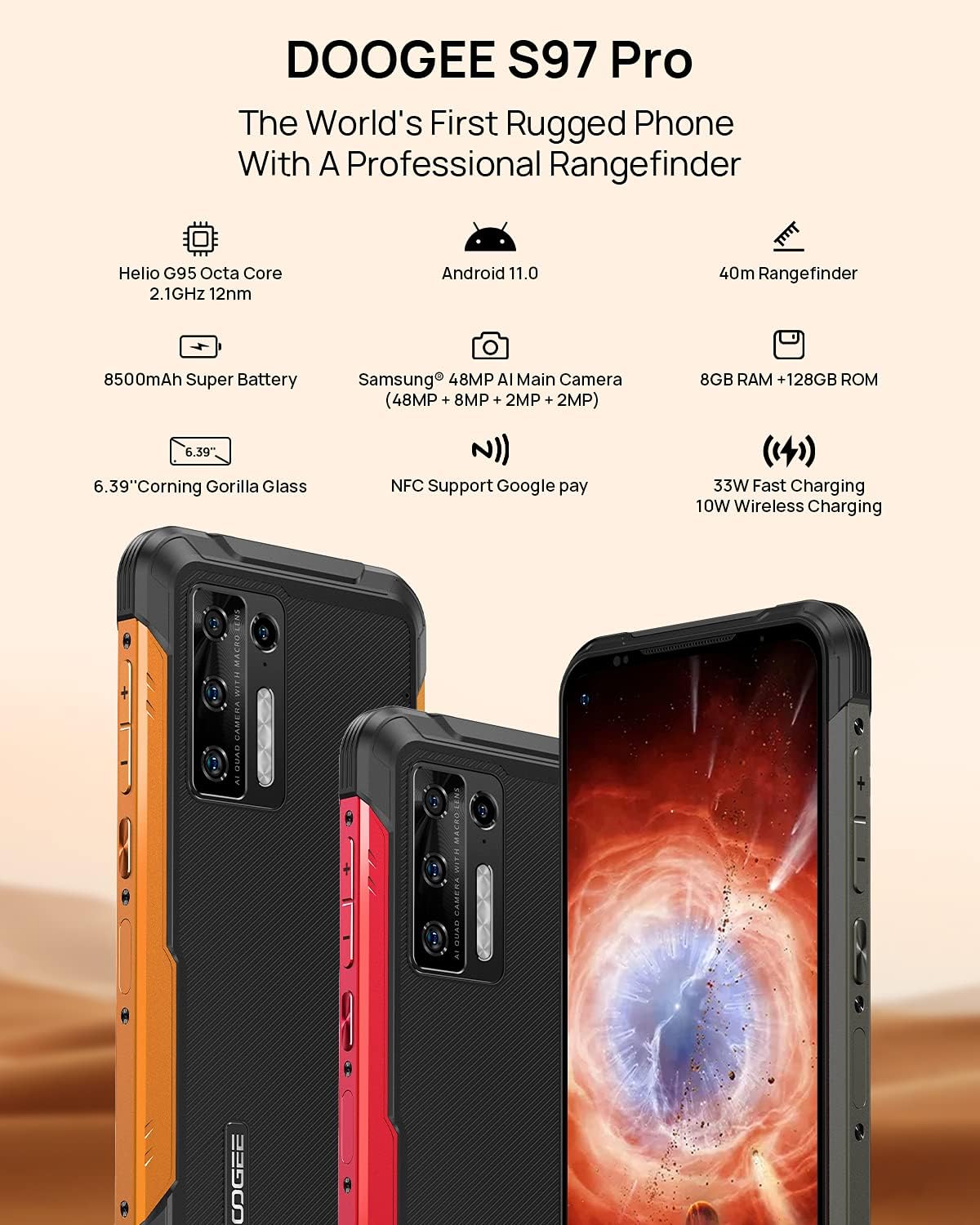
Image 2.1: Visual representation of the DOOGEE S97 Pro's main features, including processor, battery, camera, and display.
3. 설정
3.1 SIM 카드 설치
- 기기 측면에서 SIM 카드 트레이를 찾으세요.
- 제공된 SIM 꺼내기 도구를 사용하여 트레이를 엽니다.
- Carefully place your Nano SIM card(s) into the designated slots. Ensure proper orientation.
- Gently push the SIM card tray back into the device until it is flush with the body.
메모: This device supports specific frequency bands. Please verify compatibility with your network carrier before use. The DOOGEE S97 Pro does not support certain CDMA network carriers such as Verizon, Sprint, Xfinity, and TracFone.
3.2 초기 전원 켜기
- Press and hold the Power button located on the side of the device until the DOOGEE logo appears.
- 화면의 안내에 따라 언어 선택, Wi-Fi 연결, Google 계정 설정을 포함한 초기 설정을 완료하세요.
4. 사용 설명서
4.1 기본 탐색
- 뒤로 가기 기능: Swipe from the left or right edge of the screen towards the center.
- 홈 화면: 화면 하단에서 위로 스와이프하면 홈 화면으로 돌아갑니다.
- 최근 앱: Swipe up from the bottom of the screen and hold briefly to view recent applications. Swipe left or right along the very bottom of the screen to scroll through recent apps.
- 앱 서랍: The device does not feature a traditional app drawer. All installed applications are displayed on the home screen. Additional home screens are automatically added to the right as more apps are installed.
4.2 카메라 사용
The DOOGEE S97 Pro is equipped with a versatile camera system:
- 후방 카메라: 48MP main sensor, 8MP ultra-wide angle, 2MP portrait, and 2MP macro lens.
- 전면 카메라: 셀카와 화상 통화에는 16MP가 적합합니다.
To access the camera, tap the Camera icon on your home screen. Select desired modes (Photo, Video, Portrait, Macro, etc.) from the interface.

이미지 4.1: 클로즈업 view of the Samsung 48MP AI Quad Rear Camera system on the DOOGEE S97 Pro.
4.3 Rangefinder Functionality
The integrated 40m laser rangefinder allows for precise distance measurements. To use:
- Locate and open the 'Rangefinder' application on your device.
- Select the desired measurement mode (Length, Area, Volume, Pythagoras).
- Follow the on-screen instructions to aim the laser and take measurements.

Image 4.2: Screenshots of the DOOGEE S97 Pro's 40m Rangefinder application interface, showing various measurement modes.
4.4 배터리 관리
The DOOGEE S97 Pro features an 8500mAh battery. To optimize battery life and charging:
- 유선 충전: Use the provided USB Type-C cable and a compatible 33W fast charger for optimal charging speed.
- 무선 충전: The device supports 10W wireless charging. Place the phone on a compatible wireless charging pad.
- 배터리 최적화: Access battery settings to manage app power usage and enable power-saving modes.

Image 4.3: Illustration of the DOOGEE S97 Pro's 8500mAh Super Battery and charging capabilities.
4.5 내구성 특징
The S97 Pro is built to withstand harsh environments:
- IP68 등급: 먼지 유입을 방지하고 최대 1.5미터 깊이의 물에 30분 동안 잠겨도 보호 기능을 제공합니다.
- 충격 방지: Designed to resist drops and impacts.
- 코닝 고릴라 글래스: Enhances screen durability against scratches and minor impacts.

Image 4.4: Demonstrations of the DOOGEE S97 Pro's waterproof, dustproof, and shockproof capabilities.
Video 4.5: An official video from DOOGEE showcasing the rugged features and capabilities of the S59 Pro smartphone.
4.6 안드로이드 11 운영체제
The device runs on Android 11, offering enhanced privacy controls, improved notification management, and a streamlined user experience.

Image 4.6: Visual representation of the Android 11 operating system interface on the DOOGEE S97 Pro.
5. 유지관리
5.1 장치 청소
Due to its waterproof design, the DOOGEE S97 Pro can be cleaned with water. Ensure all ports are securely closed before rinsing. Use a soft, damp cloth to wipe the screen and body. Avoid harsh chemicals or abrasive materials.
5.2 소프트웨어 업데이트
최적의 성능, 보안 및 새로운 기능에 대한 액세스를 보장하려면 소프트웨어 업데이트를 정기적으로 확인하고 설치하세요. 설정 > 시스템 > 시스템 업데이트 사용 가능한 업데이트를 확인하세요.
6. 문제 해결
기기 사용 중 문제가 발생하면 다음의 일반적인 해결 방법을 참조하십시오.
- 장치가 응답하지 않음: 전원 버튼을 약 10~15초간 길게 눌러 강제로 다시 시작하세요.
- 네트워크 연결 문제: Verify your SIM card is correctly inserted. Check network settings (설정 > 네트워크 및 인터넷 > 모바일 네트워크). 장치를 다시 시작합니다.
- 충전 문제: Ensure the USB cable and charger are securely connected and undamaged. Try a different charger or cable. For wireless charging, ensure the phone is correctly positioned on the charging pad.
- Fingerprint Sensor Inaccuracy: 손가락이 깨끗하고 건조한지 확인하세요. 지문을 다시 등록하세요. 설정 > 보안 > 지문.
- 느린 성능: Close unused applications. Clear cache (설정 > 앱 및 알림 > 모든 앱 보기 > [앱 이름] > 저장공간 및 캐시 > 캐시 지우기). Consider a factory reset as a last resort (설정 > 시스템 > 옵션 재설정 > 모든 데이터 삭제(공장 초기화)).
7. 사양
| 특징 | 세부 사항 |
|---|---|
| 제품 치수 | 6.41 x 3.19 x 0.63 인치 |
| 품목 무게 | 12온스(340그램) |
| 운영 체제 | 안드로이드 11.0 |
| 숫양 | 8 GB (Note: Product data shows 4GB RAM, but images and title indicate 8GB. This manual uses 8GB as per prominent product claims.) |
| 메모리 저장 용량 | 128GB (XNUMX기가바이트) |
| 화면 크기 | 5.71 인치 |
| 배터리 용량 | 8500밀리amp Hours (Note: Product data shows 10050 mAh, but images and title indicate 8500 mAh. This manual uses 8500 mAh as per prominent product claims.) |
| 무선 통신 기술 | 셀룰러, Wi-Fi |
| 셀룰러 기술 | LTE |
| 커넥터 유형 | USB 타입 C |
| 휴먼 인터페이스 입력 | 버튼 |
| 상자 안에 무엇이 들어있나요? | USB 케이블 |
For detailed specifications, please refer to the product packaging or the official DOOGEE web대지.

Image 7.1: The DOOGEE S97 Pro highlighting its 8GB RAM and 128GB ROM, powered by a Helio G95 Octa Core processor.
8. 보증 및 지원
Your DOOGEE S97 Pro smartphone is covered by a manufacturer's warranty. Please refer to the warranty card included in your product packaging for specific terms and conditions, including warranty duration and coverage details.
For technical support, product inquiries, or service requests, please visit the official DOOGEE website or contact their customer service department. Contact information can typically be found on the DOOGEE web사이트 또는 제품 포장.


