1. 서론
The Lepro PR902103-US Smart Table Lamp offers versatile lighting solutions for your home. This LED touch lamp features RGB color changing capabilities, tunable warm to cool white light, and dimmable brightness. It is designed for seamless integration with smart home ecosystems, supporting both Amazon Alexa and Google Assistant for voice control, as well as control via a dedicated mobile application. This manual provides comprehensive instructions for setup, operation, and maintenance.

Figure 1: Lepro Smart Table Lamp 쇼씨asing its app control interface.
2. 상자 안에 무엇이 들어있나요?
포장 안에 모든 구성품이 들어 있는지 확인해 주십시오.
- 1 x Lepro Smart Table Lamp (Model: PR902103-US)
- 1 x 4.9 ft USB Cable
- 1 x 전원 어댑터
- 1 x 사용자 매뉴얼(이 문서)
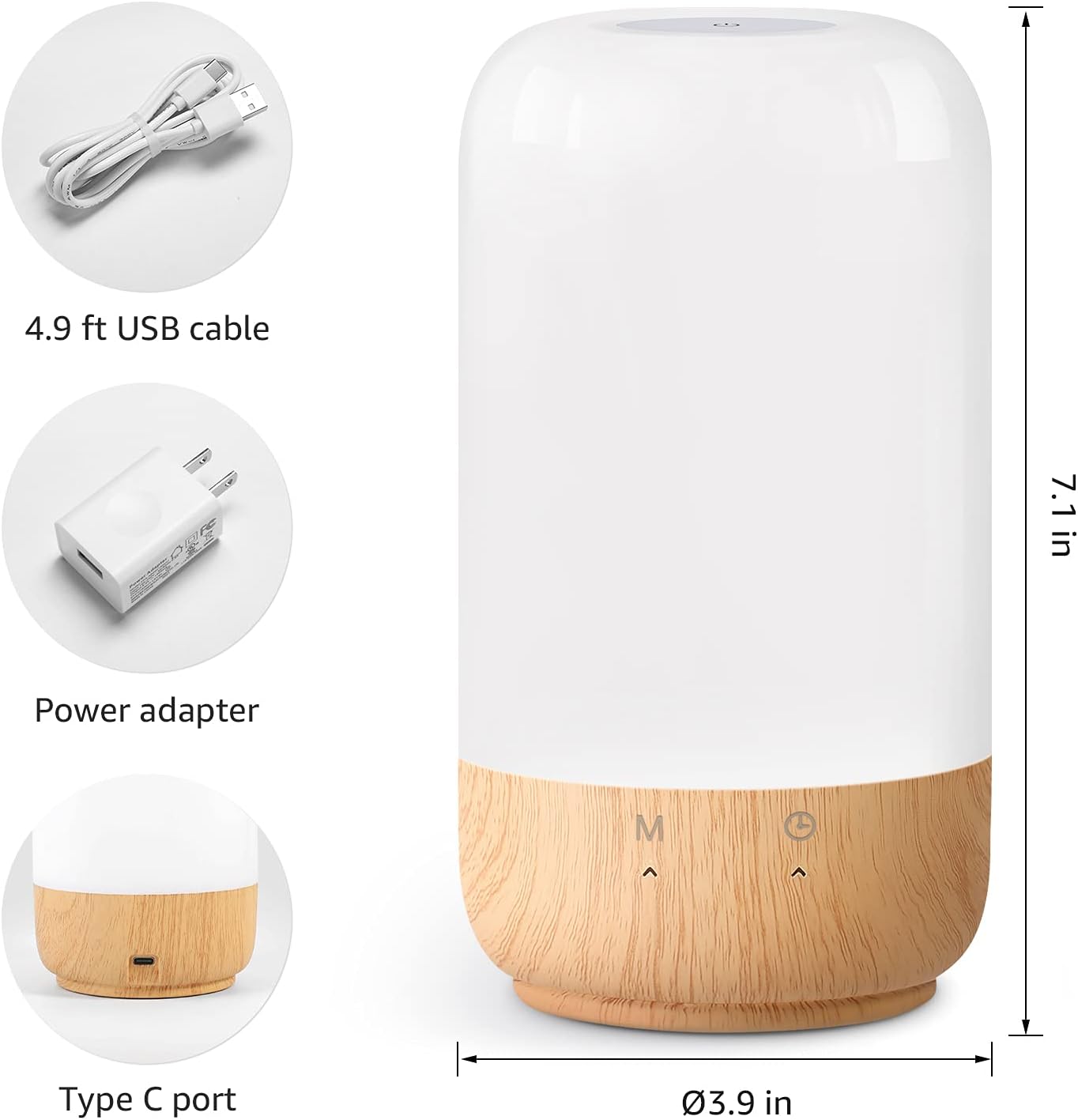
그림 2: 포함된 구성 요소 및 제품 크기.
3. 설정
Follow these steps to set up your Lepro Smart Table Lamp:
- 전원 연결: 제공된 USB 케이블을 l에 연결하세요.amp's Type-C port and the power adapter. Plug the power adapter into a standard wall outlet. The lamp 밝아질 것이다.
- 앱 다운로드 : Download the 'Lepro LampUX' app from your mobile device's App Store (iOS) or Google Play Store (Android).
- 계정 등록: Open the 'Lepro LampUX' app and register a new account or log in if you already have one.
- 장치 페어링:
- 앱에서 '기기 추가' 또는 '+' 아이콘을 탭하세요.
- Select 'Table Lamp' from the lighting category.
- l을 확인하세요amp is powered on. Long press the timer button on the lamp's base for at least 5 seconds until the indicator light blinks rapidly.
- Confirm the indicator light is blinking rapidly in the app and proceed.
- Select your 2.4 GHz Wi-Fi network and enter the password. (Note: The lamp only supports 2.4 GHz Wi-Fi networks. If your router is 5 GHz, please set it to 2.4 GHz during setup.)
- The app will begin adding the device. Once successfully added, you can rename your lamp 식별을 쉽게 하기 위해서.
Video 1: Detailed steps on how to set up your Lepro Smart Lamp 모바일 애플리케이션을 사용합니다.
4. 사용 설명서
The Lepro Smart Table Lamp can be controlled via touch, the mobile app, or voice commands.
4.1. 터치 컨트롤
- 전원 켜기/끄기: Short press the power button (marked 'M') on the lamp의 기지.
- 밝기 조정: Slide your finger along the left side of the lamp's base to adjust brightness.
- Color Change (RGB): Slide your finger along the right side of the lamp's base to cycle through RGB colors.
- 모드 스위치: Short press the timer button (clock icon) to switch between white light modes (warm white, cool white) and RGB color mode.
4.2. Mobile App Controls
The 'Lepro LampUX' app provides comprehensive control over your lamp:
- Brightness & Color Temperature: Adjust the brightness level and select color temperatures from 2700K (warm white) to 5700K (cool white).
- RGB 색상 선택: Choose from 16 million colors using the color wheel in the app.
- 장면: Select from pre-set scenes like 'Night', 'Read', 'Meeting', 'Leisure', or customize your own scenes with specific colors and effects.
- Timer & Wake-up: l에 대한 일정을 설정하세요amp to turn on/off automatically. Utilize the 'Sunrise Simulation' feature to gradually increase light for a gentle wake-up.

Figure 3: Mobile application interface for controlling lamp 설정.

그림 4: lamp's timer and wake-up functions in use.
4.3. 음성 제어
The Lepro Smart Table Lamp is compatible with Amazon Alexa and Google Assistant. To enable voice control:
- 당신의 l을 확인amp is successfully paired with the 'Lepro LampUX' app.
- Amazon Alexa 또는 Google Home 앱을 엽니다.
- '스킬 및 게임'(Alexa) 또는 'Google 연동'(Google Home) 섹션으로 이동하세요.
- 검색 and enable the 'Lepro LampUX' skill/service.
- Link your 'Lepro LampUX' account with your Alexa/Google account.
- 연결되면 다음과 같은 음성 명령을 사용할 수 있습니다.
- "알렉사, [L] 켜줘"amp 이름]."
- "헤이 구글, [L] 설정해 줘"amp Name] to warm white."
- "Alexa, change [Lamp 이름]을 파란색으로.
- "헤이 구글, 어둡게 [L]amp 이름]을 50%로 줄이세요.

그림 5: 아마존 알렉사와의 음성 제어 통합.
Video 2: Demonstration of the Lepro Smart Table Lamp working with Alexa and Google Home.
5. 유지관리
To ensure the longevity and optimal performance of your Lepro Smart Table Lamp유지 관리 시 다음 지침을 준수해 주십시오.
- 청소: 청소하기 전에 전원을 분리하세요. 부드럽고 마른 천으로 l을 닦으세요.amp's surface. Avoid using abrasive cleaners, solvents, or harsh chemicals, as these may damage the finish or electronic components.
- 저장: l을 보관하는 경우amp 장기간 보관 시에는 깨끗하고 건조한 곳에 보관하세요. 직사광선과 극한의 온도를 피해 서늘하고 건조한 곳에 보관하세요.
- 손질: 내가 처리amp 조심해서 다루세요. 떨어뜨리거나 강한 충격을 가하지 마세요.
6. 문제 해결
If you encounter issues with your Lepro Smart Table Lamp, 다음의 일반적인 문제와 해결책을 참조하세요.
| 문제 | 가능한 원인 | 해결책 |
|---|---|---|
| Lamp 켜지지 않습니다. | 전원 공급이 없습니다. | 전원 어댑터가 콘센트에 제대로 꽂혀 있는지 확인하십시오.amp and the wall outlet. Ensure the outlet is functional. |
| Wi-Fi에 연결할 수 없습니다. | Incorrect Wi-Fi band (5 GHz). 잘못된 비밀번호. 약한 Wi-Fi 신호. | Ensure your Wi-Fi network is 2.4 GHz. Verify the Wi-Fi password. Move the lamp closer to your router. |
| 음성 제어가 작동하지 않습니다. | Skill not enabled/linked. 장치 이름이 잘못되었습니다. | Ensure the 'Lepro LampUX' skill is enabled and linked in your Alexa/Google Home app. Use the exact device name configured in the app. |
| Lamp 반응이 없습니다. | 일시적인 소프트웨어 오류입니다. | l을 분리하세요amp from the power outlet for 10 seconds, then plug it back in to perform a soft reset. |
7. 사양
| 특징 | 세부 사항 |
|---|---|
| 상표 | 나병 |
| 모델 번호 | PR902103-미국 |
| 제품 치수 | 3.9인치 깊이 x 3.9인치 너비 x 7.1인치 높이 |
| 품목 무게 | 1.19파운드 |
| 재료 | 플라스틱, 목재 |
| 광원 유형 | 주도의 |
| 왓tage | 7 와트 |
| 명도 | 350루멘 |
| 밝은 색상 | RGB + CCT (Tunable White 2700-5700K) |
| 제어 방법 | App, Touch, Voice (Alexa, Google Assistant) |
| 연결성 | 2.4GHz 와이파이 전용 |
| 실내/실외 사용 | 실내 |
8. 보증 및 지원
Lepro products are designed and manufactured to the highest quality standards. For warranty information and technical support, please refer to the contact details provided on the product packaging or visit the official Lepro web사이트. 보증 청구를 위해 구매 증빙 자료로 구매 영수증을 보관하세요.


