1. 서론
The GTMEDIA V8 TURBO is a versatile Full HD 1080P TV receiver designed to provide a comprehensive viewing experience. It supports multiple digital video broadcasting standards including DVB-S2/S2X, DVB-T2, Cable, and J.83B, ensuring compatibility with various signal sources. Featuring H.265 video decoding, a built-in WiFi module, and a CA card slot, this set-top box offers advanced functionality for home entertainment.
This manual provides detailed instructions for setting up, operating, and maintaining your GTMEDIA V8 TURBO TV Receiver. Please read it thoroughly before use to ensure proper installation and optimal performance.
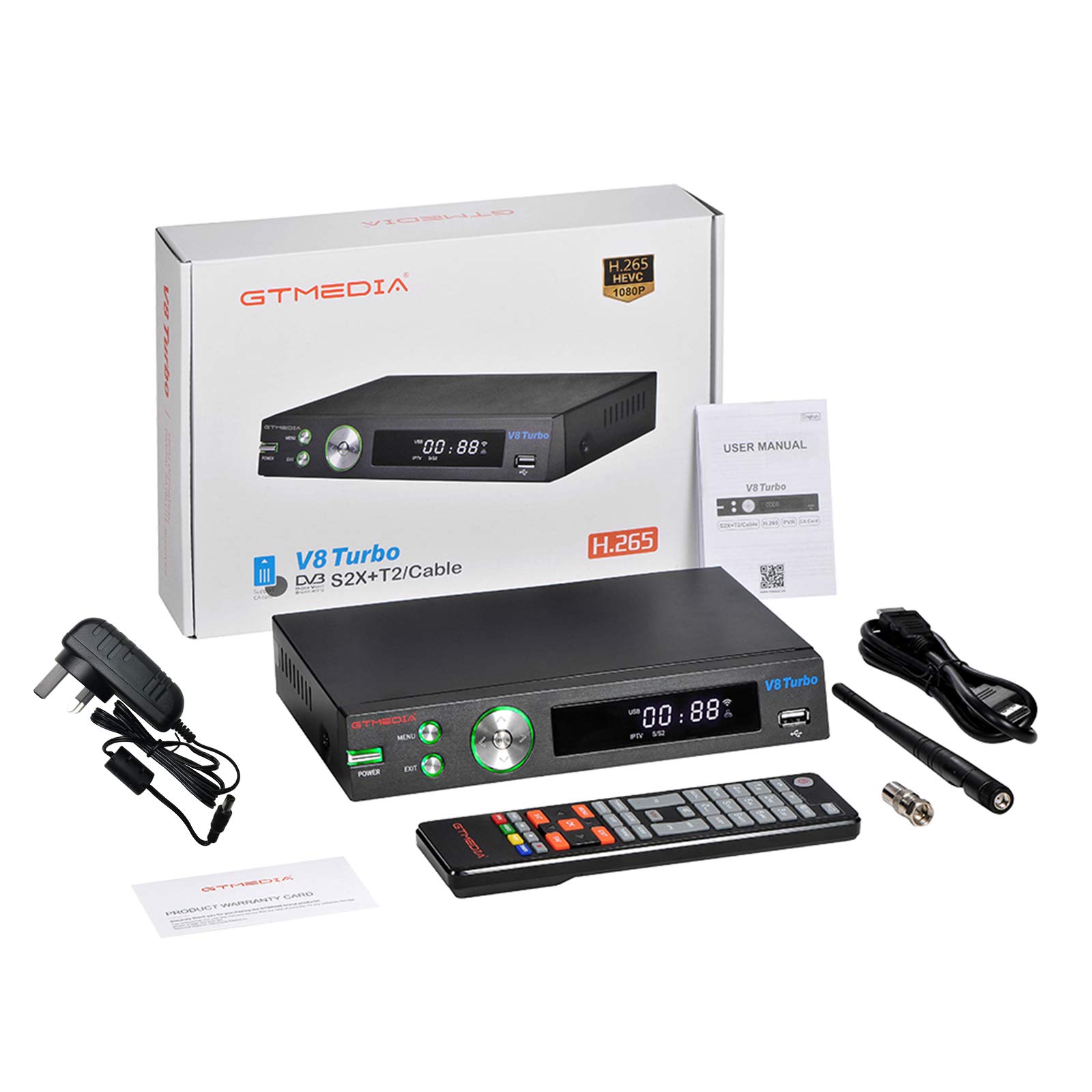
Image 1.1: GTMEDIA V8 TURBO TV Receiver in a home entertainment setup.
2. 패키지 내용
Please check the package carefully to ensure all items are present and in good condition. If any item is missing or damaged, contact your retailer.
- 1 x GTMEDIA V8 TURBO TV Receiver
- 1 x 원격 제어
- 1 x 전원 공급 어댑터
- 1 x HD 케이블(HDMI)
- 1 x 사용자 설명서

Image 2.1: All components included in the GTMEDIA V8 TURBO package.
3. 제품 오버view
3.1 전면 패널
The front panel of the GTMEDIA V8 TURBO features essential controls and indicators for easy access.
- 전원 버튼: 장치를 켜거나 끕니다.
- 메뉴 버튼: 주 메뉴에 액세스합니다.
- 종료 버튼: 현재 메뉴나 화면을 종료합니다.
- 탐색 버튼(좌/우/상/하/확인): 메뉴 탐색 및 선택에 사용됩니다.
- USB 포트: For connecting USB storage devices for media playback or software upgrades.
- LED 디스플레이: 채널 번호, 시간 또는 작동 상태를 표시합니다.

Image 3.1: Front panel layout of the GTMEDIA V8 TURBO receiver.
3.2 후면 패널
The rear panel provides all necessary connection ports for external devices.
- LNB 입력: Connects to a satellite dish.
- 개미: Connects to a terrestrial antenna or cable TV signal.
- HD 출력(HDMI): Connects to your TV for high-definition video and audio output.
- SCART: Connects to older TVs or video equipment.
- 이더넷 : 유선 네트워크에 연결하여 인터넷에 접속합니다.
- RS232 : For advanced software upgrades or debugging.
- DC 12V : 전원 입력 포트.
- WIFI ANT: Connector for the external WiFi antenna.
- 전원 스위치: Main power toggle switch.
- CA Card Slot: For inserting Conditional Access (CA) cards.

Image 3.2: Rear panel connections of the GTMEDIA V8 TURBO receiver.
4. 설정
Follow these steps to set up your GTMEDIA V8 TURBO TV Receiver.
4.1 TV에 연결하기
- Ensure your TV and the V8 TURBO receiver are turned off.
- Connect one end of the provided HD Cable (HDMI) to the HD 출력 수신기의 HDMI 포트에 한쪽 끝을 연결하고 TV의 사용 가능한 HDMI 입력 단자에 연결하십시오.
- Alternatively, for older TVs, connect a SCART cable (not included) from the 스카트 수신기의 포트를 TV의 SCART 입력 단자에 연결하세요.
4.2 Connecting Antenna/Satellite
- For satellite reception, connect your satellite dish cable to the LNB 입력 포트.
- For terrestrial or cable reception, connect your antenna or cable TV signal to the 개미가 들어와요 포트.
4.3 전원 연결
- Connect the power supply adapter to the 직류 12V 수신기의 포트.
- 전원 어댑터를 벽면 콘센트에 꽂으세요.
- Ensure the main 전원 스위치 on the rear panel is in the 'ON' position.
4.4 네트워크 연결
- 와이파이: Screw the external WiFi antenna onto the 와이파이 개미 connector on the rear panel. Once powered on, you can configure WiFi settings through the system menu.
- 이더넷: 라우터에서 이더넷 케이블을 연결하세요. 이더넷 수신기의 포트.
4.5 CA Card Insertion
If you have a Conditional Access (CA) card for encrypted channels, insert it into the CA Card Slot on the rear panel, ensuring correct orientation as indicated on the slot.
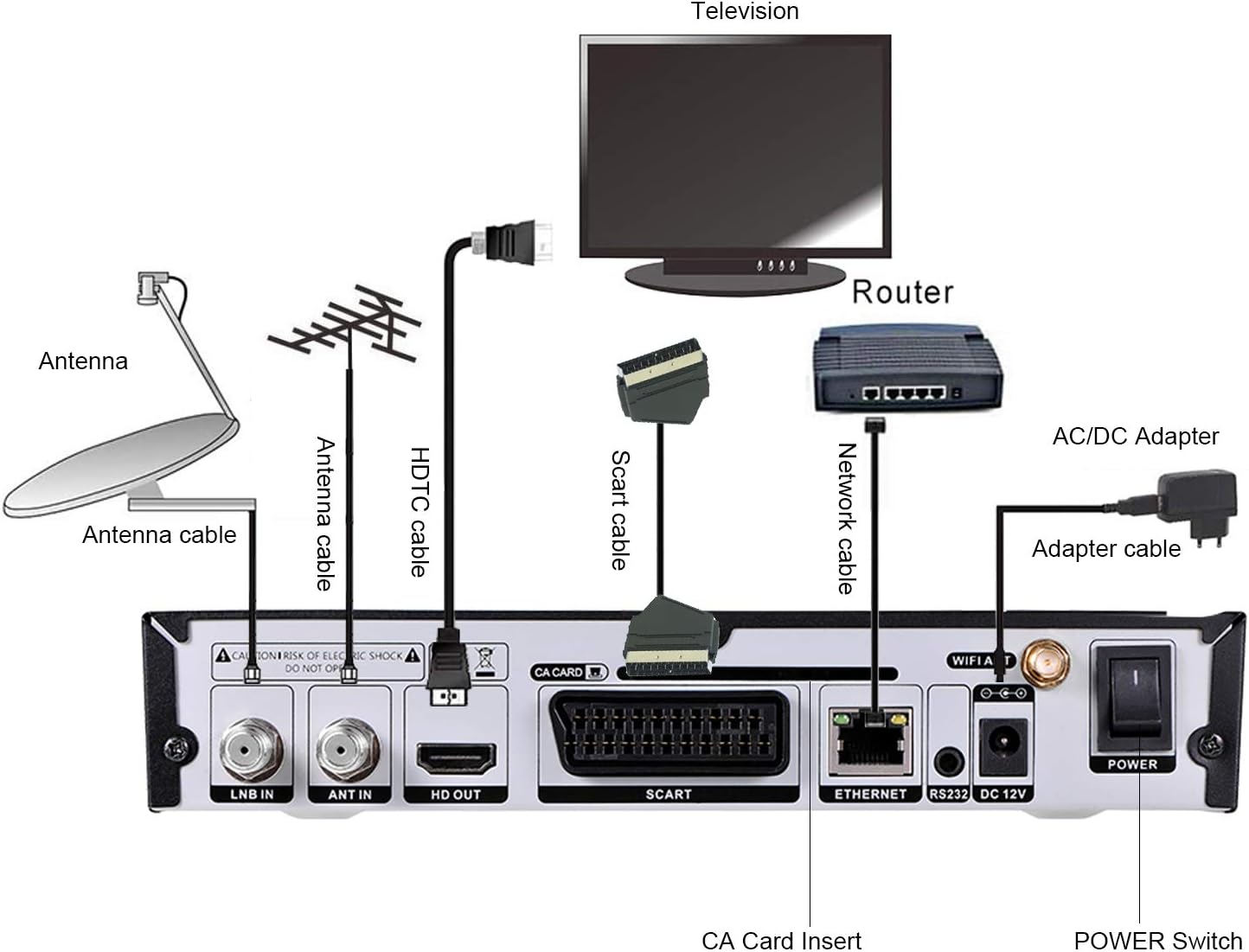
Image 4.1: Connection diagram for the GTMEDIA V8 TURBO receiver.
5. 사용 설명서
This section covers basic operation and key features of your receiver.
5.1 초기 전원 켜기 및 첫 번째 설정
- Turn on your TV and select the correct HDMI or SCART input.
- 를 누르세요 힘 수신기 또는 리모컨의 버튼.
- The receiver will boot up. Follow the on-screen instructions for initial setup, which typically includes language selection, region, and antenna/satellite configuration.
5.2 채널 스캔
After initial setup, you will need to scan for channels.
- 를 누르세요 메뉴 리모컨의 버튼을 누르세요.
- Navigate to 'Installation' or 'Channel Search'.
- Select your signal type (Satellite, Terrestrial, or Cable) and initiate an 'Auto Scan' or 'Manual Scan'.
- Wait for the scan to complete. This may take several minutes.
5.3 채널 관리
The receiver offers various channel editing functions:
- 가장 좋아하는: Create custom lists of your preferred channels.
- 이동하다: Reorder channels in your list.
- 잠그다: Protect channels with a password.
- 건너뛰다: Hide unwanted channels from the main list.
- 삭제: Remove channels permanently.
- 이름 바꾸기: Change channel names.
- 찾다: Quickly locate channels by name.
- 종류: Arrange channels by various criteria (e.g., alphabetical, transponder).
Access these functions via the 'Channel Manager' or 'Edit Channel' menu option.
5.4 미디어 재생
Connect a USB storage device to the front USB port to play media files.
- 호환되는 미디어가 포함된 USB 드라이브를 삽입하세요 files (e.g., video, audio, images).
- 를 누르세요 메뉴 button and navigate to 'Multimedia' or 'USB'.
- 원하는 것을 선택하세요 file type and browse your USB drive to play content.
5.5 고급 기능
- BISS Auto Roll, Full PowerVu, DRE & Biss Key Support: The receiver supports automatic key updates for certain encrypted channels.
- Unicable, DiSEqC1.0/1.1/1.2/USALS Motor Support: Advanced satellite dish control for multi-LNB or motorized systems. Configure these settings in the 'Satellite Setup' menu.
- Multi-room Support: Allows sharing of CA card access across multiple receivers (requires specific network configuration and compatible devices).
6. 유지관리
Proper maintenance ensures the longevity and optimal performance of your GTMEDIA V8 TURBO receiver.
- 청소: 수신기 외부를 청소할 때는 부드럽고 마른 천을 사용하세요. 액체 세척제나 연마재를 사용하지 마세요.
- 통풍: Ensure the receiver is placed in a well-ventilated area. Do not block the ventilation openings.
- 전원 끄기 : 수신기를 장기간 사용하지 않을 경우 전원 콘센트에서 분리하십시오.
- 소프트웨어 업그레이드 : Periodically check for software updates on the GTMEDIA official website. Updates can be performed via the USB port or RS232 port as described in the system menu.
7. 문제 해결
If you encounter issues with your GTMEDIA V8 TURBO, refer to the following common problems and solutions.
| 문제 | 가능한 원인 | 해결책 |
|---|---|---|
| 전원이 없습니다 | Power cable disconnected; Power switch off; Faulty power adapter | Check power cable connection; Ensure rear power switch is ON; Try a different power outlet. |
| 신호 없음 / 검은색 화면 | Incorrect TV input; Antenna/satellite cable loose or disconnected; No channels scanned; Weak signal | Select correct HDMI/SCART input on TV; Check antenna/satellite cable connections; Perform a channel scan; Adjust antenna/dish for better signal. |
| 리모컨이 작동하지 않습니다 | Batteries depleted; Obstruction between remote and receiver; Remote sensor blocked | Replace batteries; Remove any obstructions; Ensure remote is pointed at the receiver's front panel. |
| 화질/음질 불량 | Weak signal; Incorrect video/audio settings | Check signal strength in menu; Adjust antenna/dish; Verify video/audio output settings in system menu. |
| WiFi 연결 문제 | WiFi antenna loose; Incorrect password; Router too far; Internal WiFi module issue | Ensure WiFi antenna is securely attached; Re-enter WiFi password; Move receiver closer to router or use Ethernet; Contact support if issue persists. |
8. 사양
Detailed technical specifications for the GTMEDIA V8 TURBO TV Receiver.
- CPU 주파수 : 770MHz Dual Core HEVC 10Bit
- 플래시 메모리: 64MB SPI 플래시
- DDR2 메모리: 1G bit RAM
- Demultiplexer: ISO/IEC 13818-1
- Input Bit Rate: Max 100Mbit/s
- 비디오 디코드: HEVC main profile@level 4.1 and main10 profile@L4.1, High tier MPEG-2 MP@ML, H.264 BP, MP&HP@L3/L4.1/L4.2, AVS Jizhun profile and broadcast profile, MPEG-4 SP profile, advanced simple profile@L5, VC1 SP@ML, MP@HL, AP@L0-3, H263 baseline profile, JPEG decoder
- PAL/NTSC: Automatic PAL/NTSC conversion
- 종횡비: Auto, 16:9 Pillar box, 4:3 Pan & Scan, 4:3 Letter Box
- 오디오 디코드: MPEG-1/2 Layer 1/2/3, MPEG-2/4 LC-AAC, MPEG-4 HE-AAC, Dolby AC3/AC3+, DRA CH/5.1CH
- Panel Display: 4 자리 LED 디스플레이
- 와이파이: Built-in 2.4G WiFi Support IEEE 802.11b/g/n
- 소프트웨어 업그레이드 : Through USB port and RS232
- 채널 기능: Recording one channel, view another channel under same TP, various editing functions (favorite, move, lock, skip, delete, rename, find, sort)
- 입력 Voltage: AC 100V-250V, 50 / 60Hz
- 전력 소비량: 10W (operation), ≤1W (standby)
- 제품 크기: 27.1 X 19.6 X 5.9 cm (10.7 X 7.7 X 2.3에서)
- 제품 무게: 890g(30.9온스)
- 연결 기술 : USB, HDMI, Ethernet, SCART
- 컨트롤러 유형 : 원격 제어
- 특별 기능: Multi-room, Advanced Signal Processing
- 호환 장치: 텔레비전
- 총 HDMI 포트: 1
- 오디오 출력 모드: 스테레오, 서라운드
- 서라운드 사운드 채널 구성: 5.1
- 비디오 인코딩 : HEVC 메인 10

Image 8.1: Physical dimensions of the GTMEDIA V8 TURBO receiver.
9. 보증 정보
GTMEDIA products are manufactured to high-quality standards. This product comes with a standard manufacturer's warranty against defects in materials and workmanship. The specific terms and duration of the warranty may vary by region and retailer. Please retain your proof of purchase for warranty claims.
The warranty typically covers manufacturing defects but does not cover damage caused by misuse, accidents, unauthorized modifications, or normal wear and tear. For detailed warranty information, please refer to the warranty card included in your package or contact your point of purchase.
10. 지원
For technical assistance, troubleshooting beyond this manual, or warranty inquiries, please contact GTMEDIA customer support or your retailer.
- Refer to the official GTMEDIA website for the latest support information, FAQs, and software updates.
- Contact details for customer service may be found on the product packaging or the GTMEDIA web대지.