1. 제품 오버view
The Forte TEZAUR Computer Desk is designed to provide a functional workspace with integrated features. It includes an elevated monitor shelf, a metal headphone holder, a cup holder, and cable management openings. The desk features integrated LED lighting with adjustable colors, powered via USB. An additional storage unit with open compartments can be positioned on either the left or right side of the main desk.

이미지 1.1: 이상view of the Forte TEZAUR Computer Desk with its integrated features.
2. 안전 경고
Attention: This desk requires assembly. Please follow all instructions carefully and use appropriate tools. Ensure the desk is fully assembled and stable before placing any items on it or using it. Failure to do so may result in injury or damage to the product.
- 책상을 조립할 때는 항상 부드럽고 깨끗한 표면 위에서 조립하여 흠집이 생기는 것을 방지하십시오.
- 본 제품은 성인 두 명이 조립하는 것을 권장합니다.
- 나사를 너무 세게 조이지 마세요. 재료가 손상될 수 있습니다.
- 작은 부품과 포장재는 어린이의 손이 닿지 않는 곳에 보관하세요.
- Verify all components are present before beginning assembly.
3. 설치 및 조립 지침
다시 부탁드립니다view all steps before beginning assembly. Ensure you have sufficient space and the necessary tools (e.g., screwdriver, hammer).
3.1 구성 요소 식별
Unpack all components and identify them against the parts list provided in your packaging. Familiarize yourself with the different panels and hardware.
3.2 Main Desk Assembly
- Begin by assembling the main desk frame according to the provided diagrams. Attach the side panels to the main desktop using the designated hardware.
- Secure the back panel to enhance stability.
- Install the elevated monitor shelf onto the main desktop. Ensure it is securely fastened.
3.3 Storage Unit Assembly and Placement
The additional storage unit can be mounted on either the left or right side of the main desk, offering flexibility to suit your space and preference.
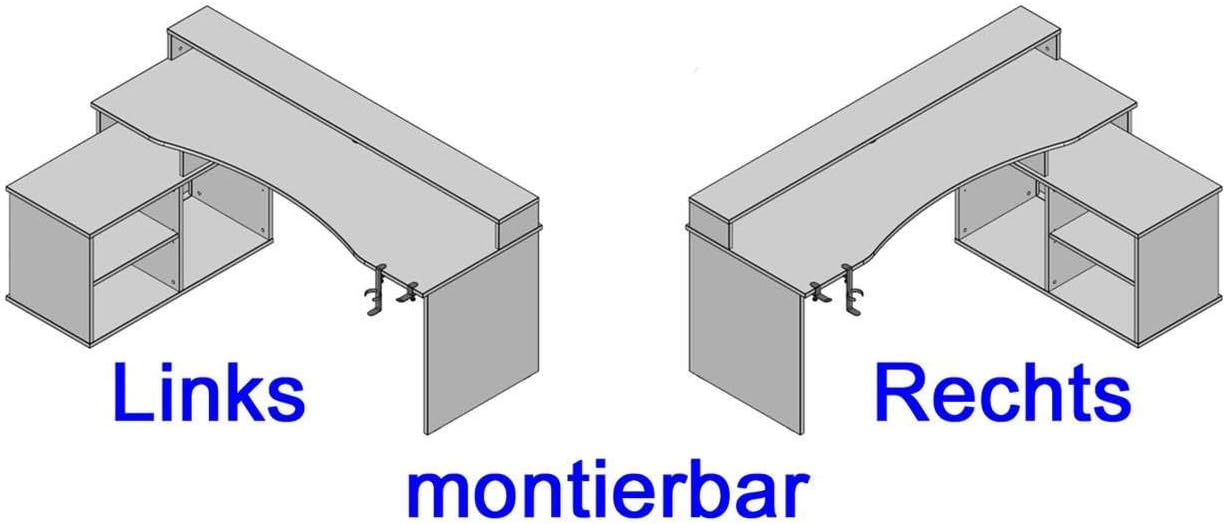
Image 3.1: The storage unit can be configured on either the left or right side of the desk.
- Assemble the storage unit's frame and internal shelves.
- Attach the assembled storage unit to the main desk structure on your preferred side (left or right) using the provided connectors.
3.4 액세서리 부착하기
- Attach the metal headphone holder and cup holder to the underside of the desk. These are typically clamp-on designs.

Image 3.2: Detail of the headphone holder attachment.

Image 3.3: Headphone and cup holder in position.
3.5 LED Lighting Installation
- Carefully place the LED strip into the designated channel on the elevated monitor shelf.
- Connect the LED strip's USB cable to a compatible USB power source (e.g., computer, USB wall adapter).
3.6 케이블 관리
Utilize the cable grommets and openings on the desk surface and back panel to route and organize your cables, maintaining a tidy workspace.

Image 3.4: Cable grommet for organized cable routing.
4. 사용 설명서
4.1 LED 조명
The integrated LED lighting is powered via a USB connection. Once connected, use the provided remote control to turn the lights on/off and change colors. Refer to the remote control's specific instructions for detailed functionality.
4.2 Headphone and Cup Holder
The detachable headphone and cup holders can be positioned as desired along the desk edge. Ensure they are securely clamped before use to prevent items from falling.
5. 유지관리
5.1 청소
책상 표면을 닦을 때는 부드러운 천을 사용하세요.amp cloth. Avoid abrasive cleaners, harsh chemicals, or solvents, as these can damage the finish. Wipe spills immediately.
5.2 Stability Check
모든 나사와 고정 장치가 단단히 조여져 있는지 주기적으로 확인하십시오. 책상의 안정성을 유지하기 위해 필요한 경우 다시 조이십시오.
6. 문제 해결
6.1 LED 조명이 작동하지 않음
- Ensure the USB cable is securely connected to a functioning USB power source.
- 리모컨 배터리를 확인하고 필요하면 교체하십시오.
- Verify the LED strip is correctly seated in its channel.
6.2 책상 불안정성
- 모든 조립 나사를 점검하고 느슨한 나사는 조이세요.
- 책상은 평평한 곳에 두세요.
- Verify that all components are correctly assembled according to the instructions.
7. 제품 사양
| 특징 | 세부 사항 |
|---|---|
| 상표 | 장점 |
| 모델 번호 | TZRB214B3-Z113 |
| 색상 | 블랙 매트 |
| 치수(길이 x 너비 x 높이) | 200cm x 125.4cm x 91.1cm(78.7인치 x 49.4인치 x 35.9인치) |
| 재료 | Engineered Wood, Metal, Melamine |
| 품목 무게 | 86.2kg(190파운드) |
| 특별 기능 | Elevated Monitor Shelf, Ergonomic Design, Cup Holder, Headphone Holder, LED Lighting (USB, color changeable) |
| Max Load - Tabletop | 40kg(88파운드) |
| Max Load - Monitor Shelf | 10kg(22파운드) |
| Max Load - Storage Compartment | 5kg(11파운드) |

Image 7.1: Detailed dimensions and maximum load capacities of the desk.
8. 보증 및 지원
This product is covered by a manufacturer's warranty. Please refer to your purchase documentation for specific warranty terms and conditions. Spare parts availability is typically 2 years from the date of purchase.
For technical assistance, missing parts, or warranty claims, please contact your retailer or the Forte customer support directly. Keep your proof of purchase handy when contacting support.


