1. 제품 오버view
This manual provides essential information for the safe and effective installation, operation, and maintenance of the IDEC ASLW212620S Illuminated 22mm Selector Switch. This device is designed for industrial control applications, offering a clear visual indication of its operational state through illumination.
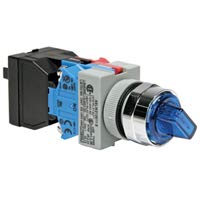
그림 1: IDEC ASLW212620S Illuminated 22mm Selector Switch. This image displays the complete assembly of the selector switch, including the illuminated actuator, mounting base, and contact blocks. The blue translucent handle indicates its illuminated feature.
주요 특징:
- 22mm mounting diameter for standard panel cutouts.
- Illuminated actuator for clear status indication.
- Two-position selector switch functionality.
- Panel mount design.
- IP54 International Protection Rating, offering protection against dust and splashing water.
2. 안전 정보
Read and understand all instructions before installing, operating, or maintaining this product. Failure to follow these instructions may result in serious injury or property damage.
- 전기적 위험: Ensure all power is disconnected before performing any installation or maintenance. Only qualified personnel should perform electrical work.
- 적절한 사용: Use this switch only for its intended purpose in industrial control circuits. Do not exceed specified voltag전자 및 현재 등급.
- 환경 조건: Do not expose the switch to conditions outside its specified operating temperature, humidity, or IP rating.
- 점검: Regularly inspect the switch for any signs of damage, wear, or loose connections. Replace damaged components immediately.
3. 설정 및 설치
Proper installation is crucial for the reliable operation of the IDEC ASLW212620S selector switch.
3.1 패널 장착
- Ensure the control panel has a 22mm diameter cutout for the switch.
- Insert the switch actuator assembly through the front of the panel cutout.
- Secure the switch to the panel using the provided mounting nut and washer on the rear side of the panel. Tighten securely but do not overtighten.
- Attach the contact block(s) and lamp holder (if separate) to the rear of the switch assembly, ensuring they are correctly oriented and locked into place.
3.2 배선
Refer to the wiring diagram provided with your specific contact block and lamp holder for detailed connection instructions. General guidelines are as follows:
- Ensure all power is off before wiring.
- Connect control circuit wires to the appropriate terminals on the contact blocks.
- Connect power for the illumination lamp l에게amp holder terminals, observing correct polarity if applicable.
- Verify all connections are secure and free from shorts.
4. 사용 설명서
The IDEC ASLW212620S is a two-position selector switch. Its operation is straightforward:
- Position Selection: Rotate the switch actuator to select between the two available positions. Each position corresponds to a specific state of the connected control circuit.
- 조명: 통합 lamp will illuminate when power is supplied to its terminals, providing a visual indication of the switch's status or the circuit's condition, depending on how it is wired.
5. 유지관리
Regular maintenance helps ensure the longevity and reliable performance of your selector switch.
- 청소: 스위치 외부를 부드러운 천으로 닦으십시오.amp cloth. Do not use abrasive cleaners or solvents, as these can damage the plastic components or markings.
- 점검: Periodically check for loose mounting nuts, damaged wiring, or signs of corrosion on terminals. Ensure the actuator rotates smoothly between positions.
- Lamp 대사: 조명이 l인 경우amp fails, replace it with a lamp of the same voltage and type specified by IDEC for this model. Ensure power is disconnected before replacing the lamp.
6. 문제 해결
If you encounter issues with your IDEC ASLW212620S switch, consider the following common problems and solutions:
- Switch Not Actuating Circuit:
- Check wiring connections to the contact blocks.
- Verify the contact block is correctly attached and functioning.
- Ensure the switch actuator is fully rotated to the desired position.
- 조명이 작동하지 않습니다:
- Check power supply to the lamp 보유자.
- Verify wiring connections to the lamp 보유자.
- l 검사amp for damage or burnout; replace if necessary.
- l을 확인하세요amp holder is correctly installed.
- Stiff or Loose Actuator:
- Check for foreign objects obstructing movement.
- Ensure the mounting nut is not overtightened or too loose.
- If the issue persists, the switch mechanism may be damaged and require replacement.
7. 사양
| 사양 | 세부 사항 |
|---|---|
| 상표 | 아이덱 |
| 모델 | ASLW212620S |
| 제조업체 | 아이덱 |
| 장착 유형 | 패널 실장 |
| 액추에이터 유형 | 선택기 스위치 |
| 위치 수 | 2 |
| 국제 보호 등급 | IP54 |
| 첫 번째 가능한 날짜 | 4년 2020월 XNUMX일 |
8. 보증 및 지원
IDEC products are manufactured to high-quality standards. For specific warranty information, please refer to the documentation provided with your purchase or visit the official IDEC website. For technical support or further assistance, please contact IDEC customer service.
IDEC Corporation Contact Information:
(Please refer to the official IDEC website for the most current contact details and regional support information.)


