1. 서론
Thank you for choosing the Suntek HC-801LTE 4G Trail Hunting Camera. This high-quality 4G wildlife camera features a 36MP image resolution and 4K video preview, offering advanced monitoring capabilities. It is designed for tracking animal movements, searching for traces, and for security purposes, such as detecting intrusions. With its cloud service integration and mobile app control, you can receive instant notifications and manage your camera remotely. This manual provides detailed instructions to help you set up, operate, and maintain your camera for optimal performance.
2. 패키지 내용
모든 품목이 들어 있는지 확인하려면 패키지 내용물을 확인하세요.
- HC-801PRO Hunting Camera
- 안테나
- USB 케이블
- 장착 스트랩
- User Manual (on CD, English version included)

Image: The HC-801LTE camera shown with its standard accessories, including the 4G antenna, USB cable, and a black mounting strap.
메모: SIM card, SD card, and AA batteries are not included and must be purchased separately.
3. 제품 오버view
Familiarize yourself with the main components of your HC-801LTE camera:
- 전면 패널: Main lens, PIR sensors, IR LEDs, TFT display.
- 사이드 패널 : Latches for securing the camera housing.
- 하단 패널: USB port, Micro SD card slot, external DC power port, SIM card slot, tripod mount.
- 후면 패널 : Battery compartment, mounting strap guides, product label.

이미지: 앞면 view of the HC-801LTE camera, highlighting the lens, PIR sensors, and the integrated display.

이미지: 측면 view of the HC-801LTE camera, illustrating the robust latches that secure the device.
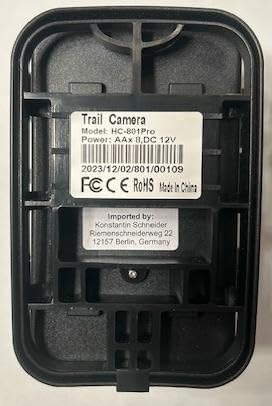
이미지: 뒤로 view of the HC-801LTE camera, displaying the battery compartment and the product label with model and power specifications.
4. 설정
카메라를 사용하기 전에 다음 단계를 따라 준비하세요.
- 배터리 설치: Open the camera housing and insert 8 AA batteries into the battery compartment, ensuring correct polarity. The camera can also be powered permanently with a 9-12V, 1.5A network power supply.
- 마이크로 SD 카드 설치: Insert a Micro SD card (up to 64GB, not included) into the designated slot. Ensure the card is formatted correctly for optimal performance.
- SIM 카드 설치: For 4G functionality, insert a compatible SIM card into the SIM card slot. Ensure the SIM card is activated and has an active data plan.
- 안테나 부착: Screw the provided 4G antenna firmly into the antenna port on top of the camera.
- 설치: Use the included mounting strap to secure the camera to a tree or pole. Alternatively, use the tripod mount for flexible positioning.

Image: The HC-801LTE camera with its 4G antenna, demonstrating its connectivity with a smartphone running the Suntekcam application.
5. 사용 설명서
This section details how to operate your Suntek HC-801LTE camera and utilize its features.
5.1 전원 켜기/끄기
Locate the power switch inside the camera housing. Switch it to the 'ON' position to power on the camera. To power off, switch it to the 'OFF' position.
5.2 작동 모드
이 카메라는 다양한 작동 모드를 지원합니다.
- 사진 모드 : 정지 이미지를 캡처합니다.
- 비디오 모드: 비디오 클립을 녹화합니다.
- 사진 + 비디오 모드: Captures a still image followed by a video clip upon detection.
5.3 Suntekcam App Usage
The Suntekcam app allows for remote control and monitoring of your camera:
- 앱 다운로드: Scan the QR code provided in the camera's manual or visit http://app.appurl.me/79814428341 다운로드하려면
관련 문서 - HC-801LTE (801Plus)

Suntek HC-810A 트레일 카메라 사용 설명서
Suntek HC-810A 트레일 카메라 사용 설명서로, 제품 소개, 매개변수, 기능 및 문제 해결 방법을 다룹니다.
Suntek HC-810Pro 4G 트레일 카메라 사용 설명서 및 사양
Suntek HC-810Pro 4G 트레일 카메라에 대한 종합 가이드입니다. 사양, 설치, 설정, 앱 연동, 문제 해결 및 작동 방법을 다룹니다. 사진 및 비디오 녹화 기능, 메모리 저장 용량, 전원 공급 방식, 감지 시스템에 대해서도 알아보세요.
4G 트레일 카메라 HC-900Pro 사용 설명서
HC-900Pro 4G 트레일 카메라 사용 설명서입니다. 제품 사양, 설치 방법, 앱 연동 방법 등을 자세히 설명합니다. 영어, 체코어, 슬로바키아어, 헝가리어, 독일어로 된 설명서가 포함되어 있습니다.
Suntek HC-810Pro 4G 트레일 카메라 사용 설명서 및 사양
Suntek HC-810Pro 4G 트레일 카메라의 설치, 설정, 앱 연동, 문제 해결 및 기술 사양을 다루는 종합 가이드입니다. 야생 동물 모니터링을 위한 고급 기능 활용법을 알아보세요.
선텍 HC-300 야생동물 디지털 적외선 트레일 카메라 사용 설명서
이 사용 설명서는 SUNTEK HC-300 야생동물 디지털 적외선 트레일 카메라의 작동에 대한 자세한 지침을 제공하며, 설치, 기본 및 고급 작동, 설정 및 기술 사양을 다룹니다.
HC-801A 트레일 카메라 사용 설명서
HC-801A 트레일 카메라 사용 설명서에는 제품 소개, 구조, 매개변수, 기능, 문제 해결 및 보증 정보가 포함되어 있습니다.