1. 제품 오버view
The Lowrance ActiveTarget Live Sonar System provides high-resolution, real-time views of fish and structure. This system allows anglers to see fish swimming around structure and reacting to lures as it happens, enhancing the fishing experience.
주요 특징:
- Live Sonar: Real-time high-resolution imaging of underwater activity.
- 삼 Views: Offers Forward, Down, and Scout views from a single transducer.
- High-Resolution Imaging: Eliminates guesswork in sonar interpretation.
- Included Mounts: Comes with all necessary trolling motor mounts for versatile installation.
- Compatibility: Designed for use with Lowrance HDS LIVE, HDS Carbon, and Elite FS fish finder/chartplotters.

Figure 1: Lowrance ActiveTarget Live Sonar System, showing the sonar module and the transducer.
2. 상자 안에 무엇이 들어있나요?
설치를 시작하기 전에 모든 구성 요소가 있는지 확인하세요.
- ActiveTarget Transducer
- ActiveTarget Sonar Box (Module)
- Trolling Motor Shaft Mount Kit
- Forward/Down Motor Mount Kit
- Scout Mount Kit
- 전원 케이블
- 이더넷 케이블
3. 설정 및 설치
Proper installation is crucial for optimal performance. Refer to the detailed installation guide provided with your unit for specific instructions and safety warnings.
3.1 Mounting the Transducer
The ActiveTarget transducer can be mounted in three primary configurations using the included kits:
- 트롤링 모터 샤프트 마운트: Ideal for a fixed position on the trolling motor shaft.
- Forward/Down Motor Mount: Allows for both forward and down views, typically mounted on the trolling motor.
- Scout Mount: Provides an ultra-wide, overhead view, also mounted on the trolling motor.
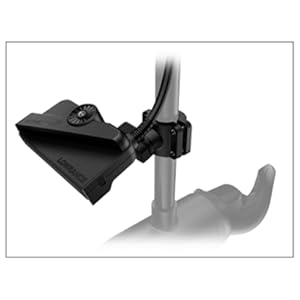
Figure 2: Transducer mounted on a trolling motor shaft for a fixed position.
3.2 Connecting the Sonar Module
The ActiveTarget Sonar Box (module) connects to your compatible Lowrance display unit via an Ethernet cable and requires a dedicated power connection.
- Connect the transducer cable to the SONAR port on the ActiveTarget module.
- Connect the Ethernet cable from the ActiveTarget module to an available Ethernet port on your Lowrance HDS LIVE, HDS Carbon, or Elite FS display.
- Connect the power cable to a 12V DC power source, ensuring proper fusing and wiring.

Figure 3: ActiveTarget Sonar Module, showing the power, Ethernet, and sonar connections.
4. 사용 설명서
Once installed and powered on, the ActiveTarget system integrates with your Lowrance display. Navigate to the sonar view on your display to access ActiveTarget features.
4.1 Selecting Sonar Views
The ActiveTarget system offers three distinct views:
- 앞으로 View: Shows a live, high-resolution view in front of your boat, allowing you to cast to fish as you see them.
- 아래에 View: Provides a live, high-resolution view directly below your boat, ideal for vertical jigging or observing structure beneath.
- 스카우트 View: Offers an ultra-wide, overhead view in front of your boat, perfect for scanning large areas quickly.

그림 4: 예ample of ActiveTarget Forward View on a Lowrance display, showing fish and structure ahead.
4.2 설정 조정
Within the ActiveTarget sonar menu on your display, you can adjust various settings to optimize performance for different conditions:
- 범위: Adjust the depth/distance range to focus on specific areas.
- 이득/감도: Control the sensitivity to pick up weaker returns or reduce clutter.
- 색상 팔레트: Select different color schemes for better visibility.
- 노이즈 제거: Minimize interference from other electronics or water conditions.
Video 1: Official Lowrance ActiveTarget Live Sonar demonstration. This video showcases the real-time capabilities of the sonar system, including how fish react to lures and the clarity of the underwater environment. It highlights the system's ability to show active fish movement, providing anglers with immediate visual feedback.
5. 유지관리
Regular maintenance ensures the longevity and optimal performance of your ActiveTarget system.
- 청소: After each use, especially in saltwater, rinse the transducer and cables with fresh water to remove salt and debris. Wipe down the sonar module and display with a damp, soft cloth. Avoid abrasive cleaners.
- 케이블 검사: Periodically check all cables for signs of wear, cuts, or corrosion. Ensure connections are secure and free of moisture.
- 소프트웨어 업데이트: Keep your Lowrance display unit's software updated to the latest version. Software updates often include performance enhancements and new features for ActiveTarget. Visit the official Lowrance website for update instructions and files.
- 저장: When not in use for extended periods, store the system in a dry, cool place, protected from direct sunlight and extreme temperatures.
6. 문제 해결
If you encounter issues with your ActiveTarget system, refer to the following common problems and solutions:
| 문제 | 가능한 원인 | 해결책 |
|---|---|---|
| 소나 이미지 없음 | Loose cable connection, no power to module, incorrect sonar source selected. | Check all power and Ethernet connections. Ensure the ActiveTarget module is powered on. Select ActiveTarget as the sonar source on your display. |
| 이미지 품질 저하 / 어수선함 | Incorrect gain/sensitivity settings, transducer dirty, interference. | Adjust gain/sensitivity settings. Clean the transducer face. Check for other electronic devices causing interference. |
| System Not Recognized by Display | Outdated software, faulty Ethernet cable. | Update your display unit's software. Try a different Ethernet cable. |
If the problem persists, contact Lowrance customer support or visit their official web추가 지원은 사이트를 참조하세요.
7. 사양
| 특징 | 세부 사항 |
|---|---|
| 모델 번호 | 000-15593-001 |
| 품목 무게 | 10.3파운드 |
| 제품 치수 | 21.06 x 10.43 x 5.32 인치 |
| Display Size (Compatible) | 7 Inches (minimum recommended) |
| 장착 유형 | 트롤링 모터 마운트 |
| 언어 | 영어 |
| 제조업체 | 로렌스 |
| 첫 번째 이용 가능 | 17년 2020월 XNUMX일 |
8. 보증 및 지원
보증 정보: The Lowrance ActiveTarget Live Sonar System comes with a 1-Year Warranty from the date of purchase. Please retain your proof of purchase for warranty claims.
고객 지원: For technical assistance, troubleshooting beyond this manual, or warranty inquiries, please contact Lowrance customer support. You can find contact information and additional resources on the official Lowrance web대지:


