소개
This manual provides detailed instructions for the installation, operation, and maintenance of your Smartwares SH4-99559 Wireless Built-in Shutter Switch Kit. This kit allows you to wirelessly control your electric blinds, shutters, or curtains, integrating them into your Smartwares Plug & Connect smart home system.
The kit includes three wireless built-in switches, designed for easy integration into existing electrical systems. For optimal performance and safety, please read this manual thoroughly before installation and use.
설정 및 설치
중요한 안전 정보: 설치는 자격을 갖춘 전기 기술자만 수행하거나 지역 전기 규정을 준수해야 합니다. 모든 전기 작업을 시작하기 전에 항상 주 회로 차단기에서 전원을 차단하십시오.
1. 개봉 및 검사
Carefully remove all components from the packaging. Verify that all three built-in switches are present and undamaged. If any components are missing or damaged, contact your retailer.

Image: The Smartwares SH4-99559 kit, showing three white wireless built-in shutter switches.
2. Wiring the Switch
Each built-in switch is designed to be installed within a standard junction box behind your existing shutter switch or directly connected to your electric motor. The module requires a 230V power supply and connects to the motor's up and down control wires.
- 전원 분리: Ensure the power supply to the circuit is completely off at the main breaker.
- 전선 식별: Identify the Live (L), Neutral (N), Up (U), and Down (D) wires for your electric shutter motor. The switch also has a connection for a common wire (C) if applicable.
- 전선 연결: Connect the wires to the corresponding terminals on the Smartwares SH4-99559 switch. Refer to the diagram below for terminal identification.
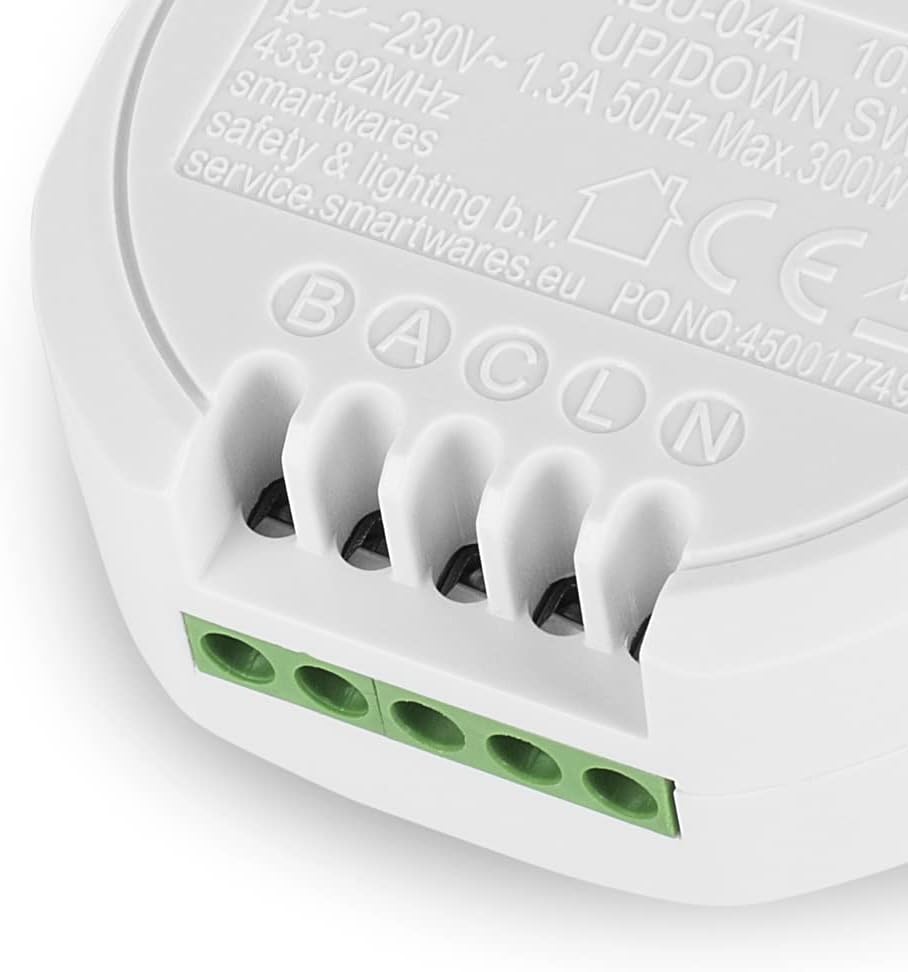
이미지: 클로즈업 view of the Smartwares SH4-99559 built-in switch, showing the screw terminals labeled B, A, C, L, N for electrical connections. These typically correspond to Up, Down, Common, Live, and Neutral.
Terminal Guide:
- L: Live (Phase) 230V AC
- N: 중성 230V AC
- U (or B): Up control wire for the motor
- D (or A): Down control wire for the motor
- C: Common wire (if required by your motor/system)
3. 스위치 장착
Once wired, carefully place the built-in switch into the junction box. Ensure no wires are pinched and that there is sufficient space for the module. Secure the module if necessary, then re-attach the cover plate or existing switch mechanism.

Image: The Smartwares SH4-99559 built-in switch shown installed within a standard round electrical junction box, demonstrating its compact design for concealed installation.
4. Pairing with a Remote Control or Smart Switch
The Smartwares SH4-99559 switches operate on a 433 MHz radio frequency and are compatible with Smartwares Plug & Connect remote controls and smart switches (sold separately). Follow these general steps to pair your switch:
- 복원력 : 주회로 차단기의 전원을 다시 켜세요.
- 페어링 모드 활성화: On the SH4-99559 module, there is typically a small learning button or a specific sequence to enter pairing mode. Consult the specific instructions for your Smartwares remote control or smart switch for the exact pairing procedure. Usually, you press the learning button on the module, then activate the desired button on your remote or app.
- 확인: The shutter motor should briefly move or an indicator light on the module should flash to confirm successful pairing.
- 테스트 기능: Test the up and down functions using your paired remote or smart switch.
작동 지침
Once installed and paired, your Smartwares SH4-99559 switches provide convenient wireless control over your electric blinds, shutters, or curtains.
Using a Smartwares Remote Control
- 를 누르세요 "위로" button on your remote to raise the shutter/blind.
- 를 누르세요 "아래에" button on your remote to lower the shutter/blind.
- 를 누르세요 "멈추다" button (if available on your remote) to halt the shutter/blind at its current position.
Using the Smartwares Smart Switch (via HomeWizard App)
If you have connected your SH4-99559 switches to a Smartwares Smart Switch (e.g., HomeWizard Link), you can control them via the free HomeWizard app on your smartphone or tablet.
- 열기 HomeWizard app 귀하의 기기에서.
- Navigate to the device list or specific room where your shutter switch is located.
- 탭하세요 "위로" or "아래에" icon to control the shutter/blind.
- The app may also offer options for setting schedules or scenes for automated control.
유지
The Smartwares SH4-99559 Wireless Built-in Shutter Switch Kit requires minimal maintenance.
- 청소: If the module is exposed (e.g., during inspection), gently wipe it with a dry, soft cloth. Do not use liquid cleaners or abrasive materials.
- 펌웨어 업데이트: If connected to a Smartwares Smart Switch and the HomeWizard app, ensure your Smart Switch firmware is up to date for optimal performance and security.
- 정기 점검: Periodically check the physical connections during other electrical maintenance to ensure they remain secure.
No user-serviceable parts are inside the module. Do not attempt to open or repair the device yourself.
문제 해결
If you encounter issues with your Smartwares SH4-99559 switches, refer to the following common problems and solutions:
| 문제 | 가능한 원인 | 해결책 |
|---|---|---|
| Shutter does not respond to remote/app. |
|
|
| Shutter moves in the wrong direction (Up button lowers, Down button raises). | Up and Down motor wires are reversed. |
|
| Switch indicator light is off. | 모듈에 전원이 공급되지 않습니다. |
|
기술 사양
| 모델 번호: | SH4-99559 |
| 상표: | 스마트웨어 |
| 입력 Voltage: | 230 볼트 AC |
| 최대 전력 부하: | 300 와트 |
| 현재 평가: | 1 Amp오히려 |
| 무선 주파수 : | 433MHz |
| 치수(길이 x 너비 x 높이): | 2.5 x 5.3 x 5.3 cm (per module) |
| 무게: | 120 Grams (per module) |
| 재료: | 플라스틱 |
| 스위치 유형: | Smart Switch, 1-way |
| Number of Pieces in Kit: | 3 |
보증 정보
Smartwares products are designed and manufactured to high-quality standards. This product comes with a limited warranty. Based on available information, spare parts availability is guaranteed for 1 year from the date of purchase.
For detailed warranty terms and conditions, please refer to the official Smartwares web사이트를 방문하거나 고객 서비스에 문의하세요.
지원 및 연락처
For further assistance, technical support, or to inquire about additional Smartwares Plug & Connect products, please visit the official Smartwares web대지:
You may also find frequently asked questions and product documentation on their support pages.


