1. 서론
The SINOTIMER TM919B is a 30A 7-day programmable electronic timer switch designed for automatic control of various electrical equipment. It allows you to set specific ON/OFF times over a 24-hour or 7-day cycle, providing convenience and energy efficiency for applications such as streetlights, lamps, water heaters, air conditioners, and more.
주요 특징:
- Ideal for household use in DB Boards.
- High capacity: 5000 Watt / 30 Amps.
- Flexible programming: 24 Hours / 7 Days a Week Programmable.
- 자동 시간 오차 보정: 주당 +/- 30초.
- Multiple programs: Repeat programs with 16 ON/OFF settings.
- 수동 켜짐/꺼짐 제어.
2. 제품 오버view
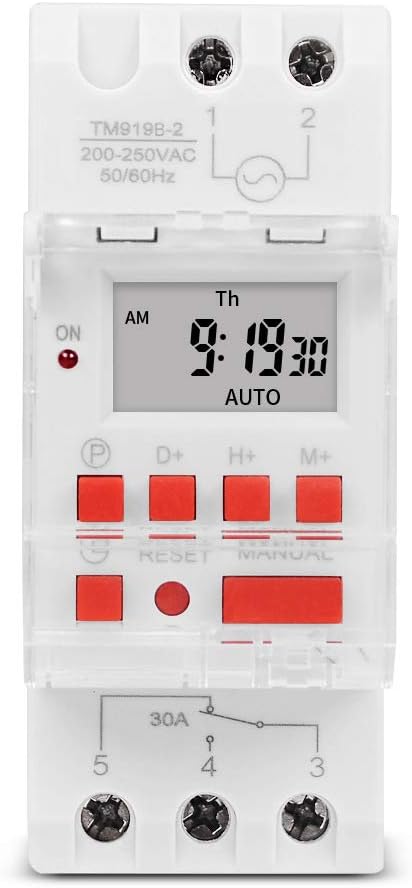
그림 1: 전면 view of the TM919B timer switch, displaying the LCD screen with time and day, and the array of control buttons including P, D+, H+, M+, RESET, and MANUAL.

그림 2: 각도 view of the TM919B timer switch, showing its side profile and the clear protective cover over the buttons.

그림 3: 측면 view of the TM919B timer switch, detailing the wiring terminals (L, N, 1, 2, 3, 4, 5) and product specifications like voltag전자 및 현재 등급.
3. 사양
| 매개변수 | 값 |
|---|---|
| 온도 범위 | -20°C ~ +50°C |
| 운영 볼륨tag전자(Ui) | 110V |
| 전력 소비 | 4.5VA(최대) |
| 표시하다 | 액정표시장치 |
| 스위칭 접점 | 1개의 전환 스위치 |
| 프로그램 | 하루 또는 일주일에 16번 켜기/끄기 설정 가능 |
| 히스테리시스 | 2 sec/day (at 25°C) |
| 최소 간격 | 1분 |
| 용량 | 30A 250V AC |
| 블랙아웃 메모리 | 60일 |
| 타이머 범위 | 1분부터 168시간까지 |
| 평균 오차 | 1초/24시간 (25°C 기준) |
| 품목 무게 | 5.3 ounces (0.2kg) |
| 패키지 크기 | 3.95 x 3.2 x 2 인치 |
| 화면 크기 | 1.5 인치 |
4. 설치 및 배선
The TM919B timer switch is designed for DIN rail mounting, making it suitable for integration into electrical distribution boards. Ensure all power is disconnected before attempting installation.
배선도:

Figure 4: Wiring diagram for the TM919B. Terminals 1 and 2 are for power input (L and N). Terminals 3, 4, and 5 are for the output, typically used for NO (Normally Open) and NC (Normally Closed) connections to control the load.
- 전원 입력: Connect the live (L) and neutral (N) wires to terminals 1 and 2 respectively. Ensure the voltage matches the timer's specification (110V for this model).
- 부하 연결: The timer has a single changeover switch.
- 단자 3: 상시 닫힘(NC) 접점.
- Terminal 4: Common (COM) contact.
- 터미널 5: 상시 개방(NO) 접점.
- Connect your load (e.g., lamp, motor) between the common terminal (4) and either the NO (5) or NC (3) terminal, depending on whether you want the load to be ON or OFF when the timer is in its default state.
- Securely fasten all wires to prevent loose connections.
- Once wiring is complete, restore power and proceed with programming.
5. 작동 지침 및 프로그래밍
The TM919B timer allows for up to 16 ON/OFF programs. Follow these steps to set the current time and program the timer.
버튼 기능:
- P(프로그램): 프로그래밍 모드로 들어갑니다.
- D+ (낮): 요일을 조정합니다.
- H+ (시간): 시간을 조정합니다.
- M+ (분): 분을 조정합니다.
- RESET : 모든 설정을 공장 초기값으로 재설정합니다. 뾰족한 물체를 사용하여 누르세요.
- 수동: 켜짐, 자동, 꺼짐 모드 간 전환 기능을 제공합니다.
현재 시간 설정:
- 를 누르세요 D+ 버튼을 눌러 현재 요일을 설정합니다.
- 를 누르세요 H+ 버튼을 눌러 현재 시간을 설정합니다.
- 를 누르세요 M+ 버튼을 눌러 현재 분을 설정합니다.
- 몇 초간 아무런 조작이 없으면 시간이 자동으로 저장됩니다.
Programming ON/OFF Times (Up to 16 Programs):
- 를 누르세요 P button once. The display will show "1 ON". This is for setting the first ON time.
- 누르다 H+ 그리고 M+ to set the desired hour and minute for the first ON event.
- 누르다 D+ to select the days of the week for this program. Options include: every day, specific days (e.g., MO-FR, MO-SA, SA-SU), or individual days. If you want the same setting every day, you do not need to press D+.
- 를 누르세요 P button again. The display will show "1 OFF". This is for setting the first OFF time.
- 누르다 H+ 그리고 M+ to set the desired hour and minute for the first OFF event.
- 누르다 D+ again if you need to specify different days for the OFF event, or leave it if it matches the ON event's days.
- Repeat steps 1-6 for programs 2 through 16 (e.g., "2 ON", "2 OFF", etc.).
- 원하는 프로그램을 모두 설정한 후, 수동 button repeatedly until "AUTO" is displayed. This ensures the timer operates according to your programmed schedule.
수동 제어:
를 누르세요 수동 작동 모드를 순환하는 버튼:
- 에: The output is continuously ON, overriding programmed settings.
- OFF : The output is continuously OFF, overriding programmed settings.
- 자동 : The timer operates according to the programmed ON/OFF schedules. Ensure the timer is in AUTO mode for automatic operation.
6. 유지관리
The TM919B timer switch requires minimal maintenance. Keep the device clean and free from dust. Do not expose it to excessive moisture or extreme temperatures. If the display becomes dim or unresponsive, check the power supply. The internal battery provides backup for settings during power outag최대 60일 동안 지속됩니다.
7. 문제 해결
| 문제 | 가능한 원인 | 해결책 |
|---|---|---|
| 타이머가 설정된 시간에 켜지거나 꺼지지 않습니다. | Not in AUTO mode; incorrect programming; power issue. | Press MANUAL until "AUTO" is displayed. Review programming steps carefully. Check power supply to the timer. |
| 디스플레이가 비어 있거나 어둡습니다. | No power supply; internal battery low (unlikely for display). | Check power connections. Ensure the timer is receiving power. |
| 시간이나 프로그램을 설정할 수 없습니다. | Buttons unresponsive; unit frozen. | Press the RESET button using a pointed object. This will clear all settings, so you will need to reprogram. |
| Load not switching. | Incorrect wiring; faulty load; timer output issue. | Verify wiring according to the diagram. Test the load independently. If issues persist, contact support. |
8. 보증 및 지원
This SINOTIMER product is covered by a standard manufacturer's warranty against defects in materials and workmanship. For warranty claims or technical support, please contact your retailer or the manufacturer directly. Keep your purchase receipt as proof of purchase.
For further assistance, visit the official SINOTIMER store: 아마존에서 SINOTIMER 스토어를 방문하세요


