VOCOO Digital Kitchen Timer
모델: 5260
사용자 설명서
소개
Thank you for choosing the VOCOO Digital Kitchen Timer. This device is designed for precise time management in various settings, including cooking, studying, fitness, and more. Featuring a large LED display, adjustable volume, and magnetic backing, it offers ease of use and versatility for all ages.

이미지: 앞면 view of the VOCOO Digital Kitchen Timer, displaying "08:24" on its large LED screen. The timer is white with a black display area.
안전 정보
- 기기 손상을 방지하기 위해 물과 과도한 습기로부터 멀리하십시오.
- Do not expose the timer to extreme temperatures or direct sunlight for prolonged periods.
- 조심스럽게 다루십시오. 기기를 떨어뜨리거나 강한 충격을 가하지 마십시오.
- 배터리가 극성 표시에 따라 올바르게 삽입되었는지 확인하세요.
- 배터리를 어린이의 손이 닿지 않는 곳에 보관하세요.
패키지 내용
패키지를 열 때 모든 품목이 들어 있고 상태가 양호한지 확인하세요.
- 1 x VOCOO Digital Kitchen Timer (Model 5260)
- AAA 배터리 3개(사전 설치 또는 별도 포함)
- 1 x 사용자 매뉴얼(이 문서)
제품 끝view
The VOCOO Digital Kitchen Timer features a sleek design with intuitive controls. Key components include:
- 대형 LED 디스플레이: Shows time clearly.
- 로터리 다이얼: Used for setting minutes and seconds.
- 시작/중지 버튼: Integrated into the display, press to start or pause.
- 마그네틱 백킹: Allows attachment to metal surfaces.
- 미끄럼 방지 패드: Provide stability on flat surfaces.
- 볼륨 스위치: Located on the back, for adjusting alarm volume (Loud, Soft, Mute).
- 밝기 스위치: Located on the back, for adjusting display brightness (Bright, ECO).

Image: A person's hands holding the VOCOO Digital Kitchen Timer, highlighting its compact and ergonomic design for easy handling.
설정
1. 배터리 설치
The timer requires three AAA batteries. These are typically included. If not, or if replacing, follow these steps:
- 타이머 뒷면에서 배터리 덮개를 찾으세요.
- 덮개를 밀어 엽니다.
- Insert three AAA batteries, ensuring the correct polarity (+/-) as indicated inside the compartment.
- 배터리 덮개를 단단히 닫으세요.
2. 초기 전원 켜기
Once batteries are installed, the timer should automatically power on and display "00:00". If not, check battery installation.
3. 자석 부착
The timer features powerful magnets on its back, allowing it to be securely attached to any iron surface, such as a refrigerator or oven. Ensure the transparent film on the silicone pads is removed for stronger magnetic adhesion.
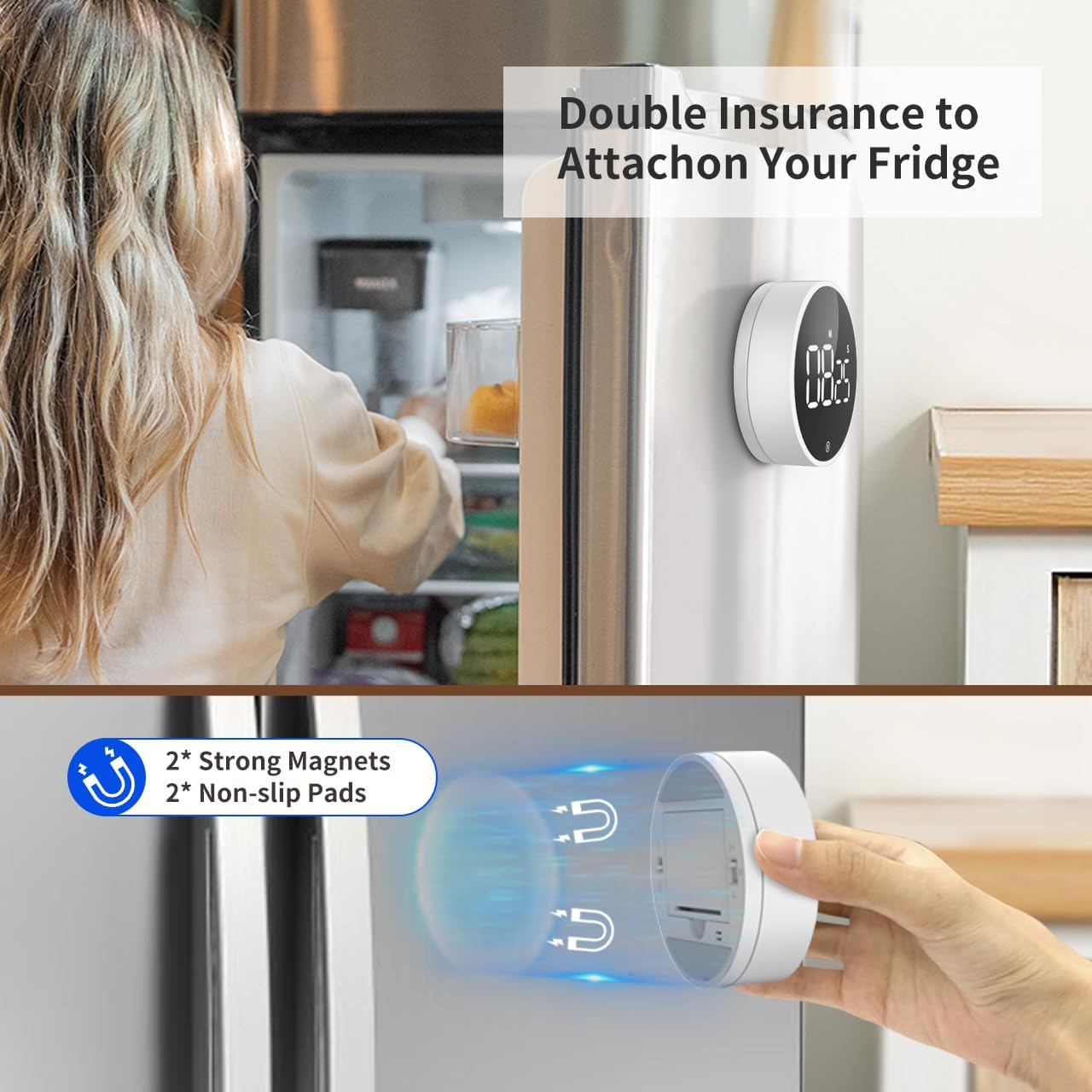
Image: The VOCOO Digital Kitchen Timer magnetically attached to the side of a refrigerator, demonstrating its convenient placement.

이미지: 자세한 view of the back of the timer, illustrating the two strong magnets and two non-slip silicone pads designed for secure attachment.
작동 지침
1. Setting Time (Countdown Mode)
카운트다운 시간을 설정하려면:
- Ensure the display shows "00:00". If not, press and hold the front button to reset it.
- Rotate the outer dial clockwise to increase the time.
- Rotate slowly to adjust seconds.
- Rotate quickly to adjust minutes.
- 최대 카운트다운 시간은 99분 55초입니다.
2. Starting and Pausing the Timer
Once the desired time is set, press the front button (the large circular area on the display) once to start the countdown. To pause the timer, press the button again. Pressing it a third time will resume the countdown.
3. 타이머 재설정
To reset the timer to "00:00" at any point, press and hold the front button for approximately 3 seconds.
4. Count-Up Mode (Stopwatch)
타이머를 스톱워치로 사용하려면:
- Ensure the display shows "00:00". If not, press and hold the front button to reset it.
- Press the front button once to start counting up from "00:00".
- Press the button again to pause the count-up.
- Press and hold the button to reset the stopwatch to "00:00".

Image: Illustration of the two counting modes: Count-up (stopwatch) from 00:00 to 99:55, and Countdown from 99:55 to 00:00. Examples show the timer used during exercise and baking.
5. 알람 소리 조절
On the back of the timer, locate the volume switch. You can select from three alarm levels:
- 시끄러운: Approximately 80-90dB, suitable for noisy environments.
- 부드러운: Approximately 60-75dB, for quieter settings.
- 무음: The numbers will blink on the display to indicate time is up without an audible alarm, ideal for silent environments like libraries or meetings.

Image: The timer's volume settings are illustrated, showing a loud setting (80-90dB) for a kitchen environment, a soft setting (60-75dB) for a quiet home, and a mute setting where numbers blink, suitable for an office or classroom.
6. 화면 밝기 조절
Also on the back of the timer, there is a switch to adjust the display brightness:
- 밝은: For optimal visibility in well-lit conditions.
- 에코: A dimmer setting to conserve battery life, suitable for low-light conditions.
The timer automatically enters power-saving mode 5 seconds after being paused or stopped. Press the front button to reactivate the display.
유지
청소
To clean the timer, wipe it gently with a soft, dry, or slightly damp 옷감. 연마성 세제를 사용하거나 장치를 물에 담그지 마십시오.
배터리 교체
When the display dims significantly or the timer stops responding, it's time to replace the batteries. Follow the battery installation steps outlined in the "Setup" section.
저장
If storing the timer for an extended period, it is recommended to remove the batteries to prevent leakage and potential damage to the device.
문제 해결
| 문제 | 가능한 원인 | 해결책 |
|---|---|---|
| 타이머가 켜지지 않습니다. | 배터리가 소진되었거나 올바르게 설치되지 않았습니다. | 배터리를 교체하거나 극성이 올바른지 확인하세요. |
| 디스플레이가 어둡습니다. | ECO brightness mode is selected or batteries are low. | Switch to "Bright" mode on the back. Replace batteries if still dim. |
| 경보음이 울리지 않습니다. | Mute volume mode is selected. | Switch to "Loud" or "Soft" mode on the back. |
| Timer does not stick to surface. | Transparent film on silicone pads not removed or surface is not iron. | Remove the transparent film. Ensure the surface is magnetic (iron/steel). |
| Time setting is too sensitive. | Rapid rotation of the dial. | Rotate the dial more slowly for precise second adjustments. Rotate quickly for minute adjustments. |
명세서
| 특징 | 세부 사항 |
|---|---|
| 모델 번호 | 5260 |
| 치수 | 3.07"D x 3.07"W x 1.06"H (7.8 x 7.8 x 2.7 CM) |
| 무게 | 4.2온스(120그램) |
| 재료 | 아크릴로니트릴 부타디엔 스티렌(ABS) |
| Max Count Time | 99분 55초 |
| 전원 | AAA 배터리 3개(포함) |
| 알람 음량 레벨 | Loud (80-90dB), Soft (60-75dB), Mute (blinking digits) |
| 디스플레이 밝기 | Bright, ECO |
| 특징 | Magnetic Backing, Non-slip Pads, Memory Function |
보증 및 지원
보증 정보
VOCOO products are manufactured with high-quality materials and undergo strict quality control. For specific warranty details, please refer to the product packaging or contact VOCOO customer support. Typically, electronic devices come with a limited warranty covering manufacturing defects.
고객 지원
If you encounter any issues or have questions regarding your VOCOO Digital Kitchen Timer, please contact our customer support team. You can usually find contact information on the product packaging, the official VOCOO web사이트나 구매 플랫폼을 통해서도 구매할 수 있습니다.
When contacting support, please have your product model number (5260) and purchase details ready to assist in a quicker resolution.


