1. 서론
Thank you for choosing the MINIX 66W Turbo 3-Port GaN Wall Charger (NEO P1). This compact and powerful charger is designed to provide ultra-fast charging for a wide range of devices, from laptops to smartphones, utilizing advanced Gallium Nitride (GaN) technology. Its versatile design includes multiple ports and international plug adapters, making it an ideal companion for both daily use and travel.
2. 안전 정보
- 충전기를 액체, 습기 또는 극한 온도에 노출시키지 마세요.
- 충전기를 떨어뜨리거나 강한 충격을 주지 마십시오.
- 충전기를 분해, 수리 또는 개조하지 마십시오.
- 충전기는 지정된 입력 전압 범위 내에서 사용해야 합니다.tage 범위(100-240V AC).
- 어린이의 손이 닿지 않는 곳에 보관하세요.
- 사용하지 않을 때는 충전기를 전원 콘센트에서 분리하십시오.
- If the charger shows any signs of damage or malfunction, discontinue use immediately.
3. 패키지 내용
- MINIX NEO P1 66W Turbo 3-Port GaN Wall Charger Body
- UK Pin Adapter
- EU Pin Adapter
- 보관 가방
4. 제품 오버view
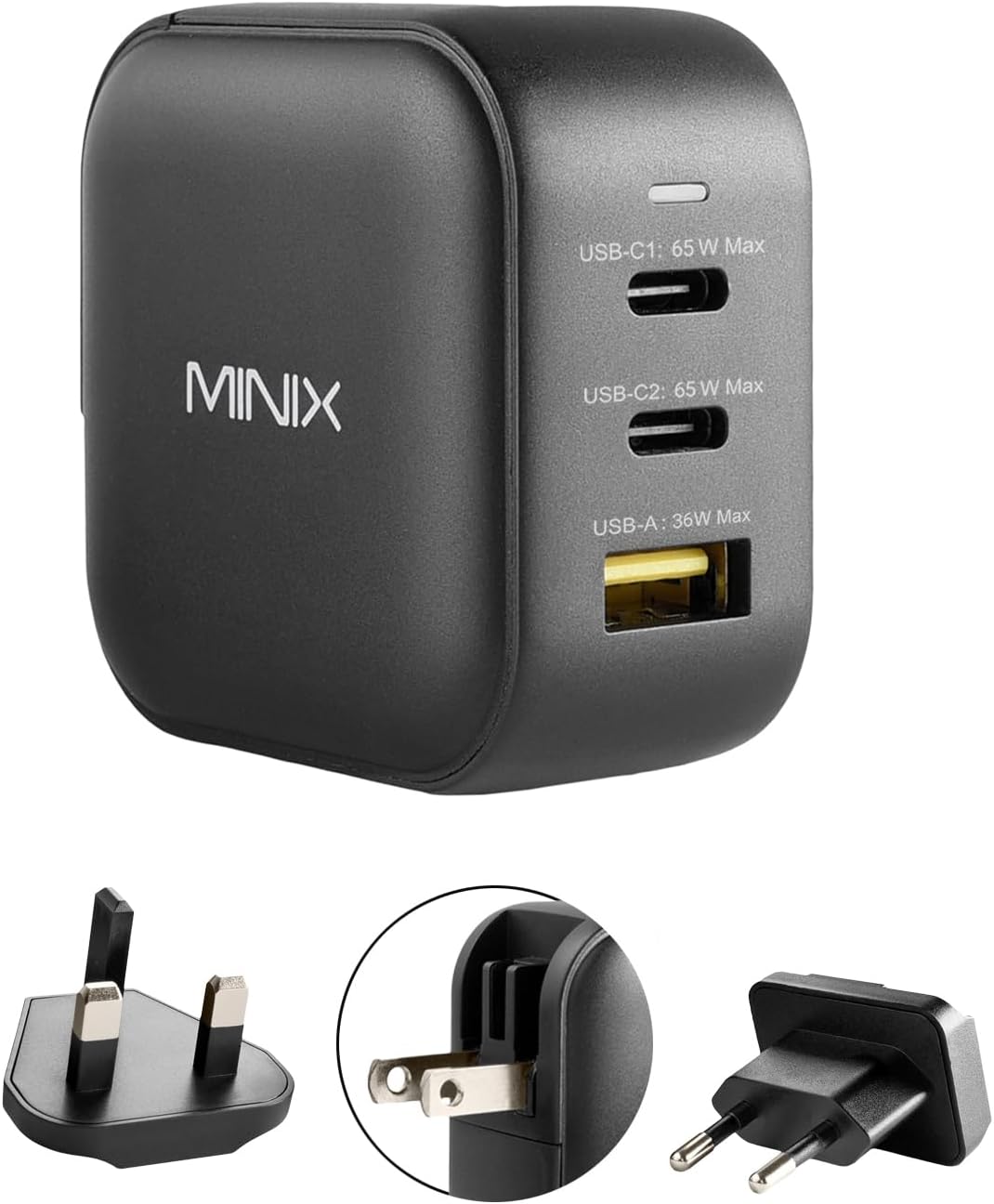
그림 1: 전면 view of the MINIX NEO P1 charger showing 2 USB-C ports (65W Max each) and 1 USB-A port (36W Max).
The MINIX NEO P1 features a compact design with a foldable US plug. It includes two USB-C Power Delivery (PD) ports and one USB-A Quick Charge (QC) 3.0 port. A small LED indicator is present on the top surface to show power status. The charger comes with interchangeable UK and EU pin adapters for international compatibility.

그림 2: 상세 view of the MINIX NEO P1 charger highlighting its dimensions (53mm x 53mm x 30.7mm) and port specifications: 2 x USB-C Ports (65W PD3.0, 5~15V/3A, 20V/3.25A) and 1 x USB-A Port (36W QC3.0, 5V/3A, 9V/2A, 12V/1.5A, 20V/1.8A).
5. 설정
5.1 Attaching International Plug Adapters
The MINIX NEO P1 comes with a built-in foldable US plug. For use in other regions, attach the appropriate international adapter:
- Fold the built-in US plug flat into the charger body.
- Align the desired UK or EU pin adapter with the slots on the charger body.
- Slide the adapter firmly into place until it clicks securely.

Figure 3: Demonstrates how to attach the EU plug adapter to the charger body.

Figure 4: Visual representation of the US, UK, and EU plug types compatible with the charger.
5.2 전원 콘센트에 연결
Once the correct plug adapter is attached, insert the charger firmly into a compatible wall outlet. The LED indicator on the charger will light up, confirming it is receiving power.
6. 사용 설명서
6.1 장치 충전
Connect your devices to the available USB-C or USB-A ports using appropriate charging cables. The MINIX NEO P1 features Dynamic Smart Detection, which automatically adjusts the power output of each port based on the connected devices to ensure efficient and safe charging.

Figure 5: The MINIX NEO P1 charger actively charging a laptop, tablet, and smartphone, demonstrating its multi-device capability.
6.2 배전
The total power output of the charger is 66W. The power is dynamically distributed among the ports as follows:

Figure 6: Power distribution diagram for the MINIX NEO P1. When using one port, USB-C ports can deliver up to 65W, and USB-A up to 36W. When using two ports, power is split (e.g., 45W/20W for USB-C, or 45W/18W for USB-C and USB-A). When using all three ports, power is distributed as 45W/15W/5W.
6.3 공식 제품 영상
비디오 1: 오버view of the MINIX 66W Turbo 3-Port GaN Wall Charger, showcasin그 특징과 컴팩트한 디자인.
7. 사양
| 특징 | 세부 사항 |
|---|---|
| 제품 치수 | 2.09 x 2.09 x 1.21 인치 |
| 품목 무게 | 7 온스 |
| 모델 번호 | 네오 P1 |
| 총 USB 포트 | 3 (2 x USB Type C, 1 x USB Type A) |
| 왓tage | 65와트(최대) |
| 입력 Voltage | 100-240V AC, 50~60Hz, 1.8A |
| 특별 기능 | Fast Charging, Lightweight Design, Short Circuit Protection, Travel-friendly (foldable plugs, UK/EU pin converters) |
| 보호 | 과전류, 과전압tage, 과열, 단락 보호 |
| 호환 장치 | MacBook Air 13'' (2018) / MacBook 12'' / MacBook Pro 13'' / MacBook Pro 15'', Microsoft Surface Pro 7 / Surface Laptop 3 / Surface Go, iPad Pro 12.9'' / iPad Pro 10.5'' / iPad Pro 11'' / iPad Air 10.5'' / iPad mini / AirPods Pro, iPhone 16/15/14/13/12/11 Pro Max/10/ 8 Plus / 8 / 7 / 6, Samsung Galaxy S23/ S21/S20 Ultra / S20+ / S20 / S10+ / S10 / S10e / S9+ / S9 / S9 Plus / S8 / S8 Plus / Note 10 / 9 / 8 / 7, Google Pixel 4 / 4 XL / 3a / 3a XL / 3 / 3 XL / 2 / 2 XL / Pixel C |
8. 유지관리
- 충전기는 마른 부드러운 천으로 닦으십시오. 액체 세척제는 사용하지 마십시오.
- 사용하지 않을 때에는 충전기를 서늘하고 건조한 곳에 보관하십시오.
- 충전기와 케이블에 마모나 손상 징후가 있는지 정기적으로 검사하십시오.
9. 문제 해결
9.1 기기가 충전되지 않음
- Ensure the charger is properly plugged into a live power outlet and the LED indicator is on.
- 충전 케이블이 충전기와 기기에 제대로 연결되어 있는지 확인하십시오.
- Try using a different charging cable or port to rule out a faulty cable or port.
- Check if your device is compatible with the charger's power output.
9.2 느린 충전
- 고속 충전을 지원하는 고품질 충전 케이블을 사용하고 있는지 확인하십시오.
- Refer to the Power Distribution table (Section 6.2) to understand how power is shared when multiple devices are connected. Disconnecting other devices may increase charging speed for a single device.
- Verify that your device supports the fast charging protocols (PD, QC 3.0) offered by the charger.
10. 보증 및 지원
MINIX products are backed by a manufacturer's warranty. For detailed warranty information, product support, or technical assistance, please visit the official MINIX web해당 사이트를 방문하거나 고객 서비스에 문의하세요. 보증 청구를 위해 구매 영수증을 보관하세요.
Official MINIX Store: Visit the MINIX Store on Amazon


