소개
This manual provides comprehensive instructions for the setup, operation, and maintenance of your Keychron K4 RGB Hot Swappable Mechanical Keyboard. Designed for productivity and a tactile typing experience, the K4 features a 96% layout with 100 keys, offering both Bluetooth wireless and USB wired connectivity. It is compatible with both Mac and Windows operating systems.
패키지 내용
- 키크론 K4 기계식 키보드
- USB Type-C 케이블
- 키캡 풀러
- 스위치 풀러
- Extra Keycaps for Windows and Mac operating systems
- 사용 설명서 (본 문서)
설정
1. 초기 충전
Before first use, connect the keyboard to a USB power source using the provided USB Type-C cable. The keyboard features a 4000 mAh battery, providing up to 240 hours of usage with the backlight disabled.
2. 연결 모드
The Keychron K4 supports both Bluetooth wireless and USB wired connections.

Image: The Keychron K4 keyboard is designed for broad compatibility, supporting both Mac and Windows operating systems, and connecting seamlessly with various devices including desktops, laptops, and smartphones/tablets.
2.1. 블루투스 연결
- Ensure the keyboard's mode switch (located on the side) is set to "BT" (Bluetooth).
- 를 누르고 계세요 Fn + 1 (또는 Fn + 2 or Fn + 3) key combination for 4 seconds until the '1' (or '2' or '3') key flashes rapidly. This indicates the keyboard is in pairing mode.
- On your device (computer, smartphone, tablet), enable Bluetooth and search for "Keychron K4".
- Select "Keychron K4" from the list of available devices to complete the pairing process. The corresponding number key will stop flashing and remain solid when connected.
- 이 키보드는 최대 3개의 장치에 연결할 수 있으며, 간편하게 장치 간 전환이 가능합니다. Fn + 1, Fn + 2, 또는 Fn + 3.
2.2. USB 유선 연결
- 키보드의 모드 스위치가 "케이블"로 설정되어 있는지 확인하십시오.
- 키보드의 USB Type-C 케이블을 컴퓨터의 USB 포트에 연결하세요.
- 키보드가 자동으로 인식되어 사용할 준비가 됩니다.
3. 운영 체제 전환
The Keychron K4 has a dedicated switch for Mac and Windows layouts. Locate the OS switch on the side of the keyboard and set it to your desired operating system for optimal key mapping.

Image: The Keychron K4 keyboard seamlessly integrates with Apple devices, as shown here next to an iMac and Magic Mouse, highlighting its Mac compatibility.
작동 지침
1. 주요 기능 및 레이아웃
The K4 features a 96% layout with 100 keys, including a number pad. It provides all necessary Mac function keys and is fully compatible with Windows. Extra keycaps for both operating systems are included for customization.

이미지: 포괄적인 view of the Keychron K4 keyboard, highlighting its compact 96% layout which includes a full numeric keypad, and its vibrant RGB backlighting.
2. 백라이트 제어
The K4 features enchanting RGB backlighting with over 15 types of flashing light modes. All backlight controls are managed directly from the keyboard without the need for software.
- Fn + Light Bulb Key (F5): Cycle through different RGB lighting effects.
- Fn + 왼쪽 화살표: 백라이트 밝기를 낮춥니다.
- Fn + 오른쪽 화살표: 백라이트 밝기를 높입니다.
- Fn + 위쪽 화살표: Increase backlight speed/effect.
- Fn + 아래쪽 화살표: Decrease backlight speed/effect.

Image: A detailed shot of the Keychron K4's RGB backlighting, showcasing the vibrant and customizable illumination beneath the keycaps.
3. N-키 롤오버(NKRO)
The K4 supports N-key rollover (NKRO) in wired mode, allowing all keys to be registered simultaneously. In wireless mode, it supports 6-key rollover (6KRO).
유지
1. 키보드 청소
키보드를 청소하려면 먼저 모든 전원에서 분리하세요. 부드럽고 보풀이 없는 천을 살짝 적셔 키보드를 닦으세요.amp물이나 순한 세척액으로 닦아주세요. 액체를 키보드에 직접 뿌리지 마세요. 키캡 사이를 청소할 때는 압축 공기나 작은 브러시를 사용하세요.
2. 핫스왑 가능 스위치
The K4 hot-swappable version allows you to personalize your typing experience by changing switches without soldering. This feature enables easy replacement of switches if they become faulty or if you wish to try different switch types (e.g., Gateron G Pro Brown, Red, Blue).
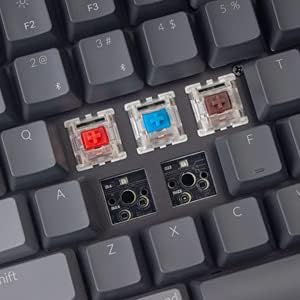
Image: This image demonstrates the hot-swappable capability of the Keychron K4, showing various Gateron switches detached from the keyboard's PCB, allowing for easy customization or replacement.
2.1. 스위치 교체
- 제공된 키캡 풀러를 사용하여 원하는 키캡을 조심스럽게 제거하세요.
- Use the provided switch puller to carefully grip the switch from its top and bottom clips. Pull straight up to remove the switch from the PCB.
- 새 스위치의 핀을 PCB의 구멍에 맞춰 정렬하세요. 핀이 일직선이 되도록 하세요.
- 새 스위치를 딸깍 소리가 나면서 제자리에 단단히 고정될 때까지 살살 밀어 넣으십시오. 무리하게 힘을 주지 마십시오.
- 키캡을 교체하세요.
3. 키캡 교체
Keycaps can be removed and replaced using the keycap puller. This is useful for cleaning or for installing custom keycap sets. Ensure proper alignment when replacing keycaps.
문제 해결
- 키보드가 Bluetooth를 통해 연결되지 않음:
- Ensure the keyboard's mode switch is set to "BT".
- Verify the keyboard is in pairing mode (Fn + 1/2/3 key flashing).
- 기기의 Bluetooth 설정을 확인하고 Bluetooth가 활성화되어 있는지 확인하세요.
- 컴퓨터/휴대폰에서 장치를 끄고 다시 페어링해보세요.
- 키보드가 충분히 충전되었는지 확인하세요.
- Bluetooth connection lag or disconnection:
- 간섭을 줄이려면 키보드를 기기에 더 가까이 옮기세요.
- 다른 강력한 무선 신호가 방해하지 않는지 확인하세요.
- 배터리 잔량을 확인하세요. 배터리 부족은 무선 성능에 영향을 줄 수 있습니다.
- Consider using the wired USB connection for critical tasks or gaming if wireless performance is inconsistent.
- 백라이트가 작동하지 않거나 멈춤:
- Ensure the backlight is not turned off (Fn + Light Bulb key).
- Adjust brightness using Fn + Left/Right Arrow keys.
- A full charge might resolve minor power-related issues.
- 키가 응답하지 않음:
- If using wireless, check battery and connection.
- If using wired, ensure the USB cable is securely connected.
- For specific keys, consider the hot-swappable feature: remove the keycap and switch, inspect the switch pins for bending, straighten if necessary, and reinsert. If the switch is faulty, replace it.
- 컴퓨터에서 키보드를 인식하지 못합니다.
- 다른 USB 포트나 케이블을 사용해 보세요.
- Ensure the OS switch on the keyboard matches your computer's operating system.
- 컴퓨터를 다시 시작하세요.
명세서
| 특징 | 세부 사항 |
|---|---|
| 상표 | 키크론 |
| 모델 번호 | 키크론 K4J3 |
| 공들여 나열한 것 | 96% (100키) |
| 연결성 | Bluetooth 5.1 (up to 3 devices) & USB Type-C Wired |
| 스위치 | Gateron G Pro Brown (Hot-Swappable) |
| 백라이트 | RGB (15+ types of flashing light mode) |
| 배터리 용량 | 4000mAh |
| 배터리 수명 | Up to 240 hours (backlight disabled) |
| N-키 롤오버(NKRO) | Wired Mode: NKRO; Wireless Mode: 6KRO |
| 운영 체제 호환성 | 맥OS, 윈도우 |
| 치수(길이x너비x높이) | 14.8 x 5.08 x 1.5 인치 |
| 품목 무게 | 2.05파운드 |
보증 및 지원
Keychron products are designed for durability and performance. For specific warranty terms and conditions, please refer to the warranty information provided with your purchase or visit the official Keychron website. For technical support, troubleshooting assistance, or inquiries regarding your Keychron K4 keyboard, please contact Keychron customer service directly.
공식 키크론 Web대지: www.keychron.com


