1. 서론
Thank you for choosing the Cecotec Ready Warm 8400 Bladeless Connected Heater. This manual provides essential information for the safe and efficient operation, maintenance, and troubleshooting of your new heater. Please read it thoroughly before use and keep it for future reference.

Image: The Cecotec Ready Warm 8400 Bladeless Connected Heater in a home setting, showcasin세련된 디자인과 디지털 디스플레이가 특징입니다.
2. 중요 안전 지침
화재, 감전 또는 부상의 위험을 줄이려면 항상 다음의 기본 예방 조치를 따르세요.
- 이 히터를 사용하기 전에 모든 지침을 읽으세요.
- 이 히터를 실외에서 사용하지 마십시오. 실내용으로만 설계되었습니다.
- 이 히터는 사용 중 뜨거워집니다. 화상을 피하기 위해 맨살이 뜨거운 표면에 닿지 않도록 하십시오.
- 가구, 베개, 침구, 종이, 옷, 커튼 등 가연성 물질은 히터 앞쪽에서 최소 1미터(3피트) 떨어뜨려 놓고, 측면과 뒤쪽에서도 멀리 두세요.
- 어린이 또는 환자 근처에서 히터를 사용할 경우와 히터를 작동 상태로 두고 방치할 경우에는 극히 주의가 필요합니다.
- 사용하지 않을 때는 항상 히터의 플러그를 뽑아두세요.
- 손상된 코드나 플러그가 있는 히터나 히터가 오작동하거나, 떨어뜨리거나, 어떤 식으로든 손상된 후에는 히터를 작동하지 마십시오. 히터를 공인 서비스 시설로 돌려보내 검사, 전기 또는 기계적 조정 또는 수리하십시오.
- 카펫 아래로 코드를 놓지 마십시오. 코드를 러그, 러너 또는 이와 유사한 덮개로 덮지 마십시오. 코드를 교통 구역에서 멀리하고 걸려 넘어지지 않는 곳에 정리하십시오.
- 감전이나 화재가 발생하거나 히터가 손상될 수 있으므로 통풍구나 배기구에 이물질을 넣거나 이물질이 들어가지 않도록 주의하세요.
- 화재 가능성을 예방하려면 공기 흡입구나 배출구를 어떤 식으로든 막지 마십시오. 침대와 같이 구멍이 막힐 수 있는 부드러운 표면에서는 사용하지 마십시오.
- 히터는 내부에 뜨겁고 아크 또는 스파크가 발생하는 부분이 있습니다. 가솔린, 페인트 또는 인화성 액체를 사용하거나 보관하는 곳에서는 사용하지 마십시오.
- 이 히터는 이 설명서에 설명된 대로만 사용하십시오. 제조업체에서 권장하지 않는 다른 용도로 사용하면 화재, 감전 또는 인명 상해가 발생할 수 있습니다.
- 히터는 항상 벽면 콘센트/수용구에 직접 꽂으세요. 연장 코드나 이동식 전원 탭(콘센트/전원 스트립)과 함께 사용하지 마세요.
- This heater includes an automatic shut-off safety feature if it tips over.
3. 제품 오버view
The Cecotec Ready Warm 8400 is a bladeless, connected heater designed for efficient indoor heating. It features a digital display and touch controls for easy operation.
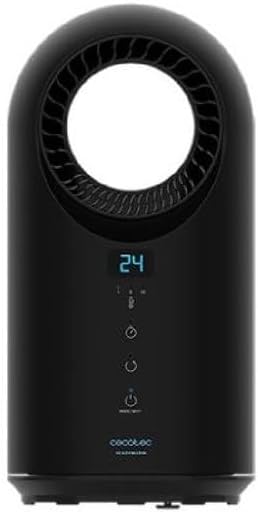
이미지: 앞면 view of the heater, highlighting the control panel and bladeless air outlet.
제어판 및 디스플레이
The heater features an intuitive control panel with a digital display. The display shows the current temperature and selected settings. The touch buttons allow you to adjust settings directly on the unit.

이미지: 상세 view of the bladeless air outlet and digital temperature display.
- 디지털 디스플레이: Shows current temperature, timer, and mode indicators.
- 전원 버튼: 장치를 켜거나 끕니다.
- 모드 버튼: Cycles through heating modes (e.g., low, medium, high heat, fan only).
- 온도 조절 버튼: 원하는 온도를 높이거나 낮춥니다.
- 타이머 버튼: 작동 타이머를 설정합니다.
- Wi-Fi 표시기: 연결 상태를 표시합니다.
4. 설정
- 짐 풀기: 히터를 포장에서 조심스럽게 꺼내세요. 보관이나 향후 운송을 위해 포장을 보관하세요.
- 놓기: Place the heater on a firm, level surface. Ensure there is at least 1 meter (3 feet) of clear space around the heater from walls, furniture, and other objects to allow for proper airflow and prevent fire hazards. Do not place it near water sources or in high humidity areas.
- 전원 연결: Plug the power cord directly into a grounded 220-240V AC electrical outlet. Do not use extension cords or power strips.
5. 사용 설명서
5.1 기본 작업
- 전원 켜기/끄기: 전원 버튼 (U) on the control panel to turn the heater on or off. The digital display will illuminate when the unit is on.
- 온도 조정: 온도 조절 버튼을 사용하세요.+ / −) to set your desired room temperature. The heater will automatically adjust its heating output to maintain this temperature.
- 모드 선택: Press the Mode button to cycle through available heating modes (e.g., Low Heat, High Heat) or a fan-only mode. The selected mode will be indicated on the display.

Image: User interacting with the heater's touch control panel.
5.2 타이머 기능
The timer function allows you to set a specific operating duration for the heater.
- While the heater is on, press the Timer button.
- 누를 때마다 작동 시간이 증가합니다(예: 1시간, 2시간, 최대).
- The display will show the set timer duration. The heater will automatically turn off once the set time has elapsed.
5.3 Connected Features (Wi-Fi & App Control)
The Ready Warm 8400 can be controlled remotely via a smartphone application, offering enhanced convenience and scheduling options.

Image: Smartphone showing a control app, demonstrating the heater's connected functionality.
- 앱 다운로드 : Download the official Cecotec smart home application from your device's app store (e.g., Google Play Store or Apple App Store).
- 편성: Follow the in-app instructions to pair your heater with your home Wi-Fi network. Ensure your heater is within range of your Wi-Fi router.
- 원격 제어: Once paired, you can control the heater's power, temperature, modes, and set schedules from your smartphone, even when you are away from home.
6. 유지관리
정기적인 청소는 히터의 성능을 유지하고 수명을 연장하는 데 도움이 됩니다.
- 청소 전: 청소하기 전에 항상 히터를 전원 콘센트에서 뽑고 완전히 식히십시오.
- 외부 청소: 히터의 외부 표면을 부드러운 천으로 닦으십시오.amp 천으로 닦아주세요. 연마성 세제, 용제 또는 강한 화학 물질은 마감재를 손상시킬 수 있으므로 사용하지 마세요.
- 공기 흡입구/배출구: Use a soft brush or a vacuum cleaner with a brush attachment to gently remove dust and debris from the air inlets and outlets. Ensure these areas remain clear for optimal performance.
- 저장: 히터를 장기간 보관할 경우, 깨끗하게 청소한 후 원래 포장재에 넣어 서늘하고 건조한 곳에 보관하십시오.
7. 문제 해결
히터에 문제가 발생하면 다음의 일반적인 문제와 해결 방법을 참조하세요.
| 문제 | 가능한 원인 | 해결책 |
|---|---|---|
| 히터가 켜지지 않습니다. | No power supply; Power button not pressed; Safety switch activated. | Check if the power cord is securely plugged in. Ensure the wall outlet is functional. Press the Power button. Check if the heater has tipped over and reset it. |
| 열 출력이 없습니다. | 잘못된 모드를 선택했습니다. 온도 설정이 너무 낮습니다. | Ensure a heating mode is selected (not fan-only). Increase the desired temperature setting above the current room temperature. |
| 히터에서 이상한 소리가 납니다. | Obstruction in air vents; Internal component issue. | Unplug the heater and check for any obstructions in the air inlets/outlets. If the noise persists, contact customer support. |
| Wi-Fi 연결이 실패합니다. | Incorrect Wi-Fi password; Heater out of range; Router issue. | Ensure correct Wi-Fi password. Move heater closer to router. Restart router. Follow app's pairing instructions carefully. |
8. 사양
| 특징 | 사양 |
|---|---|
| 상표 | 세코텍 |
| 모델 번호 | 05371 |
| 제품 크기(L x W x H) | 41.5 x 22 x 22.5cm |
| 무게 | 2.5 킬로그램 |
| 힘 | 1500 와트 |
| 권tage | 28 Volts (Note: Standard operating voltage for heaters is typically 110-120V or 220-240V. Please verify with product labeling.) |
| 자동 종료 | 예 |
| 속도의 수 | 3 |
| 소음 수준 | 10데시벨 |
| 특징 | Bladeless, Connected (Wi-Fi) |
| 폼 팩터 | 탑 |
| 가열 방식 | 전달 |
| 용도 | 실내 |
9. 보증 및 지원
기술 지원, 보증 청구 또는 예비 부품 문의는 Cecotec 공식 고객 지원 센터를 통해 문의하십시오. web구매 시 제공된 사이트 또는 연락처 정보.
Spare parts for this model are indicated to be available for up to 10 years from the date of purchase.
보증 관련 문의사항이 있을 경우 구매 증빙서류를 보관해 주시기 바랍니다.