소개
This manual provides comprehensive instructions for the Elekpia Universal Remote Control, designed as a direct replacement for your original remote for all ONN Roku TVs. This remote offers seamless control of your television and features dedicated buttons for popular streaming services like Netflix, Sling, Hulu, and VUDU.
Please read this manual carefully to ensure proper setup and operation of your new remote control.
설정
1. 배터리 설치
The Elekpia Universal Remote Control requires two (2) AAA alkaline batteries (not included) for operation. Follow these steps to install the batteries:
- 리모콘 뒷면에서 배터리함을 찾으세요.
- 배터리 덮개를 아래로 밀어서 엽니다.
- AAA 배터리 2개를 넣고 양극(+)과 음극(-) 단자가 배터리 보관함 내부 표시와 올바르게 맞춰지도록 합니다.
- 배터리 덮개를 제자리에 밀어 넣어 딸깍 소리가 날 때까지 밀어 넣습니다.
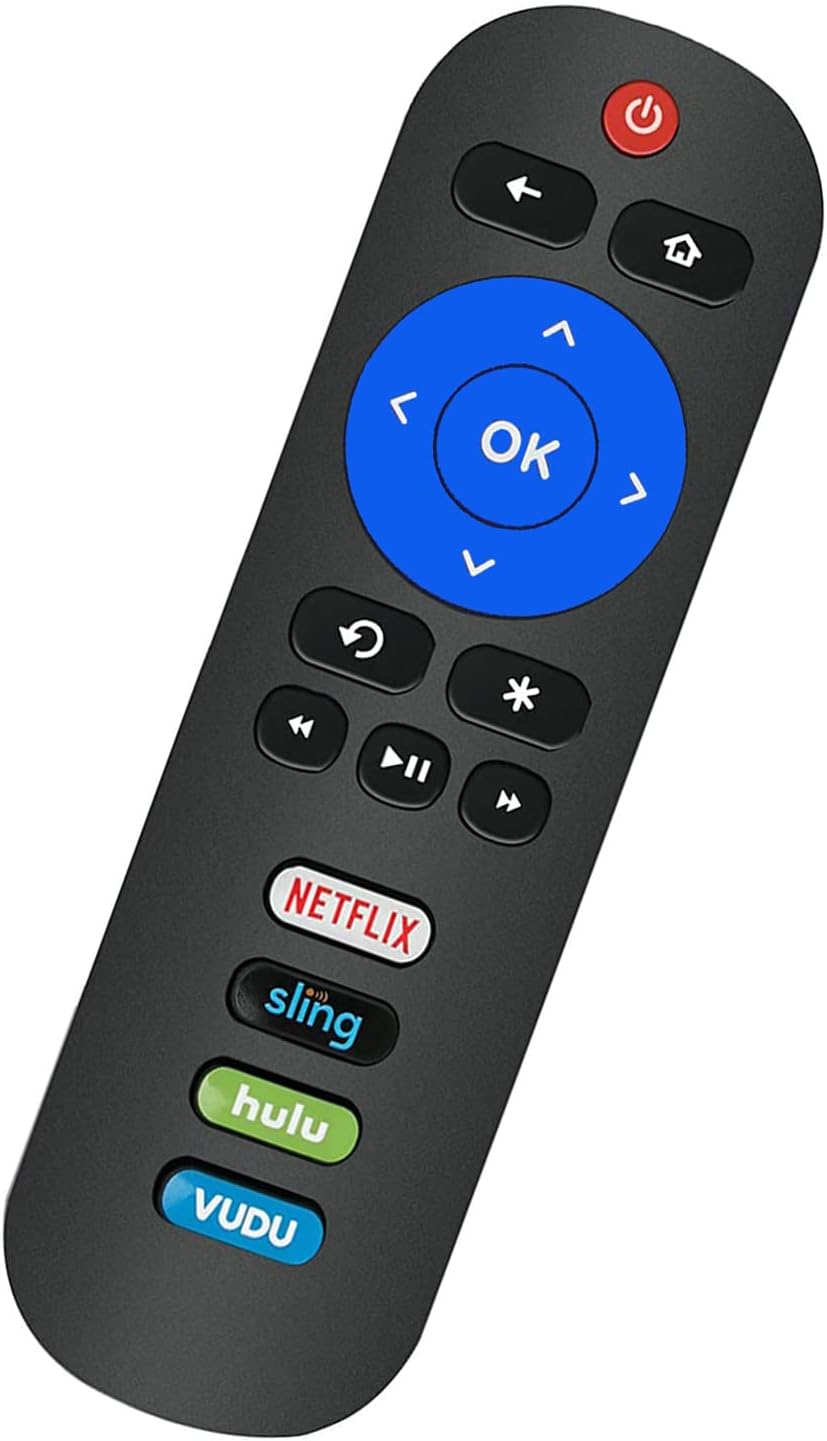
Image: Back of the remote control with the battery compartment visible.
2. 최초 사용 (프로그래밍 불필요)
This remote control is pre-programmed to work with all ONN Roku TVs. No programming or pairing is needed. Once the batteries are installed, the remote is ready for immediate use with your compatible ONN Roku TV.
중요 참고 사항: This remote control operates via Infrared (IR) technology and is specifically designed for ONN Roku TVs. It 작동하지 않습니다 with Roku sticks, Roku players, Roku boxes, or any other non-TV Roku devices. It also lacks a pairing button, voice function, and headphone jack.
작동 지침
Familiarize yourself with the buttons on your Elekpia Universal Remote Control:

이미지: 앞면 view of the Elekpia remote control, displaying all control buttons.
- 전원 버튼 (⏻): Turns your ONN Roku TV on or off.
- 뒤로 버튼(←): 이전 화면 또는 메뉴로 돌아갑니다.
- 홈 버튼 (⌂): Roku 홈 화면으로 이동합니다.
- 방향 패드(위, 아래, 왼쪽, 오른쪽): 메뉴를 탐색하고 옵션을 선택하는 데 사용됩니다.
- 확인 버튼: 선택 항목을 확정하거나 항목을 엽니다.
- 즉시 재생 버튼 (↻): 영상의 마지막 몇 초를 다시 재생합니다.
- 별표 버튼(∗): 앱 또는 메뉴 내의 옵션이나 설정에 접근합니다.
- 되감기(⏮), 재생/일시정지 (⏸), 빨리 감기 (⏭): 표준 미디어 재생 제어 기능.
- 볼륨 업/다운(🔊 / 🔉): TV 볼륨을 조정합니다.
- 음소거 버튼(🔇): TV 오디오를 음소거하거나 음소거 해제합니다.
- Dedicated App Buttons (Netflix, Sling, Hulu, VUDU): Directly launch the corresponding streaming application.

이미지: 측면 view of the remote control, showing the volume and mute buttons located on the side.
유지
- 배터리 교체: 리모컨의 반응이 느려지거나 작동이 멈추면 배터리를 교체하십시오. 항상 두 개의 배터리를 새 AAA 알칼리 배터리로 동시에 교체하십시오. 오래된 배터리와 새 배터리를 혼용하거나, 종류가 다른 배터리를 사용하지 마십시오.
- 청소: To clean the remote control, wipe it with a soft, dry cloth. Do not use liquid cleaners, sprays, or abrasive materials, as these may damage the remote's surface or internal components.
- 저장: 리모컨은 직사광선과 극한의 온도를 피해 서늘하고 건조한 곳에 보관하세요. 리모컨을 장기간 사용하지 않을 경우, 누액을 방지하기 위해 배터리를 분리해 두는 것이 좋습니다.
- 손질: Avoid dropping the remote control or subjecting it to strong impacts, which can cause internal damage.
문제 해결
| 문제 | 가능한 원인 / 해결책 |
|---|---|
| 리모컨이 응답하지 않습니다. |
|
| 원격 접속은 일부 기능에는 작동하지만 다른 기능에는 작동하지 않습니다. |
|
| Remote does not work with my Roku device. | This remote is specifically designed for ONN Roku TVs (televisions with Roku built-in). It is 호환되지 않음 with standalone Roku streaming sticks, Roku players, Roku boxes, or Roku gaming consoles. |
명세서
- 모델: Elekpia-ONN-RK
- 제품 크기: 5.5 x 1.5 x 0.6인치(13.97 x 3.81 x 1.52cm)
- 품목 무게: 1.76 온스(50그램)
- 전원 공급 장치: 1.5V AAA 알칼리 배터리 2개 (별도 구매)
- 연결 기술 : 적외선 (IR)
- 호환 장치: All ONN Roku TVs (e.g., models 100012585, 100012584, 100012586, 100012587, 100012589, 100018971, 100012590, 100005844, 3226000855, 3226000858, 100007147, 100005395, 100005397, 100005396, 100012588)
- 특별 기능: Universal compatibility with ONN Roku TVs, dedicated streaming service buttons.
보증 정보
Specific warranty details for the Elekpia Universal Remote Control are typically provided by the seller or manufacturer at the time of purchase. Please refer to your purchase documentation or contact the retailer from whom you purchased this product for information regarding warranty coverage and terms.
지원하다
If you encounter any issues or have questions regarding your Elekpia Universal Remote Control that are not addressed in this manual, please contact the seller or the manufacturer directly for assistance. Provide your product model number (Elekpia-ONN-RK) and details of your issue for faster support.
For general inquiries, you may also refer to the product listing page where you purchased the item for additional resources or frequently asked questions.


