1. 서론
구매해주셔서 감사합니다asing the SHARP XL-B512 Stereo Sound System. This micro sound system offers a rich 45-watt sound experience with versatile connectivity options including Bluetooth, CD player, USB, and FM radio. Its elegant design with a wooden speaker housing and LED display complements any living space. This manual provides essential information for setting up, operating, and maintaining your device to ensure optimal performance and longevity.
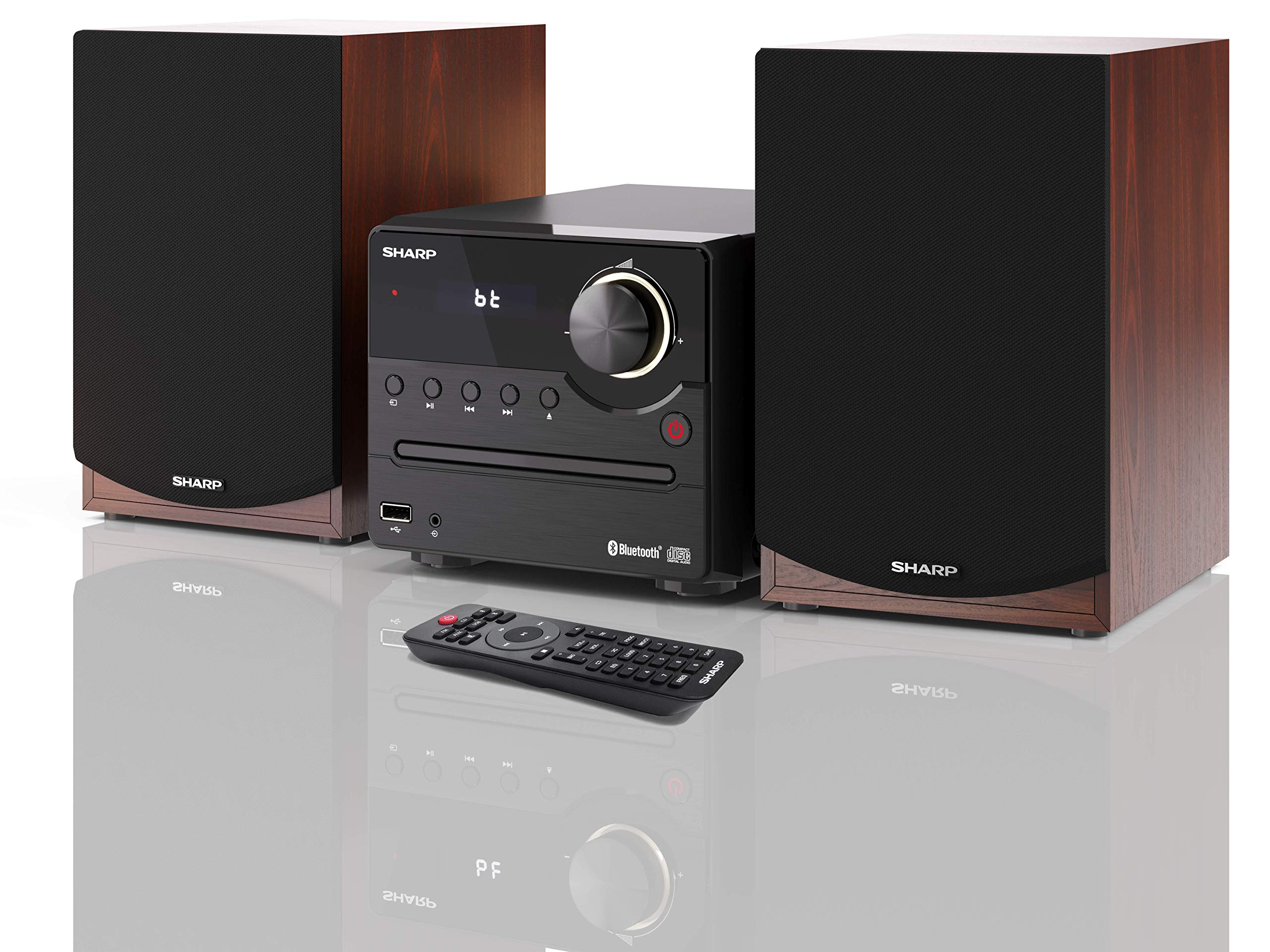
그림 1: SHARP XL-B512 Stereo Sound System. This image shows the central unit flanked by two wooden-cased speakers, reflecting on a polished surface.
2. 안전 정보
제품을 사용하기 전에 모든 안전 지침을 주의 깊게 읽으십시오. 나중에 참조할 수 있도록 이 설명서를 보관하십시오.
- 전원: 지정된 전원 공급 장치만 사용하십시오. 볼륨이 적절한지 확인하십시오.tage는 귀하의 지역 전원 공급 장치와 일치합니다.
- 통풍: 환기구를 막지 마십시오. 공기가 원활하게 흐르도록 장치 주변에 충분한 공간을 확보하십시오.
- 물과 습기: 본 기기를 비, 습기 또는 액체가 떨어지거나 튀는 곳에 노출시키지 마십시오. 꽃병 등 액체가 담긴 물건을 기기 위에 올려놓지 마십시오.
- 열: 라디에이터, 난방 장치, 스토브 또는 기타 장치(예: 열원)에서 장치를 멀리 두십시오. amp열을 생성하는 발전기.
- 청소: 청소하기 전에 벽면 콘센트에서 제품의 플러그를 뽑으세요. 마른 천만 사용하세요.
- 서비스: 이 제품을 직접 수리하려고 하지 마십시오. 모든 서비스는 자격을 갖춘 서비스 담당자에게 문의하십시오.
3. 패키지 내용
아래 나열된 모든 품목이 패키지에 포함되어 있는지 확인하세요.
- SHARP XL-B512 Micro Sound System (Main Unit)
- Two Speakers (with wooden housing)
- 전원 케이블
- 리모콘(배터리 포함)
- 사용 설명서(본 문서)
- 빠른 시작 가이드
4. 설정
4.1 스피커 연결
Connect the two speakers to the main unit using the provided speaker cables. Ensure correct polarity (positive to positive, negative to negative) for optimal sound quality.
4.2 전원 연결
Connect the power cable to the AC IN port on the rear of the main unit, then plug it into a wall outlet.

그림 2: Rear panel connections. This image displays the back of the central unit with ports for speaker wires and the AC power input, alongside the rear of the two speakers.
4.3 초기 전원 켜기
Press the Power button on the main unit or the remote control to turn on the system. The LCD display will illuminate.
5. 사용 설명서
5.1 전면 패널 컨트롤

그림 3: Front panel controls. This close-up shows the central unit's display, volume knob, and various control buttons for playback and source selection.
- 전원 버튼: 장치를 켜거나 끕니다.
- 소스 버튼 : Cycles through available input sources (CD, FM, Bluetooth, USB, AUX).
- 볼륨 노브: 마스터 볼륨 레벨을 조절합니다.
- 재생 컨트롤: Play/Pause, Stop, Skip Forward/Backward for CD and USB modes.
- USB 포트: 음악 재생을 위해 USB 저장 장치를 연결합니다.
- 보조 입력: 외부 오디오 장치를 연결하기 위한 3.5mm 잭입니다.
5.2 CD 재생
- 를 누르세요 원천 button to select 'CD' mode.
- Open the CD tray by pressing the Eject button.
- Place a CD (CD/CD-R/CD-RW/MP3 format) with the label side up into the tray.
- Close the CD tray. The system will read the disc and begin playback automatically or display track information.
- 재생 제어 기능(재생/일시 정지, 정지, 건너뛰기)을 사용하여 음악을 관리하세요.
5.3 FM 라디오
- 를 누르세요 원천 'FM' 모드를 선택하는 버튼입니다.
- The system will automatically search for available stations or you can manually tune.
- To save a station as a preset, tune to the desired station, then press and hold the 사전 설정 button (if available on remote) or follow on-screen instructions. The system supports 40 preset memories.
- 사용하세요 프리셋 업/다운 버튼을 사용하여 저장된 방송국을 탐색합니다.
5.4 블루투스 페어링
- 를 누르세요 원천 button to select 'Bluetooth' mode. The display will show 'bt' and flash, indicating it's in pairing mode.
- 모바일 기기에서 블루투스를 활성화하고 사용 가능한 기기를 검색하세요.
- Select 'SHARP XL-B512' from the list of devices.
- Once paired, the 'bt' indicator on the system's display will stop flashing. You can now stream audio from your device.
5.5 USB 재생
- 전면 패널의 USB 포트에 USB 저장 장치를 삽입합니다.
- 를 누르세요 원천 'USB' 모드를 선택하는 버튼입니다.
- 시스템이 호환되는 오디오를 자동으로 감지하고 재생합니다. files(MP3).
- 재생 컨트롤을 사용하여 트랙을 탐색하세요.
5.6 AUX 입력
- Connect an external audio device (e.g., smartphone, MP3 player) to the AUX IN jack on the front panel using a 3.5mm audio cable (not supplied).
- 를 누르세요 원천 'AUX' 모드를 선택하는 버튼입니다.
- Play audio from your connected device. The sound will be output through the SHARP XL-B512 system.
5.7 이퀄라이저 설정
The system features 6 preset equalizers with independent treble and depth control. Use the EQ button on the remote control or main unit to cycle through the presets and adjust sound to your preference.
6. 유지관리
6.1 장치 청소
Wipe the unit with a soft, dry cloth. Do not use abrasive cleaners, waxes, or solvents as they may damage the finish. Ensure the unit is unplugged before cleaning.
6.2 CD 케어
Handle CDs by their edges. Keep them clean and free of scratches. Store CDs in their cases when not in use.
6.3 스피커 관리
The wooden speaker housing can be cleaned with a soft, dry cloth. Avoid placing heavy objects on the speakers or exposing them to direct sunlight or extreme temperatures.
7. 문제 해결
If you encounter any issues with your SHARP XL-B512 system, refer to the following table for common problems and solutions.
| 문제 | 가능한 원인 | 해결책 |
|---|---|---|
| 전원이 없습니다 | Power cable not connected securely; Power outlet not active. | 전원 케이블 연결을 확인하세요. 다른 전원 콘센트를 사용해 보세요. |
| 소리가 나지 않습니다 | Volume too low; Incorrect source selected; Speaker cables disconnected. | 볼륨을 높이세요. 올바른 입력 소스를 선택하세요. 스피커 케이블 연결 상태를 확인하세요. |
| 블루투스가 페어링되지 않습니다 | System not in pairing mode; Device too far; Bluetooth disabled on device. | Ensure system is in Bluetooth pairing mode; Move device closer; Enable Bluetooth on your device. |
| CD가 재생되지 않습니다 | CD inserted incorrectly; CD is dirty or scratched; Incorrect format. | Reinsert CD correctly; Clean CD; Ensure CD is a supported format (CD/CD-R/CD-RW/MP3). |
| 리모컨이 작동하지 않습니다 | 배터리가 소진되었거나 잘못 삽입되었습니다. 리모컨과 장치 사이에 장애물이 있습니다. | 배터리를 교체하십시오. 배터리 극성이 올바른지 확인하십시오. 장애물을 제거하십시오. |
이러한 해결 방법을 시도한 후에도 문제가 지속되면 고객 지원팀에 문의하세요.
8. 사양
Below are the technical specifications for the SHARP XL-B512 Stereo Sound System:
- 모델: XL-B512
- 총 출력 전력 : 45 와트
- 오디오 출력 모드: 스테레오 재생
- Speaker Output Channel Quantity: 2
- 지원되는 오디오 형식: MP3, CD, CD-R, CD-RW
- 튜너 기술: FM PLL Tuner
- FM 주파수 범위 : 87.5~108MHz
- FM Preset Memory: 40개 스테이션
- 연결성: 블루투스, USB, AUX(3.5mm)
- 특별 기능: 6 Preset Equalizers, LCD Display with white backlight
- Sound System Dimensions (W x H x D): 17 x 22 x 15cm
- Speaker Dimensions (W x H x D): 14.5 x 17.7 x 22.3cm(각각)
- 품목 무게: 4kg
- 전원: 코드식 전기
- 원격 제어: 네 (배터리 포함)
9. 보증 및 지원
Your SHARP XL-B512 Stereo Sound System comes with a standard manufacturer's warranty. Please refer to the warranty card included in your package for specific terms and conditions, including the warranty period and coverage details.
For technical support, service inquiries, or further assistance, please contact your local SHARP customer service center. Contact information can typically be found on the manufacturer's web사이트 또는 보증 문서에서 확인하세요.


