1. 서론
Thank you for choosing the FREESTYLE FH0955 LED Bluetooth Headphones. This manual provides essential information for the proper setup, operation, and maintenance of your new headphones. Please read it carefully before use to ensure optimal performance and longevity of the product.
2. 제품 오버view
The FREESTYLE FH0955 headphones offer a wireless audio experience with integrated features designed for convenience and style. Key features include Bluetooth 5.0 + EDR connectivity, a built-in microSD card slot for direct music playback, a foldable headband for portability, and subtle LED backlighting on the earcups.

이미지 2.1: 앞면 view of the FREESTYLE FH0955 LED Bluetooth Headphones, showcasing the over-ear design and LED lighting.

이미지 2.2: 사이드 프로file of the FREESTYLE FH0955 LED Bluetooth Headphones, highlighting the earcup and headband design.

Image 2.3: A person wearing the FREESTYLE FH0955 LED Bluetooth Headphones, demonstrating typical usage.
3. 설정
3.1. 헤드폰 충전
Before first use, fully charge the headphones. The FH0955LB model is equipped with a 400 mAh Lithium-ion battery.
- Connect the supplied MicroUSB charging cable to the charging port on the headphones.
- Connect the other end of the cable to a USB power source (e.g., computer USB port, USB wall adapter, or power bank).
- The LED indicator will illuminate during charging and turn off or change color once fully charged.
- A full charge typically takes approximately 2 hours and provides up to 10 hours of continuous music playback.
3.2. 블루투스 페어링
헤드폰을 장치에 무선으로 연결하려면:
- 헤드폰이 충전되어 있고 전원이 꺼져 있는지 확인하세요.
- 헤드폰의 전원 버튼을 LED 표시등이 깜빡일 때까지 길게 누르세요. LED 표시등이 깜빡이면 페어링 모드에 진입한 것입니다.
- 기기(스마트폰, 태블릿, 컴퓨터)에서 Bluetooth를 활성화하고 사용 가능한 기기를 검색하세요.
- Select "FH0955" or a similar name from the list of found devices.
- 연결이 완료되면 LED 표시등이 깜빡임을 멈추고 계속 켜져 있거나 모델에 따라 꺼집니다.
- The Bluetooth 5.0 + EDR technology allows for a stable connection up to 10 meters.
3.3. MicroSD 카드 재생
The headphones feature an integrated microSD card slot for direct music playback without a connected device.
- 오디오가 미리 저장된 microSD 카드를 삽입하세요. files) into the designated slot on the headphones.
- The headphones should automatically switch to microSD playback mode. If not, use the Mode button (if available) to switch.
- Use the playback controls on the headphones to manage your music.
3.4. 유선 연결(3.5mm 오디오 잭)
For devices without Bluetooth or when the battery is depleted, you can use the included 3.5mm audio cable.
- 3.5mm 오디오 케이블의 한쪽 끝을 헤드폰의 오디오 잭에 연결합니다.
- 다른 쪽 끝을 장치의 3.5mm 오디오 출력에 연결합니다.
- 헤드폰은 패시브 모드로 작동하며 블루투스 기능은 비활성화됩니다.
4. 사용 설명서
4.1. 전원 켜기/끄기
- 전원 켜기: LED 표시등이 켜질 때까지 약 3초 동안 전원 버튼을 길게 누릅니다.
- 전원 끄기 : LED 표시등이 꺼질 때까지 약 3~5초 동안 전원 버튼을 길게 누릅니다.
4.2. 음악 재생
- 재생/일시 중지: 재생/일시정지 버튼을 한 번 누르세요.
- 다음 트랙: Press the "Next" button (often Volume Up, long press).
- 이전 트랙 : Press the "Previous" button (often Volume Down, long press).
- 볼륨 업: 볼륨 높이기 버튼을 짧게 누르세요.
- 볼륨 작게 : 볼륨 낮추기 버튼을 짧게 누르세요.
4.3. 통화 관리
내장 마이크를 통해 블루투스로 연결하면 전화 통화를 관리할 수 있습니다.
- 전화 받기/종료: 전화가 걸려오는 동안 재생/일시정지 버튼을 한 번 누르세요.
- 전화 거부: 전화가 걸려오는 동안 재생/일시정지 버튼을 약 2초 동안 길게 누르세요.
- 마지막 번호 재다이얼: 재생/일시정지 버튼을 두 번 누르세요.
4.4. LED Backlighting
The headphones feature subtle LED backlighting. Refer to the specific controls on your device for toggling or changing LED modes, if available. This feature is primarily aesthetic.
5. 유지관리
5.1. 청소
- 부드럽고 마른 천을 사용하여 헤드폰 표면을 닦으세요.
- 연마성 세척제, 알코올 또는 화학 용제를 사용하지 마십시오. 마감재가 손상될 수 있습니다.
- 충전 포트와 오디오 잭에 먼지와 이물질이 들어가지 않도록 하십시오.
5.2. 보관
- 헤드폰은 직사광선과 극한의 온도를 피해 시원하고 건조한 곳에 보관하세요.
- When not in use for extended periods, charge the battery at least once every three months to maintain battery health.
- Utilize the foldable headband feature for compact storage and transport.
6. 문제 해결
| 문제 | 가능한 원인 | 해결책 |
|---|---|---|
| 헤드폰의 전원이 켜지지 않습니다. | 배터리가 부족합니다. | 헤드폰을 완전히 충전하세요. |
| 블루투스로 페어링할 수 없습니다. | 헤드폰이 페어링 모드가 아닙니다. 기기의 Bluetooth가 꺼져 있습니다. 기기와 너무 멀리 떨어져 있습니다. | Ensure headphones are in pairing mode. Turn device Bluetooth off/on. Move closer to device (within 10m). |
| 소리가 나지 않습니다. | 볼륨이 너무 낮음; 오디오 소스가 올바르지 않음; 헤드폰이 연결되지 않음. | Increase volume on headphones and device. Check Bluetooth connection or 3.5mm cable. Ensure correct mode (Bluetooth/MicroSD). |
| microSD 카드가 재생되지 않습니다. | 카드가 올바르게 삽입되지 않았습니다. 지원되지 않는 카드입니다. file 포맷 오류; 카드가 손상되었습니다. | Reinsert card. Ensure audio files are in a supported format (e.g., MP3). Try a different microSD card. |
7. 사양
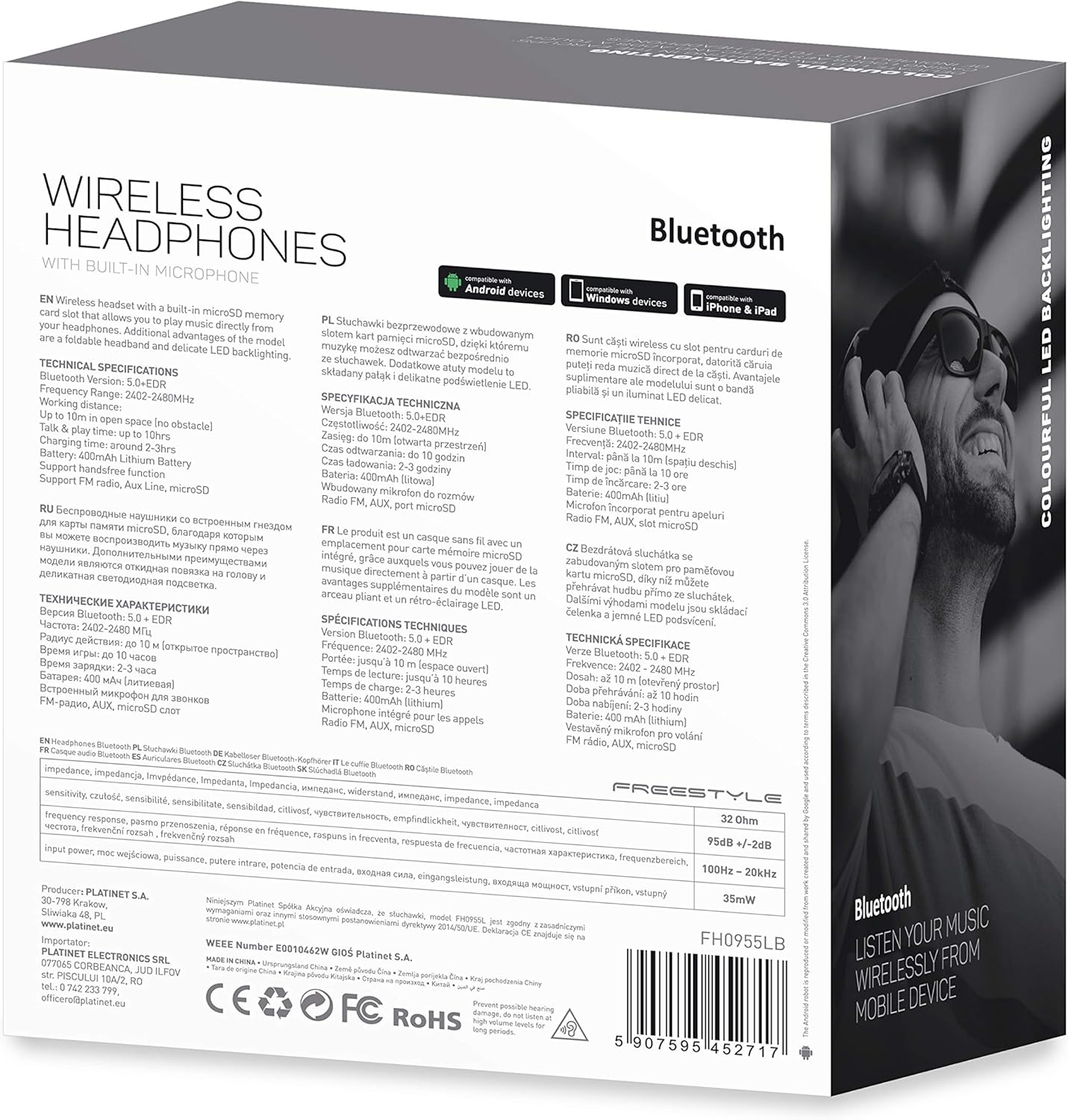
이미지 7.1: 상세 view of the product packaging, showing technical specifications and compliance information.
| 특징 | 사양 |
|---|---|
| 모델 번호 | FH0955LB |
| 상표 | 프리스타일 |
| 연결 기술 | Wireless (Bluetooth 5.0 + EDR) |
| 무선 범위 | 최대 10미터 |
| 오디오 잭 | 3.5mm (XNUMXmm) |
| 폼 팩터 | 귀덮개 (귀둘레) |
| 특별 기능 | Noise Cancellation, LED Backlighting, MicroSD Card Slot |
| 배터리 유형 | Integrated Lithium-ion (400 mAh) |
| 재생 시간 | 최대 10시간 |
| 충전 시간 | 약 2시간 |
| 충전 포트 | 마이크로USB |
| 색상 | 검은색 |
| 재료 | Leather (earpads/headband) |
| 방수 레벨 | 방수 |
| 포함된 구성 요소 | 헤드폰 1 쌍 |
| 제조업체 | 플래티넷 |
8. 보증 및 지원
특정 보증 세부 사항은 일반적으로 구매 문서 또는 제조업체의 공식 문서에 제공됩니다. web사이트. 보증 청구를 위해 구매 증빙 자료를 보관해 주세요.
For technical support or inquiries, please refer to the contact information provided by your retailer or the manufacturer, Platinet.
9. 안전 정보
- 헤드폰을 극한의 온도, 습도 또는 액체에 노출시키지 마십시오.
- 청력 손상을 방지하려면 장시간 높은 볼륨으로 청취하지 마십시오.
- 헤드폰을 분해하거나 개조하지 마십시오. 보증이 무효화될 수 있으며 제품이 손상될 수 있습니다.
- 어린이의 손이 닿지 않는 곳에 보관하세요.
- Dispose of the product responsibly according to local electronic waste regulations.


