1. 제품 오버view
The Blueair DreamWell H38i is an advanced evaporative humidifier designed to provide a clean and comfortable indoor environment. This unit incorporates a UV lamp for enhanced hygiene and utilizes 360° InvisibleMist Technology to deliver ample humidification without visible mist. Its user-friendly design ensures easy maintenance, with a machine-washable filter and a dishwasher-safe water tank. The H38i also features an automatic shut-off function for safety when the water level is low. Enhance your daily relaxation with its quiet operation, integrated light function, and aroma compatibility, creating a pleasant atmosphere for improved sleep.

Blueair DreamWell H38i Humidifier placed on a bedside table in a bedroom setting, highlighting its compact and stylish design.

Diagram illustrating the 360° InvisibleMist Technology, showing how the evaporative humidification works without producing visible mist.
2. 설정
2.1 풀기
Carefully remove all components from the packaging. Ensure all protective wraps and packing materials are removed from the unit and its accessories.
2.2 배치
Place the humidifier on a flat, stable surface. Ensure there is adequate space around the unit for optimal air circulation.
2.3 물 탱크 채우기
The DreamWell H38i offers two convenient ways to refill the water tank:
- Top-Fill Method: Pour water directly into the top opening of the humidifier.
- Tank Removal Method: Remove the water tank from the base, fill it at a sink, and then reinsert it into the unit.
Use clean tap water. Do not exceed the maximum fill line.

Image demonstrating two ways to refill the humidifier: pouring water directly from the top or removing the tank for filling.
2.4 전원 연결
Connect the power adapter to the humidifier and then plug it into a standard electrical outlet (100 V AC, 50/60Hz).
2.5 Wi-Fi 설정 (선택 사항)
For smart control features, download the Blueair app from the App Store or Google Play. Follow the in-app instructions to connect your H38i humidifier to your Wi-Fi network (IEEE 802.11b/g/n, 2.4GHz band required).
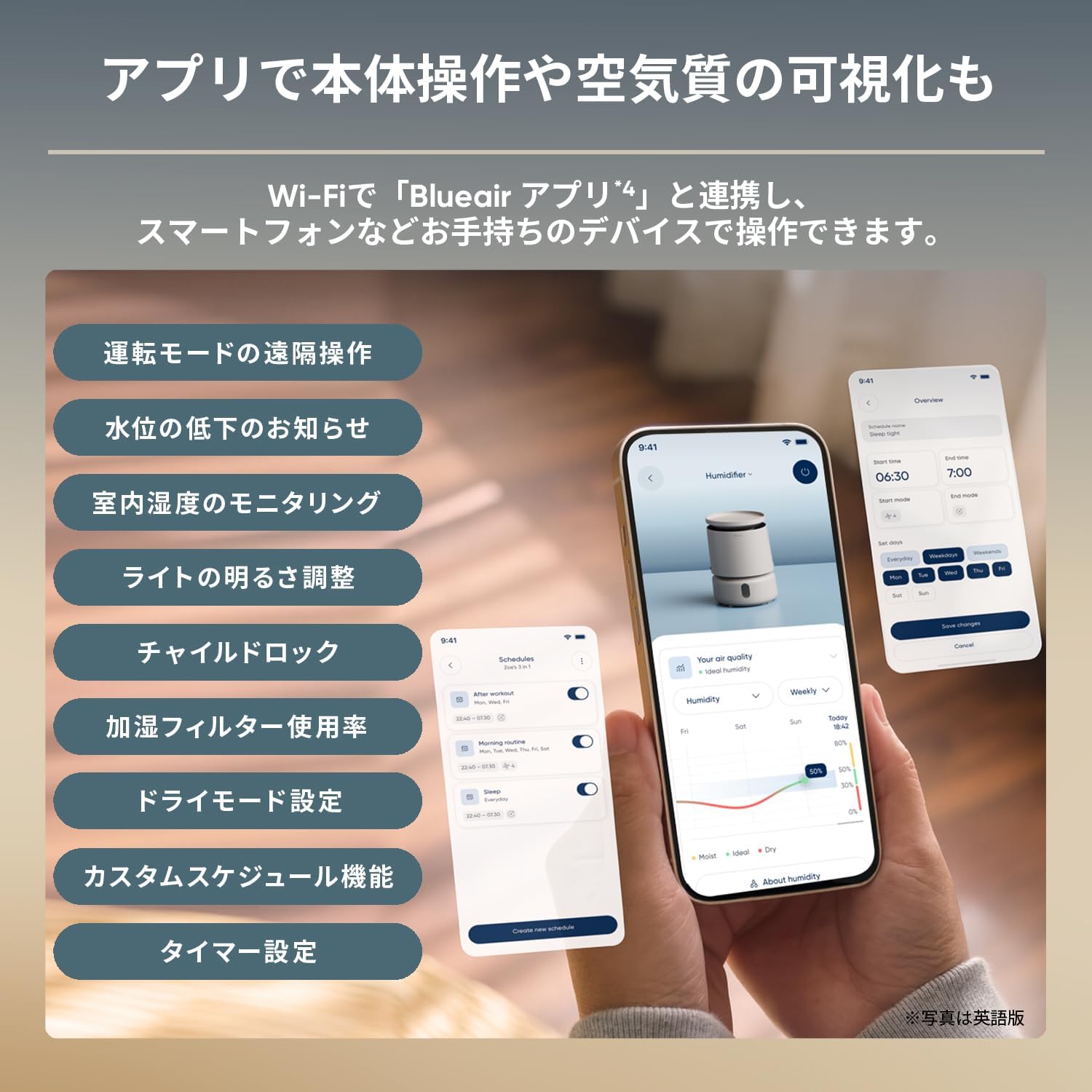
Screenshots of the Blueair app on a smartphone, demonstrating remote operation, humidity monitoring, scheduling, and other smart features.
3. 사용 설명서
3.1 전원 켜기/끄기
Press the power button on the top panel or use the Blueair app to turn the unit on or off.
3.2 Humidity Settings
Adjust the desired humidity level using the controls on the unit's display or through the Blueair app. The unit will automatically maintain the set humidity.

Close-up of the humidifier's top panel, showing the digital display with humidity percentage and touch controls for various functions.
3.3 Operating Speed
Select from Night mode or speeds 1-3. Night mode operates at a quiet 20 dB(A) for undisturbed sleep.
3.4 향기 기능
Add 2-3 drops of your preferred aroma oil to the included scent pod. Insert the pod into the designated slot on the humidifier to enjoy a pleasant fragrance in your room.

Image showing how to add aroma oil to the scent pod, which slides into a designated slot on the humidifier.
3.5 수위 표시기
The unit features a water level sensor and indicator. When the water level is low, the unit will automatically stop operation and indicate the need for refilling.

The Blueair DreamWell H38i Humidifier in a bedroom at night, with a soft glow from its light function, creating a relaxing atmosphere.
4. 유지관리
가습기의 최적 성능과 위생을 위해서는 정기적인 청소 및 관리가 매우 중요합니다.
4.1 Humidifying Filter Cleaning
The humidifying filter is designed for easy cleaning. It can be washed in a washing machine. Refer to the detailed instructions in the full user manual for specific washing conditions. The recommended replacement guideline for the filter is approximately 9-12 months, depending on usage and water quality.

A person placing the humidifying filter into a washing machine, demonstrating the ease of cleaning.
4.2 물탱크 청소
The water tank is dishwasher-safe for convenient and thorough cleaning. For manual cleaning, use mild soap and water. The 'Wet & Dry Separate Structure' ensures that the humidifying filter and tank are completely separated, making it easier to keep the filter clean.
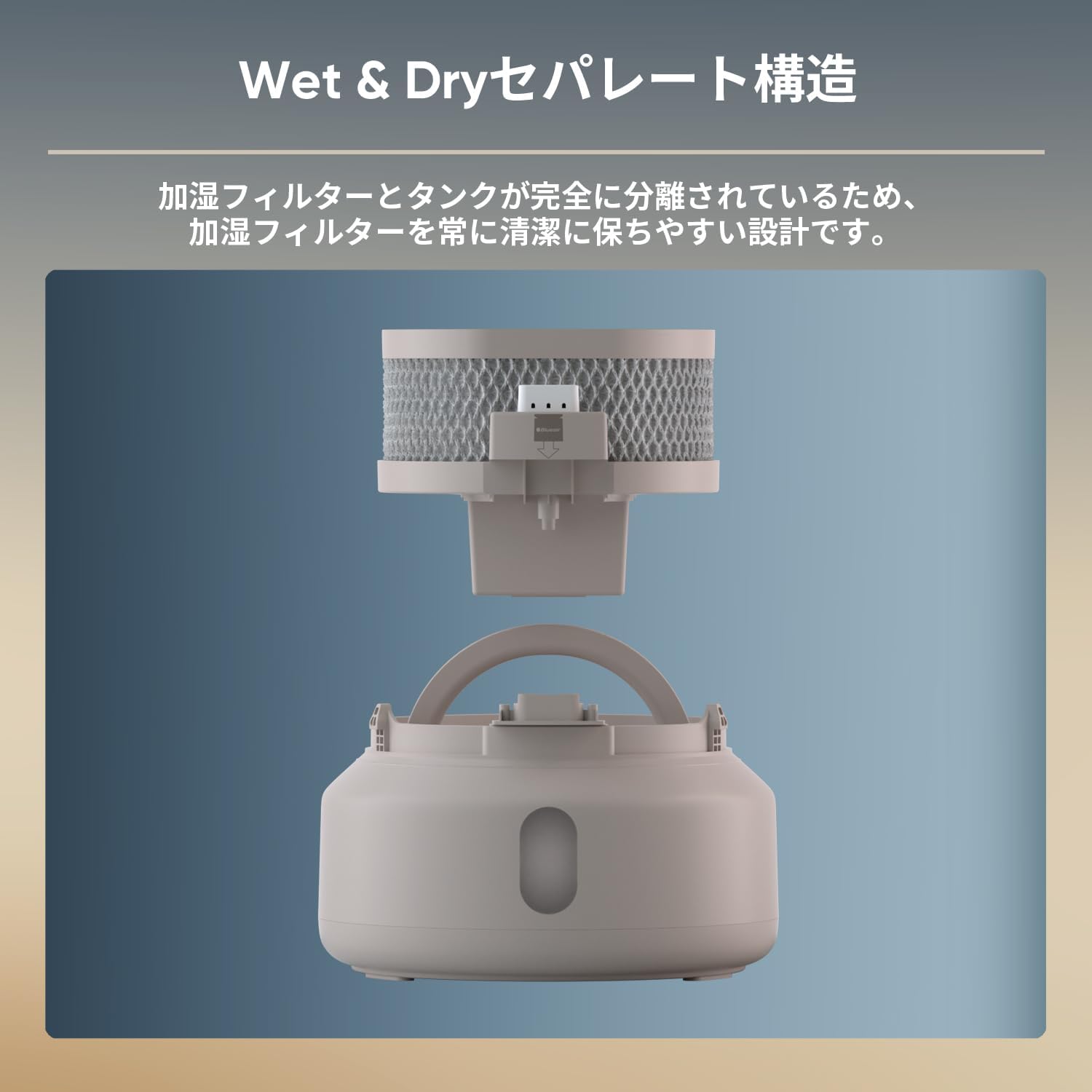
폭발했다 view of the humidifier showing the 'Wet & Dry Separate Structure' with the humidifying filter and water tank clearly separated.
4.3 UVLamp
통합 UV lamp in the pump helps suppress bacterial growth in the water, contributing to a clean humidification environment. No user maintenance is typically required for the UV lamp 그 자체.
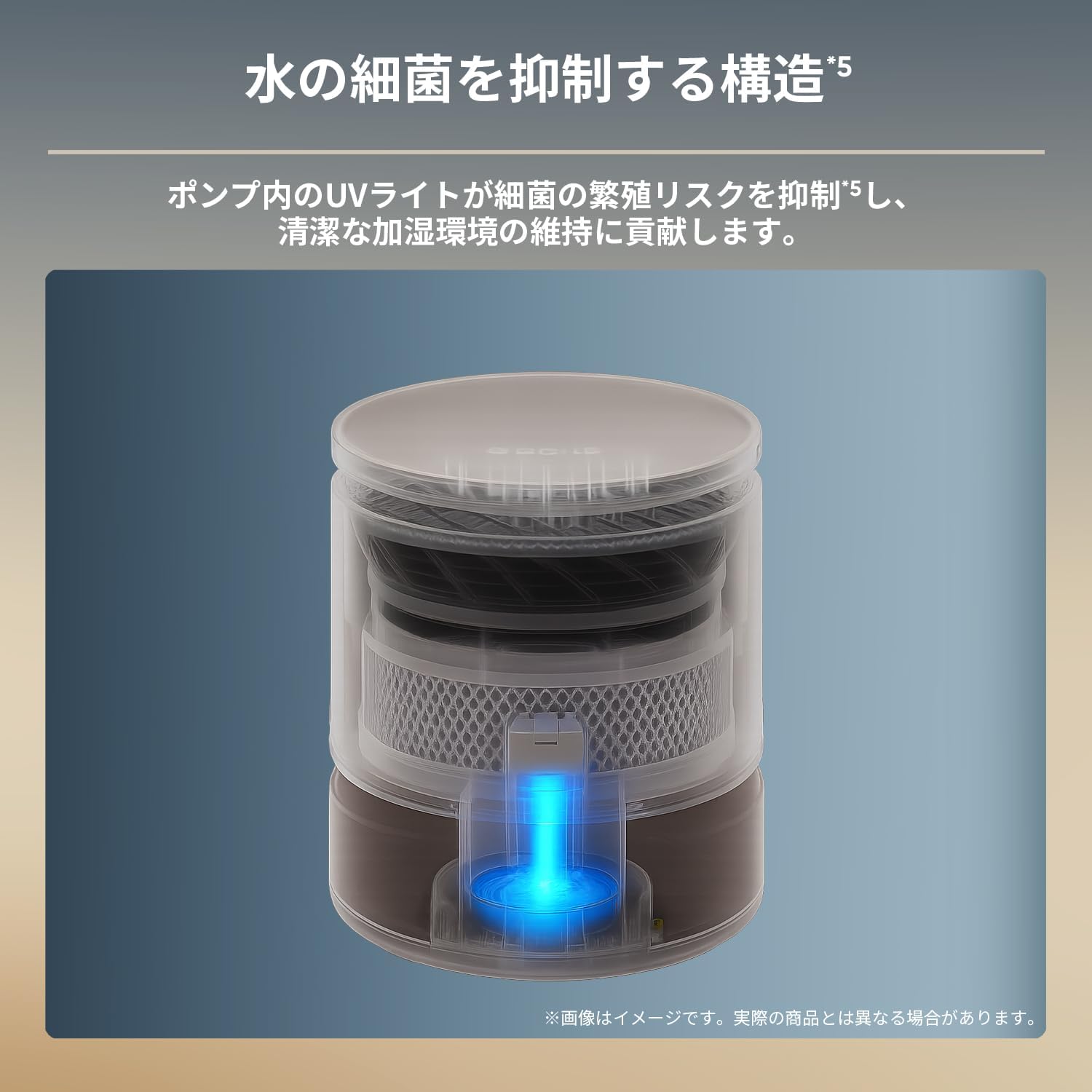
내부 view of the humidifier highlighting the UV light in the pump, which suppresses bacterial growth in the water.
5. 문제 해결
| 문제 | 가능한 원인 | 해결책 |
|---|---|---|
| 기기가 켜지지 않습니다. | 전원 공급이 없습니다. | Check if the power adapter is securely plugged into the unit and the wall outlet. |
| 분무 기능이 없거나 가습량이 적습니다. | 물탱크가 비어 있거나 부족합니다. | Refill the water tank. The unit has an automatic shut-off when water is low. |
| 습도 측정값이 정확하지 않은 것 같습니다. | External factors or sensor calibration. | If using the Blueair app, you may be able to adjust the target humidity to compensate for minor discrepancies. Ensure the sensor is not obstructed. |
| 작동 중 비정상적인 소음이 발생합니다. | Unit not on a flat surface, or internal component issue. | Ensure the unit is on a stable, flat surface. If the noise persists, contact customer support. |
| Aroma not dispersing. | Scent pod empty or incorrectly inserted. | Add more aroma oil to the scent pod and ensure it is correctly inserted into its slot. |
6. 사양
- 모델 번호: 3331912000 (Product No: 113369)
- 치수(직경 x 높이): 245mm x 330mm
- 단위 무게: 약 2.8kg
- 가습 방법: 증발
- 적용 지역: Prefabricated Western room ~11 tatami (18m²), Wooden Japanese room ~7 tatami (11m²)
- 가습 용량: 약 400mL/h
- 전력 소비량: 3.3 - 12.0 W
- 작동 소음: 20 - 40 dB(A)
- 탱크 용량: 3.8리터
- 센서: Temperature/Humidity sensor, Water level sensor
- 와이파이 지원: Yes (IEEE 802.11b/g/n, 2.4GHz band)
- Operating Speed Settings: Night, 1, 2, 3
- 전원 어댑터 입력: 100 V AC, 50/60Hz, 0.5A
- 전원 어댑터 출력: 12VDC, 1A
- Filter Replacement Guideline: Approx. 9-12 months (based on 10 hours/day usage)
7. 보증 정보
This Blueair DreamWell H38i Humidifier comes with a 3년 보증 from the date of purchase. This warranty covers defects in materials and workmanship under normal use. Please retain your proof of purchase for warranty claims. The warranty does not cover damage resulting from misuse, accident, unauthorized modification, or normal wear and tear of consumable parts like filters.
8. 지원
For further assistance, technical support, or to purchase replacement parts and filters, please visit the official Blueair website or contact Blueair customer service. Contact details can typically be found on the product packaging or the official brand web대지.
- 온라인 지원: Visit the Blueair official webFAQ, 문제 해결 가이드, 제품 등록을 위한 사이트입니다.
- 고객 서비스: Refer to your regional Blueair contact information for phone or email support.


