1. 서론
This manual provides essential information for the safe and effective use of your ProForm Sport 3.0 Treadmill. Please read all instructions thoroughly before assembly and operation. Retain this manual for future reference.
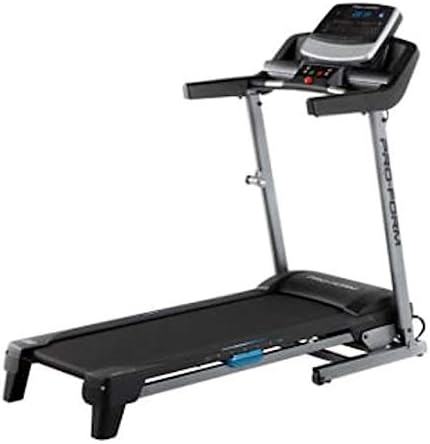
Image: The ProForm Sport 3.0 Treadmill, showcasing its overall design and console.
2. 중요한 안전 정보
To reduce the risk of serious injury, read the following important precautions before using the treadmill:
- 운동 프로그램을 시작하기 전에 의사와 상담하십시오.
- The treadmill is designed to support a maximum user weight of 125킬로그램(275파운드).
- Recommended for users 15세 이상.
- 항상 첨부하세요 안전 키 to your clothing before starting the treadmill. The treadmill will stop if the safety key is disengaged.
- 작동 중에는 어린이와 애완동물을 런닝머신에 가까이 두지 마십시오.
- 러닝머신을 평평한 표면에 놓고 뒤쪽으로 최소 2m(6.5피트), 양쪽으로 각각 0.5m(1.6피트)의 여유 공간을 두세요.
- 적절한 운동복과 운동화를 착용하세요.
- 전원 코드나 플러그가 손상되었거나 제대로 작동하지 않는 경우 런닝머신을 작동하지 마십시오.
3. 조립 설명서
The ProForm Sport 3.0 Treadmill requires assembly. Please refer to the separate assembly guide included with your product for detailed, step-by-step instructions. Ensure all components listed in the assembly guide are present before beginning. A tool kit is included to assist with assembly.
The treadmill features a 공간 절약 design, allowing it to be folded for storage after use. Follow the assembly guide for instructions on how to properly fold and unfold the treadmill.
4. 사용 설명서

이미지: 클로즈업 view of the ProForm Sport 3.0 Treadmill console.
4.1 전원 켜기 및 끄기
- Connect the power cord to a grounded outlet. The treadmill operates on 9Vcc 2.0A.
- Locate the main power switch, usually near the front of the treadmill base, and flip it to the 'ON' position.
- To power off, flip the main power switch to 'OFF' and unplug the power cord.
4.2 콘솔 종료view
The console features a 5-inch Multi-Color Display that shows workout metrics such as speed, incline, time, distance, and heart rate. It includes an audio port compatible with two 2-inch speakers for entertainment during your workout.
4.3 운동 시작하기
- 러닝머신 벨트 위로 올라가서 발을 측면 레일에 올려놓으세요.
- 첨부하다 안전 키 clip to your clothing. Insert the safety key into its designated slot on the console.
- 콘솔의 '시작' 버튼을 누르십시오. 벨트가 저속으로 움직이기 시작합니다.

Image: A user engaging in a workout on the ProForm Sport 3.0 Treadmill.
4.4 속도 및 경사 조절
- 사용하세요 디지털 속도 제어 buttons (usually '+' and '-') to adjust the belt speed from 0 ~ 10MPH.
- 사용하세요 Digital Incline Control buttons to adjust the incline from 0%에서 10%까지.
- Quick speed and incline buttons may also be available for rapid adjustments.
4.5 사전 설정 프로그램 사용
The treadmill includes 16 Pre-set Training Programs. Select a program from the console. The treadmill will automatically adjust speed and incline according to the program's profile화면에 나타나는 안내에 따라 진행하세요.
4.6 심박수 모니터링
The treadmill is equipped with an EKG Pulse Sensor. To monitor your heart rate, grasp the metal contacts on the handlebars firmly with both hands. Your heart rate will be displayed on the console after a few seconds.
5. 유지관리
정기적인 유지관리는 러닝머신의 수명과 최적의 성능을 보장합니다.
- 청소: 콘솔과 기타 표면을 광고로 닦으세요.amp 사용 후 천으로 닦아주세요. 연마성 세제나 용제는 사용하지 마세요.
- 벨트 검사: Periodically check the walking belt for wear and tear. Ensure the belt is centered and properly tensioned. Refer to the assembly guide for belt adjustment procedures.
- 매끄럽게 하기: The walking belt may require lubrication over time. Consult your assembly guide or manufacturer's recommendations for the correct lubricant and application frequency.
- 구성 요소 확인: Regularly inspect all nuts, bolts, and moving parts for tightness and proper function. Tighten any loose fasteners.
6. 문제 해결
If you experience issues with your treadmill, refer to the following common problems and solutions:
| 문제 | 가능한 원인 | 해결책 |
|---|---|---|
| 러닝머신의 전원이 켜지지 않습니다. | 전원 코드가 꽂혀 있지 않음; 메인 전원 스위치가 꺼져 있음; 회로 차단기가 작동함. | Ensure power cord is securely plugged in. Turn main power switch to 'ON'. Check household circuit breaker. |
| 벨트가 움직이지 않습니다. | Safety key not inserted; motor overload; belt misalignment. | Insert the safety key fully. Reduce user weight if exceeding capacity. Refer to assembly guide for belt alignment. |
| 심박수 측정값이 부정확합니다. | 센서에 손이 제대로 닿지 않았거나, 손이 건조하거나, 간섭이 발생한 경우. | Ensure firm, consistent contact with EKG pulse sensors. Moisten hands slightly if dry. Avoid electronic interference. |
| 작동 중 비정상적인 소음이 발생합니다. | 부품 헐거움; 벨트 마찰; 모터 문제. | Check and tighten all visible bolts and screws. Lubricate belt if necessary (refer to manual). If noise persists, contact support. |
7. 사양
| 모델 번호 | 스포츠 3.0 |
| 모터 파워 | 2.5마력 |
| 최대 사용자 무게 | 125kg(275파운드) |
| 속도 범위 | 0 - 10 MPH (Digital Control) |
| 경사 범위 | 0 - 10% (Digital Control) |
| 러닝 벨트 치수 | 가로 16인치, 세로 50인치 (약 40.6cm, 세로 127cm) |
| 디스플레이 유형 | 5-inch Multi-Color LCD |
| 사전 설정 프로그램 | 16 |
| 쿠셔닝 시스템 | ProShoxTM Plus |
| 프레임 소재 | 강철 합금 |
| 제품 크기(L x W x H) | 170 x 70 x 30cm (약 67 x 27.5 x 11.8인치) |
| 제품 무게 | 50kg(110파운드) |
| 전력 요구 사항 | 9Vcc 2.0A (Cable Eléctrico) |
| 포함된 구성 요소 | Power cable, Tool kit, Space Saver system, ProShoxTM Plus cushioning, Safety key braking system |
8. 보증 및 지원
For information regarding your product's warranty, please refer to the warranty card included with your purchase or visit the official ProForm website. If you require technical assistance, replacement parts, or have questions not covered in this manual, please contact ProForm customer support directly.
Extended protection plans may be available for purchase separately. Please consult your retailer for details on available extended warranty options.


