1. 서론
This manual provides instructions for the XR15 Voice Control Remote, designed for use with Xfinity and Comcast X1, Xi6, Xi5, and XG2 systems. The remote allows users to control their television and compatible TV box, offering features such as voice commands, backlit keypad, and direct access to accessibility options.

Image 1.1: The XR15 Voice Control Remote, a replacement remote for Xfinity Comcast systems.
2. 패키지 내용
패키지에 모든 품목이 들어 있는지 확인하세요.
- 1 x XR15 Voice Control Remote
- 2 x AA 배터리
- 1 x User's Guide (this document)
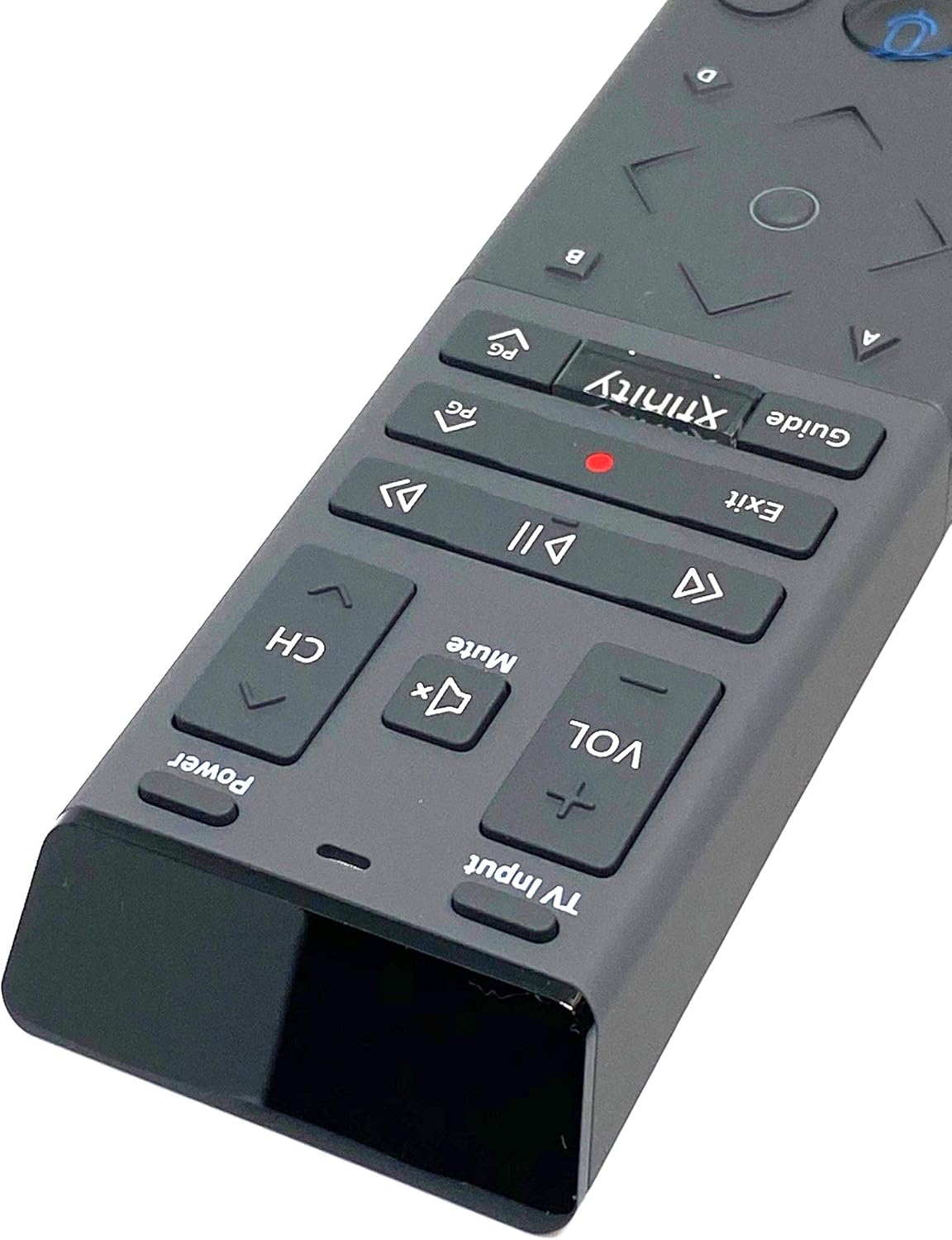
Image 2.1: The XR15 Voice Control Remote as received in its protective packaging.
3. 주요 특징
The XR15 Voice Control Remote offers several advanced features for an enhanced user experience:
- 음성 제어: Use voice commands to change channels, search for content, and get recommendations.
- 백라이트 키패드: Buttons illuminate for visibility in low-light conditions.
- 어디든 조준할 수 있는 기능: Operates without needing to point directly at the device.
- 자동 페어링: Simplifies the setup process with compatible devices.
- 접근성 기능: Quick access to Closed Captioning, video description, and voice guidance.
- TV 입력 제어: Manage TV power and input settings.
4. 설정
4.1 배터리 설치
To power your remote, install the two AA batteries provided:
- 리모컨 뒷면에서 배터리함을 찾으세요.
- 배터리 덮개를 아래로 밀어서 엽니다.
- AA 배터리 두 개를 넣고 양극(+)과 음극(-) 단자가 배터리 보관함 내부의 표시기와 올바르게 맞춰지도록 합니다.
- 딸깍 소리가 날 때까지 배터리 덮개를 다시 제자리에 밀어 넣습니다.

이미지 4.1: 후면 view of the XR15 remote, highlighting the battery compartment area.
4.2 페어링 지침
The XR15 remote can be paired with your Xfinity X1 TV Box and television for full functionality. Follow these steps:
- Pairing with X1 TV Box:
- TV 박스의 전원이 켜져 있는지 확인하십시오.
- Point the remote at the TV Box.
- 를 누르고 계세요 엑스피니티 버튼과 정보(i) button simultaneously for five seconds until the status light on the remote changes from red to green.
- 화면의 지시에 따라 페어링 과정을 완료하세요.
- Pairing with Television (for TV Power and Volume):
- After pairing with the TV Box, the remote may automatically attempt to pair with your TV.
- If not, or if it fails, press and hold the 설정 button (usually a small, recessed button on the side or back, or a combination of buttons like 엑스피니티 그리고 무음) until the status light turns green.
- Enter the TV brand code. Refer to your TV's user manual for specific codes if the Xfinity codes do not work.
- 테스트 힘 그리고 용량 buttons. If they work, the pairing is successful.
5. 사용 설명서
The XR15 remote features a clear layout for intuitive control. Below is a guide to its primary buttons and their functions:

이미지 5.1: 클로즈업 view of the upper section of the XR15 remote, showing TV Input, Volume, Mute, Power, and Channel buttons.
5.1 버튼 기능
| 단추 | 기능 |
|---|---|
| 힘 | Turns the TV and compatible TV Box on or off. |
| TV 입력 | Cycles through available TV input sources. |
| VOL + / VOL- | 볼륨을 높이거나 낮춥니다. |
| 무음 | 소리를 끄거나 켤 수 있습니다. |
| 채널+ / 채널- | 다음 채널 또는 이전 채널을 선택합니다. |
| 재생/일시정지(►▮▮) | 실시간 TV, Xfinity On Demand 또는 DVR 콘텐츠를 재생하거나 일시 정지합니다. |
| FF (►►) | Xfinity On Demand 또는 DVR 콘텐츠를 빨리 감기하세요. |
| Rew (◄◄) | Xfinity 주문형 비디오(On Demand) 또는 DVR 콘텐츠를 되감기할 수 있습니다. |
| 출구 | Exits on-screen guides; stops and exits Xfinity On Demand and DVR content. Returns to "Live" point during live TV replay. |
| Record (Red Dot) | Records the current program. |
| 엑스피니티 | Displays the main menu of the guide, providing access to DVR and Xfinity On Demand. |
| 가이드 | TV 편성표를 표시합니다. |
| 음성 제어(마이크 아이콘) | Activates voice command functionality. Press and speak into the remote. |
| Directional Pad (Up, Down, Left, Right, OK) | 메뉴를 탐색하고 옵션을 선택합니다. |
| 정보(i) | 현재 프로그램 또는 선택한 항목에 대한 정보를 표시합니다. |
| 숫자 패드(0-9) | 채널 번호나 다른 숫자 입력을 직접 입력합니다. |

이미지 5.2: 클로즈업 view of the lower section of the XR15 remote, featuring the voice control button, directional pad, and numeric keypad.
6. 유지관리
To ensure the longevity and optimal performance of your XR15 Voice Control Remote, follow these maintenance guidelines:
- 청소: 리모컨은 부드럽고 마른 천으로 닦으세요. 잘 지워지지 않는 오염의 경우 가볍게 두드리세요.amp천에 물이나 순하고 연마성이 없는 세제를 묻혀 닦아주세요. 과도한 습기는 피하세요.
- 배터리 교체: Replace batteries when the remote's performance degrades or the status LED indicates low power. Always use new AA batteries and dispose of old batteries responsibly.
- 저장: 리모컨은 직사광선과 극한의 온도를 피해 서늘하고 건조한 곳에 보관하세요.
- 낙하 방지: 리모컨을 물리적 충격으로부터 보호하세요. 떨어뜨리면 내부 구성 요소가 손상될 수 있습니다.
7. 문제 해결
If you encounter issues with your XR15 Voice Control Remote, refer to the following common problems and solutions:
- 원격 응답 없음:
- 배터리 방향을 확인하고 배터리가 새것인지 확인하십시오.
- Verify the remote is paired correctly with your X1 TV Box and TV (refer to Section 4.2).
- 리모컨과 셋톱박스/TV 사이에 장애물이 없는지 확인하십시오.
- 음성 명령이 작동하지 않음:
- Ensure the remote is paired for voice control (refer to Section 4.2).
- 마이크에 대고 명확하고 직접적으로 말하세요.
- Check your Xfinity X1 system settings for voice control activation.
- TV 전원/볼륨이 작동하지 않음:
- Confirm the remote is programmed with the correct TV code (refer to Section 4.2).
- Try re-programming the TV code, potentially using codes from your TV's original manual.
- Backlight Not Illuminating:
- The backlight activates when the remote is moved or a button is pressed. If it doesn't, check batteries.
- Ensure the remote is not in a power-saving mode if such an option exists in your Xfinity settings.
8. 사양
| 특징 | 세부 사항 |
|---|---|
| 모델 번호 | XR15 |
| 상표 | 케이블 |
| 제품 치수 | 12 x 3 x 1 인치 |
| 품목 무게 | 5.9 온스 |
| 필요한 배터리 | AA 배터리 2개 |
| 특별 기능 | Backlit, Voice Search |
| 지원되는 최대 장치 수 | 1 (TV Box + TV) |
| 호환 장치 | Set Top Box, Television (Xfinity X1, Xi6, Xi5, XG2) |
| 연결 기술 | 무선 주파수 (RF) |
| 첫 번째 이용 가능 날짜 | 7년 2020월 XNUMX일 |
9. 보증 및 지원
For warranty information or technical support, please refer to the documentation provided by your service provider (Xfinity/Comcast) or contact the product manufacturer directly. Keep your purchase receipt for warranty claims.


