1. 서론
The EPEVER Tracer-BN Series MPPT solar charge controller is designed for solar power systems, featuring advanced Maximum Power Point Tracking (MPPT) technology. This manual provides essential instructions for the Tracer3215BN model, ensuring efficient and safe operation of your solar charging system. It is suitable for 12V/24V battery systems and supports a maximum PV input voltage는 150V입니다.

이미지: 앞면 view of the EPEVER MPPT Charge Controller Tracer3215BN.
2. 안전 지침
Observe the following safety guidelines during installation and operation to prevent damage to the controller or injury:
- Ensure proper wiring polarity for all connections (PV, battery, load).
- Do not exceed the maximum PV input voltag150VDC의 e.
- Connect the battery first before connecting solar panels or loads.
- The controller features multiple electronic protections, including:
- PV 단락 보호
- PV 오버볼tag전자 경보 보호
- 태양광 전류 제한 보호
- PV 역극성 보호
- 배터리 과충전 보호
- 배터리 과방 전 보호
- 배터리 역극성 보호
- 과부하 보호 부하
- 부하 단락 보호
- 과열 보호
- Install the controller in a well-ventilated area to ensure adequate heat dissipation.
- Avoid exposing the controller to direct sunlight, moisture, or corrosive environments.
3. 제품 특징
The Tracer3215BN controller incorporates advanced features for optimal solar system performance:
- 고급 MPPT 기술: High tracking efficiency (≥ 99.5%) and peak conversion efficiency (98%).
- 신속 처리: Ultra-fast tracking speed and accurate Maximum Power Point (MPP) recognition.
- Wide MPP Operating Voltag전자 범위: Adapts to various solar panel configurations.
- PV Current Limiting: 신뢰할 수 있는 자동 태양광 전류 제한 기능.
- 내구성 있는 디자인: Die-cast aluminum housing for excellent heat dissipation and extended lifespan.
- 배터리 호환성: Supports Sealed, Gel, Flooded, and User-defined battery types. Includes battery temperature compensation.
- Flexible Load Control: 다양한 부하 작동 모드: 수동 제어, 조명 켜짐/꺼짐, 조명 켜짐+타이머, 시간 제어.
- 데이터 모니터링: Real-time energy statistics and data monitoring.
- 의사소통: RS485 port with industrial standard MODBUS open architecture for communication with MT50, APP, or PC software.
- 펌웨어 업그레이드: Supports firmware upgrades for future enhancements.

Image: Visual summary of the Tracer-BN series features.
4. Components and Ports Identification
Familiarize yourself with the controller's external components and connection ports:
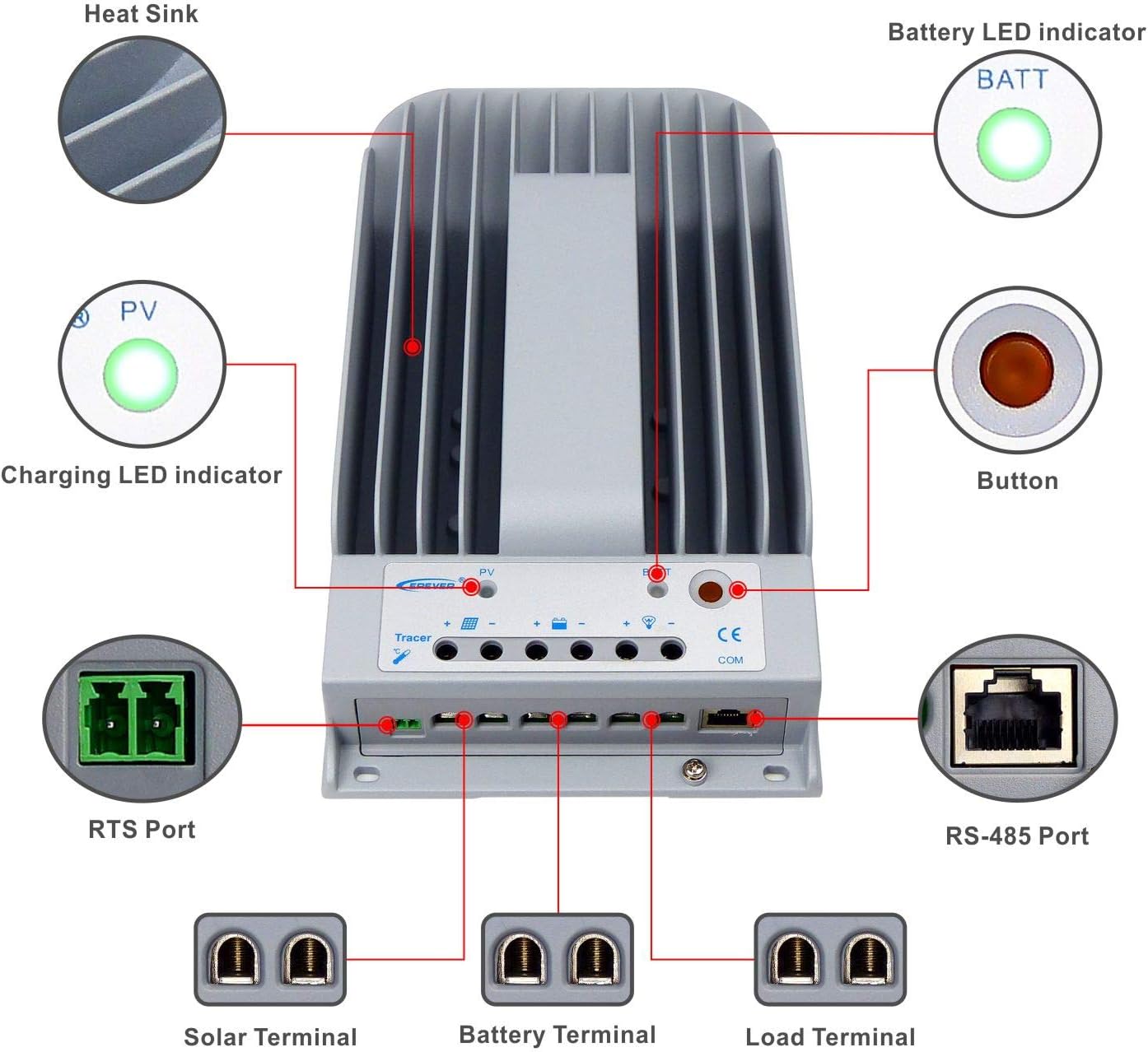
Image: Labeled diagram of the controller's external features.
| 목 | 이름 | 목 | 이름 |
|---|---|---|---|
| 1 | 방열판 | 6 | 터미널 로드 |
| 2 | 충전 LED 표시기 | 7 | RS-485 포트 |
| 3 | RTS 포트 | 8 | 단추 |
| 4 | 솔라 터미널 | 9 | 배터리 LED 표시기 |
| 5 | 배터리 터미널 |
설명:
- RTS Port (3): Connection for a Remote Temperature Sensor to remotely detect battery temperature.
- RS-485 Port (7): Used to monitor the controller via PC and update controller software using an RS485 (RJ45 Interface) connection.
5. 설정 및 설치
Follow these steps for proper installation of your Tracer3215BN controller:
- 설치: Mount the controller vertically on a flat surface in a well-ventilated indoor area, away from direct sunlight, high temperatures, and moisture. Ensure sufficient space around the heat sink for air circulation. The mounting dimensions are 130mm x 204mm with Φ4.7 mounting holes.
- 배선 순서: Connect the system components in the following sequence to ensure safety and proper operation:
- 1단계: 배터리를 연결하세요. Connect the battery to the controller's battery terminals. Ensure correct polarity. The controller will detect the system voltage (12V/24V auto work).
- 2단계: 태양광 패널을 연결하세요. Connect the solar panel array to the controller's solar terminals. Ensure correct polarity.
- 3단계: 부하를 연결합니다. DC 부하를 컨트롤러의 부하 단자에 연결하십시오. 극성이 올바른지 확인하십시오.
- 케이블 크기: Use appropriate cable sizes. For the Tracer3215BN, a power cable size of 6AWG (16mm²) is recommended.
- 접지: The controller features common negative grounding. Ensure proper grounding according to local electrical codes.
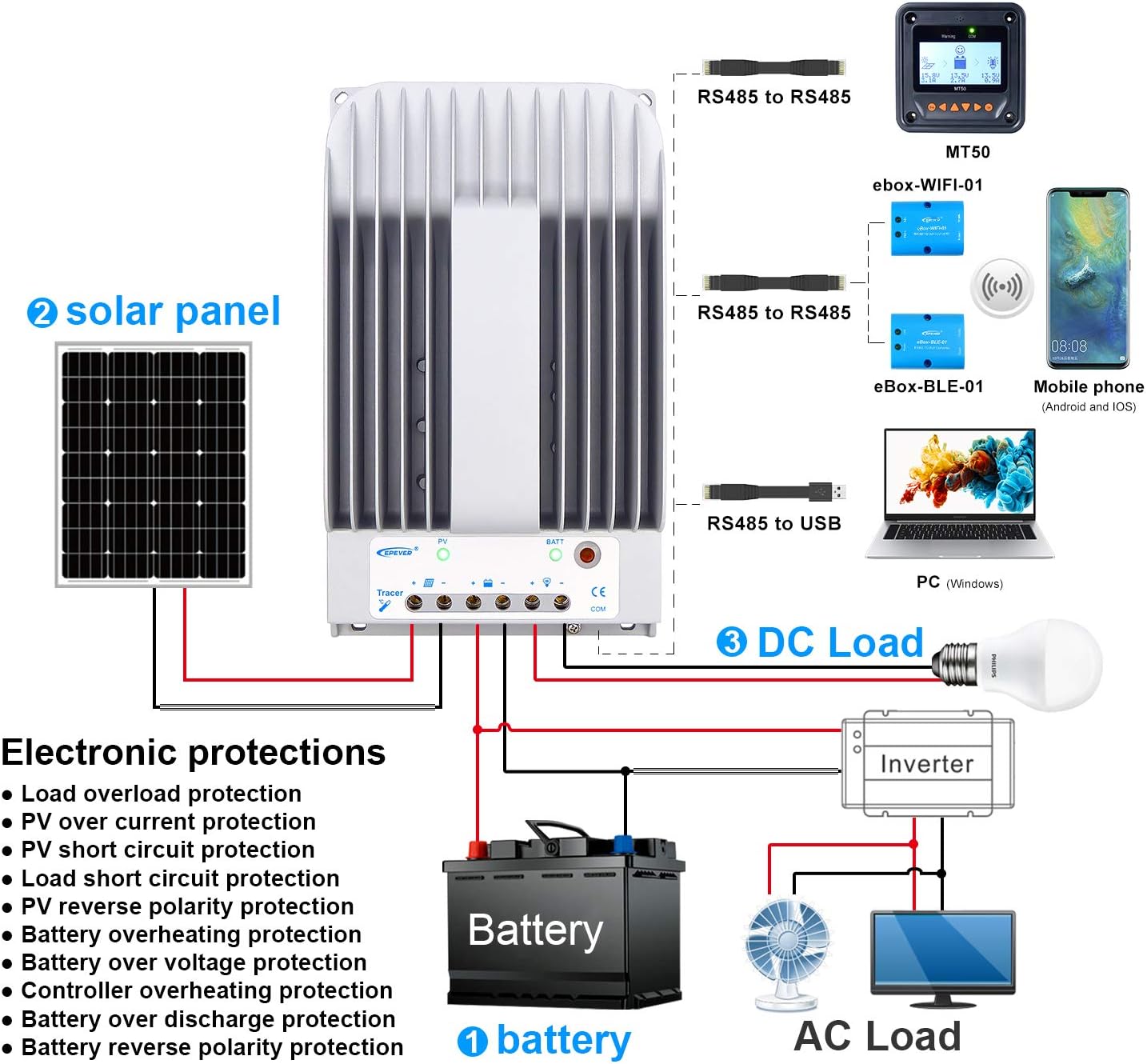
Image: Wiring diagram illustrating connections for battery, solar panel, and DC load.

Image: Controller dimensions for mounting reference.
6. 사용 설명서
Once installed, the controller operates automatically. However, you can configure settings and monitor performance:
- 배터리 유형 선택: The controller supports Sealed, Gel, Flooded, and User-defined battery types. Select the appropriate type through the controller's interface (if available) or via external monitoring tools (MT50, APP, PC software) to ensure correct charging parameters.
- 작동 모드 로드: Configure the DC load output behavior using the available modes:
- 수동 제어: Turn the load ON/OFF manually.
- 조명 켜기/끄기: 전원은 해질녘에 켜지고 새벽에 꺼집니다.
- 조명 켜짐+타이머: Load turns ON at dusk and stays ON for a set duration.
- 시간 제어: Load operates during specified time periods.
- 모니터링 및 구성: Use the optional MT50 remote meter, mobile application, or PC software connected via the RS485 port to monitor real-time data, view energy statistics, and adjust parameters.
7. 유지관리
Regular maintenance ensures the longevity and optimal performance of your charge controller:
- 연결 검사: 태양광 패널, 배터리, 부하 등 모든 배선 연결부의 조임 상태와 부식 여부를 주기적으로 점검하십시오. 연결이 헐거워지면 과열 및 손상이 발생할 수 있습니다.
- 컨트롤러 청소: Keep the controller's exterior clean and free from dust and debris. Ensure the heat sink fins are clear for effective cooling.
- 통풍: Verify that the installation area remains well-ventilated and free from obstructions that could impede airflow around the controller.
- 모니터 성능: Regularly check the controller's display or monitoring software for any error codes or unusual readings.
- 배터리 상태: Ensure your battery bank is properly maintained according to the battery manufacturer's guidelines.
8. 문제 해결
If you encounter issues with your Tracer3215BN controller, consider the following:
- 충전 안함:
- Check PV panel connections and ensure correct polarity.
- PV 입력 볼륨을 확인하십시오tage is within the controller's operating range (Max 150VDC).
- Ensure sufficient sunlight on the solar panels.
- 로드가 작동하지 않음:
- 부하 연결을 확인하고 극성이 올바른지 확인하십시오.
- 배터리 용량 확인tage는 저볼륨 위에 있습니다tag연결 해제 임계값.
- Check the selected load working mode.
- Ensure the load current does not exceed the rated discharge current (30A).
- 컨트롤러 과열:
- 컨트롤러 주변에 적절한 환기가 이루어지도록 하십시오.
- Reduce the load or PV input if consistently operating at maximum capacity in high ambient temperatures.
- 오류 코드: Refer to the controller's display or monitoring software for specific error codes and consult the EPEVER official documentation for their meaning and resolution.
9. 기술 사양
Key technical data for the Tracer3215BN MPPT Charge Controller:

이미지: 상세 기술 사양표.
| 매개변수 | 값 |
|---|---|
| 명목 시스템 Voltage | 12VDC/24VDC 자동차 작업 |
| 정격 충전 전류 | 30A |
| 정격 방전 전류 | 30A |
| 최대 태양열 입력 Voltage | 150VDC |
| 최대 태양광 입력 전력(12V 배터리) | 390와트 |
| 최대 태양광 입력 전력(24V 배터리) | 780와트 |
| Self-consumption (12V) | ≤60mA |
| Self-consumption (24V) | ≤30mA |
| 장착 치수 | 130mm x 204mm |
| 장착 구멍 크기 | Φ4.7 |
| 전원 케이블 | 6AWG(16mm²) |
| 차원 | 281mm x 160mm x 60mm |
| 무게 | 2.3kg |
| 작업 환경 온도 | -35℃ ~ +55℃ |
| 상대 습도 | ≤95% (NC) |
| 울로 둘러싼 땅 | IP30 |
| 접지 | 일반적인 네거티브 |
| 통신 포트 | RS485 / RJ45 Interface |
10. 보증 정보
For detailed warranty terms and conditions, please refer to the product packaging, the official EPEVER website, or contact your authorized dealer. Warranty coverage typically includes defects in materials and workmanship under normal use.
11. 지원
Should you require technical assistance, have questions regarding installation, operation, or troubleshooting, please contact:
- EPEVER Customer Service: Refer to the official EPEVER web연락처 정보 사이트.
- 공식 판매 대리점: GolandCentury (as mentioned in product information).
When contacting support, please have your product model (Tracer3215BN) and any relevant error codes or observations ready.


