제품 끝view
The Refoss Wireless Garage Door Keypad provides keyless entry for your garage, offering convenience and security. This keypad is designed to work specifically with garage door openers featuring a purple learn button, operating on a 315 MHz frequency. It supports control of up to three individual garage doors with unique PINs.

Image: Refoss Wireless Garage Door Keypad. This image displays the keypad with its protective cover lifted, revealing the numeric buttons and the specific compatibility label for purple learn buttons.
호환성
This Refoss Wireless Garage Door Keypad is only compatible with garage door openers that have a PURPLE learn button. It works with Security+ 315 MHz Chamberlain, LiftMaster, and Craftsman garage openers manufactured between 2006 and 2014. Please verify your garage door opener's learn button color before proceeding with installation or programming.
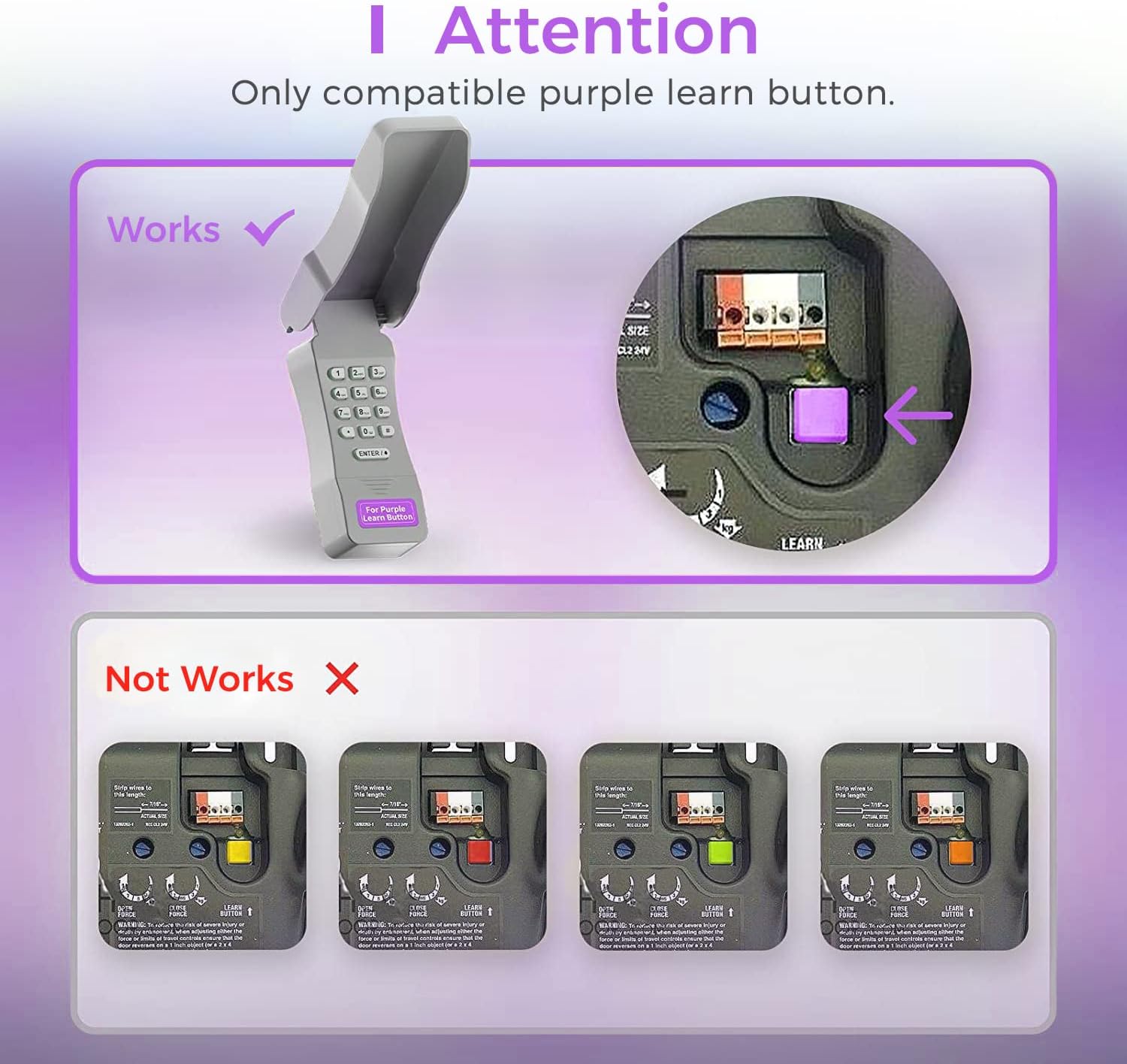
Image: Compatibility Diagram. This visual guide illustrates the correct purple learn button for compatibility and shows examples of incompatible learn button colors (red, orange, green, yellow).
패키지 내용
설치를 시작하기 전에 패키지에 모든 구성품이 들어 있는지 확인하십시오.
- 1 x Refoss Wireless Keypad
- 1 x 사용자 매뉴얼(이 문서)
- 4 x 나사
- 4 x 나사 앵커
- 4 x 3M 양면 테이프
- 1 x 9V 배터리

Image: Package Contents. This illustration details all items included in the product box, ensuring users can verify they have everything needed for installation.
설정 및 프로그래밍
The Refoss Wireless Keypad is designed for easy, wireless programming. Follow these steps carefully to set up your keypad and program it to your garage door opener.
1단계: 배터리 설치
- Open the battery compartment on the back of the keypad.
- 동봉된 9V 배터리를 극성을 확인하여 삽입하십시오.
- 배터리 칸을 단단히 닫으세요.
2단계: 키패드 프로그래밍
This keypad can control up to three garage doors. Each door requires its own unique PIN.
- 위치 PURPLE Learn Button on your garage door opener motor unit. This button is typically found on the back or side panel of the motor.
- 를 눌렀다가 즉시 놓습니다. PURPLE Learn Button. The learn indicator light on the opener will glow steadily for 30 seconds.
- Within 30 seconds, enter your desired 4-digit PIN on the Refoss keypad.
- 를 누르고 계세요 ENTER / # 차고 문 열림 표시등이 깜빡이거나 두 번 딸깍 소리가 날 때까지 키패드의 버튼을 계속 누르고 있습니다. 이는 프로그래밍이 성공적으로 완료되었음을 나타냅니다.
- PIN을 입력하고 키를 눌러 키패드를 테스트하세요. ENTER / #차고 문이 작동해야 합니다.
To program additional garage doors (up to three), repeat Step 2 for each door, using a different 4-digit PIN for each.
작동 지침
Opening/Closing a Garage Door
- Enter your 4-digit PIN for the desired garage door.
- 를 누르세요 ENTER / # 단추.
- The garage door will open or close.
Controlling Multiple Doors
The keypad supports individual PINs for up to three garage doors. Simply enter the specific PIN for the door you wish to operate.

Image: One Keypad for Three Doors. This image visually represents the keypad's capability to manage up to three distinct garage doors using individual access codes.
유지
배터리 교체
The keypad uses one 9V alkaline battery. When the keypad backlight dims or the keypad becomes unresponsive, it is time to replace the battery.
- Open the battery compartment on the back of the keypad.
- 오래된 9V 배터리를 제거하세요.
- 올바른 극성을 확인하여 새로운 9V 알카라인 배터리를 삽입합니다.
- 배터리 칸을 단단히 닫으세요.
청소
키패드 표면을 부드러운 천으로 닦으세요.amp 천. 연마성 세척제나 용매를 사용하지 마십시오.
날씨 보호
The keypad features a weatherproof protective cover designed to shield it from various weather conditions. Ensure the cover is properly closed when not in use to maximize its protective capabilities.

Image: Weatherproof and Fluorescent Features. This image demonstrates the keypad's durability against outdoor elements and its illuminated keys for visibility in low-light conditions.
문제 해결
| 문제 | 가능한 원인 | 해결책 |
|---|---|---|
| 키패드가 작동하지 않습니다. | 배터리가 없거나 부족합니다. | 9V 배터리를 교체하십시오. |
| Garage door does not open/close after entering PIN. | Keypad not programmed correctly or incompatible opener. |
|
| Keypad backlight is dim. | 배터리가 부족합니다. | 9V 배터리를 교체하십시오. |
| Cannot program multiple doors. | Incorrect programming sequence for additional doors. | Ensure you are using a unique PIN for each door and repeating the programming steps for each. |
명세서
- 모델: RGR545
- 호환성: Chamberlain, LiftMaster, Craftsman garage door openers with PURPLE learn button (Security+ 315 MHz, manufactured 2006-2014)
- 빈도: 315MHz
- Number of Doors Supported: 최대 3개
- 전원: 1 x 9V 알카라인 배터리
- 치수: 약 2 x 6 x 1인치
- 무게: 약 7.8온스
- 특별 기능: Weatherproof, Fluorescent Keypad
보증 정보
This Refoss Wireless Garage Door Keypad comes with a 1년 보증 구매일로부터. 본 보증은 정상적인 사용 중 발생하는 재료 및 제조상의 결함에 적용됩니다. 오용, 사고, 무단 개조 또는 부적절한 설치로 인한 손상은 보증되지 않습니다.
보증 청구를 위해 구매 증명서를 보관하십시오.
고객 지원
For any questions, technical assistance, or support regarding your Refoss Wireless Garage Door Keypad, please contact our customer support team. We offer caring customer support 7 days a week.
Refer to the product packaging or the Refoss official web최신 연락처 정보는 사이트에서 확인하세요.