소개
Thank you for choosing the MOUNTUP Full Motion TV Wall Mount, model MU0018. This manual provides detailed instructions for the safe and proper installation, operation, and maintenance of your new TV wall mount. Designed for most 26-50 inch TVs, this mount offers full motion capabilities including swivel, tilt, and extension, allowing you to achieve optimal viewing angles. Please read this manual thoroughly before installation and keep it for future reference.

Image: The MOUNTUP Full Motion TV Wall Mount MU0018, showcasin관절형 암과 VESA 플레이트를 포함합니다.
안전 정보
Always ensure proper safety precautions are followed during installation. Failure to do so may result in property damage, serious injury, or death. If you are unsure about any part of the installation process, please consult a qualified professional.
- 중량 용량: This mount is designed for TVs up to 53 LBS (24 kg). Do not exceed this weight limit.
- VESA 호환성: Ensure your TV's VESA pattern is between 75x75mm and 300x300mm.
- 벽 유형: This mount is suitable for single wood studs, concrete walls, and brick walls.
- WARNING: DO NOT MOUNT ON DRYWALL ALONE. For concrete or brick walls, appropriate anchors (not included) are required. Contact MOUNTUP customer service if you need wall anchors.
- 도구: 설치 시 적절한 도구를 사용하세요. 항상 보안경을 착용하세요.

Image: Illustration showing compatible wall types: single wood stud, concrete wall (requires anchors), and brick wall (requires anchors). A warning states not to mount on drywall alone.
패키지 내용
설치를 시작하기 전에 모든 구성 요소가 있고 손상되지 않았는지 확인하세요.
- TV 벽걸이 조립
- 장착 하드웨어 키트(다양한 나사, 와셔, 스페이서)
- 사용 설명서
명세서
| 특징 | 사양 |
|---|---|
| 상표 | 마운트업 |
| 모델 번호 | 무크 녹스 |
| 호환 가능한 TV 크기 | 26-50 인치 |
| 최대 중량 용량 | 53파운드(24kg) |
| VESA 호환성 | 최소 75x75mm ~ 최대 300x300mm |
| 회전 각도 | +/-90° |
| 틸팅 각 | +5°/-15° |
| 레벨 조정 | +/-3° (설치 후) |
| 벽에서 연장된 부분 | 2.6인치(수축 시)에서 14.6인치(확장 시)까지 |
| 재료 | 합금강 |
설정 및 설치
1. VESA 호환성 확인
Before installation, measure the horizontal and vertical distance between the mounting holes on the back of your TV. This is your TV's VESA pattern. The MU0018 mount supports VESA patterns from 75x75mm up to 300x300mm.

Image: Diagram illustrating how to measure VESA hole distance (horizontal x vertical) and a table of suitable VESA patterns for the MU0018 mount (Max 300x300mm).

Image: Comparison of VESA patterns, showing the MU0018's maximum 300x300mm VESA and noting that for VESA larger than 300x300mm, models MU0009 or MU0014 should be considered.
2. Wall Type Selection
Identify your wall type. The mount is designed for single wood studs. For concrete or brick walls, specialized anchors are required and are not included in the standard package. Do not attempt to mount on drywall alone without securing to a stud.
3. 벽면 플레이트 장착
Locate the center of your wood stud using a stud finder. Mark the drilling points for the wall plate. For concrete or brick walls, use a hammer drill and appropriate masonry bits to drill holes, then insert the correct anchors. Secure the wall plate firmly to the wall using the provided lag bolts.
4. TV에 브래킷 부착하기
Attach the TV brackets to the back of your television using the appropriate screws, washers, and spacers from the hardware kit. Ensure the brackets are securely fastened and evenly aligned.
5. TV 걸기
Carefully lift the TV with the attached brackets and hook them onto the wall plate. Secure the TV to the wall plate using the safety screws or locking mechanisms provided. Ensure the TV is level and stable.
작동 지침
The MOUNTUP MU0018 offers full motion capabilities for enhanced view유연성.
회전 조정
The mount allows for a swivel angle of +/-90°. Gently push or pull the TV to the desired left or right position. The maximum swivel angle depends on your TV size and its distance from the wall.

Image: A TV mounted in a corner, demonstrating the +/-90° swivel capability of the mount.
틸팅 조정
Adjust the vertical tilt angle from +5° (tilt up) to -15° (tilt down) to reduce glare and optimize your viewing experience. Loosen the tilt knobs on the TV brackets, adjust to the desired angle, and then tighten the knobs to secure the position.

Image: An illustration showing a TV tilting down by 15 degrees and tilting up by 5 degrees, demonstrating the range of tilt adjustment to reduce glare.
확장 및 수축
The articulating arm allows the TV to extend up to 14.6 inches (370mm) from the wall and retract to a slim 2.6 inches (65mm) for space-saving. Gently pull or push the TV to extend or retract the arm.
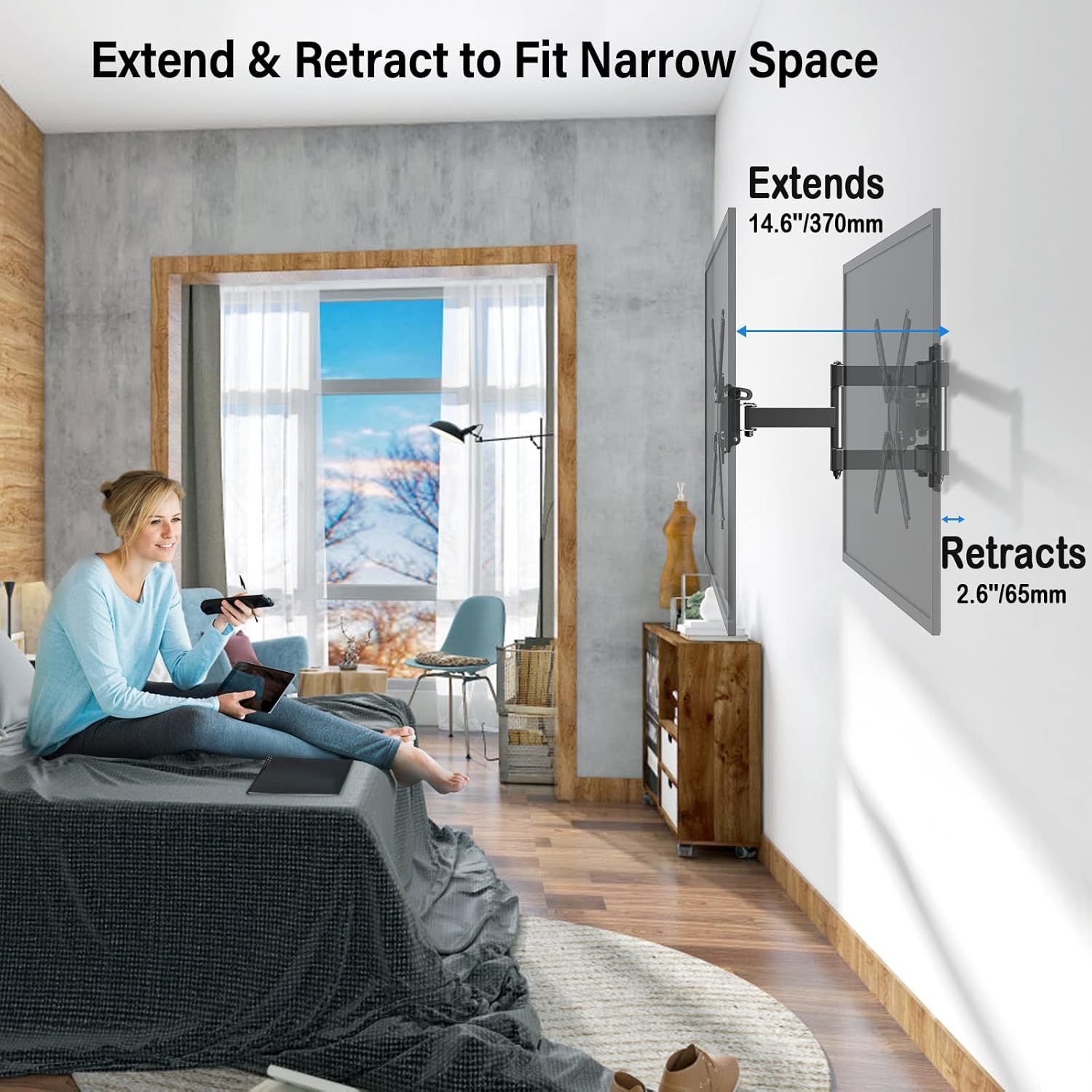
Image: A TV mounted on a wall, showing the mount extended 14.6 inches and retracted 2.6 inches, illustrating its ability to fit narrow spaces.
레벨 조정
After installation, you can make minor level adjustments of +/-3° to ensure your TV is perfectly horizontal. This feature helps correct any slight misalignment during mounting.

Image: A TV mounted on a wall, with arrows indicating a +/-3 degree level adjustment, demonstrating how to fine-tune the TV's horizontal position after installation.
유지
정기적인 유지 관리는 TV 벽걸이 거치대의 수명 연장과 안전한 작동을 보장합니다.
- 정기 점검: 모든 나사와 연결부를 주기적으로 점검하여 단단히 고정되어 있는지 확인하세요.
- 청소: 부드럽고 마른 천으로 거치대를 닦으십시오. 연마성 세척제나 용제를 사용하지 마십시오.
- 움직이는 부품: If the articulating arm feels stiff, a small amount of silicone-based lubricant can be applied to the joints.
문제 해결
| 문제 | 가능한 원인 | 해결책 |
|---|---|---|
| 설치 후 TV가 수평이 아닙니다. | Slight misalignment during mounting. | +/-3° 수평 조절 기능을 사용하여 TV의 수평 위치를 미세 조정하세요. |
| 마운트가 헐거워지거나 불안정하게 느껴집니다. | Screws are not fully tightened or incorrect wall anchors used. | Re-check all mounting screws and wall connections. Ensure appropriate anchors were used for concrete/brick walls. Do not mount on drywall alone. |
| TV가 거치대에 맞지 않습니다. | VESA 마운트 패턴이 잘못되었거나 TV 무게가 허용 용량을 초과했습니다. | Verify your TV's VESA pattern (75x75mm to 300x300mm) and weight (max 53 LBS). If larger, consider other MOUNTUP models like MU0009 or MU0014. |
보증 및 지원
MOUNTUP TV stands come with a full 3-year protection. For any questions regarding purchase or installation, please feel free to contact our friendly support team. We are dedicated to providing comprehensive and advanced technology solutions.
고객 서비스: Please refer to the contact information provided with your product packaging or visit the official MOUNTUP web지원 사이트입니다.


