1. 서론
This manual provides detailed instructions for the setup, operation, and maintenance of your OhO Smart Glasses. These polarized sunglasses integrate a Bluetooth speaker system, offering UV protection and voice control capabilities for a seamless audio experience while staying aware of your surroundings.
2. 제품 오버view
The OhO Smart Glasses combine stylish eyewear with advanced audio technology. Key features include:
- Open Ear Bluetooth Headset: Allows audio listening while maintaining environmental awareness.
- Voice Control Smart Glasses: Supports hands-free phone calls and voice assistant commands (Siri, Cortana, Google Now).
- 볼륨 조절: Dedicated buttons for volume adjustment and track navigation.
- Ultra Slim Unisex Design: 가볍고 장시간 착용해도 편안합니다.
- Impact Resistant Lenses and Frame: US Safety Lens Standard ANSI/ISEA Z87.1-2015 compliant, 100% UV400 protection polarized lenses.

그림 2.1: 전면 view of OhO Smart Glasses with blue polarized lenses.
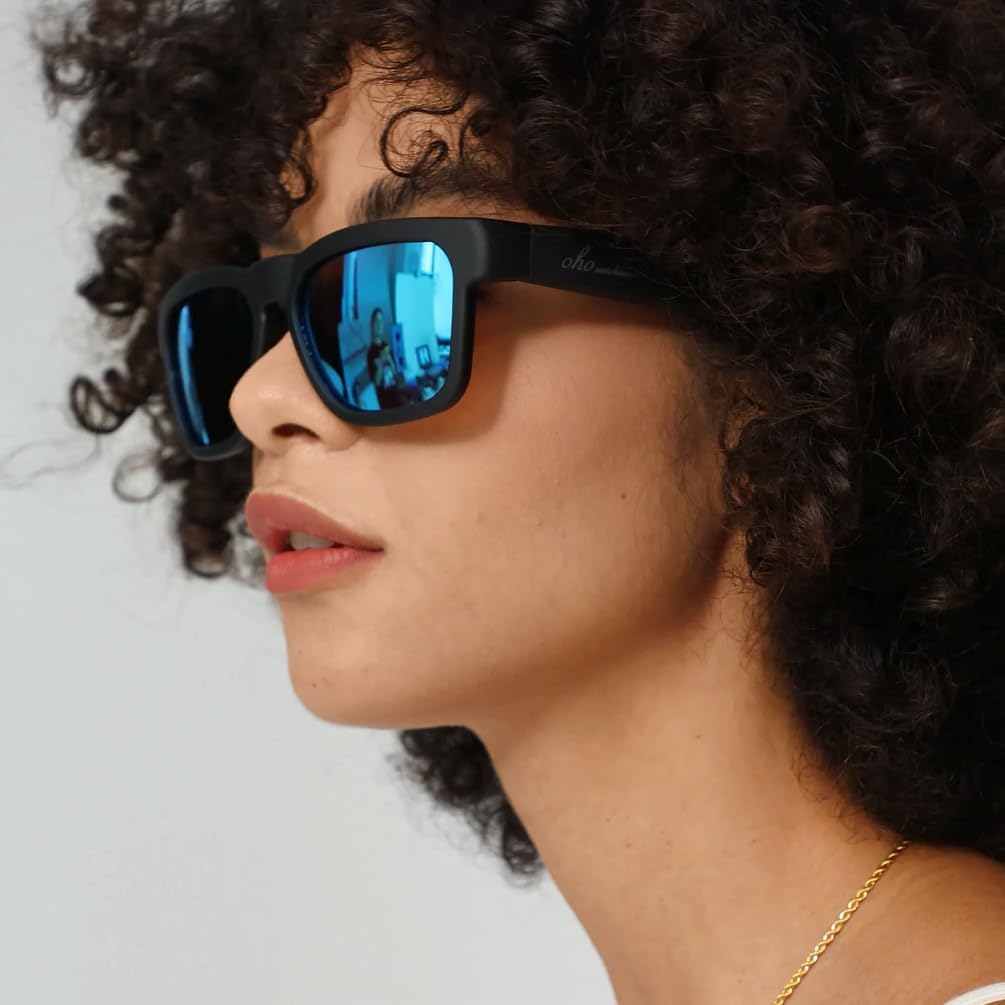
그림 2.2: 측면 view of OhO Smart Glasses, highlighting the temple arms where audio components are housed.
3. 설정
3.1 안경 충전하기
Before initial use, fully charge your OhO Smart Glasses. The battery provides up to 10 hours of playback time.
- Locate the charging port on the temple arm of the glasses. It is typically covered by a small flap for protection.
- Gently open the flap to expose the micro USB port.
- Connect the provided micro USB charging cable to the port on the glasses.
- USB 케이블의 다른 쪽 끝을 호환되는 USB 전원(예: 컴퓨터 USB 포트, 벽면 어댑터)에 꽂으십시오.
- Allow the glasses to charge until the indicator light shows a full charge (refer to the indicator light section in your quick start guide for specific light behavior).

그림 3.1: 클로즈업 view of the micro USB charging port located on the temple arm.
3.2 블루투스 페어링
To use the audio features, you must pair your OhO Smart Glasses with a Bluetooth-enabled device (e.g., smartphone, tablet).
- 안경이 충전되어 있고 전원이 켜져 있는지 확인하세요.
- 모바일 기기에서 Bluetooth를 활성화하세요.
- 검색 available devices in your device's Bluetooth settings.
- Select "Oho A8 pro" from the list of available devices.
- Once connected, the glasses will indicate successful pairing (e.g., an audible prompt or indicator light change).

Figure 3.2: A smartphone displaying the Bluetooth pairing screen, showing the OhO Smart Glasses as a connectable device.
Video 3.1: A demonstration of charging and Bluetooth pairing for the OhO Smart Glasses, along with basic audio controls.
4. 사용 설명서
4.1 Audio Playback and Volume Control
Once paired, you can stream audio from your device to the glasses.
- 재생/일시 중지: Press the main button (typically located on the temple arm) once to play or pause audio.
- 볼륨 업: Press and hold the volume up button to increase the volume. An audible cue will indicate maximum volume.
- 볼륨 작게 : To decrease volume, continue holding the volume up button past the maximum volume cue; it will reset to the lowest volume and then increase from there. (Note: There is no dedicated volume down button; volume cycles from max to min).
- 다음 트랙: 메인 버튼을 두 번 누르면 다음 트랙으로 넘어갑니다.
- 이전 트랙 : 메인 버튼을 세 번 누르면 이전 트랙으로 이동합니다.

Figure 4.1: A user wearing the OhO Smart Glasses, demonstrating their use for audio playback in an outdoor setting.
4.2 Voice Control and Call Management
The glasses support voice commands and hands-free calling.
- Voice Assistant 활성화 : Double-press the main button to activate your device's voice assistant (Siri, Cortana, Google Now). You can then issue commands verbally.
- 전화 받기/종료: 메인 버튼을 한 번 누르면 걸려오는 전화를 받거나 통화 중인 전화를 종료할 수 있습니다.
- 전화 거부: 수신 전화를 거절하려면 메인 버튼을 길게 누르세요.

Figure 4.2: A user wearing the OhO Smart Glasses, engaged in a hands-free phone conversation.
5. 유지관리
5.1 청소
To maintain optimal clarity and extend the life of your lenses and frame:
- Use the provided lens cleaning cloth to gently wipe the lenses. Avoid using abrasive materials or harsh chemicals.
- For the frame, use a soft, damp 천으로 닦아주세요. 안경을 물에 담그지 마세요.

Figure 5.1: A close-up of the polarized lenses of the OhO Smart Glasses, emphasizing their clarity and coating.
5.2 보관
Proper storage protects your glasses from damage.
- When not in use, store the glasses in the provided hard case to prevent scratches and impacts.
- Keep the glasses away from extreme temperatures and direct sunlight for prolonged periods.
6. 문제 해결
If you encounter issues with your OhO Smart Glasses, refer to the following common solutions:
| 문제 | 가능한 원인 | 해결책 |
|---|---|---|
| 기기와 페어링할 수 없습니다 | Bluetooth is off; glasses are off; out of range; already paired to another device. | Ensure Bluetooth is on and glasses are charged/on. Move closer to the device. Disconnect from other devices. |
| 소리가 나지 않거나 볼륨이 작음 | Volume too low on glasses/device; not properly paired; audio source issue. | Increase volume on both glasses and device. Re-pair the glasses. Check audio source on your device. |
| 충전 문제 | Cable not connected properly; faulty cable/charger; charging port obstruction. | Ensure cable is securely connected. Try a different USB port or charger. Check charging port for debris. |
| 음성 어시스턴트가 응답하지 않음 | Not properly paired; voice assistant not enabled on device; poor microphone connection. | Ensure glasses are paired. Check device settings for voice assistant. Speak clearly into the microphone. |
7. 사양
- 모델 번호: A8 프로
- 제품 크기: 6.3 x 5.71 x 1.85 인치
- 품목 무게: 1.09온스(31그램)
- 배터리: 1개의 리튬 금속 배터리(포함)
- 배터리 용량: 200밀리amp 시간
- 운영 체제: OhO sunshine OS
- 연결 기술 : 블루투스
- 휴먼 인터페이스 입력: 마이크로폰
- 특징: 가벼움
- 색상: Black Frame-blue Lens
- 제조업체: 오오 선샤인
8. 보증 및 지원
For warranty information or technical support, please refer to the documentation included with your purchase or contact OhO sunshine customer service directly. Contact details can typically be found on the manufacturer's official web사이트나 소매업체를 통해 구매하세요.


