1. 서론
This manual provides essential instructions for the safe and effective use of your Wellue Bluetooth Blood Pressure Monitor BP2A. This device is designed for home use to measure systolic blood pressure (SYS), diastolic blood pressure (DIA), mean arterial pressure (MAP), pulse rate, and pulse pressure. It also features an ECG function for additional heart health monitoring. Please read this manual thoroughly before first use and retain it for future reference.
2. 중요한 안전 정보
- Consult your physician before using this device for any medical condition. Self-diagnosis and treatment based on measurements can be dangerous.
- This device is intended for adult home use only. It is not intended for use on infants, children, or pregnant women.
- Do not use this device in conjunction with high-frequency surgical equipment.
- 기기를 어린이와 애완동물이 닿지 않는 곳에 보관하세요.
- 기기를 분해하거나 수리하려고 하지 마십시오. 모든 정비는 자격을 갖춘 기술자에게 맡기십시오.
- Avoid strong electromagnetic fields during use, as they may interfere with the device's operation.
- 식이 보충제에 대한 진술은 FDA에서 평가하지 않았으며, 어떠한 질병이나 건강 상태를 진단, 치료, 치유 또는 예방하기 위한 것이 아닙니다.
3. 패키지 내용
패키지를 열었을 때 모든 품목이 들어 있는지 확인하세요.
- Wellue Bluetooth Blood Pressure Monitor BP2A (integrated with cuff)
- USB 충전 케이블
- 사용자 설명서
4. 디바이스 오버view
The Wellue BP2A monitor features a compact, one-piece design for ease of use and portability. It includes an integrated arm cuff, a digital display, and control buttons.

Figure 4.1: Wellue BP2A Blood Pressure Monitor and ViHealth App Interface.

Figure 4.2: Key features of the Wellue BP2A monitor, including Bluetooth connectivity, FDA clearance, rechargeable battery, and built-in memory for 50 readings.
5. 설정
5.1 장치 충전
Before initial use, fully charge the device using the provided USB cable. Connect the cable to the monitor's charging port and a standard USB power adapter (not included). A full charge can provide power for up to 300 measurements.
5.2 Installing the ViHealth App
The Wellue BP2A works with the free ViHealth app, available for iOS and Android devices. 검색 "ViHealth" in your device's app store and install it.

Figure 5.1: The ViHealth app for Android and iOS, used to track blood pressure and heart measurements.
5.3 블루투스 페어링
Ensure Bluetooth is enabled on your smartphone. Open the ViHealth app. Turn on the Wellue BP2A monitor. The device should automatically connect to the app. Follow any on-screen prompts within the app to complete the pairing process.
6. 사용 설명서
6.1 적절한 커프 위치
Accurate measurement depends on correct cuff placement. Ensure the cuff is placed directly on your bare upper arm, 1-2 cm above the elbow joint. The air tube (if applicable, though this is a one-piece design, the sensor area should be aligned) should be positioned over the brachial artery. The cuff should fit snugly but not too tightly. Refer to the diagram below for guidance.

Figure 6.1: Correct cuff placement for accurate blood pressure measurement.
6.2 혈압 측정하기
- 등을 편안하게 지지하고 발을 바닥에 댄 채 앉으세요. 팔은 테이블에 올려놓고 커프가 심장 높이에 오도록 하세요.
- Ensure the device is powered on and, if desired, connected to the ViHealth app.
- 를 누르세요 시작/중지 button on the device. The cuff will begin to inflate.
- 측정하는 동안 움직이지 않고 조용히 있으십시오.
- Once complete, your blood pressure readings (SYS, DIA, MAP, Pulse Rate, Pulse Pressure) will be displayed on the device screen and automatically uploaded to the ViHealth app if connected.

Figure 6.2: User taking a blood pressure measurement with the Wellue BP2A monitor.
6.3 Taking an ECG Measurement
The device also supports ECG measurements. To take an ECG:
- Ensure the device is powered on and connected to the ViHealth app.
- Hold the device with both hands, placing your thumbs on the designated electrodes (usually the metal strips on the sides or top of the device).
- Remain still and relaxed for the duration of the measurement (typically 30 seconds).
- The ECG waveform and heart rate will be displayed on the device and recorded in the app.
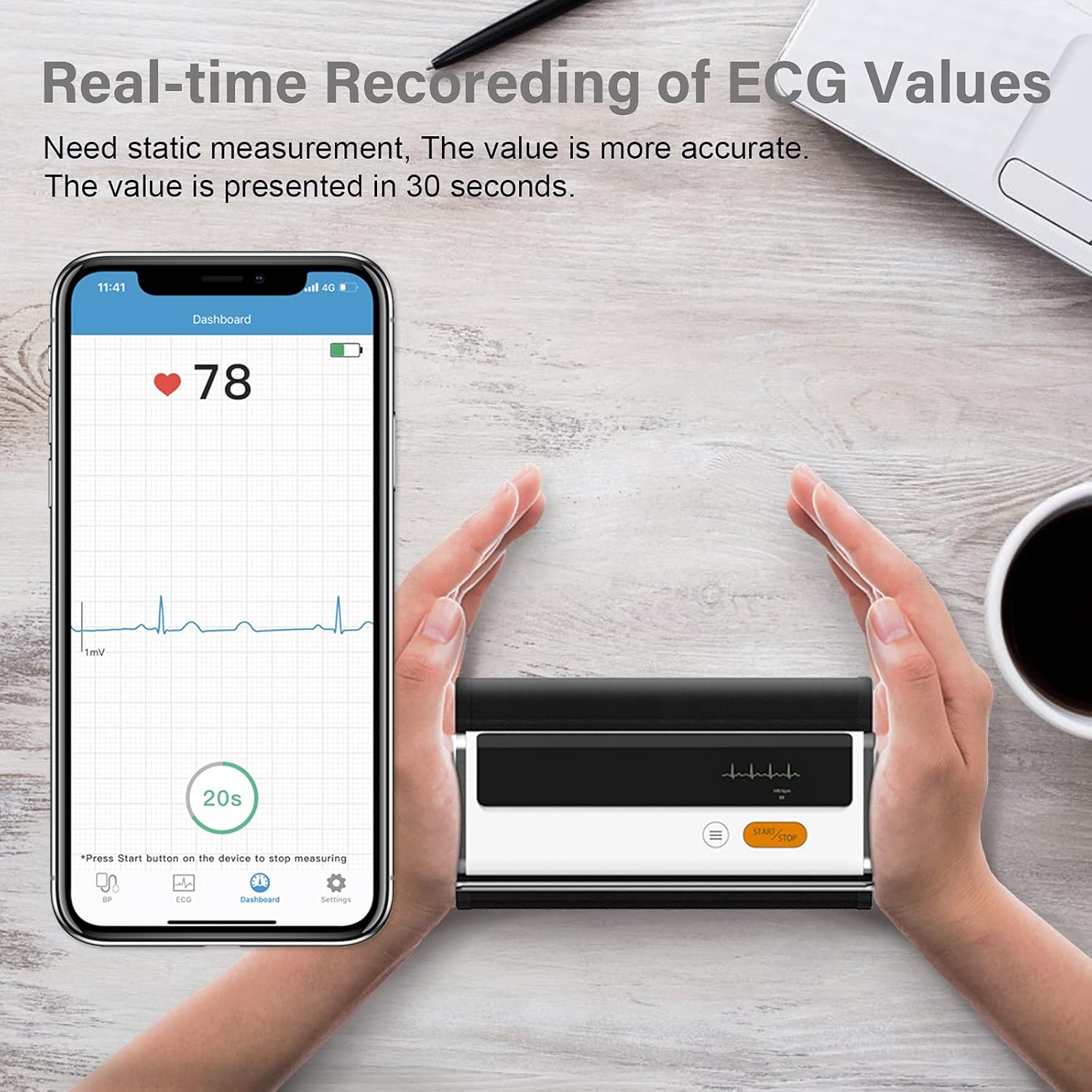
Figure 6.3: Real-time recording of ECG values using the Wellue BP2A monitor.
6.4 Using the ViHealth App for Data Management
The ViHealth app allows you to:
- View real-time readings during measurement.
- Access historical data and trends for multiple users.
- Generate and share PDF/CSV reports with healthcare providers.
- Track both blood pressure and ECG data in one place.
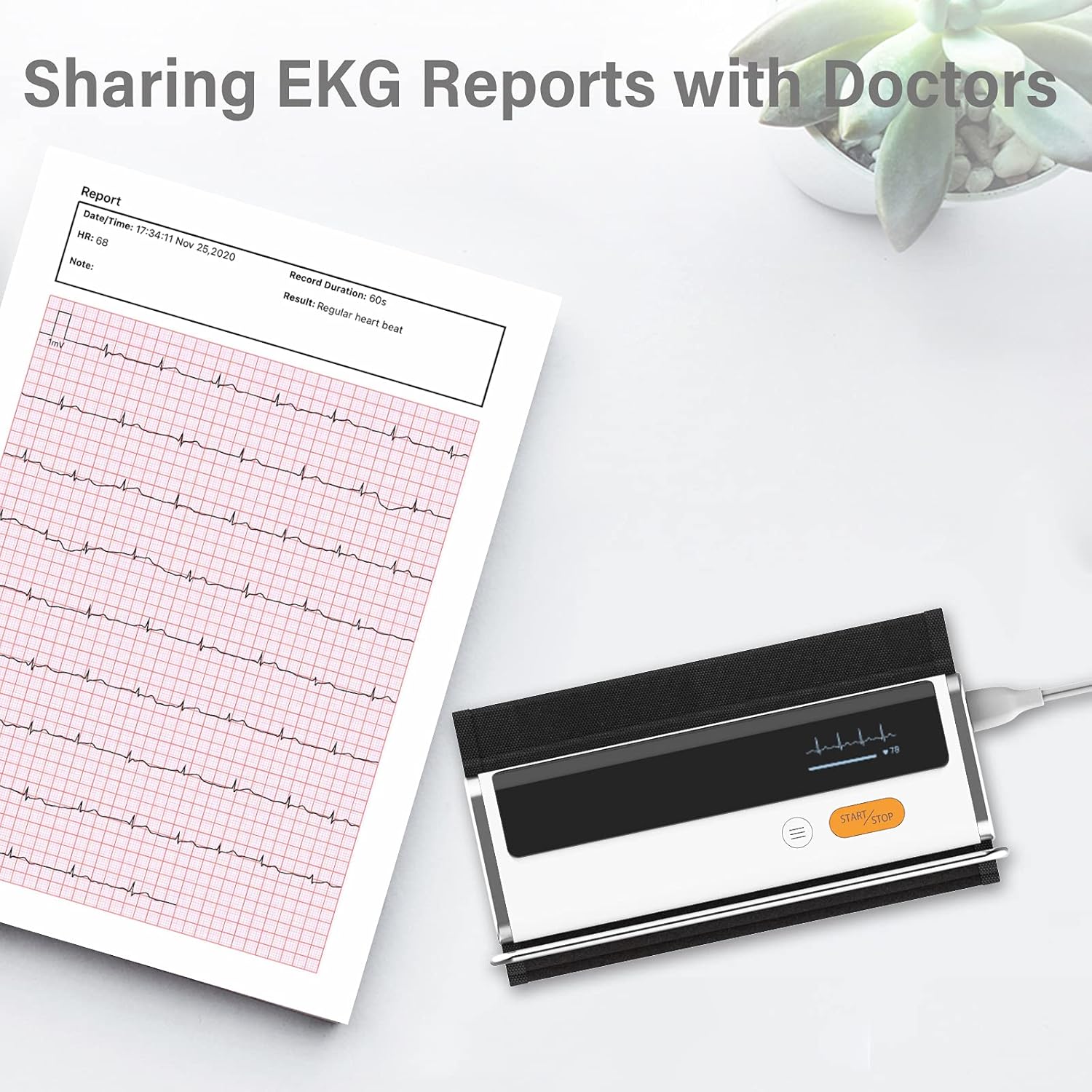
Figure 6.4: Sharing EKG reports generated by the ViHealth app.
Video 6.1: Demonstration of the Wellue blood pressure monitor's features and its integration with the ViHealth app for real-time readings and data sharing.
7. 유지관리
7.1 청소
기기와 커프를 부드럽고 마른 천으로 닦으십시오. 필요한 경우, 가볍게 물기를 제거한 천을 사용하십시오.ampened with water or a mild disinfectant. Do not immerse the device in water or use abrasive cleaners.
7.2 보관
기기를 서늘하고 건조한 곳에 직사광선과 극한의 온도를 피해 보관하십시오. 사용하지 않을 때는 원래 포장이나 보호 케이스에 보관하십시오.
7.3 배터리 관리
배터리 수명을 연장하려면 자주 사용하지 않더라도 기기를 정기적으로 충전하십시오. 배터리를 장시간 완전히 방전시키지 마십시오.
8. 문제 해결
| 문제 | 가능한 원인 | 해결책 |
|---|---|---|
| 기기가 켜지지 않음 | 배터리 부족 | USB 케이블을 사용하여 기기를 충전하세요. |
| 앱에 연결할 수 없습니다. | Bluetooth off, app not open, device not in pairing mode | Ensure Bluetooth is on, open ViHealth app, restart device. |
| 부정확한 판독 | Incorrect cuff placement, movement during measurement, speaking during measurement | Re-position cuff correctly, remain still and silent during measurement. |
| 커프가 부풀어 오르지 않습니다 | Cuff not properly attached, air leak | Check cuff connection, ensure no leaks. |
9. 사양
- 모델 이름: Armfit Plus
- 품목 모델 번호: BP2A
- 상표: 웰루에
- 커프 크기 : 8.7-16.5인치(22-42cm)
- 전원: 배터리 구동식 (리튬 이온 배터리 1개 포함)
- 디스플레이 유형: 디지털
- 제품 크기: 5.9인치 길이 x 1.9인치 너비 x 1.18인치 두께
- 무게: 약 15.84온스
- 연결성: 블루투스
- 메모리: Built-in memory for 50 sets of readings
10. 보증 및 지원
For warranty information and technical support, please refer to the official Wellue web사이트를 방문하거나 고객 서비스에 직접 문의하세요. 보증 청구를 위해 구매 증빙 자료로 구매 영수증을 보관하세요.


