1. 서론
The Taurus Foodie Multifunction Food Processor is designed to simplify your cooking experience with its extensive range of features. This appliance combines 31 cooking functions into a single unit, allowing you to prepare a wide variety of dishes efficiently. It includes an integrated scale for precise ingredient measurement and comes with a comprehensive recipe book to inspire your culinary creations.
This manual provides essential information for the safe and effective operation, maintenance, and troubleshooting of your Foodie food processor. Please read it thoroughly before first use and keep it for future reference.
2. 안전 지침
To ensure safe operation and prevent damage to the appliance or injury, please observe the following safety guidelines:
- Always ensure the appliance is placed on a stable, flat, and dry surface. The base is equipped with suction cups for enhanced stability.
- 본체, 전원 코드, 플러그를 물이나 기타 액체에 담그지 마십시오.
- 작동 중에는 손, 머리카락, 옷, 조리 도구 등이 움직이는 부품에 닿지 않도록 하여 부상을 방지하십시오.
- The appliance features an automatic safety stop and protection system. It will only activate when the bowl and all accessories are correctly placed and securely locked. Ensure all components are properly assembled before starting.
- Exercise caution when handling sharp blades. Always use the blade cover when removing or cleaning the blades.
- 사용하지 않을 때, 부품을 조립하거나 분해하기 전, 청소하기 전에는 반드시 전원 콘센트에서 기기의 플러그를 뽑아 두세요.
- 본 제품은 가정용으로만 사용하십시오. 실외 또는 상업적 용도로 사용하지 마십시오.
- All components, including the bowl and accessories, are BPA-free.
3. 제품 구성품
The Taurus Foodie Food Processor comes with several components designed for various cooking tasks:
- 메인 유닛: The base of the appliance housing the motor and control panel.
- 스테인레스 스틸 그릇: 3.5-liter total capacity (2-liter cooking capacity) for processing ingredients.
- 뚜껑: 작동 중에 그릇을 고정합니다.
- 블레이드: High-performance stainless steel blades for chopping, crushing, and pulverizing.
- Steamer (2-level): For steaming ingredients, with a capacity of up to 3 liters.
- 바구니: For cooking delicate ingredients or straining.
- 믹싱 패들: Designed for stirring, emulsifying, and kneading soft doughs.
- 블레이드 커버: Used to protect ingredients from direct contact with blades, ideal for rice or delicate cooking.
- 계량컵: 정확한 액체 측정을 위해.
- 주걱: 긁어내고 저어주는 용도입니다.

Image 3.1: The Taurus Foodie Food Processor displayed with all its included accessories, including the main unit, stainless steel bowl, steamer, basket, mixing paddle, spatula, and recipe book.
4. 설정
Before using your Taurus Foodie Food Processor for the first time, follow these setup steps:
4.1 포장 풀기 및 초기 청소
- 포장에서 모든 구성 요소를 조심스럽게 제거합니다.
- Wash the stainless steel bowl, lid, blades, steamer, basket, mixing paddle, blade cover, measuring cup, and spatula with warm soapy water. Rinse thoroughly and dry. These parts are dishwasher safe.
- 본체를 광고용 세제로 닦으세요amp 옷감. 본체를 물에 담그지 마십시오.
4.2 조립
- Place the main unit on a clean, stable, and dry surface. Ensure the suction cups on the base are firmly attached.
- Insert the blades into the bottom of the stainless steel bowl. Ensure they are securely seated.
- Place the stainless steel bowl onto the main unit, aligning it correctly until it clicks into place.
- 그릇에 재료를 추가합니다.
- Secure the lid onto the bowl. The appliance will not operate if the lid is not properly closed and locked.

이미지 4.1: 앞면 view of the Taurus Foodie Food Processor, showcasin디지털 디스플레이와 제어판이 있습니다.
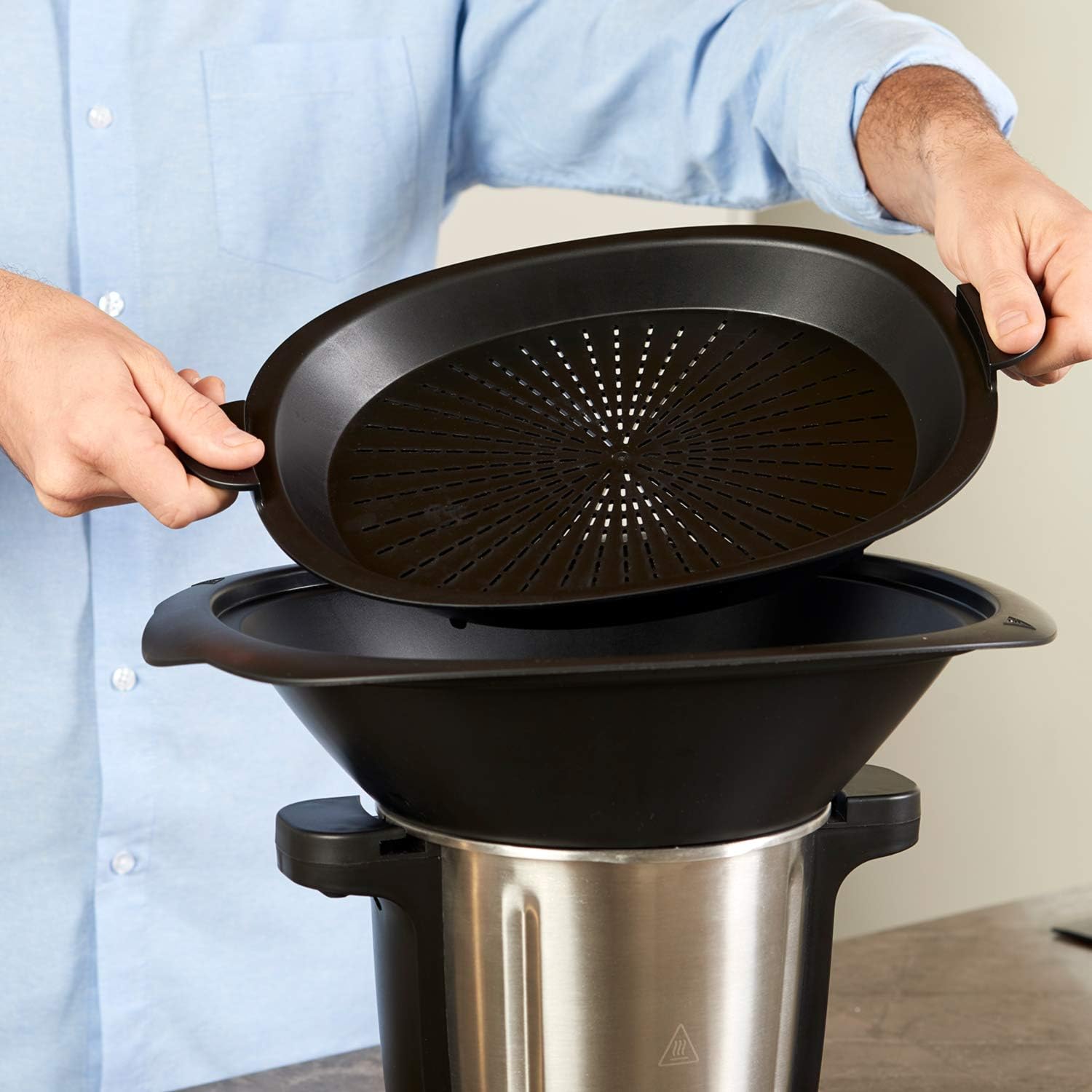
Image 4.2: A user carefully adding ingredients into the stainless steel bowl of the Foodie food processor using the measuring cup.
5. 사용 설명서
The Taurus Foodie Food Processor offers a digital display and intuitive controls for various cooking functions.
5.1 제어판 및 디지털 디스플레이
The digital display shows current settings for speed, temperature, and time. The control panel features dedicated buttons for various functions and a central dial for adjustment.

이미지 5.1: 자세한 view of the Foodie food processor's control panel, highlighting the digital display for speed, temperature, and time, along with function buttons and the central adjustment dial.
5.2 기본 작업
- 기기를 적절한 전원 콘센트에 꽂습니다.
- Use the central dial to adjust settings for speed (12 levels), temperature (30°C to 120°C), and cooking time (up to 90 minutes).
- Press the corresponding function button or the start/pause button to begin operation. An end-of-function warning will sound upon completion.
5.3 주요 기능
- Multifunction (31 functions): Includes pulverizing, crushing, grating, kneading, boiling, frying, steaming, liquefying, simmering, fermenting, weighing, and bain-marie cooking.
- 통합 규모: Weigh ingredients directly in the bowl with 5g precision.
- Yogurt Maker Function: Specific setting for preparing homemade yogurt.
- 펄스 기능: Provides short bursts of maximum power for quick chopping or mixing.
- Auto-cleaning Function: Simplifies the cleaning process (see Section 6).
- Butterfly Function: Utilizes the butterfly whisk accessory for whipping, emulsifying, and stirring delicate mixtures.
- 보온 기능: 요리 후에도 음식을 따뜻한 온도로 유지합니다.
- DIY 기능: Allows you to program and save your own custom cooking settings for quick access.

Image 5.2: The mixing paddle accessory, designed for gently stirring, emulsifying, and kneading soft doughs within the Foodie food processor.

Image 5.3: The steamer basket accessory, used for steaming vegetables, fish, or other delicate foods, fitting securely within the food processor's bowl.
5.4 Using the Recipe Book
The included recipe book contains 200 recipes, covering appetizers, main courses, and desserts. Follow the instructions in the book, adjusting settings on your Foodie food processor as indicated.
6. 유지관리 및 청소
Regular cleaning and maintenance will prolong the life of your Taurus Foodie Food Processor.
6.1 Auto-cleaning Function
For quick and easy cleaning of the bowl, use the auto-cleaning function. Add a small amount of water and a drop of dish soap to the bowl, then activate the auto-cleaning program.
6.2 수동 청소
- 세척하기 전에는 항상 기기의 플러그를 뽑으세요.
- The stainless steel bowl, lid, blades, steamer, basket, mixing paddle, blade cover, measuring cup, and spatula are dishwasher safe. Alternatively, wash them by hand with warm soapy water, rinse, and dry thoroughly.
- 부드러운 천으로 본체를 닦으세요.amp 천으로 닦아주세요. 연마성 세제를 사용하거나 본체를 물에 담그지 마세요.
- Handle blades with extreme care due to their sharpness.
7. 문제 해결
If you encounter issues with your Foodie food processor, refer to the following common problems and solutions:
| 문제 | 가능한 원인 | 해결책 |
|---|---|---|
| 기기가 시작되지 않습니다 | Bowl or lid not correctly assembled/locked. | Ensure the bowl is securely placed on the main unit and the lid is properly closed and locked. |
| 오류 코드 E3이 표시됩니다 | The lid of the bowl is not properly engaged. | Check and re-secure the lid, ensuring it is fully closed and locked into position. |
| Motor runs but blades do not turn | Blades not correctly inserted or food blockage. | Unplug, remove the bowl, check blade assembly, and clear any obstructions. |
| 부정확한 계량 | Appliance not on a flat surface or scale overloaded. | Ensure the appliance is on a stable, flat surface. Do not exceed maximum weighing capacity. |
이러한 해결 방법을 시도한 후에도 문제가 지속되면 고객 지원팀에 문의하세요.
8. 사양
Detailed technical specifications for the Taurus Foodie Multifunction Food Processor:
| 특징 | 사양 |
|---|---|
| 상표 | 황소자리 |
| 모델 번호 | 925013000 |
| 색상 | 블랙 이녹스 |
| 제품 크기(L x W x H) | 41.8P x 30.8l x 50H cm |
| 총 용량 | 3.5리터 |
| 조리능력 | 2리터 |
| 힘 | 1500 와트 |
| 권tage | 240볼트(AC) |
| 재료 | 스테인리스 스틸 |
| 속도의 수 | 12 |
| 소음 수준 | 44데시벨 |
| 특별 기능 | 31 Functions, Integrated Scale, Multifunction, Recipes Included, BPA-Free |
| 품목 무게 | 7.2 킬로그램 |
9. 보증 및 지원
9.1 보증 정보
The Taurus Foodie Multifunction Food Processor comes with a 2년 보증, which includes a 1-year retail warranty and an additional 1-year extended warranty. To activate your extended warranty, please register your product online at the manufacturer's web대지.

Image 9.1: A circular badge indicating a 2-year warranty for Taurus appliances, with text for online registration.
이 모델의 예비 부품은 구매일로부터 2년 동안 제공됩니다.
9.2 고객 지원
For technical assistance, warranty claims, or inquiries regarding spare parts, please refer to the contact information provided in your product packaging or visit the official Taurus website. When contacting support, please have your model number (925013000) and proof of purchase readily available.
10. 공식 제품 영상
제공된 데이터에는 이 설명서에 삽입할 수 있는 판매자의 공식 제품 비디오가 없습니다.


