1. 서론
The ASTRO Gaming A20 Wireless Headset Gen 2 provides a high-quality audio experience for gaming across multiple platforms. This manual details the setup, operation, maintenance, and troubleshooting for your headset, ensuring optimal performance and longevity.

Image 1.1: The ASTRO Gaming A20 Wireless Headset Gen 2, featuring a white and green design.
2. 패키지 내용
제품 포장에 모든 품목이 들어 있는지 확인하세요.
- ASTRO Gaming A20 Wireless Headset Gen 2
- USB Transmitter (Console Specific)
- USB-C to USB-A 충전 케이블
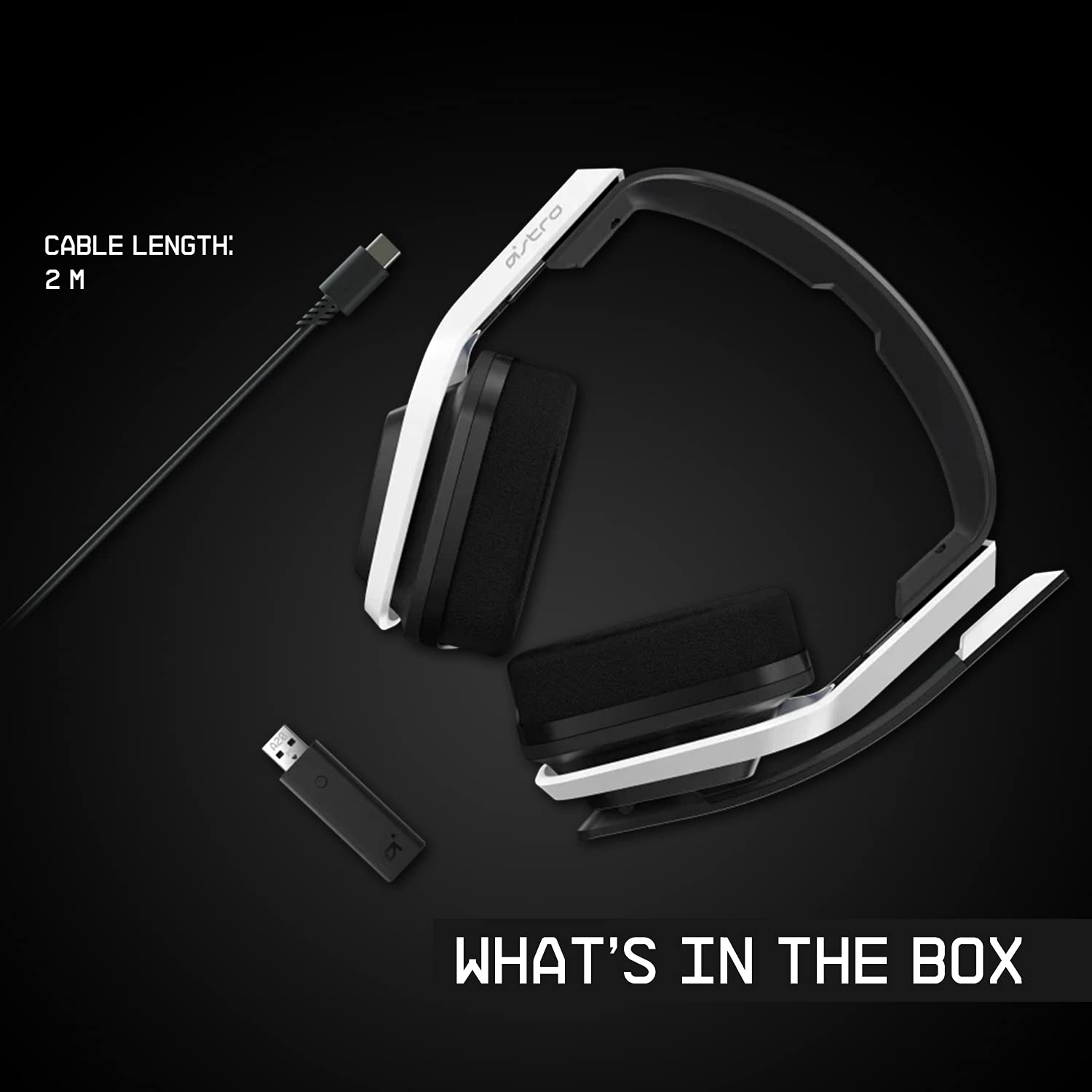
Image 2.1: Contents of the ASTRO Gaming A20 Wireless Headset Gen 2 package, including the headset, USB transmitter, and charging cable.
3. 설정
3.1 초기 충전
Before first use, fully charge the headset. Connect the USB-C end of the charging cable to the headset's USB-C port and the USB-A end to a powered USB-A port on your console, PC, or a wall adapter. A full charge provides approximately 15 hours of battery life.
3.2 Connecting to Xbox (Series X|S, Xbox One)
- Plug the USB Transmitter into an available USB port on your Xbox console.
- Power on your ASTRO A20 Wireless Headset.
- The headset and transmitter should automatically pair. The LED indicator on both devices will show a solid light when connected.
- Ensure your Xbox audio output settings are configured to send audio to the headset.
3.3 Connecting to PC / Mac
- Plug the USB Transmitter into an available USB port on your PC or Mac.
- Power on your ASTRO A20 Wireless Headset.
- The headset and transmitter should automatically pair. The LED indicator on both devices will show a solid light when connected.
- Navigate to your operating system's sound settings and select the ASTRO A20 as the default playback and recording device.

Image 3.1: The ASTRO Gaming A20 Wireless Headset Gen 2 demonstrating cross-platform connectivity with an Xbox console.
4. 사용 설명서
4.1 헤드셋 컨트롤
The ASTRO A20 Gen 2 features intuitive controls located on the headset for easy access during gameplay.
- 전원 버튼: 헤드셋을 켜거나 끕니다.
- 볼륨 휠: 전체 오디오 볼륨을 조절합니다.
- Game/Voice Balance Buttons: Allows you to adjust the balance between game audio and voice chat audio. Press the 'Game' button to increase game volume relative to chat, or the 'Voice' button to increase chat volume relative to game.
- EQ Preset Button: Cycles through 3 different equalizer presets to optimize audio for various content types.
- 플립 투 뮤트 마이크: Flipping the microphone boom arm up mutes the microphone. Flipping it down unmutes it.

Image 4.1: The ASTRO Gaming A20 Wireless Headset Gen 2 demonstrating the flip-to-mute microphone feature.
4.2 배터리 수명 및 충전
The headset provides over 15 hours of continuous use on a full charge. When the battery is low, you will hear an audible alert. Recharge the headset using the provided USB-C to USB-A cable as described in Section 3.1.

Image 4.2: The ASTRO Gaming A20 Wireless Headset Gen 2 highlighting its 15+ hours of battery life.
5. 유지관리
Proper care ensures the longevity and performance of your headset:
- 청소: 헤드셋을 닦을 때는 부드럽고 마른 천을 사용하십시오. 연마성 세척제나 용제는 사용하지 마십시오.
- 저장: 헤드셋은 직사광선과 극한의 온도를 피해 서늘하고 건조한 곳에 보관하세요.
- 배터리 관리 : For optimal battery health, avoid fully discharging the battery frequently. Recharge when the low battery indicator appears.
6. 문제 해결
If you encounter issues with your ASTRO A20 Wireless Headset Gen 2, refer to the following common solutions:
| 문제 | 가능한 해결책 |
|---|---|
| No audio / Headset not connecting |
|
| Microphone not working / Static in mic |
|
| Short battery life / Not charging |
|
| Audio cutting out / Wireless range issues |
|
7. 사양
| 특징 | 세부 사항 |
|---|---|
| 모델명 | ASTRO A20 Wireless Headset Gen 2 |
| 품목 모델 번호 | 939-001882 |
| 연결 기술 | 무선(RF 2.4GHz) |
| 무선 범위 | 최대 15미터(50피트) |
| 배터리 수명 | 약 15시간 |
| 오디오 드라이버 크기 | 40mm 다이나믹 드라이버 |
| 주파수 범위 | 20Hz - 20kHz |
| 마이크로폰 | Flip-to-mute functionality |
| 통제 수단 | Volume wheel, Game/Voice balance, EQ preset button |
| 충전 포트 | USB-C (for charging via USB-A source) |
| 무게 | 318그램(11.2온스) |
| 호환 장치 | Xbox Series X|S, Xbox One, PC, Mac |
8. 보증 및 지원
For detailed warranty information, technical support, and additional resources, please visit the official Logitech G / ASTRO Gaming support website. You can also refer to the official User Guide PDF for further details:
- 공식 사용자 가이드(PDF): 여기에서 다운로드하세요
- Logitech G Support: 방문하다 Web대지


