소개
The Altec Lansing Nanobuds are truly wireless earbuds designed for an immersive audio experience with complete freedom of movement. Featuring Bluetooth 5.0 technology, these earbuds offer a stable connection up to 50 feet, making them ideal for various activities from travel to sports. Their ergonomic design ensures a comfortable and secure fit, while the IPX5 water-resistant rating provides protection against sweat and rain.
This manual provides essential information on setting up, operating, maintaining, and troubleshooting your Nanobuds to ensure optimal performance and longevity.

Image: Altec Lansing Nanobuds in their open charging case, highlighting the purple earbuds and the compact design.
상자 안에 무엇이 들어있나요?
Your Altec Lansing Nanobuds package includes the following components:
- Altec Lansing Nanobuds (Left and Right Earbuds)
- 충전 케이스
- USB 케이블(USB-C)

Image: The Nanobuds charging case with the included USB-C charging cable, illustrating the complete package contents.
설정
초기 충전
Before first use, ensure your Nanobuds and charging case are fully charged. To charge:
- Place both earbuds securely into the charging case, ensuring they make good connection with the charging contacts.
- Connect the USB-C cable to the charging port on the case and plug it into a 5V or greater power source.
- The LED indicator on the case will flash while charging. Once fully charged, the LEDs may change or turn off depending on the model.
활성화 및 페어링
For first-time activation and pairing:
- 양쪽 이어버드를 충전 케이스에 넣습니다.
- Remove both earbuds from the case. This action will activate the earbuds and put them into pairing mode.
- 스마트폰이나 Bluetooth 지원 기기에서 Bluetooth 설정으로 이동하세요.
- Select "Altec Lansing Nanobuds" from the list of available devices to connect.
- Once paired, the earbuds will automatically connect to your device when removed from the case in the future.

Image: The Nanobuds charging case placed on a laptop, demonstrating a common charging scenario.
작동 지침
전원 켜기/끄기
- 켜려면: 충전 케이스에서 이어버드를 분리합니다.
- 끄기: 이어버드를 다시 충전 케이스에 넣으세요.
터치 컨트롤
The Nanobuds feature intuitive touch controls for easy management of your audio and calls:
- 재생/일시 중지: 양쪽 이어버드를 한 번 탭하세요.
- 다음 트랙: 오른쪽 이어버드를 두 번 탭하세요.
- 이전 트랙 : 왼쪽 이어버드를 두 번 탭하세요.
- 전화 받기/종료: 전화가 오는 동안 양쪽 이어버드를 한 번 탭하세요.
- 전화 거부: 전화가 오는 동안 한쪽 이어버드를 2초간 길게 누르세요.
- 음성 지원(Siri/Google Assistant) 활성화: 양쪽 이어버드를 세 번 탭하세요.
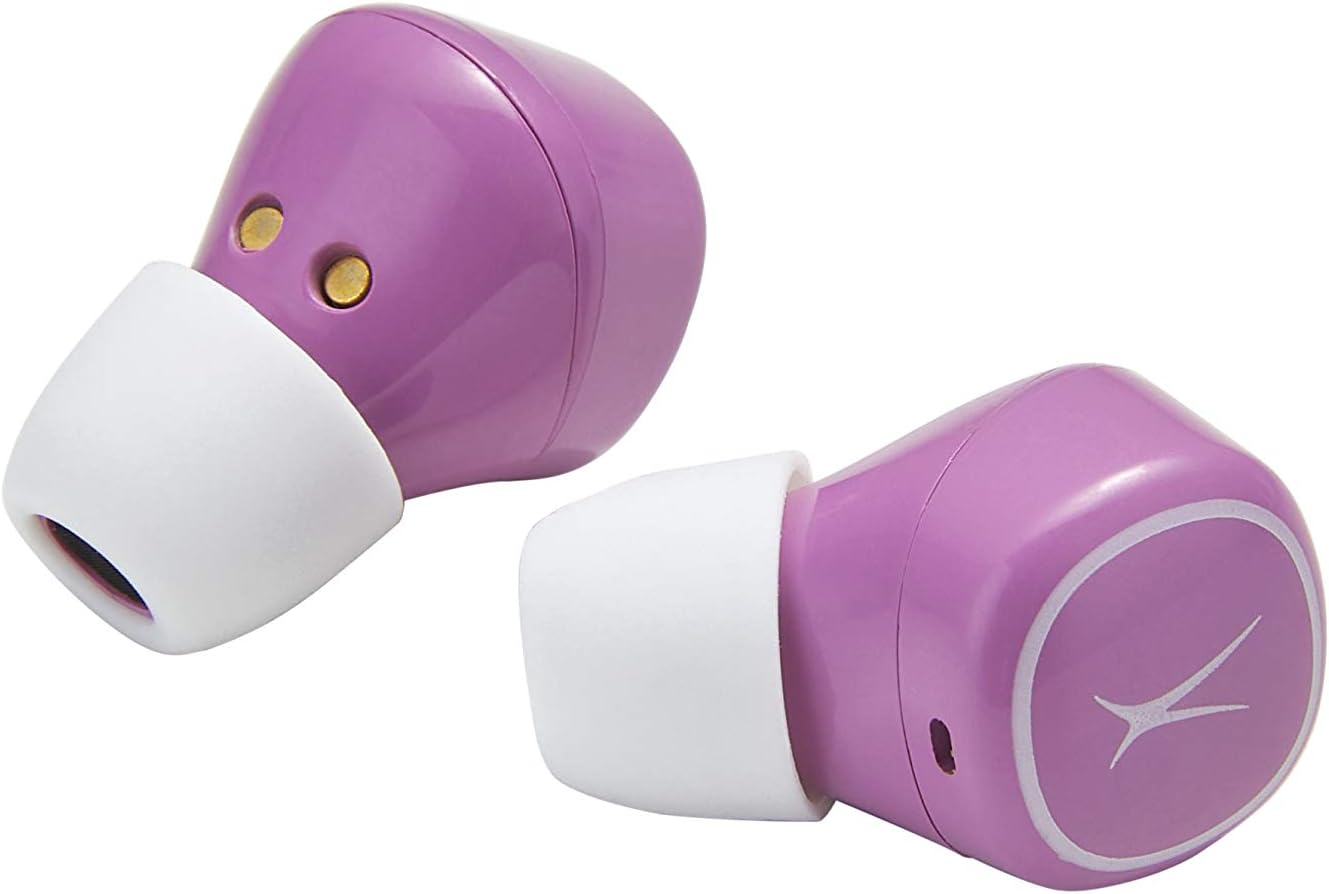
Image: Close-up of the Nanobuds earbuds, illustrating their ergonomic shape and the touch-sensitive surface.
유지
청소 및 관리
- 부드럽고 마른 보푸라기 없는 천으로 이어버드와 충전 케이스를 닦으세요.
- 연마성 세척제, 용제 또는 에어로졸 스프레이는 사용하지 마십시오.
- 충전이 제대로 되려면 이어버드와 케이스의 충전 접점이 깨끗하고 이물질이 없는지 확인하십시오.
방수 기능(IPX5)
The Nanobuds are IPX5 water-resistant, meaning they can withstand splashes of water from any direction. This makes them suitable for workouts and light rain. However, they are not designed for submersion in water. Do not expose them to pressurized water or prolonged immersion.
문제 해결
일반적인 문제 및 솔루션
- 이어폰이 켜지지 않음: Ensure the charging case is charged. If the LEDs do not turn on when earbuds are removed from the case, charge the case then try again.
- Earbuds not pairing together or with device:
Perform a Manual Reset (only if other solutions fail):
- 케이스에서 양쪽 이어버드를 분리합니다.
- Hold down the left and right sensor for 9 seconds. Both earbuds will flash blue three times, then flash red and blue before resetting.
- Place both earbuds back into the case to activate them.
- Take both earbuds out of the case to re-pair them.
- Reconnect the smartphone to your earbuds.
- 충전 문제: Ensure earbuds are making good connection with the contacts in the case. Securely connect the USB-C cable to the charging port on the case and plug into a 5V or greater power source.
- 음질 문제: If the size of the earbud tips does not match your ear canals or the headset is not worn properly, you may not obtain correct sound qualities. Change earbud tips to ones that fit more snugly.
명세서
| 특징 | 세부 사항 |
|---|---|
| 모델명 | Nanobuds |
| 모델 번호 | MZX559-PP |
| 연결 기술 | 블루투스 5.0 |
| 무선 범위 | 최대 50피트 |
| 배터리 수명(이어버드) | 충전당 최대 4시간 |
| 배터리 수명(케이스 포함) | 최대 16시간 추가 |
| 방수 레벨 | IPX5(방수) |
| 제어 유형 | 터치 컨트롤 |
| 재료 | 플라스틱 |
| 품목 무게 | 3.5 온스 |
| 제품 치수 | 3.94 x 3.39 x 1.93 인치 |
| 한국어: | 021331153395 |
보증 및 지원
For detailed warranty information and additional support, please refer to the official documents and resources below:
- 사용 설명서 (PDF)
- 문제 해결 가이드(PDF)
- 방문하세요 알텍 랜싱 매장 더 많은 제품과 지원을 원하시면.


