소개
This manual provides comprehensive instructions for the NETUM NT-1698W Wireless Barcode Scanner. It covers setup, operation, maintenance, and troubleshooting to ensure optimal performance of your device. The NT-1698W offers both 2.4G wireless and USB wired connectivity for versatile use with computers and laptops.
패키지 내용
패키지에 모든 품목이 들어 있는지 확인하세요.
- NETUM NT-1698W Barcode Scanner
- 조절 가능한 스탠드
- USB 충전/데이터 케이블
- 2.4G Wireless USB Receiver
- 사용 설명서 (본 문서)

영상: The NETUM NT-1698W barcode scanner assembled with its adjustable stand, alongside the USB charging/data cable and the 2.4G wireless USB receiver.

영상: The NETUM NT-1698W barcode scanner in handheld mode, with the USB cable and 2.4G wireless receiver displayed.
설정
1. 스캐너 충전
Before first use, fully charge the scanner. Connect the USB charging cable to the scanner's charging port and the other end to a USB power adapter or a computer's USB port. The indicator light will show charging status.
2. 연결 모드
The NT-1698W supports two connection modes: 2.4G Wireless and USB Wired.

영상: Illustration of the two connection methods: wireless via a 2.4GHz USB receiver and wired via a USB cable.
2.1. 2.4G 무선 연결
- Insert the 2.4G wireless USB receiver into an available USB port on your computer.
- Turn on the barcode scanner. It will automatically attempt to pair with the receiver.
- 연결이 성공하면 스캐너에서 특정 소리나 빛 패턴이 나타납니다.

영상: Visual representation of the scanner's wireless range, showing effective distances for indoor and outdoor use.
2.2. USB 유선 연결
- 스캐너와 컴퓨터의 USB 포트에 USB 케이블을 직접 연결하십시오.
- The scanner will be recognized as a HID keyboard device and will function immediately without driver installation.
3. 스탠드 조립
The adjustable stand allows for hands-free scanning. Attach the scanner to the flexible arm of the stand, ensuring it is securely fastened. Adjust the angle as needed for comfortable operation.

영상: The adjustable stand component, designed to hold the barcode scanner for hands-free operation.
작동 지침
1. 기본 스캐닝
Point the scanner's laser beam at the barcode you wish to scan. Press the trigger button. A successful scan will typically be indicated by a beep and the data appearing in your active application (e.g., a text editor, spreadsheet, or POS software).
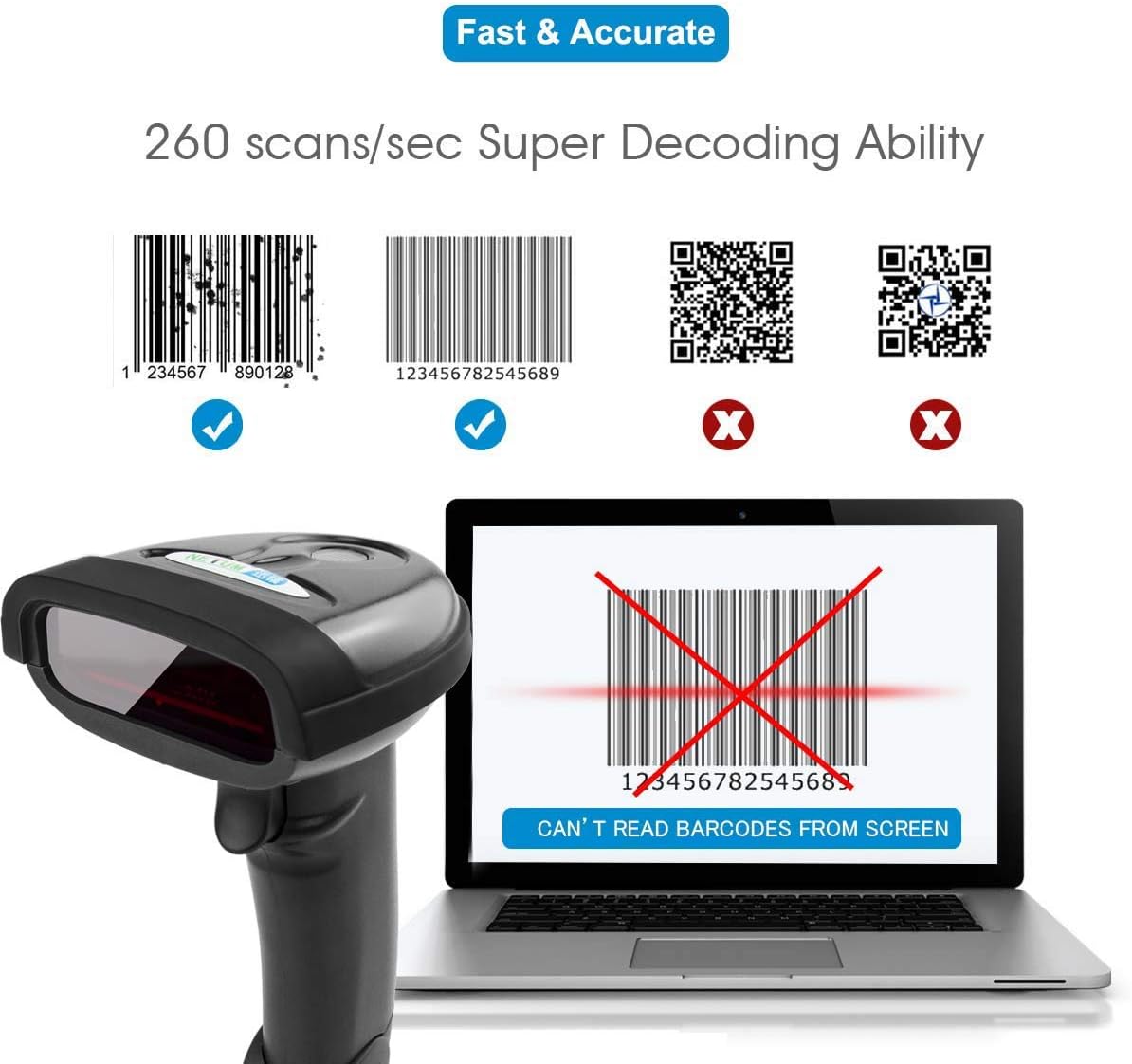
영상: This scanner is designed for 1D barcodes, demonstrating its capability to read common 1D formats like Code 128 and EAN-13 at a high speed. It does not support 2D barcodes such as QR codes or Data Matrix.
2. 업로드 모드
The NT-1698W supports two data upload modes:
- 자동 업로드 모드: Scanned data is transmitted to the connected device immediately. This is the default mode.
- Collection Upload Mode (Storage Mode): Scanned data is stored in the scanner's internal memory. You can upload the collected data in batches later by scanning a specific command barcode (refer to the full programming guide for details).

영상: Explanation of the scanner's two data upload modes: storing data for batch upload or transmitting it instantly, highlighting the wireless range for instant uploads.
3. Advanced Barcode Programming
The scanner can be configured using special programming barcodes to customize its behavior, including:
- Prefix & Suffix Settings: 스캔한 데이터 앞이나 뒤에 사용자 정의 문자를 추가합니다.
- Insert/Delete Characters: Modify the scanned data by inserting or deleting specific characters at designated positions.
- Other settings such as volume, sleep time, and symbology enablement/disablement.
Refer to the complete programming manual (usually a separate document or available online) for a full list of configuration barcodes and instructions.

영상: The scanner in use, demonstrating its advanced programming capabilities such as adding prefixes/suffixes and modifying characters within scanned data.
유지
- 청소: 부드럽고 마른 천을 사용하여 스캐너 외부를 청소하세요. 스캔 창에는 긁힘 방지를 위해 렌즈 청소용 천을 사용하세요. 연마성 세척제나 용제는 사용하지 마세요.
- 저장: 스캐너는 직사광선과 극한의 온도를 피해 시원하고 건조한 곳에 보관하세요.
- 배터리 관리 : 배터리 수명을 연장하려면 배터리를 자주 완전히 방전시키지 마십시오. 스캐너를 자주 사용하지 않더라도 정기적으로 충전하십시오.
문제 해결
| 문제 | 가능한 원인 | 해결책 |
|---|---|---|
| 스캐너가 바코드를 읽지 못합니다. |
|
|
| 컴퓨터로 데이터가 전송되지 않았습니다. |
|
|
| 스캐너에서 신호음은 나지만 데이터가 나타나지 않습니다. |
|
|
명세서
| 특징 | 세부 사항 |
|---|---|
| 모델 | NT-1698W |
| 연결성 | 2.4G 무선, USB 유선 |
| 스캔 유형 | 1D Laser Barcode Reader |
| 스캔 속도 | 초당 최대 260회 스캔 |
| 호환 장치 | Desktop, Laptop (Windows, macOS) |
| 전원 | Rechargeable Battery, Corded Electric (via USB) |
| 무선 범위 | Up to 50m (164ft) indoors, 100m (330ft) outdoors (barrier-free) |
| ASIN | B08DCXLXTR |
보증 및 지원
NETUM products typically come with a standard manufacturer's warranty. Please refer to the warranty card included with your product or visit the official NETUM web자세한 보증 약관은 해당 사이트에서 확인하세요.
For technical support, troubleshooting assistance, or inquiries regarding your NETUM NT-1698W barcode scanner, please contact NETUM customer service through their official web사이트 또는 제품 포장에 제공된 연락처 정보를 참조하세요.


