1. 서론
The YABER V3 Mini Bluetooth Projector is designed to provide a versatile and high-quality viewing experience for home entertainment and outdoor use. Featuring native 1280x720p resolution with 1080P support, a 6000:1 contrast ratio, and an advanced German LED light source, it delivers clear and accurate images. This projector also includes Bluetooth 5.0 for wireless audio connectivity and supports wireless screen mirroring via Anycast or Chromecast (adapters sold separately).
2. 상자 안에 무엇이 들어있나요?
- YABER V3 Mini Bluetooth Projector
- HDMI 케이블
- 전원 코드
- 사용자 설명서
- AV 케이블
- 렌즈 청소 천
- 리모콘(배터리는 포함되어 있지 않음)
3. 제품 특징
- Native 720P & 1080P Supported: Offers a native resolution of 1280x720 pixels, supporting up to 1080P input for clear images.
- 높은 명암비: Features a 6000:1 contrast ratio for enhanced image depth and detail.
- 블루투스 5.0 연결: Allows wireless connection to Bluetooth headsets, speakers, and Airpods for enhanced audio.
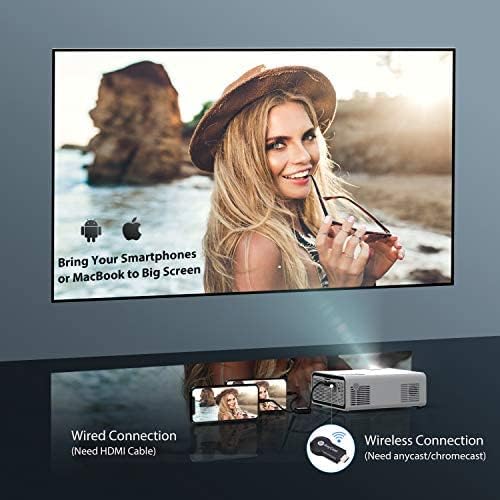
- 무선 화면 미러링: Supports Anycast and Chromecast for mirroring content from smartphones and other devices (adapters required).
- 줌 기능 : Adjusts image size from 100% to 50% using the remote control without moving the projector.
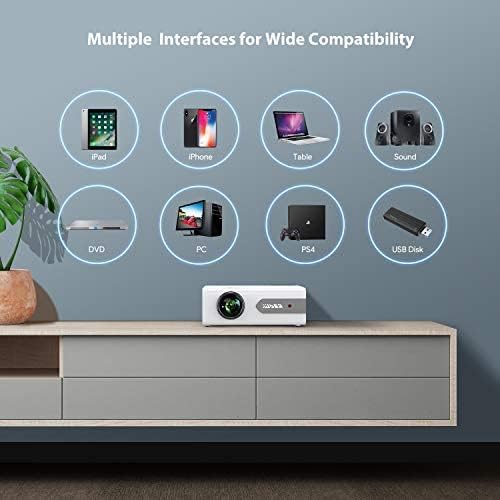
- 다중 인터페이스: Equipped with HDMI, USB, VGA, AV, and Audio ports for wide compatibility with various devices.
- HIFI 스테레오 사운드: Built-in dual stereo speakers with an SRS sound system provide a good auditory experience.
- 고급 냉각 시스템: Designed to minimize lamp power consumption and extend lamp 수명은 최대 100,000시간입니다.


4. 설정
4.1 초기 배치
Place the projector on a stable, flat surface or mount it to the ceiling. Ensure there is adequate ventilation around the projector to prevent overheating. The projection distance and screen size can be adjusted based on your view환경을 보호합니다.

4.2 전원 연결
프로젝터의 전원 입력 단자에 전원 코드를 연결한 다음 전원 콘센트에 꽂으세요.
4.3 전원 켜기/끄기
프로젝터 또는 리모컨의 전원 버튼을 눌러 기기를 켜거나 끄세요.
5. 사용 설명서
5.1 초점 및 키스톤 보정
Adjust the focus ring on the projector lens until the image is clear. Use the keystone correction feature (manual or digital, if available) to correct any trapezoidal distortion of the image.
5.2 입력 소스 선택
Use the 'Source' button on the remote or projector to select the desired input source (HDMI, USB, VGA, AV).
5.3 블루투스 연결
To connect to a Bluetooth audio device:
- Ensure your Bluetooth speaker or headset is in pairing mode.
- Navigate to the Bluetooth settings on the projector.
- 페어링할 수 있는 기기 목록에서 기기를 선택하세요.
- 연결되면 블루투스 장치를 통해 오디오가 재생됩니다.
메모: The V3 mini projector supports Bluetooth output devices (speakers, headphones) but does not connect to phones/pads via Bluetooth for mirroring. Turn off Bluetooth when not in use to avoid potential issues.
5.4 무선 화면 미러링
The YABER V3 supports wireless screen mirroring from iOS and Android devices using an external Anycast or Chromecast dongle (purchased separately). Connect the dongle to an HDMI port and follow the dongle's instructions for mirroring.
5.5 줌 기능
To adjust the image size without moving the projector, use the zoom function via the remote control. This allows you to shrink the image from 100% down to 50%.
5.6 사용 시나리오
The YABER V3 projector is suitable for various applications:
- 홈시어터: Enjoy movies and shows on a large screen.
- 노름: Connect gaming consoles for an immersive experience.
- Outdoor Movies: Perfect for backyard movie nights in dark environments.

6. 유지관리
6.1 렌즈 세척
Regularly clean the projector lens using the provided lens cleaning cloth or a soft, lint-free cloth. Avoid using abrasive cleaners or harsh chemicals.
6.2 에어 필터 청소
Check and clean the air filter periodically to ensure proper airflow and prevent dust buildup, which can affect performance and lamp 삶.
6.3리터amp 삶
프로젝터의 LED lamp has a lifespan of up to 100,000 hours. Proper maintenance, including adequate ventilation and cleaning, helps maximize its longevity.
7. 문제 해결
- 사진 없음:
- 전원 케이블이 제대로 연결되어 있는지 확인하십시오.
- 올바른 입력 소스가 선택되었는지 확인하세요.
- Verify that the connected device (e.g., TV Stick, PC) is powered on and outputting a signal.
- 초점과 키스톤을 조정하세요.
- 소리 없음:
- 프로젝터와 연결된 장치의 볼륨 설정을 확인하십시오.
- 블루투스를 사용하는 경우, 기기가 제대로 페어링되고 연결되었는지 확인하십시오.
- If using an external speaker via AUX, ensure the cable is fully inserted.
- Some content (e.g., certain streaming services) may have audio format incompatibilities; try a different source or content.
- 흐린 이미지:
- 렌즈의 초점링을 조정합니다.
- 투사 표면이 평평하고 프로젝터가 안정적인지 확인하세요.
- 프로젝터 렌즈를 청소하세요.
- 원격 제어가 작동하지 않음:
- 리모컨의 배터리를 교체하세요.
- 리모컨과 프로젝터의 IR 수신기 사이에 장애물이 없는지 확인하세요.
- 과열:
- 프로젝터 주변에 적절한 환기가 이루어지도록 하십시오.
- Clean the air filter and vents to remove dust.
- Avoid operating in excessively hot environments.
8. 사양
| 모델 번호 | V3 |
| 디스플레이 해상도 | Native 1280 x 720 (Supports 1080P) |
| 대비율 | 6000시 1분 |
| 종횡비 | 16:9 / 4:3 |
| 광원 | 주도의 |
| Lamp 삶 | 최대 100,000시간 |
| 연결 기술 | 3.5mm Jack, Bluetooth, HDMI, USB, VGA, AV |
| 블루투스 버전 | 5.0 |
| 제품 치수 | 8.19 x 6.61 x 3.07 인치 |
| 품목 무게 | 2.2파운드 |
| 추천 용도 | Home Cinema, Gaming, Business (not recommended for professional presentations) |
9. 보증 및 지원
YABER provides a 6-month return policy and 3-year repair service for the V3 Mini Bluetooth Projector. Lifetime professional technical support is also available. For any issues or inquiries, please contact YABER customer service.


