1. 서론
This manual provides detailed instructions for the setup, operation, maintenance, and troubleshooting of your MYPIN Infrared Remote Control. This remote is specifically designed to work with MYPIN 4K Media Players, including models B07WPY8VKL and B07PGFCPTV.
리모컨을 사용하기 전에 이 설명서를 꼼꼼히 읽어주시면 올바른 기능을 활용하고 최상의 사용자 경험을 누릴 수 있습니다.
2. 패키지 내용
- 1 x MYPIN Infrared Remote Control
참고: AAA 배터리는 포함되어 있지 않으며 별도로 구매해야 합니다.
3. 설정
3.1 배터리 설치
- 리모콘 뒷면에서 배터리함을 찾으세요.
- 배터리 덮개를 아래로 밀어서 엽니다.
- 2개(2)의 AAA 배터리를 넣고 양극(+)과 음극(-) 단자가 배터리 보관함 내부 표시와 올바르게 맞춰지도록 합니다.
- 배터리 덮개를 제자리에 밀어 넣어 딸깍 소리가 날 때까지 밀어 넣습니다.
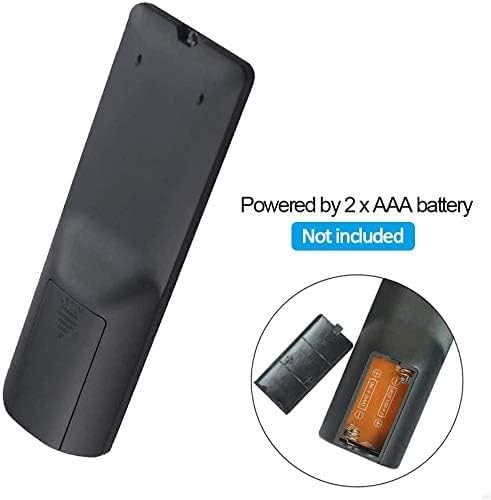
그림 3.1: Battery installation for the MYPIN Infrared Remote Control. Ensure correct polarity when inserting two AAA batteries.
3.2 호환성
This remote control is designed exclusively for MYPIN 4K Media Players. It is compatible with models such as B07WPY8VKL and B07PGFCPTV. It may not function correctly with other brands or models of media players.
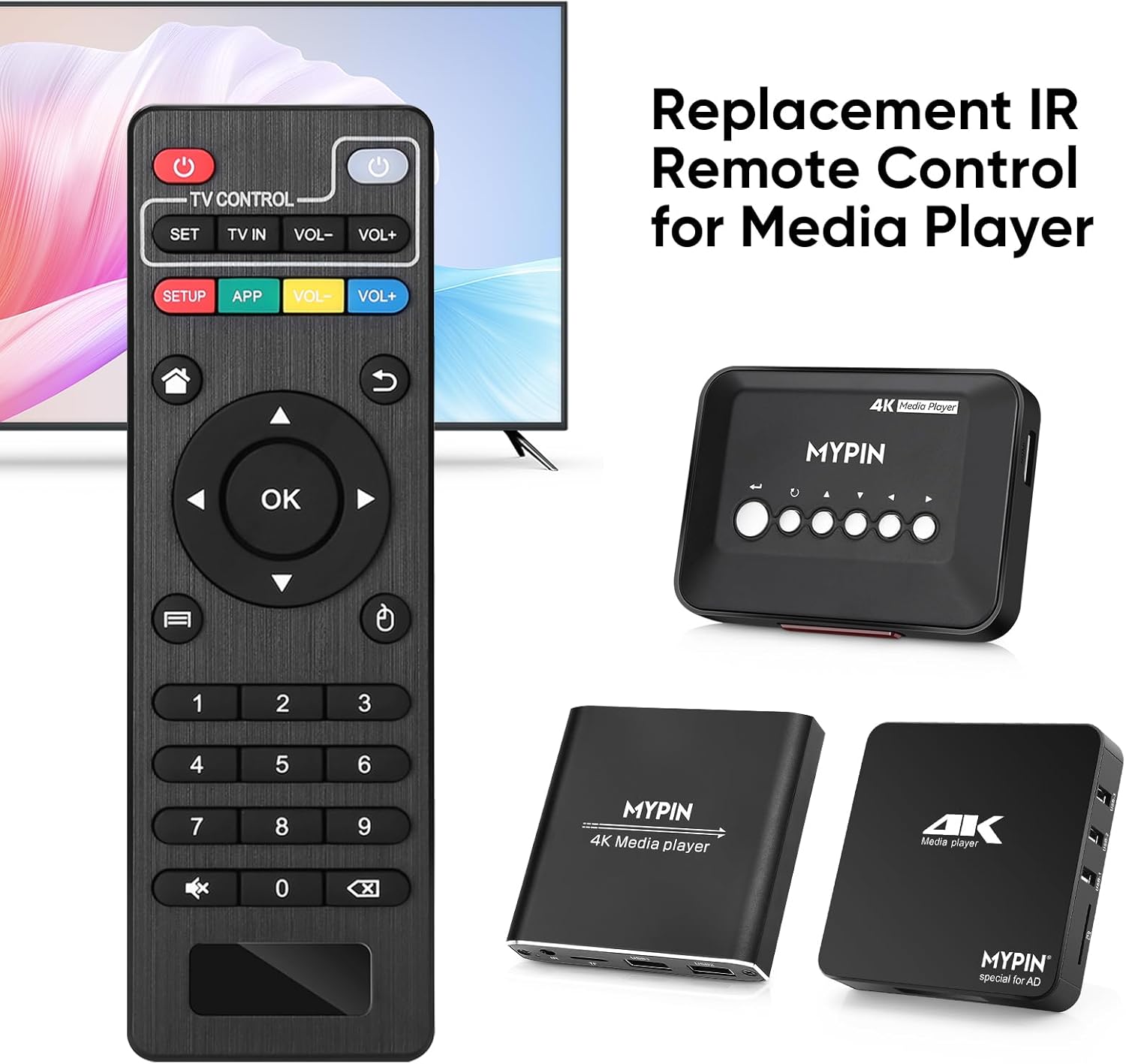
그림 3.2: The MYPIN remote control shown with compatible MYPIN 4K Media Players.
3.3 초기 연결
The MYPIN Infrared Remote Control operates via infrared (IR) signals. No pairing process is required. Simply point the remote control directly at the IR receiver of your MYPIN 4K Media Player. Ensure there are no obstructions between the remote and the media player.

그림 3.3: Using the MYPIN remote control with an optional IR cable for discreet placement of the media player.
4. 사용 설명서
The MYPIN Infrared Remote Control features a standard layout for intuitive control of your media player. Below is a guide to its primary functions:

그림 4.1: Key functional areas of the MYPIN Remote Control.
4.1 버튼 기능
- 전원 버튼(빨간색, 왼쪽 상단): Turns the media player on or off.
- TV Control Section (Top Row):
- TV Learning Button (1): Used to program basic TV functions (e.g., TV Power, Volume). Refer to your TV's manual for learning remote functions.
- 세트: Used for TV learning mode.
- TV에서: TV 입력 소스를 전환합니다.
- 볼륨- / 볼륨+: TV 볼륨을 조절합니다.
- SETUP / APP / VOL- / VOL+ (Colored Buttons): These buttons provide quick access to specific media player functions or applications. Their exact function may vary depending on the media player's software.
- 홈 버튼(집 모양 아이콘): Returns to the main menu or home screen of the media player.
- Return/Back Button (Arrow Icon): 이전 화면이나 메뉴로 돌아갑니다.
- Direction Keys (2 - Up, Down, Left, Right): Navigates through menus and content. When playing videos or music, Up/Down typically selects previous/next track, and Left/Right performs fast backward/forward.
- 확인 버튼(가운데): Confirms selections or plays content.
- Menu Key (3 - Three Horizontal Lines Icon): Accesses context-sensitive menus or playback options.
- 숫자 패드(0-9): Used for direct input of numbers, such as channel selection or specific menu options.
- Mute Button (Crossed Speaker Icon): Mutes or unmutes the media player's audio.
- Context Menu Button (Box with Arrow Icon): Opens additional options or settings.

그림 4.2: Accessing playback options using the Menu key on the MYPIN remote control.
5. 유지관리
5.1 배터리 교체
When the remote control's performance degrades (e.g., reduced range, unresponsive buttons), it is likely time to replace the batteries. Follow the battery installation steps in Section 3.1 to replace the two AAA batteries.
5.2 청소
리모컨을 청소하려면 부드럽고 마른 천으로 표면을 부드럽게 닦으세요. 찌든 때는 가볍게 두드리세요.ampen the cloth with water or a mild, non-abrasive cleaner. Avoid using harsh chemicals or excessive moisture, as these can damage the remote's electronics.
5.3 보관
리모컨은 직사광선과 극한 온도 변화를 피해 서늘하고 건조한 곳에 보관하십시오. 장기간 사용하지 않을 경우, 누액 및 손상 방지를 위해 배터리를 제거하는 것이 좋습니다.
6. 문제 해결
- 리모컨이 응답하지 않습니다.
- 새 AAA 배터리가 올바르게 설치되었는지 확인하세요.
- Point the remote directly at the media player's IR receiver.
- Remove any obstructions between the remote and the media player.
- Check the operating distance; the remote has an infrared range of approximately 7 meters.
- If the remote initially seems unresponsive after battery installation, allow a short period for it to initialize, as some users have reported spontaneous functionality after a delay.
- Buttons not performing expected functions:
- Verify that the remote is compatible with your specific MYPIN media player model.
- Some buttons (e.g., SETUP, APP) may have functions determined by the media player's software and may not be universally assigned.
- TV Control buttons not working:
- Ensure you have successfully programmed the TV Learning Button functions according to your TV's instructions.
7. 사양
| 특징 | 세부 사항 |
|---|---|
| 연결 기술 | 적외선 (IR) |
| 호환 장치 | MYPIN media players (e.g., B07WPY8VKL, B07PGFCPTV) |
| 지원되는 최대 장치 수 | 1 (for media player control) |
| 특징 | 인체공학적 디자인 |
| 전원 | AAA 배터리 2개 (포함되지 않음) |
| 적외선 거리 | 최대 7미터 |
| 적외선 각도 | 30도 |
| 품목 무게 | 1.13 온스 |
| 패키지 크기 | 5.43 x 1.81 x 0.71 인치 |
| 모델 번호 | B08CDNZMJG |
8. 보증 정보
MYPIN products are manufactured to high-quality standards. For specific warranty details regarding your remote control, please refer to the documentation included with your MYPIN 4K Media Player or visit the official MYPIN web사이트. 보증 청구에 대비해 구매 증빙 자료로 구매 영수증을 보관하세요.
9. 지원
If you encounter any issues not covered in this manual or require further assistance, please contact MYPIN customer support through the retailer where you purchased the product or visit the official MYPIN support web연락처 정보 사이트.


